

A platform dedicated to providing unbiased reviews of newly launched applications, analyzing everything from their features to their full potential.
info@scoutforge.net© 2026 Scoutforge. All rights reserved.
A platform dedicated to providing unbiased reviews of newly launched applications, analyzing everything from their features to their full potential.
info@scoutforge.net© 2026 Scoutforge. All rights reserved.
A platform dedicated to providing unbiased reviews of newly launched applications, analyzing everything from their features to their full potential.
info@scoutforge.net© 2026 Scoutforge. All rights reserved.
Cycling through all six. Tap any point to stop.
Measured on six things
Brush away unwanted objects, people, watermarks, and text...
HTTPS and HSTS are good, but missing CSP, frame protection, and other headers; no security certifications or bug bounty mentioned.
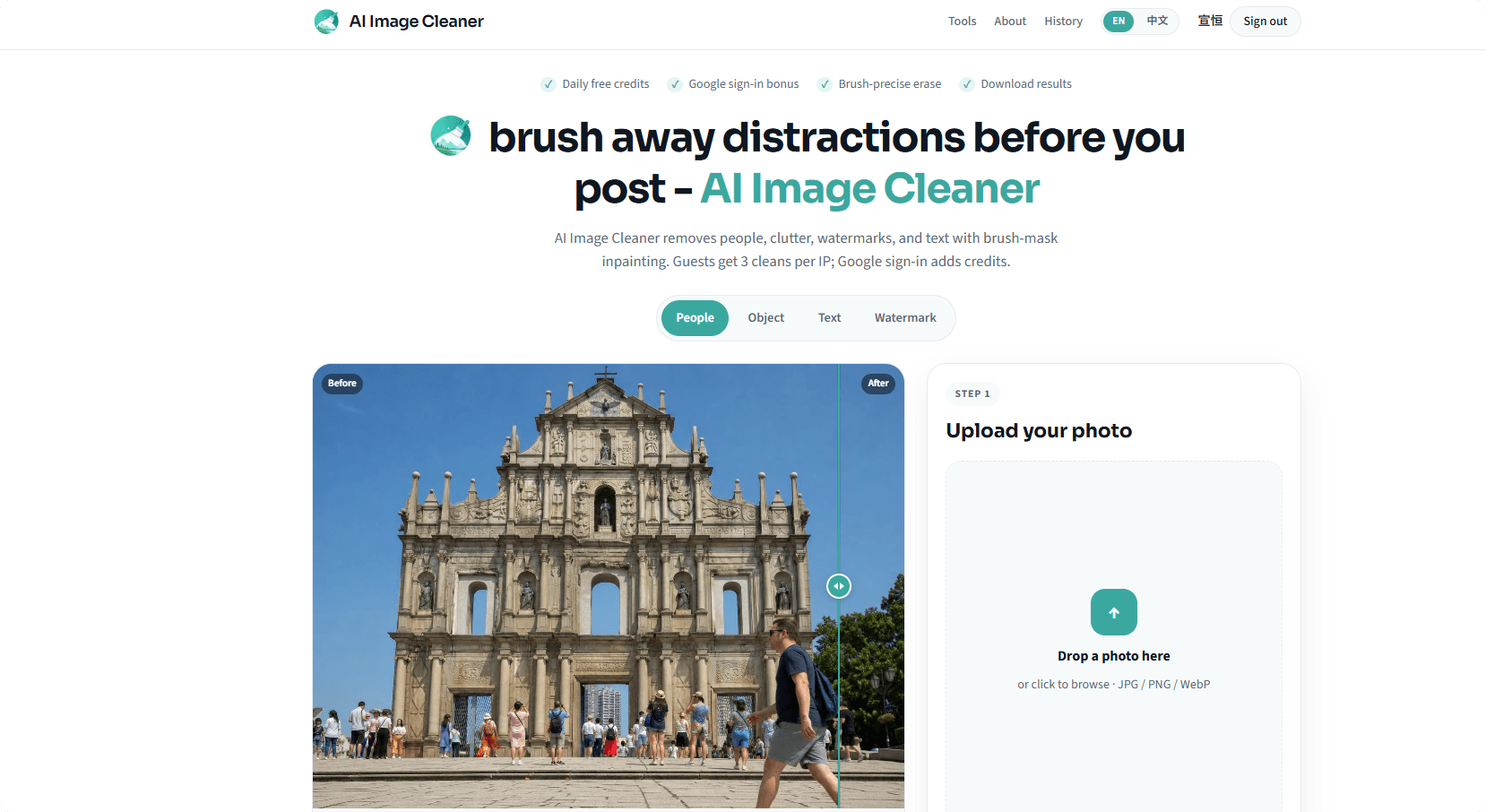
AI Image Cleaner is a web-based tool that lets you remove unwanted elements from your photos with a simple brush mask. Instead of relying on complex selection tools, you just paint over the object you want to eliminate, and the AI fills in the background seamlessly. It's perfect for cleaning up tourist shots, removing date stamps, erasing power lines, or getting rid of photobombers. The tool is built for precision—you have full control over the mask, with eraser and undo options. It uses advanced inpainting technology (similar to LaMa) to rebuild the background naturally. Plus, you get free credits daily, and a Google sign-in bonus, making it accessible for quick edits without a subscription. I've used it personally to remove a stray passerby from a landmark photo, and the result was impressively natural—no more awkward cropping or manual cloning in Photoshop.
Drawn from the product itself, not from a survey.
Demographic
Casual photographers and social media users
Pain points
Photos ruined by photobombers, clutter, or unwanted objects; lack of advanced editing skills; want quick and easy fixes
Primary needs
Simple, free tool to remove distractions; no complex layers or selections; fast results
Demographic
Travel bloggers and content creators
Pain points
Scenic shots spoiled by crowds, wires, or signs; need to maintain authenticity; time constraints
Primary needs
Efficient editing to clean up images before posting; realistic inpainting; batch handling maybe
Demographic
Small business owners and marketers
Pain points
Need clean product images without watermarks or text; lack design skills; cost-effective solutions
Primary needs
Affordable way to edit images; precise removal of logos/text; professional-looking results
Demographic
Archivists and historical photo restorers
Pain points
Scanned photos have date stamps, creases, or unwanted marks; need to preserve original feel; tricky details
Primary needs
Accurate inpainting that matches grain and texture; control over fine details; no loss of quality
Written by AI from measured evidence, scored out of 100.
AI Image Cleaner is a competent tool for quick object removal, with a clear workflow and generous free tier. The design is average, and the mobile speed is a concern. Security is basic but adequate for a small service. Accessibility is above average. The main challenge is standing out in a crowded market—it needs to leverage its brush precision and free credits to build a loyal user base.
Core workflow is clear and demo is above fold, but long page with repeated examples and hidden FAQ answers adds friction.
Average visual design with strong before/after demos and consistent teal accent, but repetitive layout and redundant sections hurt polish.
Mobile performance is weak (LCP 25.8s) due to heavy hero images; desktop is decent (80/100). No user complaints found.
HTTPS and HSTS are good, but missing CSP, frame protection, and other headers; no security certifications or bug bounty mentioned.
Lighthouse accessibility 97/100 with only a contrast issue; site references WebAIM alt-text practices, but no explicit WCAG statement.
Real problem with clear differentiators (free credits, brush precision) but crowded category; needs to prove it can stand out.
The design is functional but not memorable. The before/after slider is the star, showing real value quickly. However, the page repeats the same workflow in multiple sections, making it feel padded. Usability is decent: the upload is prominent, and the three-step process is clear. But the FAQ hides answers behind clicks, and the long scroll with repeated examples tests patience. For a tool that promises quick fixes, the site could be more concise.
Speed is a mixed bag: desktop loads fine, but mobile LCP of 25.8s is a dealbreaker for on-the-go users. The heavy hero images are likely the culprit. Security is basic: HTTPS and HSTS are there, but missing CSP and other headers leave room for improvement. No certifications, but for a small tool, it's acceptable. The privacy policy is transparent about not selling images, which is a plus.
Accessibility is a strong point with a 97/100 Lighthouse score, though the contrast issue is a minor blemish. The site references WebAIM, showing awareness. Growth potential is real: the problem of removing unwanted objects is universal, and the free tier lowers the barrier. But the category is crowded with free tools like Cleanup.pictures and powerful alternatives like Photoshop. The differentiator is the brush control and daily credits, but it needs to prove it can win users beyond the free tier.
Conclusion
If you're tired of cloning in Photoshop or squinting at Snapseed, AI Image Cleaner is worth a try. The free credits let you test it without commitment. Just be patient on mobile—or use a desktop. With some polish and faster loading, it could become a go-to for quick fixes. For now, it's a solid tool with room to grow.
Named competitors, point by point. Nobody paid to appear here or to be left out.
 AI Image Cleaner AI Image Cleaner |  Adobe Photoshop Adobe Photoshop |  Snapseed Snapseed |  Cleanup.pictures Cleanup.pictures | |
|---|---|---|---|---|
| Pricing model | Free daily credits; 3 guest cleans per IP; Google sign-in bonus | Subscription-based (paid monthly/yearly) | Free with in-app ads | Freemium with paid credits |
| Object removal method | Brush-mask inpainting (LaMa-inspired) | Healing brush, clone stamp, content-aware fill | Healing tool (simple brush) | Brush-based object removal |
| Platform | Web-based | Desktop (Windows/Mac) and web | Mobile (iOS/Android) | Web-based |
| Ease of use | Simple 3-step process, no learning curve | Steep learning curve, complex tools | Easy but limited precision | Simple brush, but fewer controls |
Adobe Photoshop
Professional-grade editor with advanced healing and cloning tools, but complex and subscription-based.
Snapseed
Mobile app with healing tool for simple object removal, but less precise and limited to mobile.
Cleanup.pictures
Web tool that removes objects with brush, similar concept, but with different features and pricing.
Comparing options? See AI Image Cleaner alternatives, scored side by side

Uni-1 is an advanced multimodal text-to-image AI model th...

Fast, open-source AI video generator with 4K support, mul...

A free online AI-powered tool that instantly converts ima...

O tradutor de mangá com IA traduz capítulos em lote, personaliza textos e oferece edição visual para estúdios.

HeyVid AI is a free all-in-one AI video and image generat...

An AI-powered photo restoration app that brings old, blur...

Private on-device dictation for Apple-silicon Macs.

Privacy gateway that masks personal data in LLM traffic

An AI-powered patent drafting assistant that acts like a ...

AI face swap online with no subscription, pay per use.

Export all your Apple Voice Memos to one text file.

AI writer that fact-checks before writing, with real sour...
A platform dedicated to providing unbiased reviews of newly launched applications, analyzing everything from their features to their full potential.
info@scoutforge.net© 2026 Scoutforge. All rights reserved.
