Cycling through all six. Tap any point to stop.
Measured on six things
Translate Japanese manga into 12 languages with AI-powere...
Security
52HTTPS enforced with SPF and DMARC, but no HSTS, CSP, frame protection, or Referrer-Policy — 4/12 header checklist points. Google sign-in only; no SOC 2, ISO, or security page published.
Screenshots
1 / 1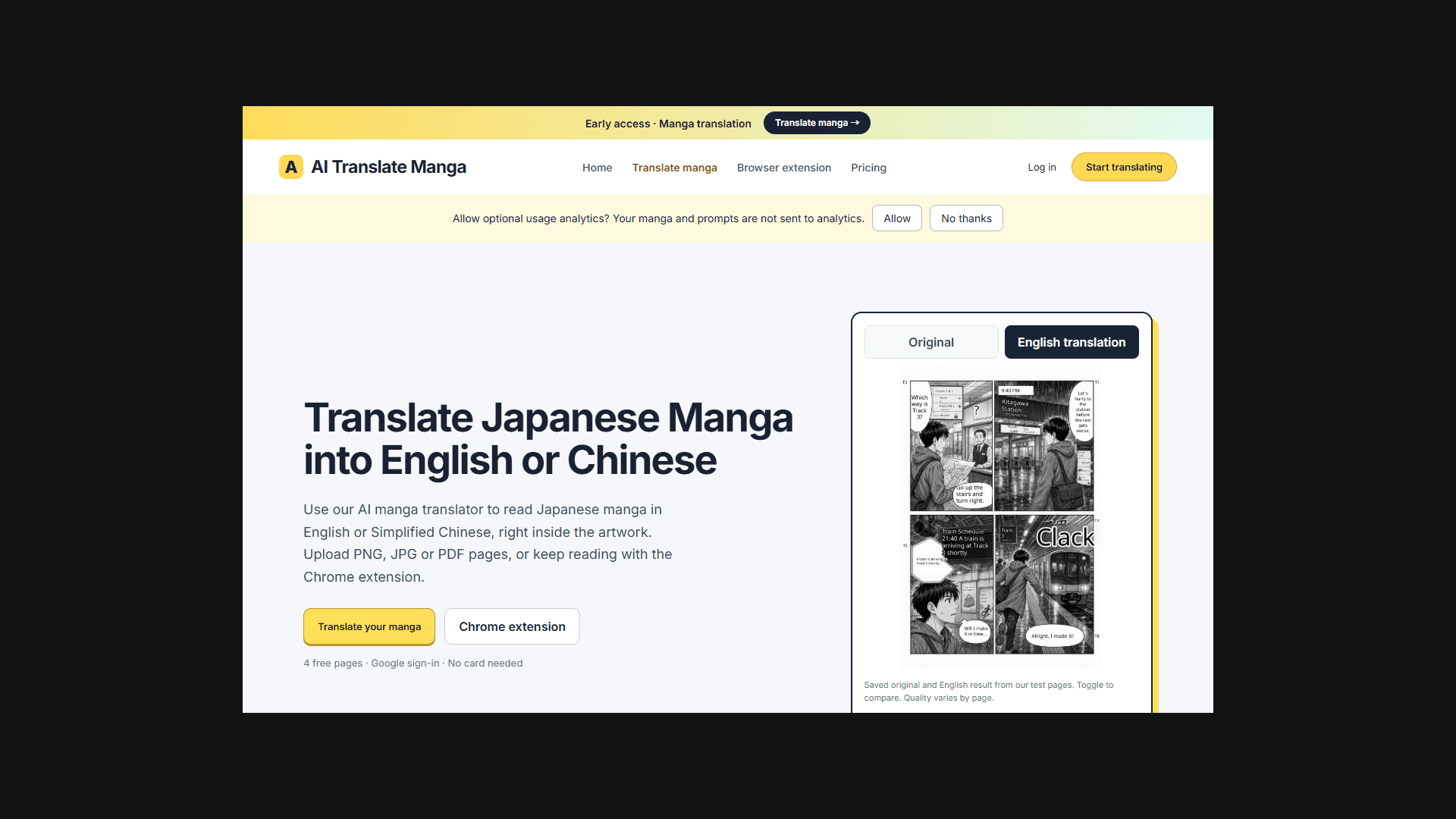
About this app
AI Translate Manga is a specialized web app and Chrome extension that translates Japanese-language manga pages into 12 output languages, including English, Simplified and Traditional Chinese, Korean, Spanish, Portuguese, Indonesian, Thai, French, German, and Vietnamese. You upload PNG, JPG, or PDF pages (up to 20 pages per batch, 5 MB per image, 50 MB per PDF), and the tool detects text inside panels and speech bubbles, then replaces it with translated dialogue. The Chrome extension lets you read manga on desktop Chrome in place, keeping the original artwork visible and letting you switch back anytime; it supports loaded PNG/JPG images and visible Canvas views (including opt-in Canvas Auto), though iframe readers and mobile Chrome are not supported. You get 4 free pages with Google sign-in, valid for 30 days and no card required, and each successful page costs 1 credit. The site is upfront that quality varies by page: ordinary dialogue is usually readable, dense lettering can overfl...
Key features
- 1Translates Japanese manga pages into 12 output languages including English, Chinese, Korean, Spanish, Portuguese, and Vietnamese.
- 2Chrome extension for in-place reading on desktop Chrome, keeping original artwork visible with toggle-back comparison.
- 3Batch upload of PNG/JPG (5 MB each) and PDF (50 MB) up to 20 pages, with per-page credit pricing at $4.99/100 pages.
Target customer profile
Drawn from the product itself, not from a survey.
Demographic
Manga fans reading raw Japanese releases
Pain points
Official translations lag months behind; raw pages are unreadable without Japanese fluency
Primary needs
Fast, readable Japanese-to-English bubble translation that keeps the original artwork intact
Demographic
Scanlation and fan-translation hobbyists
Pain points
Manual cleaning, typesetting, and translation are slow and repetitive across long chapters
Primary needs
Batch page upload, PDF support, and a Chrome extension for in-place reading and comparison
Demographic
Language learners and multilingual readers
Pain points
Hard to compare original Japanese dialogue with translations to study phrasing and vocabulary
Primary needs
Side-by-side original and translated results with multiple output languages, including Chinese and Korean
Demographic
Small publishers and indie localization teams
Pain points
Professional localization is expensive and slow for quick previews or low-volume titles
Primary needs
Affordable per-page credit pricing and a free trial to test quality before committing
Scout Review
Written by AI from measured evidence, scored out of 100.
AI Translate Manga is a focused, honestly-priced tool for a real problem: Japanese manga is unreadable without fluency, and official translations are slow. The product does the core job — detect text in panels and bubbles, translate into twelve output languages, and let you compare against the original — and the Chrome extension for in-place reading is a genuine differentiator over free alternatives. The pricing model is the best thing about it: $4.99 one-time for 100 pages, 4 free pages with Google sign-in, no subscription, 14-day refund on unused packs. The measured profile is uneven in the ways early products usually are. Accessibility is excellent (100/100 Lighthouse). Speed is good on desktop but the 13.2s mobile LCP undermines the hero. Security is thin — 4/12 header checklist points, no CSP, no HSTS, no security page. Design is average with a few unfinished controls. Usability is solid but cluttered. Growth is a real idea with a real wedge, held back only by the category's free alternatives and the site's own admission that quality varies.
Measure by measure
Usability
62Clear primary CTA, explained sign-in, transparent $4.99/100-page pricing and a 4-page free trial. Undercut by tiny fine print and too many parallel entry points competing for the next click.
Design
57Coherent yellow brand and a persuasive Original/English comparison card, but an unstyled native file input, low-contrast disabled button, and SEO link clutter under the hero drag the polish down to average.
Speed
68Lighthouse mobile 75/100 and desktop 82/100, with CLS 0 and TBT 19ms. The 13.2s mobile LCP is the sore spot — the hero comparison image takes its time arriving.
Security
52HTTPS enforced with SPF and DMARC, but no HSTS, CSP, frame protection, or Referrer-Policy — 4/12 header checklist points. Google sign-in only; no SOC 2, ISO, or security page published.
Accessibility
80Lighthouse accessibility 100/100 with a single failing audit on mismatched accessible names. Twelve output languages and a responsive layout support a broad audience; no formal WCAG statement published.
Growth
63Real, specific problem (raw Japanese manga is unreadable without fluency) with a concrete wedge: per-page credits, batch PDF, and in-place Chrome reading. Early-stage domain (0.2 years) is context, not the score.
Improvement areas
- Security posture: add HSTS, CSP, X-Content-Type-Options, Referrer-Policy, Permissions-Policy and publish a security page.
- Mobile performance: 13.2s LCP on the hero image needs compression and lazy-loading.
- Design polish: replace the native file input and fix the low-contrast disabled button state.
- Onboarding clarity: reduce parallel entry points and enlarge the critical fine print about formats and limits.
Design & Usability
The homepage does the hard part right: a real Original/English comparison card shows the product working on actual manga artwork, and the yellow accent is applied with enough restraint to read as a brand rather than decoration. The three numbered steps scan cleanly. But the execution slips where it matters most — the file picker inside the upload dropzone is a raw browser default, the disabled 'Translate pages' button is pale yellow on pale yellow, and eight SEO links wrap under the hero before a visitor has clicked anything. Usability is genuinely decent: the primary CTA is repeated in header and hero, sign-in is explained rather than hidden, and pricing is refreshingly plain ($4.99 one-time for 100 pages, 4 free with Google sign-in, 14-day refund). The friction is small print set too small to read and too many parallel entry points — hero CTA, upload card, extension, API, guides — competing for the same click.
Speed & Security
Speed is a split verdict. Lighthouse gives mobile 75/100 and desktop 82/100, with CLS 0 and TBT 19ms — the page is stable and responsive once it loads. The problem is the 13.2-second mobile LCP: the hero comparison image, the single most persuasive element on the page, is also the slowest thing to arrive. On desktop it's a non-issue; on a phone over cellular it's the difference between reading the pitch and bouncing. Security is the weakest measured dimension. HTTPS is enforced and SPF/DMARC are configured, but the header probe found no HSTS, no CSP, no frame protection, no X-Content-Type-Options, no Referrer-Policy and no Permissions-Policy — 4 of 12 checklist points. Authentication is Google sign-in only, and there is no security page, SOC 2, ISO, pen-test summary or bug bounty. For a tool that accepts user-uploaded images and holds page credits, that's a thin public posture, though not unusual for an early-access product.
Accessibility & Growth
Accessibility is the standout measured result: Lighthouse scores 100/100, with a single failing audit about visible text labels not matching accessible names — a real but narrow fix. The site ships in twelve output languages and a responsive layout, which broadens reach meaningfully. What's missing is a published WCAG statement or a11y documentation, so the 100 is automated confidence rather than a verified commitment. Growth is a judgement on the idea, not the traction. The problem is real and specific: raw Japanese manga is unreadable without fluency, and official translations lag months. The wedge is concrete — per-page credits instead of a subscription, batch PDF upload, and a Chrome extension that keeps the original artwork visible for comparison. Against Google Lens (free but doesn't preserve bubble layout), mangatranslatorai.io (which the site explicitly disclaims affiliation with), and the open-source Manga Image Translator (free but DIY), the paid convenience tier is defensible. The honest limit: the domain is 0.2 years old, the category has free and open-source alternatives, and the site itself admits quality varies by page — which caps how far a paid per-page model can carry it before users test the free options first.
Conclusion
If you read raw Japanese manga and want a fast, cheap way to get readable English bubbles without a subscription, this is worth the four free pages — the comparison card shows exactly what you're buying, and the per-page credit model means you're never locked in. Go in expecting variable quality on dense lettering and sound effects, as the site itself warns. If you're evaluating it for a localization team or need compliance documentation, the missing security headers and absent SOC 2/ISO posture are a real gap. The product is honest about its limits, which is rarer than it should be; the next step is finishing the polish — the file input, the disabled button state, the mobile hero image — and publishing a security page.
Suggestions for improvement
- Replace the native file input inside the upload dropzone with a styled control that matches the surrounding component system.
- Fix the disabled 'Translate pages' button contrast and add an inline hint explaining what unlocks it.
- Compress and lazy-load the hero comparison image to bring mobile LCP down from 13.2s.
- Add HSTS, CSP, X-Content-Type-Options, Referrer-Policy and Permissions-Policy, and publish a short security page.
Alternatives comparison
Named competitors, point by point. Nobody paid to appear here or to be left out.
 AI Translate Manga |  Google Lens | Manga Translator AI (mangatranslatorai.io) |  Manga Image Translator | |
|---|---|---|---|---|
| Pricing model | $4.99 one-time for 100 pages; 4 free pages with Google sign-in; 14-day refund on unused packs | Free | Paid service; AI Translate Manga explicitly disclaims affiliation | Free and open source |
| Preserves bubble layout / typesets result | Yes — replaces text inside panels and speech bubbles; site warns dense lettering may overflow | No — overlays translation, does not preserve bubble layout | Yes — AI manga translation with typesetting | Yes — detects, translates, and typesets bubbles |
| In-place reading via browser extension | Yes — Chrome extension for desktop Chrome; iframe readers and mobile Chrome unsupported | No — camera/image translation only | Web-based upload; no in-place extension reading stated | No — local/CLI tool, not an in-browser reader |
| Batch and PDF support | Up to 20 pages per batch; PNG/JPG 5 MB each, PDF up to 50 MB | Single image at a time | Batch upload supported | Batch via CLI/script; no hosted UI |
| Output languages | 12 output languages from Japanese source only | 100+ languages via Google Translate | Multiple languages; varies by service | Configurable; depends on translation backend |
Google Lens
Free camera and image-based translation that can read text in manga panels, but it doesn't preserve bubble layout or typeset the result.
Manga Translator AI (mangatranslatorai.io)
Another AI manga translation service; note that AI Translate Manga explicitly states it is not affiliated with this site.
Manga Image Translator
Open-source tool for detecting, translating, and typesetting manga text bubbles, popular among scanlation groups.
Comparing options? See AI Translate Manga alternatives, scored side by side
More AI Generations apps
View all AI Generations
Uni-1 by Luma AI
92Uni-1 is an advanced multimodal text-to-image AI model th...

Gerty
91Private, local AI assistant for Mac that runs offline

LTX 2.3 AI Video Generator
91Fast, open-source AI video generator with 4K support, mul...

DemoVexa
90Turn your code into professional product demo videos with AI-generated scripts, animated UI, and natural voiceovers.

AI Vocals Generator
89Add AI singers or rappers to your own beat, get two takes...

Voqusa
89Transcribe social media video and audio links into text (free signup, 5 free credits, then pay-as-you-go)

All of Us
89Add deceased loved ones to photos with AI and see free pr...

PodRescale
89Every episode becomes two weeks of posts. In your voice. Posted for you.

Pixelimg
88A free online AI-powered tool that instantly converts ima...

Cantoro
88Custom AI songs with a name, heard free before paying $4....

tradutor de mangá com IA
88O tradutor de mangá com IA traduz capítulos em lote, personaliza textos e oferece edição visual para estúdios.

IraVoice
88Private on-device dictation for Apple-silicon Macs.


A platform dedicated to providing unbiased reviews of newly launched applications, analyzing everything from their features to their full potential.
info@scoutforge.net© 2026 Scoutforge. All rights reserved.
