Cycling through all six. Tap any point to stop.
Measured on six things
AI video expander that turns vertical clips into full 16:9 or 9:16 with AI-painted edges—no black bars or blur.
Growth
62Real, specific problem (aspect-ratio repurposing) with a genuine wedge — AI outpainting vs crop/blur — and pay-per-clip pricing against Runway's subscription. Early domain, but the idea has room.
Screenshots
1 / 2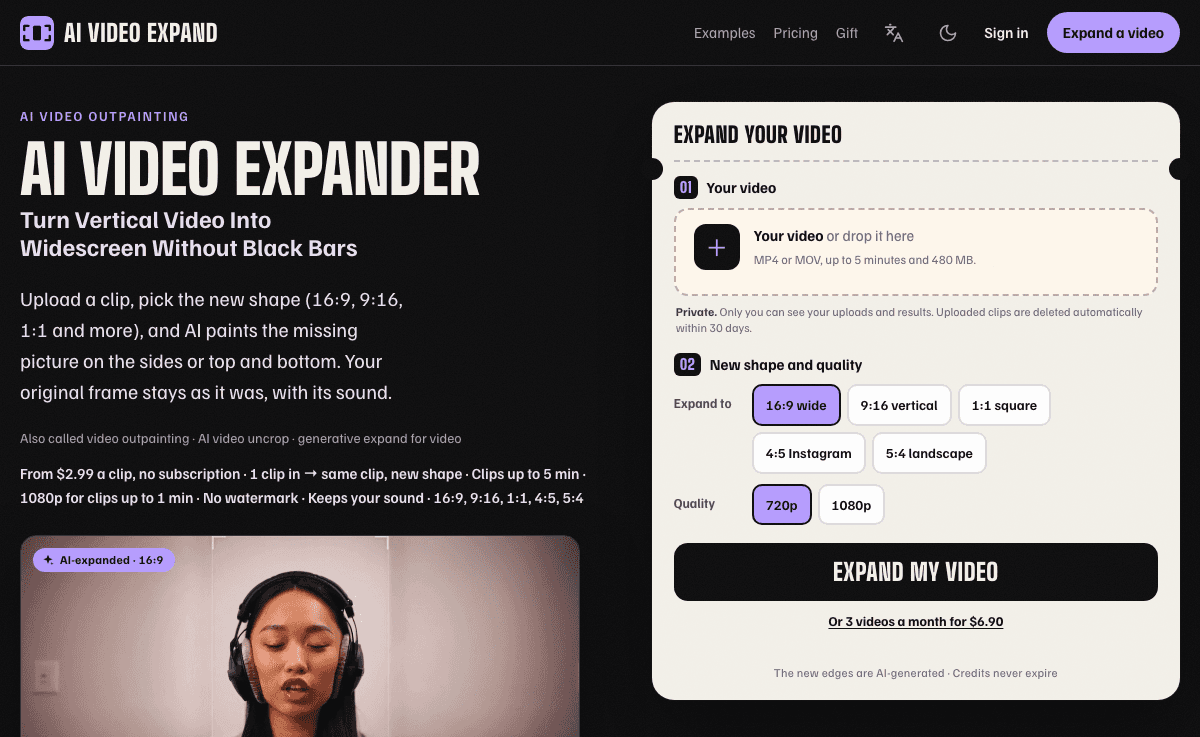
About this app
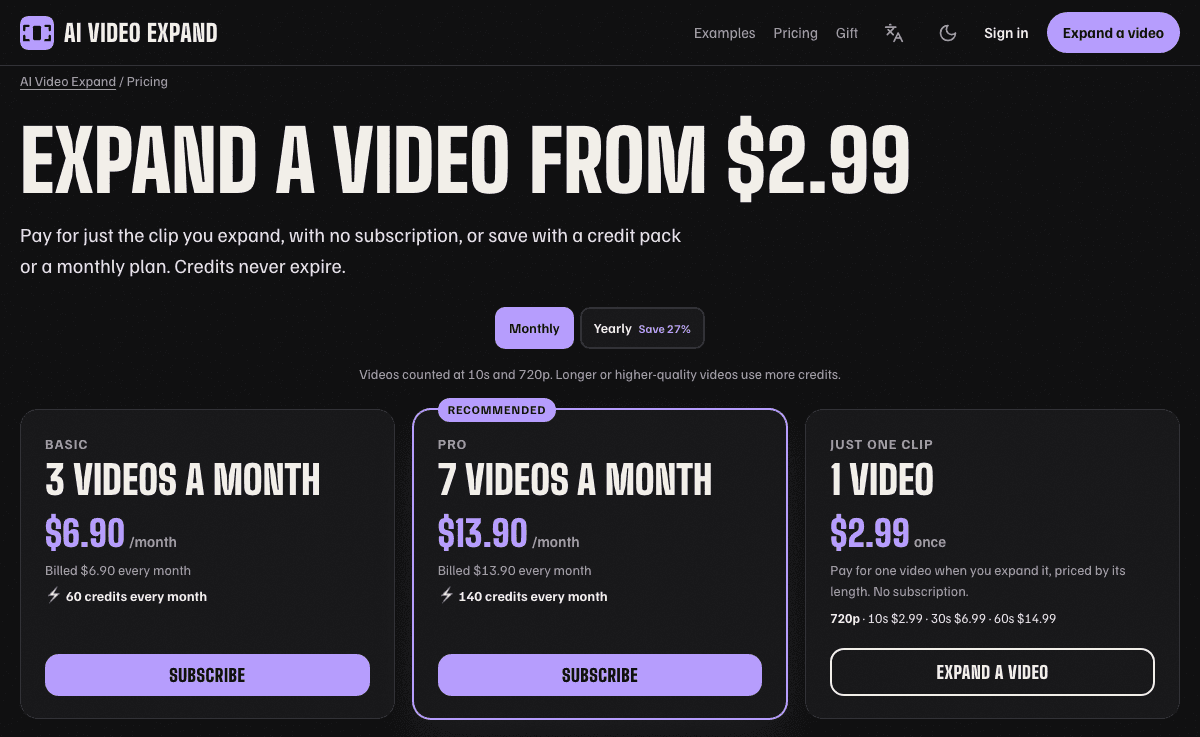
AI Video Expand is a browser-based AI video expander and video outpainting tool for changing a clip's aspect ratio without cropping people out or adding black bars. Upload an MP4 or MOV up to 5 minutes (480 MB max) and choose 16:9, 9:16, 1:1, 4:5, or 5:4. Your original video stays untouched in the center while AI generates matching edges frame by frame, preserving original sound with no watermark at 720p or 1080p. No prompts, app install, or sign-up required. Pricing is pay-per-clip starting at $2.99 for up to 10s at 720p, with optional credit packs from $6.99 and plans from $6.90/month (paid tool, no free tier). See our guide on how to remove black bars from video: https://aivideoexpand.com/guides/remove-black-bars-from-video-ai/
Key features
- 1AI video outpainting: keeps the original frame centered and generates matching edges frame by frame for 16:9, 9:16, 1:1, 4:5 and 5:4.
- 2Pay-per-clip pricing from €2.99 (10s at 720p), scaling by length and quality, with optional credit packs and monthly/yearly plans.
- 3No sign-up to start, no watermark, original sound preserved, MP4/MOV up to 5 minutes and 480 MB, output at 720p or 1080p.
Target customer profile
Drawn from the product itself, not from a survey.
Demographic
Content creators repurposing videos across platforms
Pain points
Black bars or blurred backgrounds look unprofessional; cropping cuts off important parts
Primary needs
Quickly adapt aspect ratios (9:16 to 16:9, etc.) without losing content or quality
Demographic
Social media managers handling multiple accounts
Pain points
Manually resizing videos for each platform is time-consuming and yields poor results
Primary needs
Batch-process clips affordably with credits, no subscription, and maintain brand consistency
Demographic
Independent filmmakers and videographers
Pain points
Client requests for different aspect ratios require reshoots or expensive editing
Primary needs
AI outpainting that preserves original frame and sound, with professional output at 1080p
Demographic
Small business owners creating promotional videos
Pain points
Limited budget and skills for video editing; need versatile formats for ads and social posts
Primary needs
Cost-effective, pay-per-use tool that delivers clean, watermark-free videos
Scout Review
Written by AI from measured evidence, scored out of 100.
AI Video Expand is a focused, well-explained tool for one job: changing a clip's aspect ratio without cropping people out or leaving black bars. The homepage earns its keep — a working upload panel above the fold, a coherent purple accent system, and before/after plus four-way comparison sections that show the mechanic instead of claiming it. Pricing is transparent per clip (€2.99 for 10s at 720p, scaling by length and quality) with credit packs and optional plans, and the guides page documents the flow, the limits and the failure-refund policy honestly. The measured profile is uneven in the right places: security is the standout at 12/12 on the header probe with Stripe checkout and a clear deletion policy, accessibility lands 100/100 on automated checks, and desktop performance is a clean 100. The drags are real — mobile LCP at 4.8s, a €/$ currency mismatch between hero and pricing page, low-contrast small text, and a pricing page that asks the buyer to weigh four billing models at once. None of these are structural; all are fixable in a week.
Measure by measure
Usability
68Upload, shape and quality controls sit together above the fold with no sign-in, and three-step cards plus guides give a clear path. Pricing spread across one-clip, credits, monthly and yearly adds decision weight.
Design
71Coherent purple accent system, a real tool panel above the fold, and before/after plus four-way comparison sections that explain outpainting visually. Held back by €/$ currency mismatch and low-contrast small text.
Speed
68Desktop Lighthouse 100/100 and mobile 83/100 with CLS 0 and TBT 29ms, but mobile LCP of 4.8s sits well past the 2.5s 'good' line — the one metric dragging the mobile score down.
Security
76Full header set (HSTS, CSP, frame protection, Permissions-Policy), SPF and DMARC, Stripe checkout, and stated 30-day deletion with no training on clips. No SOC 2, ISO or pen-test claim published.
Accessibility
80Lighthouse accessibility 100/100 with one failing audit on mismatched accessible names, and the visual audit flagged low-contrast small grey text. No WCAG statement published, so the score sits mid-band on automated evidence.
Growth
62Real, specific problem (aspect-ratio repurposing) with a genuine wedge — AI outpainting vs crop/blur — and pay-per-clip pricing against Runway's subscription. Early domain, but the idea has room.
Improvement areas
- Currency inconsistency between hero (€2.99) and pricing page ($2.99 / $6.90) undermines trust at the exact moment of purchase.
- Mobile LCP of 4.8s is nearly double the 'good' threshold — compress hero media and preload fonts.
- Low-contrast small grey text on dark backgrounds fails comfortable reading, especially in the spec table and pricing footnotes.
- Pricing page presents four billing models at once plus a 'Hidden deal' popup — simplify to two primary choices.
Design & Usability
The homepage does the hard thing well: it shows the product working. A real tool panel sits above the fold with a dashed drop zone, segmented aspect-ratio chips and a single black CTA, and the purple accent carries consistently through nav, selected states and the RECOMMENDED badge. The before/after section with corner crop markers and the four-way Crop / Black bars / Blur / AI comparison explain outpainting without a paragraph of copy. Two flaws pull it down: the hero quotes €2.99 while the pricing page headline and plan cards quote $2.99 and $6.90, and small grey caption text on the dark background drops below comfortable contrast. Usability is strong at the start — upload, shape and quality together, no sign-in, three-step cards and a detailed guides page — but the pricing decision is heavy, with one-clip, credit packs, monthly and yearly all competing on one screen plus a 'Hidden deal' popup.
Speed & Security
Speed is split down the middle. Desktop Lighthouse returns a clean 100/100, and the mobile run keeps CLS at 0 and TBT at 29ms, so the page is stable and responsive once it paints. The problem is mobile LCP at 4.8s, nearly double the 2.5s 'good' threshold — on a phone the first impression is a wait. Security is the strongest measured dimension: the HTTP probe found HTTPS enforced with HSTS, CSP, frame protection, X-Content-Type-Options, Referrer-Policy and Permissions-Policy all set, plus SPF and DMARC for email, for a 12/12 checklist. Checkout runs through Stripe, the site states uploads are private and deleted within 30 days, and clips are never used to train models. What's missing is third-party assurance — no SOC 2, ISO 27001, pen-test summary or bug bounty is published, so the trust rests on the maker's own policy text.
Accessibility & Growth
Accessibility scores well on automated evidence: Lighthouse returns 100/100, with a single failing audit for elements whose visible text labels don't match their accessible names. The visual audit adds the human caveat — small grey body and caption text on the dark background falls below comfortable contrast, particularly in the spec table and pricing footnotes — and no WCAG conformance statement is published, so the 80 reflects strong automated results rather than a verified a11y program. Growth is the more interesting question. The problem is real and specific: creators and social managers need the same clip in 9:16, 16:9, 1:1 and 4:5, and crop cuts faces while blur looks like a phone clip in a frame. The wedge is genuine AI outpainting — the original frame stays untouched with its sound, no watermark, at 1080p — and pay-per-clip from €2.99 with no subscription is a concrete contrast to Runway's subscription model. The limit is structural: CapCut and Premiere already own the editing workflow and can bolt on generative expand, so the defensible position is speed and price for people who don't want an editor at all.
Conclusion
What makes this worth a look is honesty about limits. The site tells you the AI invents what was outside the frame, that a person cut off at the edge gets a made-up body, that busy edges can shimmer, and that a failed run refunds automatically as credits. That's the kind of copy that builds trust faster than a badge. The product is early — the domain is brand new and there's no third-party review presence to point at — so the verdict rests on what's shipped: a working tool, a clear price, and a security posture that's better than most indie SaaS at this stage. Fix the currency mismatch, compress the mobile hero image, raise the caption contrast, and simplify the pricing page to two choices. Do that and this moves from 'solid' to 'the obvious pick' for anyone who just needs the clip in the right shape.
Suggestions for improvement
- Unify currency across hero and pricing page — €2.99 in one place and $2.99 in another reads as a bug, not a localization feature.
- Cut mobile LCP from 4.8s: compress or lazy-load the hero media and preload the display font to get under 2.5s.
- Raise contrast on small grey caption and spec-table text against the dark background to meet WCAG AA.
- Collapse the pricing page to two primary choices (one clip vs credits) and tuck monthly/yearly plans behind a toggle.
Alternatives comparison
Named competitors, point by point. Nobody paid to appear here or to be left out.
 AI Video Expand |  Runway |  CapCut |  Adobe Premiere Pro | |
|---|---|---|---|---|
| Core approach to changing aspect ratio | AI outpainting — original frame stays centered, edges generated frame by frame | AI outpainting within a broader generative video suite | Cropping or blurred background fill, not AI outpainting | Content-aware fill and manual reframing in a full NLE |
| Pricing model | Pay-per-clip from €2.99; optional credit packs from €6.99 and plans from €6.90/mo | Subscription-based credit plans | Free tier with paid Pro subscription | Monthly/annual Creative Cloud subscription |
| Learning curve / setup | No sign-up, no prompts, no install — upload, pick shape, pay, download | Account required; broader suite with steeper learning curve | Account and app install; timeline-based editing | Professional NLE with significant learning curve |
| Watermark and output quality | No watermark, 720p or 1080p, original sound preserved | Watermark on free tier; higher resolutions on paid plans | Watermark on some exports; Pro removes it | No watermark; full export control |
| Batch / multi-clip workflow | Credit packs support multiple clips; credits never expire | Credit-based batch generation within the suite | Batch export available in the editor | Media Encoder batch processing |
Runway
AI video editing suite with outpainting features, but requires subscription and has higher learning curve.
CapCut
Free video editor with aspect ratio adjustment, but relies on cropping or blurring, not AI outpainting.
Adobe Premiere Pro
Professional editing software with content-aware fill, but expensive and complex for simple aspect ratio changes.
Comparing options? See AI Video Expand alternatives, scored side by side
More AI Generations apps
View all AI Generations
Uni-1 by Luma AI
92Uni-1 is an advanced multimodal text-to-image AI model th...

Gerty
91Private, local AI assistant for Mac that runs offline

LTX 2.3 AI Video Generator
91Fast, open-source AI video generator with 4K support, mul...

DemoVexa
90Turn your code into professional product demo videos with AI-generated scripts, animated UI, and natural voiceovers.

AI Vocals Generator
89Add AI singers or rappers to your own beat, get two takes...

Voqusa
89Transcribe social media video and audio links into text (free signup, 5 free credits, then pay-as-you-go)

All of Us
89Add deceased loved ones to photos with AI and see free pr...

PodRescale
89Every episode becomes two weeks of posts. In your voice. Posted for you.

Pixelimg
88A free online AI-powered tool that instantly converts ima...

Cantoro
88Custom AI songs with a name, heard free before paying $4....

tradutor de mangá com IA
88O tradutor de mangá com IA traduz capítulos em lote, personaliza textos e oferece edição visual para estúdios.

IraVoice
88Private on-device dictation for Apple-silicon Macs.


A platform dedicated to providing unbiased reviews of newly launched applications, analyzing everything from their features to their full potential.
info@scoutforge.net© 2026 Scoutforge. All rights reserved.
