Cycling through all six. Tap any point to stop.
Measured on six things
Turn an existing website into an Android app with an online website-to-APK builder.
Security
52HTTPS enforced with frame protection and nosniff, but no HSTS, CSP, SPF or DMARC — 5/12 checklist points. No SOC 2, pen-test or security page found.
Screenshots
1 / 1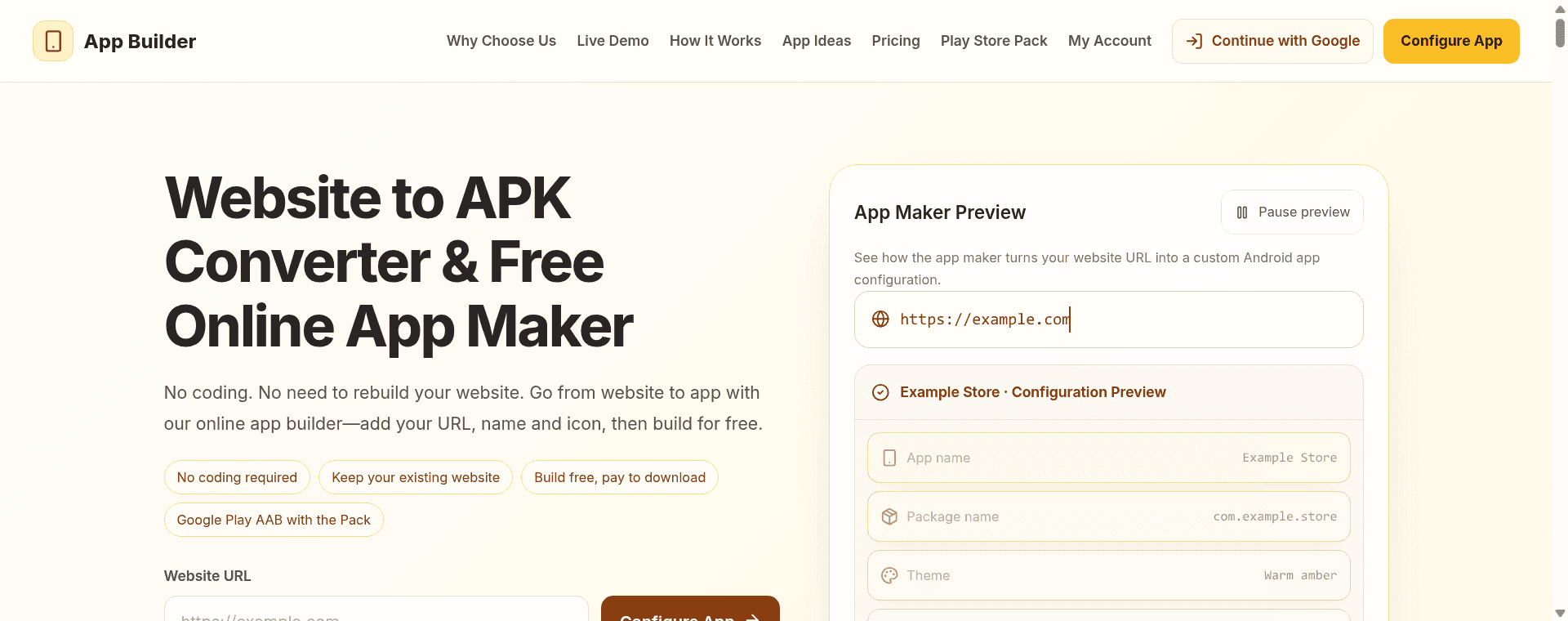
About this app
App Builder AI helps website owners create an Android app from a website URL without writing app code. Configure the app name, package identifier, icon, colors and orientation, then build an APK. An optional Play Store Pack provides an Android App Bundle for a separate Google Play submission. Store publishing remains subject to Google account, testing and review requirements.
Key features
- 1Convert any website URL into a signed Android APK with custom name, package, icon, theme color and orientation.
- 2Live content sync — the app loads your existing site, so new posts and products appear without rebuilding.
- 3Optional Play Store Pack produces an Android App Bundle (AAB) for separate Google Play submission.
- 4Free to build and preview; one-time $5.90 payment unlocks the APK download, no subscription.
Target customer profile
Drawn from the product itself, not from a survey.
Demographic
Small business owners (e-commerce, restaurants, services)
Pain points
No budget or staff for native Android development; app stores feel out of reach; website traffic isn't converting into repeat visits.
Primary needs
A quick, low-cost branded Android app that mirrors their existing website and menu/catalog.
Demographic
Bloggers and content creators (WordPress, publications)
Pain points
Readers lose track of articles; mobile web experience feels disconnected; no easy way to offer a home-screen shortcut.
Primary needs
An app that stays in sync with live content and carries their name and icon without rebuilding for every post.
Demographic
Founders and indie developers testing MVPs
Pain points
Need to validate an app idea or web tool on Android fast; native builds are time-consuming; distribution tooling is complex.
Primary needs
An Android package to test an existing website on a device before release.
Scout Review
Written by AI from measured evidence, scored out of 100.
App Builder AI is a focused website-to-APK tool with a clean, fast landing page, a genuinely useful live preview and a fair one-time $5.90 download price. It's honest about its limits, which is rarer than it should be. The measured speed is excellent and the design is above the category's usual template mush. Where it stumbles is depth and defensibility: no docs or support surface, thin security headers, two accessibility fails, and a single-platform scope against an alternative that ships both Android and iOS. It's a competent, cheap utility for someone who wants a branded Android shell around their existing site — not a platform.
Measure by measure
Usability
63Fast path from URL to built APK, free to preview and $5.90 once to download. Honest about limits (no native permissions, no auto-publish), but no docs or support channel visible.
Design
68Clean dark/amber landing page with a live configuration preview that actually shows what you're building. Dense copy and disclaimer walls drag it below the polish of its hero.
Speed
88Lighthouse mobile 97/100 (LCP 1.8s, CLS 0, TBT 37ms) and desktop 100/100. Genuinely fast, lightweight site with no measured lag complaints.
Security
52HTTPS enforced with frame protection and nosniff, but no HSTS, CSP, SPF or DMARC — 5/12 checklist points. No SOC 2, pen-test or security page found.
Accessibility
78Lighthouse a11y 97/100, but two real fails: insufficient color contrast and visible-text/accessible-name mismatch. No WCAG statement or multi-language support.
Growth
58Real problem (cheap Android presence for web-first businesses) with a specific wedge: live content sync, no rebuild per post. Android-only vs. Appilix's dual-platform caps the ceiling.
Improvement areas
- No visible documentation, help center or support channel beyond inline copy.
- Thin security posture: no HSTS, CSP, SPF or DMARC; 5/12 header checklist points.
- Two Lighthouse accessibility fails (contrast, accessible names) and no WCAG statement.
- Android-only scope against an alternative that ships both Android and iOS builds.
Design & Usability
The design is the strongest surface here: a dark/amber landing page with a live configuration preview that shows app name, package, theme and orientation before you commit. It's more honest than most URL-to-APK tools, which usually hide the seams. Usability follows the same logic — paste a URL, set name/icon/color, build for free, pay $5.90 once to download the signed APK. The friction is low and the try-before-buy gate is fair. What's missing is depth: no visible docs, help center or support channel, and the page spends a lot of words telling you what it does NOT do (native permissions, remote icons, auto-publish). Honesty is good; a wall of disclaimers is not onboarding.
Speed & Security
Speed is the standout measured result: Lighthouse mobile 97/100 with LCP 1.8s, CLS 0 and TBT 37ms, and a perfect 100 on desktop. The site is light, snappy and doesn't make you wait to configure anything. Security is the weak flank. HTTPS is enforced and frame protection, nosniff and Referrer-Policy are present, but there's no HSTS, no CSP, no Permissions-Policy, and no SPF or DMARC on the domain — 5 of 12 checklist points. No SOC 2, ISO, pen-test or bug-bounty signals appear anywhere. For a tool that takes a payment and hands you a signed binary, the header hygiene is thin.
Accessibility & Growth
Accessibility scores 97/100 on Lighthouse but fails two real audits: insufficient color contrast and a visible-text/accessible-name mismatch. There's no WCAG statement and no multi-language support, so the automated score flatters it. Growth is a judgement on the idea: the problem is real — small businesses and bloggers want an Android presence without native dev — and the wedge is specific, since the app loads your live site so new posts appear without rebuilding the APK. The honest limit is the alternative list: Appilix does the same thing for Android and iOS, and this product is Android-only. The domain is roughly 0.1 years old, so traction is context, not a verdict.
Conclusion
If you run a WordPress blog or a small store and just want an icon on someone's home screen that opens your live site, this does the job for less than a coffee. Go in knowing what you're getting: an Android WebView wrapper with your branding, not a native app, and not an iOS one. The free build-and-preview step means you can judge the output before paying, which is the right way to sell this. The work ahead is unglamorous — write real docs, tighten the headers, fix the contrast — but it's the difference between a tool people trust and a tool people try once.
Suggestions for improvement
- Publish a real docs/help center covering package naming, signing and Play Store submission steps.
- Add HSTS, a Content-Security-Policy and DMARC/SPF records to the domain.
- Fix the two Lighthouse a11y fails: contrast ratios and accessible-name mismatches on labeled controls.
- Add an iOS build path or clearly position Android-only as a deliberate, cheaper scope.
Alternatives comparison
Named competitors, point by point. Nobody paid to appear here or to be left out.
 App Builder AI App Builder AI | Appilix | |
|---|---|---|
| Platforms supported | Android only (APK / AAB) | Android and iOS |
| Pricing model | Free to build; $5.90 one-time APK download | Subscription-based plans |
| Coding required | None — URL, name, icon, color, orientation | None — website-to-app conversion |
| Live content sync without rebuild | Yes — app loads live website | Yes — app mirrors live website |
| Play Store submission support | Optional Play Store Pack (AAB + resources); submission is user's responsibility | Store publishing assistance offered |
| Native device features (camera, mic, location, push) | Not implemented — selections are planning notes only | Native feature integrations available |
Comparing options? See App Builder AI alternatives, scored side by side
More Development & Engineering apps
View all Development & Engineering
CreateMyCoin
92A no-code Solana token creator that deploys SPL tokens in...

Vibe Coding Agent Skills
92A free, open-source platform offering 110 AI agent skills...

CC Switch
91Open-source desktop app for switching AI coding providers...

TaxID
90Fast EU VAT validation API for developers, covering 27 EU...

DemoVexa
90Turn your code into professional product demo videos with AI-generated scripts, animated UI, and natural voiceovers.

deed.page
89Permanent web hosting for AI agents, no human step

BeartIMAGE
88BeartIMAGE is a free, web-based image processing platform engineered for fast, bulk photo editing and conversion directly in your browser.

Claw Messenger
88Claw Messenger is an iMessage API service that gives AI a...

DataHabibi
88AI-powered Dubai real estate data platform with 12M+ DLD ...

ButterKit
82macOS app for App Store screenshots: 3D mockups, auto-tra...

PERM Processing Time: Current DOL Queue & History
88PERM Processing Time is an independent data analysis platform that helps users navigate the U.S. Department of Labor’s permanent labor certification process.

kosa8
88Sealed VMs for AI agents with instant rewind, audit trails & zero key exposureSealed VMs for AI agents with instant rewind and audit tr...


A platform dedicated to providing unbiased reviews of newly launched applications, analyzing everything from their features to their full potential.
info@scoutforge.net© 2026 Scoutforge. All rights reserved.
