Cycling through all six. Tap any point to stop.
Measured on six things
Convert EML files to 15+ formats and migrate to email cli...
Design
46Dated homepage with four clashing button colours, a chat bubble clipping the hero copy, and a 14-bullet wall of text. The real Windows app screenshot is clear, but the marketing page undercuts it.
Screenshots
1 / 1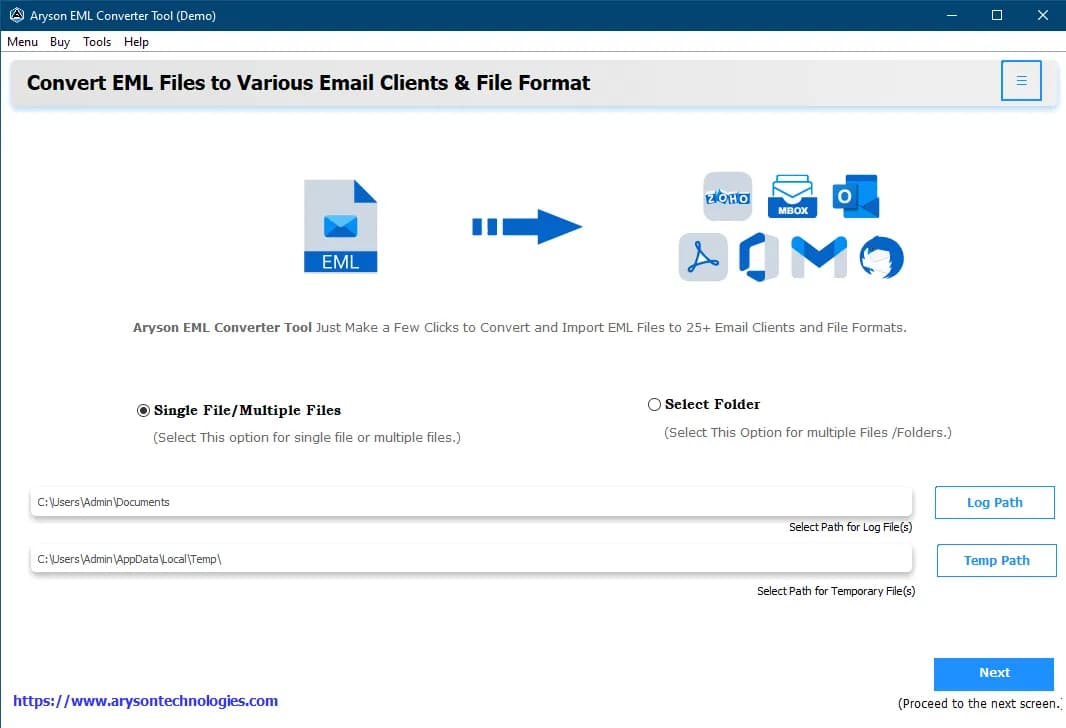
About this app
Aryson EML Converter is a reliable tool for converting EML files to PST, MSG, MBOX, PDF, HTML, and more, while preserving folder hierarchy and email integrity. It supports batch conversion, duplicate removal, and direct migration to Office 365, Gmail, and other email services. With a user-friendly interface and advanced features like data extraction and PST splitting, it's ideal for IT professionals, businesses, and individuals managing email data.
Key features
- 1Batch convert EML to PST, MSG, MBOX, PDF, DOC, CSV, XLSX, EMLX, OFT and more while preserving folder hierarchy.
- 2Direct migration of EML to Office 365, Gmail, Yahoo, G Suite, Thunderbird and IMAP, with duplicate and skip-previous-migration options.
- 3Extract Data feature pulls emails, phone numbers, URLs and attachments into CSV/XLSX for audits and forensics.
- 4PST splitting, attachment exclusion, custom folder naming, and a 50-email-per-folder free trial.
Target customer profile
Drawn from the product itself, not from a survey.
Demographic
IT professionals and system administrators
Pain points
Struggling with bulk EML conversions and email migrations to cloud services
Primary needs
Reliable batch conversion and migration to Office 365/Gmail with data integrity
Demographic
Small to medium business owners
Pain points
Need to archive or migrate company emails without technical expertise
Primary needs
User-friendly tool to convert EML to PST/PDF and migrate to email clients
Demographic
Digital forensics and legal professionals
Pain points
Extracting specific data from EML files for audits or legal cases
Primary needs
Ability to extract emails, attachments, and metadata to CSV/PDF for analysis
Scout Review
Written by AI from measured evidence, scored out of 100.
Aryson EML Converter is a competent, long-running utility (domain registered 2013) wrapped in a dated marketing page. The technical fundamentals are solid — fast paint times, a full security header set, and a feature list that covers the actual jobs (batch conversion, cloud migration, duplicate removal, PST split, data extraction). The weak spots are presentation and polish: a cluttered hero with clashing CTAs, accessibility failures that a single afternoon could fix, and no published compliance paperwork. Against SysTools and Stellar it holds its own on features but doesn't clearly outclass them. Worth a look if you need the Extract Data or skip-previous-migration options; otherwise compare on price and trial limits.
Measure by measure
Usability
58Features, screenshots, video, FAQs and a guide are all present, and the 50-email trial limit is disclosed. But three competing CTAs and a buried trial line make the first step harder than it should be.
Design
46Dated homepage with four clashing button colours, a chat bubble clipping the hero copy, and a 14-bullet wall of text. The real Windows app screenshot is clear, but the marketing page undercuts it.
Speed
70Lighthouse 81/100 on both mobile and desktop, LCP 1.1s and CLS 0 — genuinely fast paint. The 738ms total blocking time is the one soft spot, pointing at heavy main-thread script.
Security
76Full header set — HSTS, CSP, frame protection, Referrer and Permissions-Policy — plus SPF and DMARC, 12/12 on the probe. No published SOC 2, ISO or pen-test claim found.
Accessibility
58Lighthouse 83/100 but with real failures: low contrast, skipped heading levels, images missing alt text, unnamed links, small touch targets and no main landmark. Solid base, fixable gaps.
Growth
58A real, recurring migration problem with concrete differentiators (Extract Data to CSV/XLSX, PST split, skip-previous). But SysTools and Stellar ship near-identical feature sets, so the wedge is thin.
Improvement areas
- Homepage design: clashing CTA colours, overlapping chat callout, and an ungrouped 14-bullet feature wall.
- Accessibility: missing alt text, unnamed links, skipped headings, low contrast and small touch targets.
- No published compliance or security documentation (SOC 2, ISO, pen-test) despite strong header posture.
- Inconsistent product naming and format count (15+ vs 25+) across the site.
Design & Usability
The homepage is the weak link. A visual audit calls it dated: four unrelated button colours, a floating chat bubble and a 'Click Here for Queries' callout clipping the hero paragraph, and a 14-bullet feature list with no grouping. The one bright spot is the real Windows app screenshot, which shows a clean source-to-target flow. Usability is better than the design implies — features, screenshots, video, FAQs and a guide are all reachable, and the 50-email trial limit is disclosed. But three primary actions (Download Now, Purchase Now, Store badge) compete at equal weight, and the free demo link is a tiny red line that's easy to miss. The product works; the page makes you work to find out how.
Speed & Security
Speed is a genuine strength. Lighthouse scores 81/100 on both mobile and desktop, with LCP at 1.1s, FCP at 1.1s and CLS at 0 — the page paints fast and doesn't jump around. The 738ms total blocking time is the one blemish, suggesting heavy main-thread script that delays interactivity. Security is strong on the technical side: HTTPS enforced with HSTS, CSP, frame protection, X-Content-Type-Options, Referrer-Policy and Permissions-Policy all present, plus SPF and DMARC — a clean 12/12 on the header/DNS probe. What's missing is the paperwork: no SOC 2, ISO 27001, pen-test summary or bug-bounty program surfaced in the collected content. For a tool that handles email data and cloud credentials, publishing a security page would close the gap.
Accessibility & Growth
Accessibility lands at 83/100 on Lighthouse, which sounds better than it is. The failing audits are concrete: insufficient colour contrast, headings out of sequential order, images without alt attributes, links with no discernible name, touch targets too small, no main landmark, and role=presentation conflicts. None are hard to fix; together they mean screen-reader and keyboard users hit friction. On growth, the idea is sound: bulk EML conversion and migration to Office 365/Gmail is a recurring, paid problem for IT admins, SMBs and legal/forensics teams. Aryson's differentiators — Extract Data to CSV/XLSX, duplicate removal, PST splitting, skip-previous-migration — are real. The limit is the category: SysTools and Stellar ship near-identical feature sets, so there's no structural moat, just execution and price.
Conclusion
If you're an IT admin or forensics user with a pile of EML files and a deadline, this does the job — the 50-email trial lets you verify output quality before paying, which is the right way to buy a converter. Just don't judge it by the homepage: the app screenshot is cleaner than the page around it. Compare the trial limits and per-license pricing against SysTools and Stellar before committing, and check whether the Extract Data to CSV/XLSX feature is something you'll actually use, because that's the clearest reason to pick this one over the alternatives.
Suggestions for improvement
- Fix the hero: pick one primary CTA, move the free demo above the fold, and stop the chat bubble from clipping the description text.
- Resolve the accessibility failures — add alt text, fix heading order, name the links, raise contrast, and enlarge touch targets.
- Standardise product naming and the format count (15+ vs 25+) across the site so the offer reads as one product.
- Publish a security/compliance page (SOC 2 status, data-handling, pen-test summary) to back the strong header posture.
Alternatives comparison
Named competitors, point by point. Nobody paid to appear here or to be left out.
 Aryson EML Converter |  SysTools EML Converter |  Stellar EML Converter | |
|---|---|---|---|
| Core EML conversion formats | PST, MSG, MBOX, PDF, DOC, CSV, XLSX, EMLX, OFT and more | PST, MSG, PDF and other formats | Multiple formats with advanced filtering |
| Cloud / email client migration | Office 365, Gmail, Yahoo, G Suite, Thunderbird, IMAP | Migration supported | Migrate to email clients |
| Data extraction to CSV/XLSX | Yes — emails, phone numbers, URLs, attachments | Not listed in provided description | Not listed in provided description |
| Duplicate removal / skip previous migration | Yes — duplicate removal and skip-previous-migration | Batch conversion supported; duplicate handling not stated | Advanced filtering options |
| Free trial limit | 50 emails per folder | Not stated in provided description | Not stated in provided description |
SysTools EML Converter
Convert EML files to PST, MSG, PDF, and other formats with support for batch conversion and migration.
Stellar EML Converter
Convert EML files to multiple formats and migrate to email clients with advanced filtering options.
Comparing options? See Aryson EML Converter alternatives, scored side by side
More E-Mail apps
View all E-Mail
youtubetomp3.ink
87Free online YouTube to MP3 converter with no signup or so...

PitchCentric
86AI podcast booking intelligence with probability scoring.

EmailFig
85Email marketing that gets out of your way, with all featu...

PCDOTS PST Converter
85Convert Outlook PST files to 16 formats and clouds withou...

Postfleet
83Email infrastructure that turns inbound mail into safe JS...

Mailwell
83A calm, fast Mac mail app for all your accounts. Your mail stays on your Mac, with no servers in between.

CaptainVerify
82.5CaptainVerify is a powerful email and mobile number verif...

Mailmodo
82Mailmodo revolutionizes email marketing with AMP-powered interactive emails, AI tools, and automation to boost engagement and ROI.

VerifiedEmail
82A specialized tool for real-time email verification and list cleaning, boosting deliverability and compliance.

Gblock
81A Chrome extension that blocks hidden email trackers in Gmail, ensuring privacy by detecting spy pixels and anonymizing links.

Mailto Live
81AI-driven email management tool for Gmail that automates tasks like unsubscribing and organizing emails to boost productivity.

PromptLy
81An AI-powered email assistant that automates drafting, personalizes replies, and streamlines inbox management for professionals and teams.


A platform dedicated to providing unbiased reviews of newly launched applications, analyzing everything from their features to their full potential.
info@scoutforge.net© 2026 Scoutforge. All rights reserved.
