Cycling through all six. Tap any point to stop.
Measured on six things
Free printable blank calendar maker—dated 2026 or undated PDF with custom week start, paper size, and notes.
Security
52HTTPS enforced with HSTS, and the no-account model keeps stored personal data minimal. But the probe found no CSP, frame protection, Referrer-Policy or Permissions-Policy, and no SPF/DMARC — 4/12 checklist points. No published audits.
Screenshots
1 / 2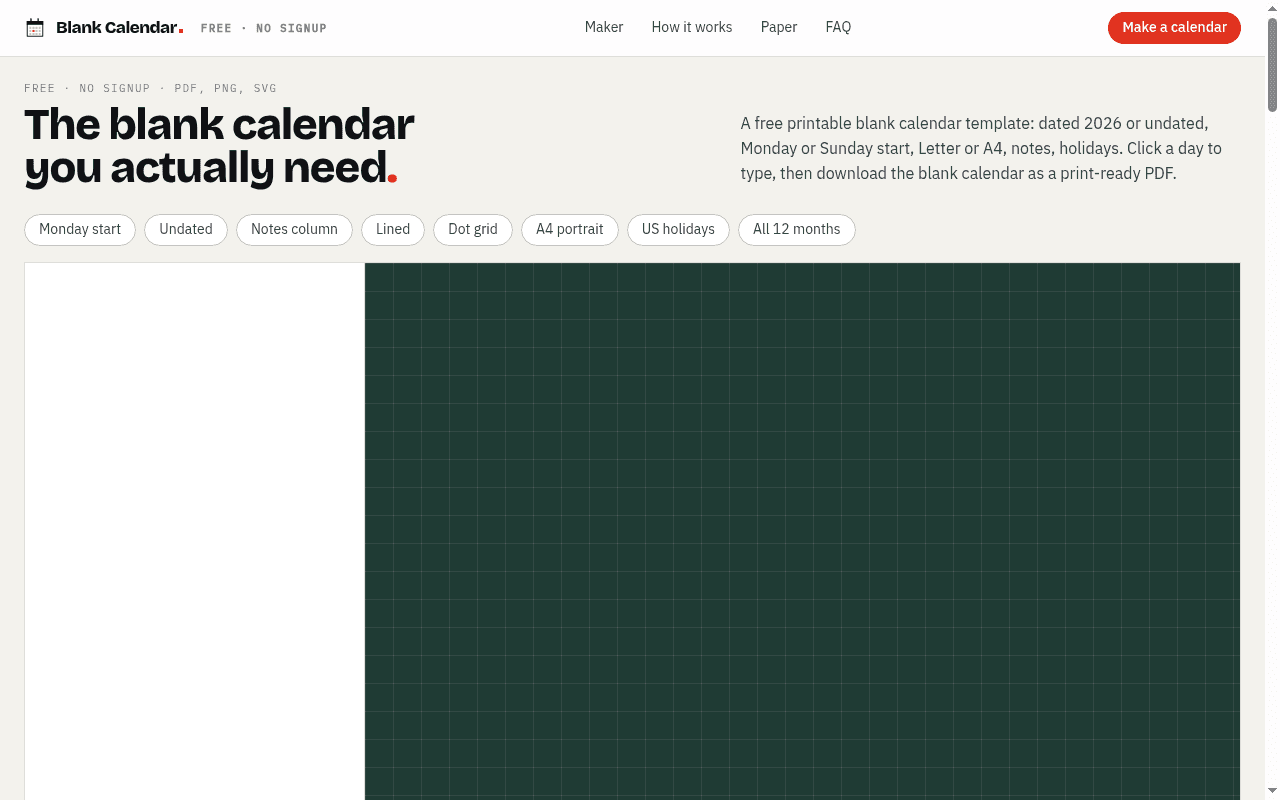
About this app
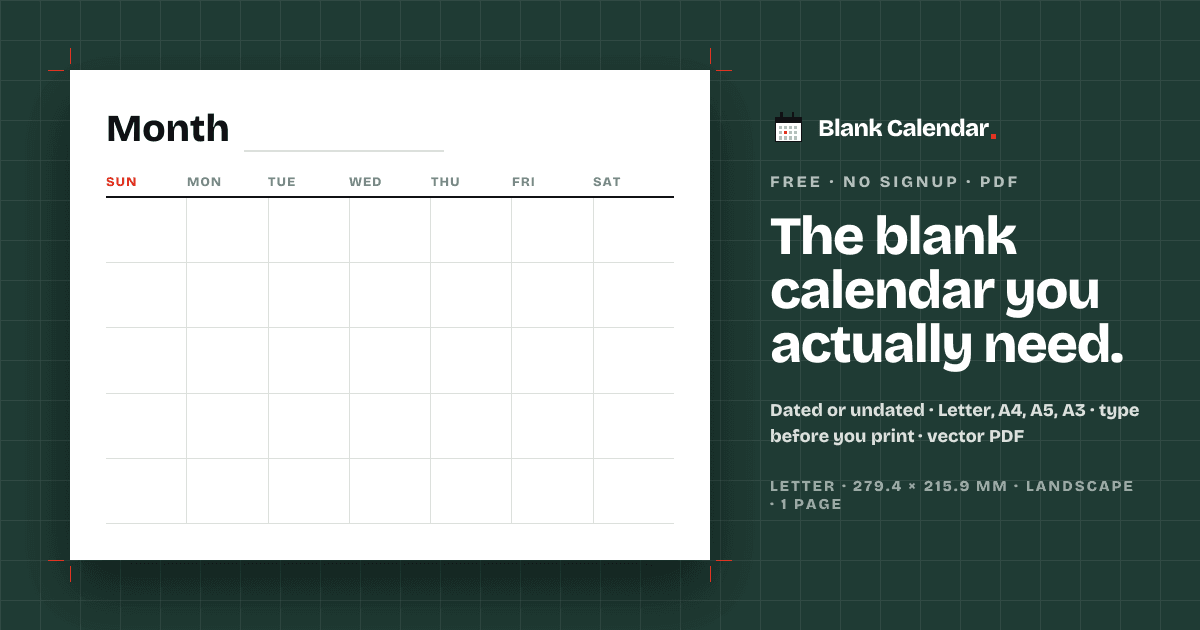
Blank Calendar Maker builds print-ready monthly calendars in the browser: dated 2026 or undated, Monday/Sunday/Saturday start, Letter/A4 and more, lined or grid day boxes, notes column, and holidays for multiple countries. Type into days before download as vector PDF, PNG, or SVG. Free, no account, no watermark.
Key features
- 1Dated 2026 or undated perpetual calendars with Monday, Sunday or Saturday week start.
- 2Six paper sizes (Letter, A4, A5, Legal, Tabloid, A3) built at real page size for 100% printing.
- 3Click-a-day typing, then export as vector PDF, 300 dpi PNG or SVG — free, no account, no watermark.
- 4Lined, dot-grid or fine-grid day boxes, notes column, ISO week numbers, weekend shading.
- 5Public holidays for 15 countries printed inside day boxes; landscape or portrait orientation.
Target customer profile
Drawn from the product itself, not from a survey.
Demographic
Families and household managers
Pain points
Cluttered digital calendars, messy handwriting on store-bought planners
Primary needs
Fridge-ready monthly view with typed appointments and weekend shading
Demographic
Teachers and classroom organizers
Pain points
Need undated grids for students and school holiday markers
Primary needs
A3 wall calendars and Letter handouts with custom day boxes
Demographic
Shift workers and project teams
Pain points
Irregular schedules and need for ISO week numbers across 12 months
Primary needs
Monday-start, multi-month PDF with typed shifts and shareable links
Demographic
Planner and bullet-journal enthusiasts
Pain points
Pre-printed layouts don't match personal planning systems
Primary needs
Dot grid or lined day boxes, notes columns, A5 size for binders
Scout Review
Written by AI from measured evidence, scored out of 100.
Blank Calendar is a focused, well-executed niche tool that does one thing properly: build a print-ready monthly calendar in the browser and hand you a vector PDF, 300 dpi PNG or SVG with no account and no watermark. The design is distinctive and the speed is excellent. The gaps are unglamorous but real — thin security headers, one contrast failure, micro-type on key instructions, and no dedicated documentation. For families, teachers, shift workers and planner people who want a sheet of paper that matches their system, it's a genuinely good answer. It isn't trying to be a platform, and it shouldn't.
Measure by measure
Usability
74No signup, no watermark, click-a-day-to-type, one-tap preset chips and a four-step how-to on the homepage. The path from landing to PDF is short and obvious. Held back by micro-type on key instructions and no dedicated docs or help center.
Design
71Confident typographic system — heavy grotesque hero, mono micro-labels, one red accent on a cutting-mat green canvas. Numbered configurator sections and preset chips keep a dense tool legible. Undercut by tiny low-contrast captions and a preview pushed below the fold.
Speed
88Lighthouse mobile 95/100 with LCP 1.9s, CLS 0 and TBT 14ms; desktop a clean 100/100. The page is light, stable and snappy — exactly what a static-feeling generator should be.
Security
52HTTPS enforced with HSTS, and the no-account model keeps stored personal data minimal. But the probe found no CSP, frame protection, Referrer-Policy or Permissions-Policy, and no SPF/DMARC — 4/12 checklist points. No published audits.
Accessibility
79Lighthouse accessibility 97/100 with one failing contrast audit, independently echoed by the visual audit's tiny low-contrast captions. Responsive layout and clear structure help; no WCAG statement or multi-language support found.
Growth
58A real, specific problem — print-exact blank calendars you can type into — with a genuine wedge over Canva, Google Calendar and timeanddate. Niche ceiling, but the positioning is honest and the segment is named.
Improvement areas
- Missing security headers: no CSP, frame protection, Referrer-Policy, Permissions-Policy, SPF or DMARC (4/12 checklist).
- Low-contrast, undersized mono captions — including the key 'click a day to type' instruction.
- Calendar preview sits below the first viewport behind an empty green canvas.
- No dedicated docs/help center or WCAG accessibility statement.
Design & Usability
Blank Calendar's design earns its confidence. The hero — 'THE BLANK CALENDAR YOU ACTUALLY NEED.' in a heavy grotesque with a single red period — is the rare landing page headline that's both memorable and accurate. Mono uppercase micro-labels and numbered configurator sections (01 Calendar, 02 Paper, 03 Day boxes, 04 Style) give a dense print tool a real hierarchy, and preset chips like 'Monday start' and 'Dot grid' map one-tap to the options people actually want. Usability backs it up: no signup, no watermark, click a day to type, download vector PDF, 300 dpi PNG or SVG. The four-step how-to and FAQ answer the obvious questions on the page. The weak spots are the same ones the visual audit found — tiny low-contrast captions, a key 'click a day to type' hint set too small, and a preview pushed below the first viewport so the default state doesn't show you a calendar.
Speed & Security
Speed is the standout. Lighthouse mobile performance 95/100 with LCP 1.9s, CLS 0 and TBT 14ms; desktop 100/100. For a tool that generates vector PDFs in the browser, that's a genuinely well-built front end — light, stable, no jank. Security is the weak flank. HTTPS is enforced with HSTS, and the no-account model means there's very little personal data to protect, which is a real structural advantage. But the header probe scored 4/12: no CSP, no frame protection, no X-Content-Type-Options, no Referrer-Policy, no Permissions-Policy, and no SPF or DMARC on the domain. None of that is catastrophic for a stateless generator, but it's table stakes hardening that's simply missing, and there's no published audit or security page to offset it.
Accessibility & Growth
Accessibility lands at 79: Lighthouse scores 97/100 with a single failing contrast audit, and the visual audit independently flagged the same tiny low-contrast mono captions. The layout is responsive and the structure is clean, but there's no WCAG conformance statement and the copy is English-only. Growth is a judgement on the idea, not the traction. The problem is real and specific — store-bought planners don't match your system, digital calendars don't print, and Canva wants an account for a sheet of paper. The wedge is concrete: print-exact sizing across six paper standards, undated perpetual grids, in-browser typing, 15-country holidays, no signup, no watermark. Against Google Calendar (no undated templates) and timeanddate (weaker typing), that's a defensible niche. The ceiling is the ceiling of printable calendars — useful, unglamorous, and unlikely to compound.
Conclusion
What makes Blank Calendar worth a look is restraint. It doesn't ask for an email, doesn't watermark the output, doesn't upsell a 'Pro' tier for A3, and doesn't pretend a calendar needs AI. It builds the PDF at real page size and tells you to print at 100%, which is the kind of detail that only comes from someone who has actually printed one. The fixes it needs are small and boring: tighten the header set, bump the caption contrast, move the preview above the fold. Do those and this goes from a good niche tool to a genuinely excellent one.
Suggestions for improvement
- Add CSP, X-Frame-Options, Referrer-Policy, Permissions-Policy and X-Content-Type-Options headers; publish SPF and DMARC records.
- Raise contrast and size on the mono captions and the 'Click a day to type' hint — it's the core interaction and currently the least readable text.
- Pull the calendar preview above the fold so the default state shows a real calendar instead of an empty green canvas.
- Add a short docs/help page and a WCAG conformance statement to back up the 97 accessibility score.
Alternatives comparison
Named competitors, point by point. Nobody paid to appear here or to be left out.
 Blank Calendar |  Canva |  Google Calendar |  Timeanddate.com Calendar Creator | |
|---|---|---|---|---|
| Account required | No — free, no signup | Yes — account required | Yes — Google account | No account for basic use |
| Undated blank templates | Yes — perpetual undated grids | Via templates, not a core mode | No | Limited |
| Print-exact paper sizing | Six sizes at real dimensions (Letter–A3) | Templates, less print-exact | Basic print, limited size control | Several sizes, less styling control |
| Type into days before export | Yes — click a day to type | Yes — full design editor | Events print, not free-form typing | Limited in-browser typing |
| Export formats | Vector PDF, 300 dpi PNG, SVG | PDF, PNG, JPG (some gated) | Print to PDF only | |
| Holidays for multiple countries | 15 countries, inside day boxes | Manual | Yes — many regions | Yes — many countries |
Canva
Graphic design platform with calendar templates, but requires an account and offers less print-exact sizing.
Google Calendar
Digital scheduling tool with print options, but lacks undated blank templates and fine control over paper size and day box styling.
Timeanddate.com Calendar Creator
Printable calendar generator with holiday options, though customization and in-browser typing are more limited.
Comparing options? See Blank Calendar alternatives, scored side by side
More Education apps
View all Education
The Stack Newsletter
92A weekly newsletter delivering curated tech jobs, intervi...

SheetScroll
90> You play; SheetScroll turns the page. It listens through the microphone or a MIDI piano and holds the page until it's sure where you are.

Cross Stitch Pattern Maker
89Free on-device photo-to-DMC/Anchor chart with skein counts.

English Test Coach
89English Test Coach checks your IELTS essays and letters, gives an estimated band score across all four criteria, and tells you exactly what to revise next.

Tracé slides
89Interactive math & physics slides with live graphs and an...

Startup Science
88A unified platform replacing 12-20 disconnected tools for...

Cromagnon
88Free, private browser-based PDF, Word, Excel, and study t...

TranscriptYou
88Free YouTube transcript generator with timestamps and AI ...

Random Movie Generator
88Free random movie picker from 142k+ films—no sign-up.

RBQ Exam
87Online practice for the RBQ contractor licence exams in Québec: original questions, timed mock exams and lessons, in French or English.

Coloring Pages Pro
87A massive collection of free printable coloring pages for...

CertWorthIt
87Data-driven tool revealing which certifications actually ...


A platform dedicated to providing unbiased reviews of newly launched applications, analyzing everything from their features to their full potential.
info@scoutforge.net© 2026 Scoutforge. All rights reserved.
