

A platform dedicated to providing unbiased reviews of newly launched applications, analyzing everything from their features to their full potential.
info@scoutforge.net© 2026 Scoutforge. All rights reserved.
A platform dedicated to providing unbiased reviews of newly launched applications, analyzing everything from their features to their full potential.
info@scoutforge.net© 2026 Scoutforge. All rights reserved.
A platform dedicated to providing unbiased reviews of newly launched applications, analyzing everything from their features to their full potential.
info@scoutforge.net© 2026 Scoutforge. All rights reserved.
Is this your app?
Claim Camtasia Online to manage its page, add your badge and see your traffic — free, and it stays free.
Cycling through all six. Tap any point to stop.
Measured on six things
Free web-based screen recorder with 1080p quality, no downloads or watermarks, ideal for quick professional captures.
Limited advanced accessibility features with basic keyboard shortcuts but minimal screen reader or language support
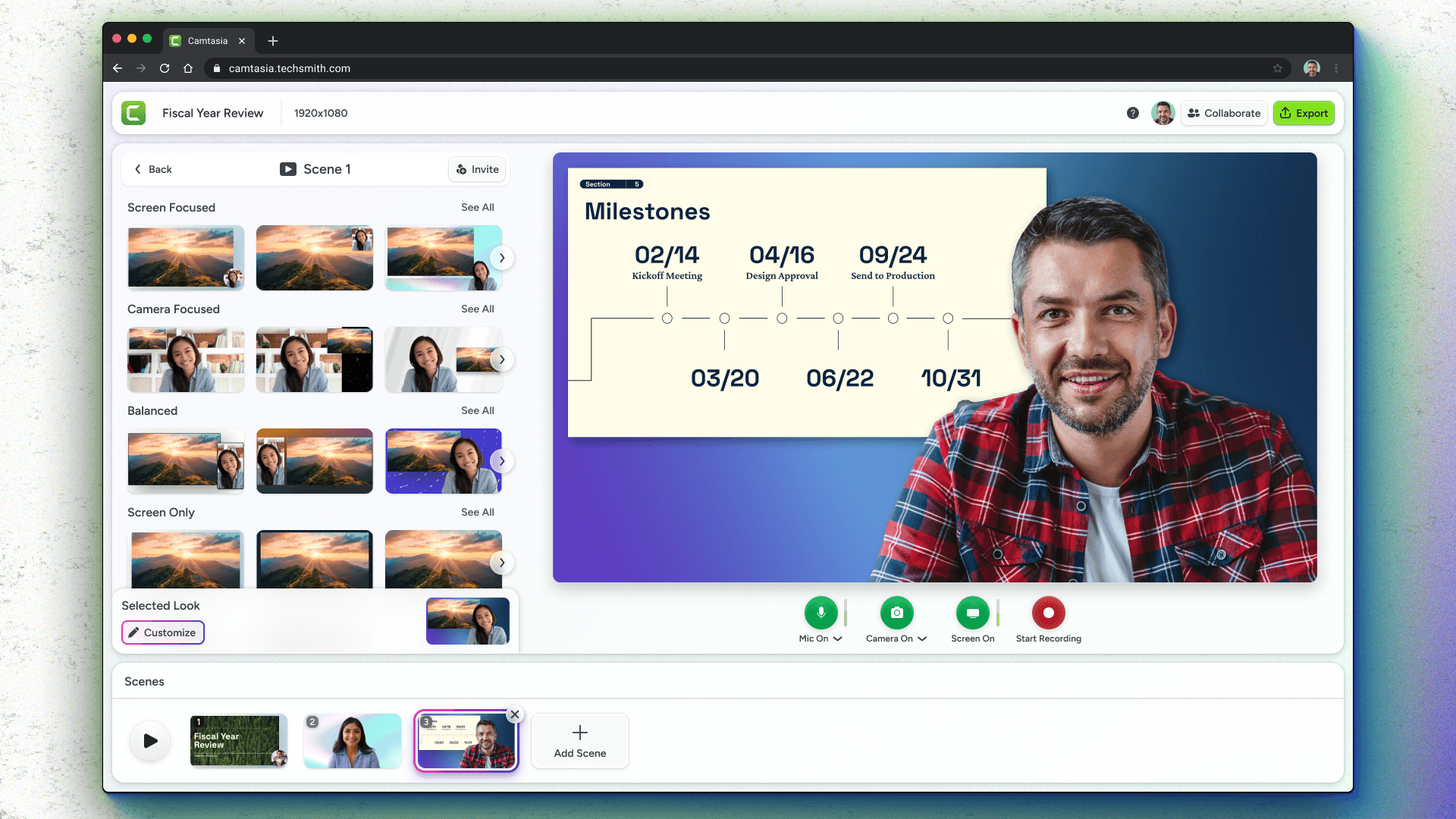
As a tech enthusiast who relies on screen recording for tutorials, I find Camtasia Online to be a game-changer for hassle-free, high-quality captures. This web-based tool lets you record your screen, webcam, and audio simultaneously without any installations, making it perfect for educators, content creators, and remote workers. With features like 1080p recording, customizable templates, and intuitive controls, it delivers polished videos in minutes. While it excels in usability and design, it could improve in accessibility and offline capabilities. Overall, it's a top pick for anyone needing efficient, watermark-free screen recordings without the complexity of downloaded software.
Drawn from the product itself, not from a survey.
Demographic
Educators and Trainers
Pain points
Time-consuming software setups, watermarks on free tools, limited editing options
Primary needs
Easy recording for lessons, professional templates, seamless sharing
Demographic
Content Creators and Marketers
Pain points
Need for high-quality visuals, compatibility across devices, cost of premium tools
Primary needs
1080p recording, webcam integration, no watermark outputs
Demographic
Remote Professionals
Pain points
Inefficient communication tools, complex recording software, privacy concerns
Primary needs
Quick screen captures, audio recording, web-based accessibility
Written by AI from measured evidence, scored out of 100.
Camtasia Online excels at delivering professional screen recordings without the typical hassles of downloaded software. Its strongest suit is the combination of ease-of-use and polished outputs that appeal to time-strapped professionals. The web-based approach eliminates installation headaches while maintaining 1080p quality and watermark-free results. While it could improve in accessibility and offline capabilities, it currently serves its target audience—educators, content creators, and remote workers—exceptionally well.
Zero-download setup with straightforward controls makes recording accessible even for complete beginners
Clean, minimalist interface with intuitive recording selection and professional templates that require zero design skills
Fast loading interface and responsive controls, though performance depends entirely on internet stability
Basic encryption through TechSmith servers, but web-based processing raises privacy considerations worth monitoring
Limited advanced accessibility features with basic keyboard shortcuts but minimal screen reader or language support
Strong market position with TechSmith backing and high demand for simple, web-based screen recording solutions
Camtasia Online delivers exactly what busy professionals need: a no-fuss, web-based screen recorder that looks polished from the first click. The interface greets you with a clean, minimalist design that immediately puts the focus on functionality. You can select recording sources—full screen, specific windows, or browser tabs—through an intuitive menu that even first-time users will navigate effortlessly. What really sets it apart are the customizable templates that add professional flair to recordings without requiring any design expertise. The recording controls are straightforward with prominent start/stop buttons, and the entire experience feels smooth and well-considered for quick content creation.
Performance-wise, Camtasia Online loads quickly and responds well to user inputs, making it ideal for spontaneous recording sessions. However, being entirely web-based means your internet connection becomes the bottleneck—when connectivity is solid, recordings proceed smoothly, but any instability can affect quality. Security follows standard web application practices with data transmission likely encrypted through TechSmith's servers. While this provides basic protection, the fact that your recordings process online means you're trusting TechSmith with your content, so reviewing their privacy policy is advisable. The lack of software downloads does eliminate installation-related security risks, which is a definite plus for cautious users.
Accessibility is where Camtasia Online shows room for improvement. While the simple layout helps users with varying technical skills, there's limited support for advanced accessibility needs. Basic keyboard shortcuts exist for recording controls, but comprehensive screen reader compatibility and multilingual interfaces appear lacking. The growth potential, however, is substantial. With TechSmith's established reputation and the increasing demand for remote collaboration tools, this platform is well-positioned to expand. The current feature set already addresses core user pain points like watermarks and complex setups, creating a solid foundation for future enhancements that could make it even more competitive in the crowded screen recording market.
Conclusion
If you're tired of complex screen recording software that requires tutorials just to get started, Camtasia Online offers a refreshing alternative. It's particularly well-suited for educators creating quick lesson demos, marketers producing product tutorials, or remote teams sharing workflow explanations. The combination of professional templates and zero-download convenience makes it a go-to solution for anyone needing quality screen captures without the technical overhead. Give this one a try if you value simplicity and professional results over advanced editing features.
Named competitors, point by point. Nobody paid to appear here or to be left out.
 Camtasia Online Camtasia Online |  OBS Studio OBS Studio |  Apowersoft Online Screen Recorder Apowersoft Online Screen Recorder |  RecordCast RecordCast | |
|---|---|---|---|---|
| Installation Required | No installation - completely web-based | Requires software download and installation | Web-based with optional desktop app | Completely web-based, no installation |
| Watermarks on Free Version | No watermarks on recordings | Completely free, no watermarks | May include watermarks in free version | Watermarks or limitations in free tier |
| Learning Curve | Very low - intuitive for beginners | Steep learning curve for new users | Moderate - some features require exploration | Low to moderate - relatively user-friendly |
| Built-in Editing Features | Basic templates, limited editing capabilities | No built-in editing, recording focus only | Limited editing features available | Includes built-in video editing tools |
OBS Studio
A free, open-source software for screen recording and live streaming, but requires download and has a steeper learning curve.
Apowersoft Online Screen Recorder
Another web-based tool offering screen and audio capture, though it may include watermarks or limited features in the free version.
RecordCast
A free online screen recorder with built-in video editing, but may have restrictions on recording length or quality.
Comparing options? See Camtasia Online alternatives, scored side by side

A weekly newsletter delivering curated tech jobs, intervi...

A unified platform replacing 12-20 disconnected tools for...

A massive collection of free printable coloring pages for...

AI-powered law school study platform with 20,000+ case br...

Custom illustrated children's books created around your c...

All-in-one CIRO exam prep for CIRE and 8 other exams, wit...

Turn timers into powerful routines with automation, widge...

Turn your content into a branded mobile app with home, co...

Free 80-item RAADS-R autism self-assessment for adults, with instant total and domain scores, privacy-first access, and clear non-diagnostic guidance.

Privacy-first OCR for math to editable Word, PDF, LaTeX.

AI humanizer for natural text with best possible human-like result

An AI-powered learning platform for K–5 that sparks curio...
A platform dedicated to providing unbiased reviews of newly launched applications, analyzing everything from their features to their full potential.
info@scoutforge.net© 2026 Scoutforge. All rights reserved.
