Cycling through all six. Tap any point to stop.
Measured on six things
On-device AI captions, teleprompter and 4K video editor f...
Growth
58Real problem, specific wedge: on-device captions, no watermark, free editing. But CapCut owns the category and the one-project free limit caps viral adoption. Domain is 0.4 years old.
Screenshots
1 / 2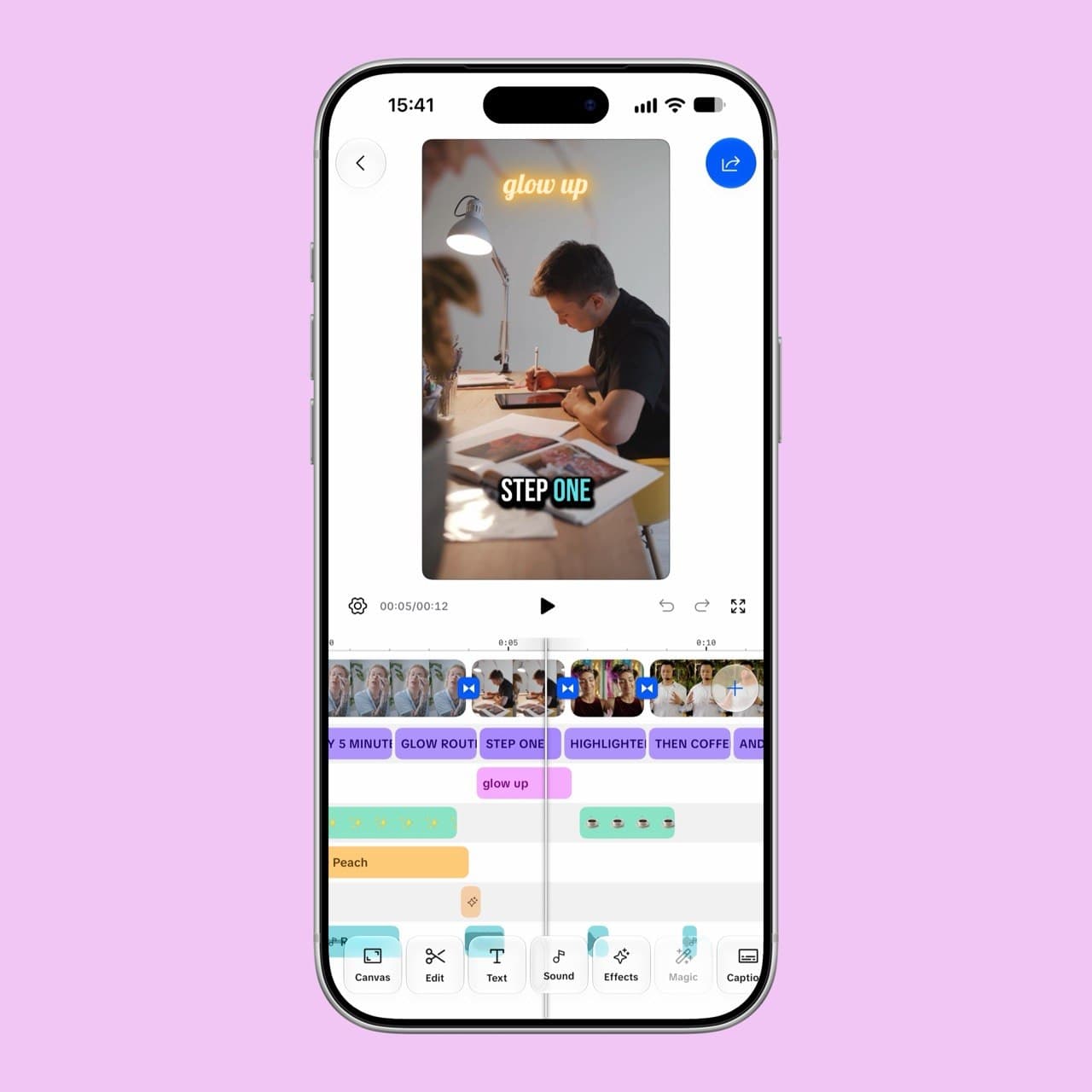
About this app
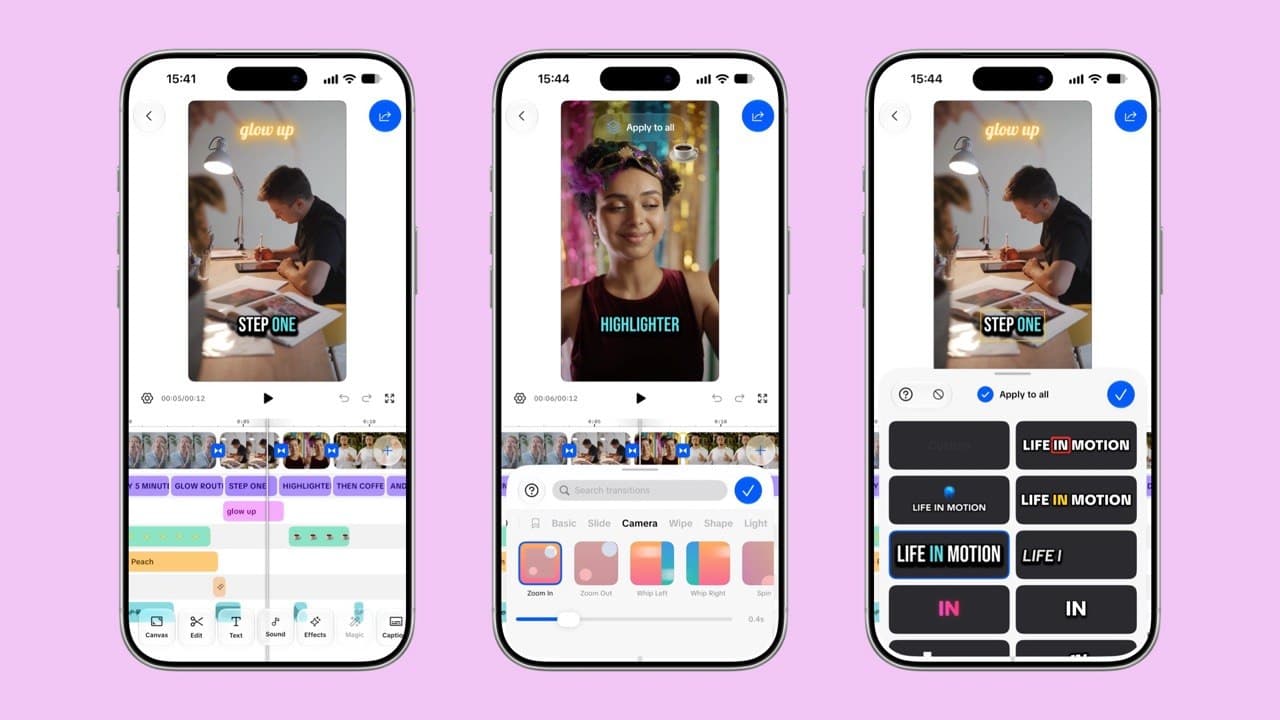
Captions Bro is a free video editor built for iPhone, iPad and Mac that handles the tedious parts of short-form video — subtitles, scripting and basic editing — without sending your footage to a server. The heart of the app is on-device speech recognition: tap once and it transcribes your audio automatically, then lights up each word karaoke-style as it's spoken, the look that's become the default on TikTok, Reels and Shorts. There are 12 animated caption templates and dozens of languages detected automatically, plus word-by-word transcript editing, filler-word stripping and profanity masking before you export. Around that sits a genuine multi-track timeline built for touch — trim, split, speed, reverse and freeze frames; layer in text, stickers, picture-in-picture video, filters, masks, sound effects and voiceover, with keyframes for position, scale and opacity. A built-in teleprompter scrolls your script under the lens while you record, so you keep eye contact and dump the take st...
Key features
- 1On-device speech recognition transcribes audio locally — captions work in airplane mode and footage never leaves the device.
- 212 animated karaoke-style caption templates with per-word highlighting, editable colors, fonts, and outlines.
- 3Multi-track timeline built for touch: trim, split, speed, reverse, freeze frames, keyframes, PiP, masks, and 4K export.
Target customer profile
Drawn from the product itself, not from a survey.
Demographic
Solo short-form creators on iPhone (TikTok, Reels, Shorts)
Pain points
Captioning is slow and manual; most editors charge or watermark; uploads to AI servers feel risky
Primary needs
One-tap accurate captions, trending karaoke styles, watermark-free 4K export
Demographic
Podcast and talking-head creators repurposing long recordings
Pain points
Cutting clips and burning in subtitles eats hours; retakes and filler words pile up
Primary needs
Fast transcript editing, on-device privacy, clean multi-track trimming
Demographic
Small business owners and marketers making product demos
Pain points
No dedicated video team; needs pro-looking captions and effects without a learning curve
Primary needs
Templates, PiP, background removal and consistent branded caption styles
Demographic
On-camera presenters and educators recording scripted content
Pain points
Memorising scripts causes retakes; eye contact drops when reading notes
Primary needs
Reliable teleprompter, adjustable scroll speed, take drops onto the timeline
Scout Review
Written by AI from measured evidence, scored out of 100.
Captions Bro is a genuinely interesting indie take on mobile video editing. The core pitch — on-device transcription, no watermark, every editing feature free — is backed by real architecture, not marketing copy. The editor UI is polished, the help center is thorough, and the 12 caption templates cover the styles creators actually use. Where it stumbles: the free tier's one-project limit is a real adoption blocker, the mobile landing page is slow at 4.5s LCP, and the DNS setup is missing SPF and DMARC despite privacy being the headline feature. The App Store listing shows no ratings yet while the homepage claims 5.0 with 11 ratings — a discrepancy that needs fixing. Against CapCut, the wedge is clear: privacy, no watermark, and a free tier that actually unlocks the editor. Whether that's enough to pull users off a free incumbent with massive distribution is the open question. It's a well-built product with a real angle, held back by a restrictive free tier and some rough edges on the marketing side.
Measure by measure
Usability
68Strong help center with real screenshots, no account required, and every editing feature free. One-project limit on free is restrictive, and the 'Apply to all' caption toggle is easy to miss in a dense editor.
Design
71Judging the app UI: dark-mode editor with clear preview/timeline/caption separation, 12 consistent caption tiles, and polished store screenshots. Homepage nav links are small and low-contrast; bottom toolbar packs 10 tiny icons.
Speed
72Lighthouse mobile 79/100 (LCP 4.5s, TBT 165ms), desktop 95/100. On-device transcription avoids server round-trips, but the 4.5s mobile LCP is sluggish for a marketing page.
Security
74HTTPS enforced with HSTS, CSP, frame protection, and 10/12 security headers. On-device processing keeps footage local. Missing SPF and DMARC records, and no published audits or bug bounty.
Accessibility
80Lighthouse accessibility 96/100, localized in 34 languages, and a responsive layout. One contrast failure flagged, and no WCAG statement or keyboard-navigation documentation found.
Growth
58Real problem, specific wedge: on-device captions, no watermark, free editing. But CapCut owns the category and the one-project free limit caps viral adoption. Domain is 0.4 years old.
Improvement areas
- Free tier's one-project-at-a-time limit is a real adoption blocker; consider a higher cap or time-limited trial.
- Mobile landing page LCP of 4.5s is sluggish; optimize images and reduce render-blocking resources.
- Missing SPF and DMARC DNS records undermine the privacy-first positioning; add them.
Design & Usability
Captions Bro ships through the App Store, so the app UI is the product and the website is marketing. The editor itself looks genuinely thought-through: dark mode, clear separation between preview, timeline, and caption list, and 12 caption templates that all animate per word. The store screenshots show a real multi-track timeline with color-coded bars, which is more than most mobile editors bother with. The problems are in the details. The bottom toolbar crams 10 icons into a single row with tiny labels — on a smaller iPhone that's a tap-error generator. The caption style grid has dark-on-dark preview text that only becomes readable on hover or selection, which is a weird choice for a touch-first app. On the website side, the nav links are small and low-contrast, and the teleprompter feature is easy to miss. Usability is carried by a genuinely good help center with real screenshots and a no-account-required flow. But the free plan's one-project-at-a-time limit is a real friction point: you either finish the video or delete it to start the next one. The 'Apply to all' caption toggle is also buried in a dense editor view. It works, it's documented, and it's free — but the free tier's project cap will push casual users away.
Speed & Security
Speed is a tale of two platforms. Desktop Lighthouse scores 95/100, which is excellent. Mobile scores 79/100 with a 4.5-second LCP — that's sluggish for a marketing page, and it's the first impression most users will get. The good news is the app itself sidesteps the server entirely: transcription runs on Apple's on-device speech models, so captions work in airplane mode and there's no upload wait. That's a genuine architectural advantage over cloud-based competitors. Security is solid on the basics: HTTPS enforced, HSTS, CSP, frame protection, X-Content-Type-Options, Referrer-Policy, and Permissions-Policy all present — 10 of 12 checklist points. The two misses are SPF and DMARC, which means the email domain is spoofable. For a product that markets privacy as its core differentiator, that's a gap worth closing. There's no published SOC 2, ISO certification, or bug bounty program, but for an indie app at this stage that's normal rather than alarming. The on-device processing claim is the strongest security signal here, and it's backed up by the docs and homepage copy. Overall: fast where it counts, secure on the fundamentals, with a couple of DNS-level loose ends.
Accessibility & Growth
Accessibility scores 96/100 on Lighthouse, which is genuinely strong. The one failing audit is a contrast ratio issue — ironic for a captioning app, where readability is the entire point. The app is localized in 34 languages, which is unusually broad for an indie tool and suggests real international ambition. There's no WCAG statement or keyboard-navigation documentation, but the automated audit suggests the fundamentals are in place. Growth is where the picture gets more complicated. The idea is sound: solo short-form creators on iPhone need fast, private captions without watermarks, and CapCut — the obvious alternative — relies on cloud processing and gates features behind Pro. That's a real wedge. The on-device transcription is a genuine differentiator, not marketing fluff, and the no-watermark promise on the free tier is rare. But the one-project free limit is a structural cap on viral adoption: the people most likely to spread the word are the ones who'll hit that wall first. The domain is 0.4 years old and the App Store listing shows no ratings yet, though the homepage claims '5.0 · 11 ratings' — an inconsistency worth resolving. The category has headroom, but CapCut's distribution advantage is enormous. This is a credible challenger with a real angle, not a category-defining play.
Conclusion
If you're a solo creator who cares about keeping footage on-device and refuses to pay for watermark removal, Captions Bro is worth a download. The editor is real, the captions work offline, and the teleprompter is a genuinely useful addition most mobile editors skip. But go in knowing the free tier gives you one project at a time — if you're juggling multiple videos, you'll hit that wall fast. The $19.99/year Pro tier is reasonable for unlimited projects and iCloud sync, but it's a hard sell when CapCut's free tier does more without the project cap. The product's future depends on whether the privacy angle is enough to overcome that friction. For now, it's a solid tool for a specific kind of creator: one who values on-device processing and doesn't mind finishing one video before starting the next.
Suggestions for improvement
- Fix the homepage's '5.0 · 11 ratings' claim — the App Store listing shows no ratings yet, and the inconsistency undermines trust.
- Add SPF and DMARC records to the domain; privacy is the headline feature and email spoofing is a bad look.
- Improve mobile LCP from 4.5s — the landing page is the first impression and it's the slowest part of the experience.
- Reconsider the one-project free limit; it caps viral adoption among the exact users most likely to share the app.
Alternatives comparison
Named competitors, point by point. Nobody paid to appear here or to be left out.
 Captions Bro: Auto Subtitles & Video Editor Captions Bro: Auto Subtitles & Video Editor |  CapCut CapCut | |
|---|---|---|
| Caption processing | On-device transcription via Apple speech models; works offline | Cloud-based auto captions; requires upload |
| Watermark on free exports | No watermark on any plan, including free | Watermark on some free exports; removal tied to Pro |
| Free tier project limit | One project at a time on free; unlimited with Pro ($4.99/mo or $19.99/yr) | Multiple projects on free tier; Pro unlocks advanced features |
| Teleprompter | Built-in teleprompter with adjustable scroll speed, script library, Apple Watch remote | No dedicated teleprompter feature |
| Platform availability | iPhone, iPad, and Mac (iOS 17+/macOS 14+) | iOS, Android, web, and desktop |
Comparing options? See Captions Bro: Auto Subtitles & Video Editor alternatives, scored side by side
More Social Media apps
View all Social Media
TranscriptYou
88Free YouTube transcript generator with timestamps and AI ...

BlueVetaUpright
86API that detects product photo rotation and tells you how...

Music Visualizer
86Online music visualizer for audio-reactive videos.

CleanAudio AI
85Free AI background noise remover for audio and video with...

Maeve Social
85Plan, approve, publish to nine social platforms, manage your inbox, and report from one social media workspace.

SnitchFeed
85AI-powered social listening for startups & SMBs to find h...

EchoWi
83Track and optimize your brand's visibility in AI answers.

DemandBird
82.5DemandBird is a social media scheduling tool that writes ...

UGCad AI
82AI UGC video ad generator: turn product URLs into authent...

Seedance 2.0
82AI video generator: prompts, photos, clips into 1080p vid...

One More Shot AI
82A free AI music video generator that creates professional...

Video Cutter AI
82AI-powered tool to turn long videos into engaging shorts ...


A platform dedicated to providing unbiased reviews of newly launched applications, analyzing everything from their features to their full potential.
info@scoutforge.net© 2026 Scoutforge. All rights reserved.
