Cycling through all six. Tap any point to stop.
Measured on six things
AI-powered tool to turn long videos into engaging shorts ...
Speed
57Lighthouse mobile 70/100 but LCP 14.1s is a dealbreaker for impatient users. Desktop 64/100. TBT is low, so interactivity is fine, but initial load is sluggish.
Screenshots
1 / 1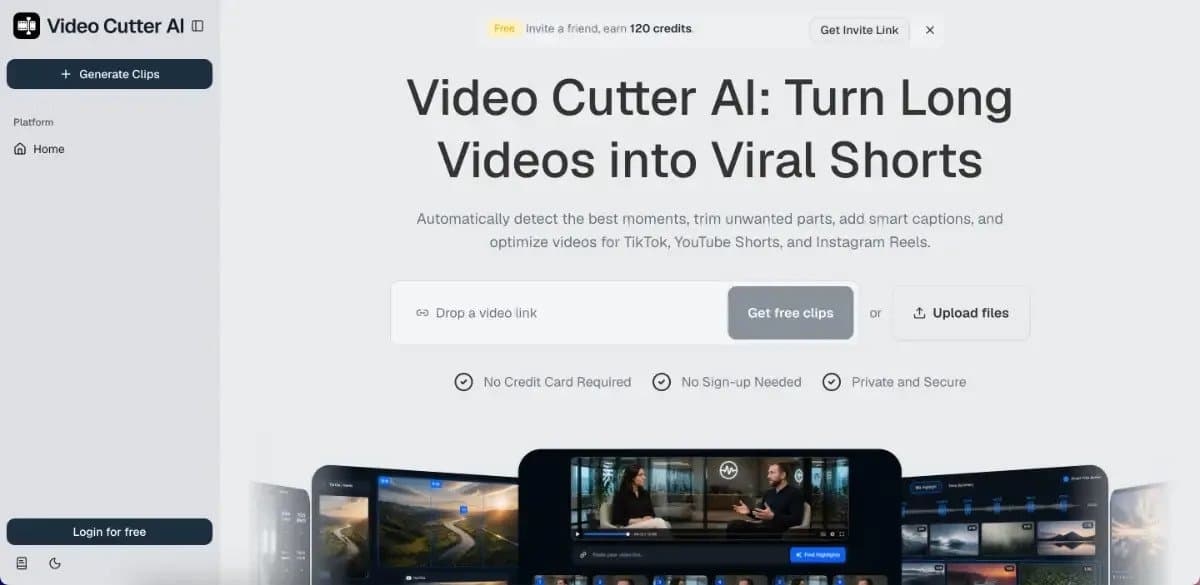
About this app
Video Cutter AI is a game-changer for content creators. Instead of spending hours manually cutting and editing, you can upload a long video – a podcast, webinar, YouTube video, even a VOD – and let AI find the most engaging moments automatically. It analyzes the content for highlights, hooks, and potentially viral segments, then lets you trim clips, add smart captions, and reframe them for TikTok, YouTube Shorts, or Instagram Reels. I was impressed by how well it detects 'scary good' moments, as one testimonial put it. Plus, it removes silences and filler words and can even add AI B-roll. The whole process is free without sign-up and exports are watermark-free, making it incredibly easy to test. While it's not a full-featured editor for complex projects, it's perfect for creators who want to repurpose existing content into multiple short clips quickly.
Key features
- 1AI highlight detection with viral score to find engaging moments.
- 2Auto-reframe for vertical shorts, smart captions, silence/filler removal.
- 3Free to use without sign-up; watermark-free exports.
Target customer profile
Drawn from the product itself, not from a survey.
Demographic
YouTube creators (18-40)
Pain points
Manual Shorts creation eats time, lack of consistency
Primary needs
Repurpose long videos into daily Shorts without extra effort
Demographic
Marketing leads & social media managers (25-45)
Pain points
High demand for social content, limited production resources
Primary needs
Scale content output from webinars and interviews, auto-reframe support
Demographic
Educators & coaches (30-55)
Pain points
Course content underutilized, need to stay top-of-mind
Primary needs
Turn lessons and webinars into bite-sized educational clips
Demographic
Podcasters (25-45)
Pain points
Limited reach, time-consuming editing, difficulty promoting episodes
Primary needs
Generate multiple clips from episodes to share on social media
Scout Review
Written by AI from measured evidence, scored out of 100.
Video Cutter AI is a promising AI repurposing tool that nails the 'try before you buy' experience with free, no-sign-up access and watermark-free exports. The design is polished, and usability is top-notch for first-time users. However, performance issues (LCP 14.1s) and missing accessibility details (contrast, labels) hold it back. Security is solid but lacks transparency. Growth potential is real, but it faces stiff competition. If the AI highlight detection lives up to the 'scary good' hype, it could carve out a niche.
Measure by measure
Usability
72Zero-friction entry: paste URL, get clips, no sign-up. Clear CTAs, trust badges, and FAQ. Sidebar navigation on homepage slightly confusing but overall intuitive.
Design
70Polished landing page with consistent accent color, realistic device mockups, and clear hierarchy. Minor issues: app-style sidebar on homepage and awkward hero crop.
Speed
57Lighthouse mobile 70/100 but LCP 14.1s is a dealbreaker for impatient users. Desktop 64/100. TBT is low, so interactivity is fine, but initial load is sluggish.
Security
74Strong header security (HSTS, CSP, frame protection) and HTTPS enforced. Missing Permissions-Policy and SPF. No SOC 2 or detailed privacy policy, but no red flags either.
Accessibility
70Lighthouse 91/100 with two failing audits: contrast and form labels. No WCAG statement or multi-language support. Keyboard navigation not explicitly tested but likely functional.
Growth
68Clear problem-solution for multiple creator segments, free entry wedge, and AI B-roll differentiator. But crowded market with strong incumbents; needs to prove viral score accuracy.
Improvement areas
- Optimize page load speed (LCP 14.1s) to reduce bounce rate.
- Fix accessibility issues: form labels and contrast ratios.
- Publish detailed security and privacy documentation for enterprise trust.
Design & Usability
Video Cutter AI's landing page is a mixed bag. The design is polished with a consistent dark-blue accent, realistic device mockups, and clear CTAs. However, the app-style sidebar on the homepage blurs the line between marketing and product, and the hero mockup crops awkwardly. Usability shines with a zero-friction entry: paste a URL, get clips, no sign-up. Trust badges and a clear FAQ reduce anxiety. The 'Platform' sidebar is a minor stumble, but overall, the flow from landing to action is smooth.
Speed & Security
Performance is a concern: Lighthouse mobile scores 70/100 but LCP is 14.1s, which will frustrate users on slow connections. Desktop is better at 64/100. Security is solid with HTTPS, HSTS, CSP, and frame protection all present, scoring 10/12 on header checks. Missing Permissions-Policy and SPF are minor gaps. No SOC 2 or detailed privacy policy, but no red flags either. For a free tool, it's acceptable, but if you plan to handle sensitive videos, consider publishing more security details.
Accessibility & Growth
Accessibility is decent with a Lighthouse score of 91/100, but two failing audits (contrast and form labels) need attention. No WCAG statement or multi-language support, which limits reach. Growth potential is strong: the tool targets multiple creator segments with a clear problem-solution narrative. Differentiators like free no-sign-up access, watermark-free exports, and AI B-roll set it apart. However, the market is crowded with Opus Clip and Kapwing. The 'viral score' feature is a differentiator but needs to prove accuracy to win trust.
Conclusion
Video Cutter AI is a solid entry in the AI repurposing space, with a frictionless onboarding that's rare to find. It's not a full-featured editor, but for creators who want to churn out shorts without the grind, it's a compelling option. Fix the load time, add a few accessibility tweaks, and publish a real privacy policy, and you've got a winner. For now, it's a strong 'try it free' recommendation.
Suggestions for improvement
- Optimize hero images and lazy-load to reduce LCP below 4s.
- Add form labels and fix contrast issues flagged by Lighthouse.
- Publish a detailed privacy policy and consider SOC 2 for enterprise trust.
- Add a 'How it works' video demo to showcase AI accuracy.
Alternatives comparison
Named competitors, point by point. Nobody paid to appear here or to be left out.
 Video Cutter AI Video Cutter AI | Opus Clip |  VEED.I/O VEED.I/O |  Kapwing Kapwing | |
|---|---|---|---|---|
| Pricing model | Free without sign-up, watermark-free exports | Freemium with credits; paid plans for more usage | Freemium with limited free tier; paid plans | Freemium with watermark on free; paid plans |
| AI highlight detection | Yes, with viral score | Yes, core feature | Basic AI tools, not highlight-specific | Yes, AI clip generation |
| Auto-reframe for vertical | Yes | Yes | Yes | Yes |
| Smart captions | Yes, animated subtitles | Yes | Yes, auto-subtitles | Yes |
| Silence/filler removal | Yes | Yes | Yes | Yes |
| AI B-roll | Yes | No | No | No |
Opus Clip
Popular AI tool for converting long videos into shorts, also offers highlights and captions.
VEED.I/O
Online video editor with AI capabilities for cutting clips, adding subtitles, and resizing for socials.
Kapwing
All-in-one editor with AI-powered clip generation, subtitle tools, and resizing.
Comparing options? See Video Cutter AI alternatives, scored side by side
More Social Media apps
View all Social Media
TranscriptYou
88Free YouTube transcript generator with timestamps and AI ...

BlueVetaUpright
86API that detects product photo rotation and tells you how...

Music Visualizer
86Online music visualizer for audio-reactive videos.

SnitchFeed
85AI-powered social listening for startups & SMBs to find h...

CleanAudio AI
85Free AI background noise remover for audio and video with...

Maeve Social
85Plan, approve, publish to nine social platforms, manage your inbox, and report from one social media workspace.

Captions Bro: Auto Subtitles & Video Editor
84On-device AI captions, teleprompter and 4K video editor f...

EchoWi
83Track and optimize your brand's visibility in AI answers.

DemandBird
82.5DemandBird is a social media scheduling tool that writes ...

UGCad AI
82AI UGC video ad generator: turn product URLs into authent...

Seedance 2.0
82AI video generator: prompts, photos, clips into 1080p vid...

One More Shot AI
82A free AI music video generator that creates professional...


A platform dedicated to providing unbiased reviews of newly launched applications, analyzing everything from their features to their full potential.
info@scoutforge.net© 2026 Scoutforge. All rights reserved.
