Cycling through all six. Tap any point to stop.
Measured on six things
Browser-based classroom screen with 22 widgets, no sign-u...
Security
52HTTPS enforced with SPF and DMARC, and a clear no-data-selling statement in the pricing FAQ. But HSTS, CSP, frame protection and Referrer-Policy are all missing — 4/12 on the header checklist.
Screenshots
1 / 2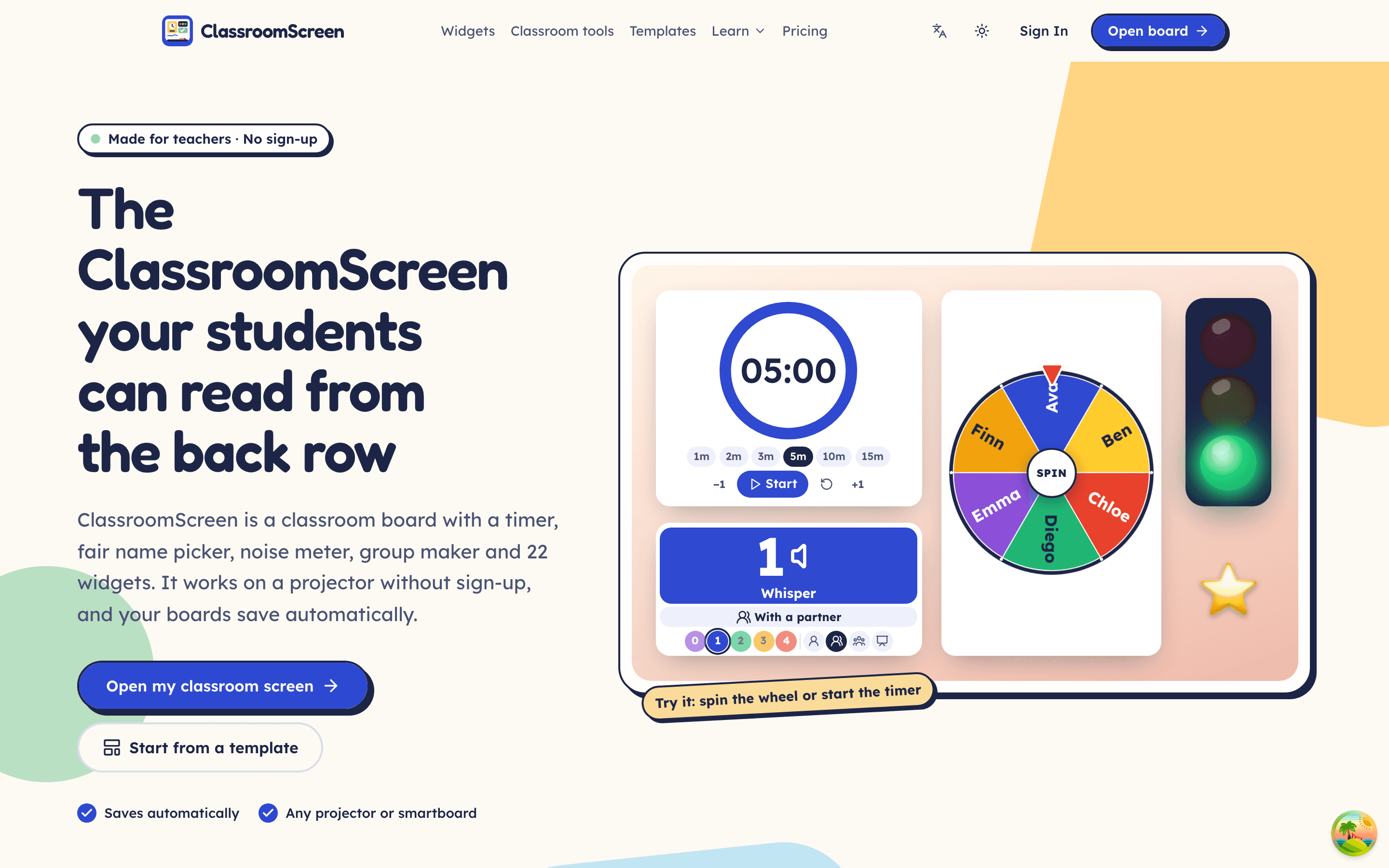
About this app
ClassroomScreen.pro is a free, browser-based classroom screen that gives teachers a single dashboard packed with 22 widgets: timers, a fair random name picker, noise meter, group maker, spin wheel, traffic light, scoreboard, reward jar, QR code, doc camera and more. It requires no download or sign-up, boards save automatically in the browser, and widgets are proportionally placed so layouts look identical on laptops, projectors and 4:3 smartboards. Accessibility touches include Lexend and Atkinson Hyperlegible fonts plus an OpenDyslexic option, and focus mode hides all controls from students. Six ready-made templates cover morning routine, lesson runner, group work, quiet test, exit ticket and brain break. Pro is $2.90/month billed yearly for cloud sync and unlimited class lists, while the Basic tier remains completely free.
Key features
- 122 widgets including timer, fair name picker, noise meter, group maker, spin wheel, traffic light, scoreboard and doc camera.
- 2No sign-up required; boards auto-save in the browser on the free Basic tier, with Pro cloud sync at $2.90/month billed yearly.
- 3Accessibility-first: Lexend, Atkinson Hyperlegible and OpenDyslexic fonts, focus mode, keyboard and clicker controls.
Target customer profile
Drawn from the product itself, not from a survey.
Demographic
K-12 classroom teachers in primary and secondary schools
Pain points
Juggling separate timers, name pickers and noise apps during lessons; losing track of routines
Primary needs
One screen to show timers, instructions, noise levels and fair student selection without setup friction
Demographic
Substitute and substitute-adjacent teachers covering unfamiliar classes
Pain points
No saved class lists or lesson materials; needing to establish routines fast in a new room
Primary needs
Ready-made templates and a no-login board that projects instantly from any browser
Demographic
Special education and inclusive-learning teachers
Pain points
Standard displays and dense interfaces overwhelm students with dyslexia or visual needs
Primary needs
High-contrast, large-text widgets with OpenDyslexic support and a distraction-free focus mode
Demographic
Homeschool parents and tutors running small-group sessions
Pain points
Managing multiple children's attention spans, transitions and rewards on a tight budget
Primary needs
Free access to lesson runners, reward jars and visual schedules without subscriptions
Scout Review
Written by AI from measured evidence, scored out of 100.
ClassroomScreen.pro is a well-executed fork of the original ClassroomScreen, and it's better than a fork has any right to be. The landing page shows the product working, the guide is real documentation, and the Lighthouse numbers (99/100 mobile and desktop, 1.1s LCP) put it ahead of most edtech dashboards. The accessibility story is the strongest card: OpenDyslexic, Atkinson Hyperlegible, focus mode and keyboard controls are shipped, not promised. The free Basic tier covering all 22 widgets is generous, and Pro at $2.90/month undercuts the original. Where it stumbles: security headers are thin (4/12), the widget catalogue is hard to scan, and the whole proposition rests on being a slightly cheaper, slightly more accessible version of a product that already exists. For a teacher who needs a board tomorrow, that's enough. For a product that wants to win the category, it needs a wedge the original can't copy.
Measure by measure
Usability
74No sign-up, auto-save, and a real getting-started guide with step-by-step widget and board instructions. Compact nav puts Open board one click away. Dense widget list is harder to scan than the cards above it.
Design
71Coherent, playful system with a hero that shows the actual board working. Pastel tiles and navy offset borders read as one brand. Held back by low-contrast widget catalogue text and orphaned grid cells.
Speed
88Lighthouse 99/100 on both mobile and desktop, LCP 1.1s, CLS 0, TBT 9ms. Genuinely fast for a widget-heavy dashboard. No lag complaints surfaced in the collected evidence.
Security
52HTTPS enforced with SPF and DMARC, and a clear no-data-selling statement in the pricing FAQ. But HSTS, CSP, frame protection and Referrer-Policy are all missing — 4/12 on the header checklist.
Accessibility
79Lighthouse 100/100 with one failing audit on accessible names. Ships Lexend, Atkinson Hyperlegible and OpenDyslexic fonts, focus mode and keyboard/clicker controls — a real a11y story, not a checkbox.
Growth
58Real problem, specific wedge: no-login, auto-saving, dyslexia-friendly widgets at $2.90 vs the original's $3. Differentiated but the category is crowded and the fork angle caps the ceiling.
Improvement areas
- Security headers are thin (4/12): no HSTS, CSP, frame protection or Referrer-Policy despite handling student names.
- Widget catalogue uses small low-contrast grey text and has orphaned grid cells that make the layout look unfinished.
- No published WCAG conformance statement to back up the strong accessibility feature set.
Design & Usability
The homepage does the thing most SaaS landing pages fail at: it shows the product working above the fold. A 05:00 timer ring, a spinning name wheel, a traffic light and a noise tile sit in the hero, so a teacher knows in three seconds what they're getting. The pastel-tile-and-navy-offset-border system carries through every section and reads as one brand rather than five templates stapled together. Usability is where it earns its keep: no sign-up, boards auto-save in the browser, and there's a real getting-started guide at /guide with numbered steps for adding widgets, building screens and using templates. The nav is compact and 'Open board' is one click from anywhere. The weak spots are in the details — the 22-widget catalogue uses small low-contrast grey text that's hard to scan, and the grid leaves orphaned cells where Dice & coin, Clock and Sticker sit alone in their rows.
Speed & Security
Speed is the standout number: Lighthouse 99/100 on both mobile and desktop, LCP 1.1s, CLS 0, TBT 9ms. For a dashboard that renders 22 interactive widgets, that's genuinely well-built — no heavy SPA bloat, no layout shift when the board loads. Security is the opposite story. HTTPS is enforced and SPF/DMARC are in place, and the pricing FAQ is unusually clear that data is never sold or shared, with Basic data staying in the browser and Pro data stored in the account. But the HTTP probe found no HSTS, no CSP, no frame protection, no X-Content-Type-Options, no Referrer-Policy and no Permissions-Policy — 4/12 on the header checklist. For a product that handles student names and class lists, even in-browser, that's a gap worth closing. No SOC 2, ISO or pen-test claims were found.
Accessibility & Growth
Accessibility is a real strength, not a marketing line. Lighthouse scores 100/100 with a single failing audit on accessible names, and the product ships Lexend, Atkinson Hyperlegible and OpenDyslexic fonts, a focus mode that hides controls from students, and keyboard/clicker navigation (space starts the timer, arrows switch screens). English and Chinese are both supported. What's missing is a published WCAG conformance statement — the intent is clearly there, the paperwork isn't. Growth is the harder call. The problem is real: teachers juggle timers, name pickers and noise apps, and a single no-login board that auto-saves is a genuine workflow win. The wedge is specific — dyslexia-friendly fonts, proportional widget placement across projectors and 4:3 smartboards, and a $2.90 price undercutting the original Classroomscreen.com's $3. But it's a fork of an existing product in a crowded category, and the differentiators are refinements rather than a moat. The domain is 0.4 years old, so traction is early — context, not a verdict.
Conclusion
If you're a K-12 teacher who wants a timer, name picker and noise meter on one screen without a login, ClassroomScreen.pro delivers that today, for free, and it loads faster than most things you'll open on a school laptop. The Pro tier is cheap enough to be an easy yes if you want cloud sync across devices. The honest caveat is that this is a fork, and the improvements — better fonts, proportional layouts, a lower price — are the kind of thing the original could ship in a quarter. Use it, enjoy it, but don't expect the moat to hold forever. The security headers are the one thing worth fixing before a school district asks.
Suggestions for improvement
- Add HSTS, CSP, frame protection and Referrer-Policy headers — 4/12 on the checklist is thin for a product handling student names.
- Publish a WCAG 2.1 AA conformance statement to back up the strong a11y feature set with paperwork.
- Fix the accessible-name audit failure flagged by Lighthouse and bump the widget catalogue text contrast.
- Clean up the orphaned grid cells in the 22-widget catalogue so the layout reads as intentional.
Alternatives comparison
Named competitors, point by point. Nobody paid to appear here or to be left out.
 ClassroomScreen.pro | Classroomscreen.com |  Google Slides + Timer extensions | ClassDojo | |
|---|---|---|---|---|
| Free tier | All 22 widgets, templates, lesson runner, 5 class lists, 10 photo backgrounds | Free Basic tier with similar widgets, limited backgrounds | Free with Google account, but requires manual setup per lesson | Free core behavior points and parent messaging |
| Pro pricing | $2.90/month billed yearly ($34.80/year) | $3/month | Free (extensions vary) | Free core; paid school plans |
| No sign-up required | Yes — open board and teach, auto-saves in browser | Yes for Basic | No — Google account required | No — teacher account required |
| Noise meter | Yes — live sound meter with quiet-minute rewards | Yes | No | No |
| Dyslexia-friendly fonts | Lexend, Atkinson Hyperlegible, OpenDyslexic | Limited font options | Depends on chosen font | Not a focus |
| Parent communication | No | No | No | Yes — core feature |
Classroomscreen.com
The original ClassroomScreen platform from which .pro is a fork, with similar widgets and free Basic tier but slightly higher Pro pricing ($3/month) and limited background options.
Google Slides + Timer extensions
A DIY alternative using Google Slides with Chrome timer extensions, letting teachers build custom displays but requiring manual setup for each lesson.
ClassDojo
A classroom management app centered on behavior points and parent communication, offering a scoreboard and timer but no noise meter or group maker.
Comparing options? See ClassroomScreen.pro alternatives, scored side by side
More Education apps
View all Education
The Stack Newsletter
92A weekly newsletter delivering curated tech jobs, intervi...

SheetScroll
90> You play; SheetScroll turns the page. It listens through the microphone or a MIDI piano and holds the page until it's sure where you are.

Cross Stitch Pattern Maker
89Free on-device photo-to-DMC/Anchor chart with skein counts.

English Test Coach
89English Test Coach checks your IELTS essays and letters, gives an estimated band score across all four criteria, and tells you exactly what to revise next.

Tracé slides
89Interactive math & physics slides with live graphs and an...

Startup Science
88A unified platform replacing 12-20 disconnected tools for...

Cromagnon
88Free, private browser-based PDF, Word, Excel, and study t...

TranscriptYou
88Free YouTube transcript generator with timestamps and AI ...

Random Movie Generator
88Free random movie picker from 142k+ films—no sign-up.

RBQ Exam
87Online practice for the RBQ contractor licence exams in Québec: original questions, timed mock exams and lessons, in French or English.

Coloring Pages Pro
87A massive collection of free printable coloring pages for...

CertWorthIt
87Data-driven tool revealing which certifications actually ...


A platform dedicated to providing unbiased reviews of newly launched applications, analyzing everything from their features to their full potential.
info@scoutforge.net© 2026 Scoutforge. All rights reserved.
