

A platform dedicated to providing unbiased reviews of newly launched applications, analyzing everything from their features to their full potential.
info@scoutforge.net© 2026 Scoutforge. All rights reserved.
A platform dedicated to providing unbiased reviews of newly launched applications, analyzing everything from their features to their full potential.
info@scoutforge.net© 2026 Scoutforge. All rights reserved.
A platform dedicated to providing unbiased reviews of newly launched applications, analyzing everything from their features to their full potential.
info@scoutforge.net© 2026 Scoutforge. All rights reserved.
Is this your app?
Claim CodeCharm to manage its page, add your badge and see your traffic — free, and it stays free.
Cycling through all six. Tap any point to stop.
Measured on six things
A VS Code extension using Google's Gemini AI for automated code comments and refactoring suggestions to boost readability and maintenance.
Relies on VS Code's native accessibility features without additional enhancements; emoji comments may challenge screen readers.
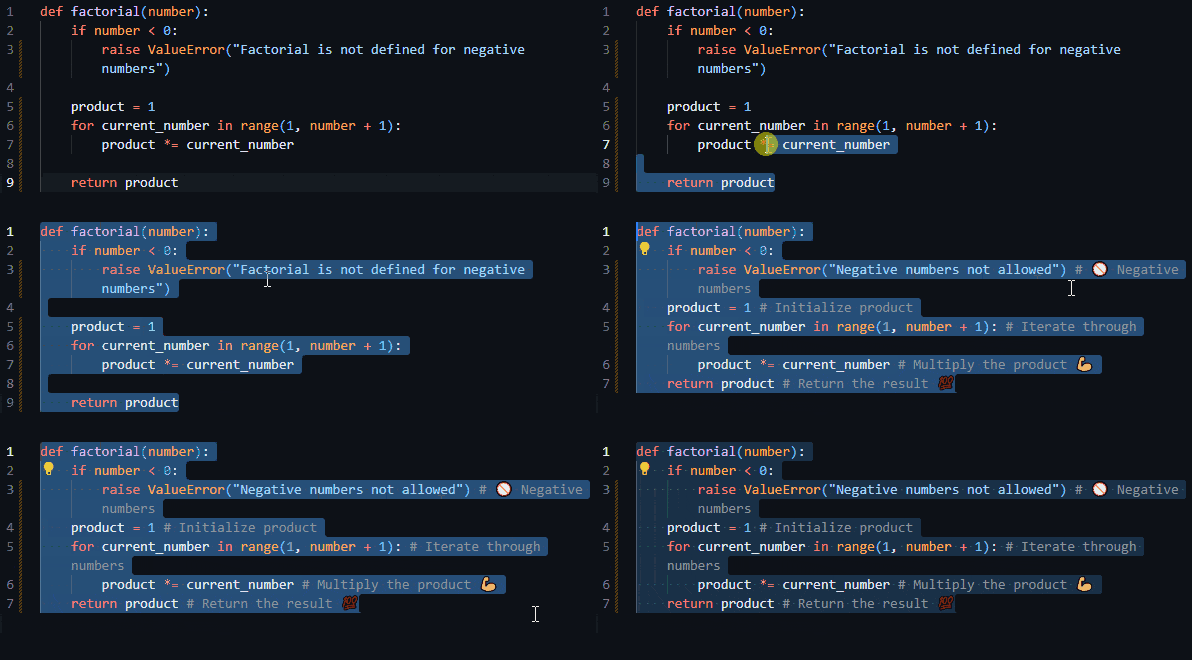
CodeCharm is a game-changer for developers tired of manual documentation. As a VS Code extension, it leverages Google's Gemini AI to automatically generate insightful inline comments with emojis for clarity and offers smart refactoring tips via simple hotkeys like Ctrl+Win+J and Ctrl+Win+G. It integrates seamlessly into your workflow without slowing things down, thanks to its lightweight design and local API key storage for security. With a multi-model fallback system, it stays reliable even if one AI model hiccups. Ideal for pros, students, and teams, it tackles pain points like inconsistent commenting and legacy code upkeep, making coding more efficient and collaborative. While it excels in core functionality, there's room for improvements in accessibility and customization, but overall, it's a solid tool for anyone serious about clean, maintainable code.
Drawn from the product itself, not from a survey.
Demographic
Professional developers and software engineers
Pain points
Time-consuming manual documentation, inconsistent commenting standards, legacy code maintenance
Primary needs
Automated documentation, code readability improvement, team collaboration enhancement
Demographic
Student programmers and coding bootcamp participants
Pain points
Learning proper documentation practices, understanding complex code structures
Primary needs
Educational tool for code comprehension, documentation best practices learning
Demographic
Development team leads and technical managers
Pain points
Codebase maintainability, onboarding new developers, code quality consistency
Primary needs
Standardized documentation, improved code review process, team productivity tools
Written by AI from measured evidence, scored out of 100.
CodeCharm delivers exactly what developers need most - automated documentation that doesn't disrupt workflow. It's particularly brilliant for tackling legacy codebases, onboarding new team members, or just maintaining consistent commenting habits. The integration feels native, the security approach is sensible, and the core functionality works reliably. While it could use improvements in accessibility and customization, it's already a solid tool that respects your development process rather than forcing you to adapt to it.
Intuitive hotkey system with straightforward setup, though customization options could be more extensive for power users.
Clean VS Code integration with minimal interface clutter, using keyboard shortcuts and inline comments that preserve coding workflow.
Performance depends on external API response times, but multi-model fallback provides reliability during outages.
Local API key storage and minimal data transmission create solid security foundation without external server dependencies.
Relies on VS Code's native accessibility features without additional enhancements; emoji comments may challenge screen readers.
Strong position in growing AI development tools market with clear expansion opportunities for additional features and models.
CodeCharm nails the integration with VS Code's native interface, maintaining that clean, developer-focused environment we all love. The design philosophy is minimalistic to a fault - no cluttered panels or distracting buttons, just pure keyboard shortcut power. The Ctrl+Win+J and Ctrl+Win+G hotkeys become second nature quickly, and the inline comment generation preserves your coding flow beautifully. The emoji-enhanced comments actually work surprisingly well for visual scanning, though I wish there were more customization options for comment templates and formatting. Setup is refreshingly straightforward with clear API key configuration, making this one of those 'just works' extensions that doesn't require a PhD in configuration management.
Performance-wise, CodeCharm is generally responsive, though you'll notice the occasional lag when waiting for Gemini API responses - it's the price we pay for cloud-based AI magic. The multi-model fallback system is a smart touch that prevents complete functionality loss during API hiccups. Security is where this extension truly shines - local API key storage means your credentials never leave your machine, and minimal data transmission reduces attack vectors. It's the kind of security-first thinking that makes enterprise adoption more likely. The lightweight design ensures VS Code doesn't turn into a sluggish beast, maintaining that buttery-smooth coding experience we developers crave.
Accessibility is CodeCharm's Achilles' heel - it leans heavily on VS Code's native features without adding much of its own. The emoji comments, while visually helpful, can be problematic for screen readers, and there's no alternative output format for accessibility tools. Language support is limited to what Gemini offers, which might frustrate developers working in less common programming languages. However, the growth potential is massive - positioned perfectly in the exploding AI-assisted development market, with clear paths to adding more AI models, batch processing, and advanced customization. This could easily become the go-to documentation tool for teams establishing coding standards.
Conclusion
If you're tired of manually documenting code or struggling with inconsistent commenting across your team, CodeCharm offers a practical, workflow-respecting solution. It's perfect for professional developers drowning in legacy code, students learning documentation best practices, and team leads establishing coding standards. The straightforward approach combined with powerful AI capabilities makes this one of those rare tools that actually delivers on its promises without unnecessary complexity. Give it a try if you want to transform documentation from a chore into an automated advantage.
Named competitors, point by point. Nobody paid to appear here or to be left out.
 CodeCharm CodeCharm |  Workik AI Code Comment Generator Workik AI Code Comment Generator |  ZZZCode AI Code Documentation ZZZCode AI Code Documentation |  Ninja AI Code Generator Ninja AI Code Generator | |
|---|---|---|---|---|
| VS Code Integration | Native VS Code extension | Web-based, no integration | Manual copy-paste required | External environment |
| AI Model Used | Google Gemini AI | Multiple AI models | Various AI models | AI-powered solution |
| Workflow Integration | Seamless keyboard shortcuts | Context switching required | Manual process | External tool usage |
| Security Approach | Local API key storage | Web-based security | Online security measures | External security protocols |
Workik AI Code Comment Generator
Web-based AI comment generator supporting multiple languages but lacking VS Code integration
ZZZCode AI Code Documentation
Online code documentation tool that requires manual code copying and pasting
Ninja AI Code Generator
AI-powered code commenting solution that operates outside the development environment
Comparing options? See CodeCharm alternatives, scored side by side

A no-code Solana token creator that deploys SPL tokens in...

A free, open-source platform offering 110 AI agent skills...

Open-source desktop app for switching AI coding providers...

Fast EU VAT validation API for developers, covering 27 EU...

Claw Messenger is an iMessage API service that gives AI a...

PERM Processing Time is an independent data analysis platform that helps users navigate the U.S. Department of Labor’s permanent labor certification process.

AI-powered Dubai real estate data platform with 12M+ DLD ...

BeartIMAGE is a free, web-based image processing platform engineered for fast, bulk photo editing and conversion directly in your browser.

macOS app for App Store screenshots: 3D mockups, auto-tra...

Real-time monetization infrastructure for AI products tha...

A native macOS process explorer and advanced monitor that...

A developer-first financial data API providing structured...
A platform dedicated to providing unbiased reviews of newly launched applications, analyzing everything from their features to their full potential.
info@scoutforge.net© 2026 Scoutforge. All rights reserved.
