Cycling through all six. Tap any point to stop.
Measured on six things
Two photos in, a straight-faced coffee-making TikTok fail video out
Growth
58A real, specific trend with a clear wedge: two photos in, a fixed meme out, no prompt, pay-per-video. Narrow by design — it rides one format, and the format has a shelf life.
Screenshots
1 / 1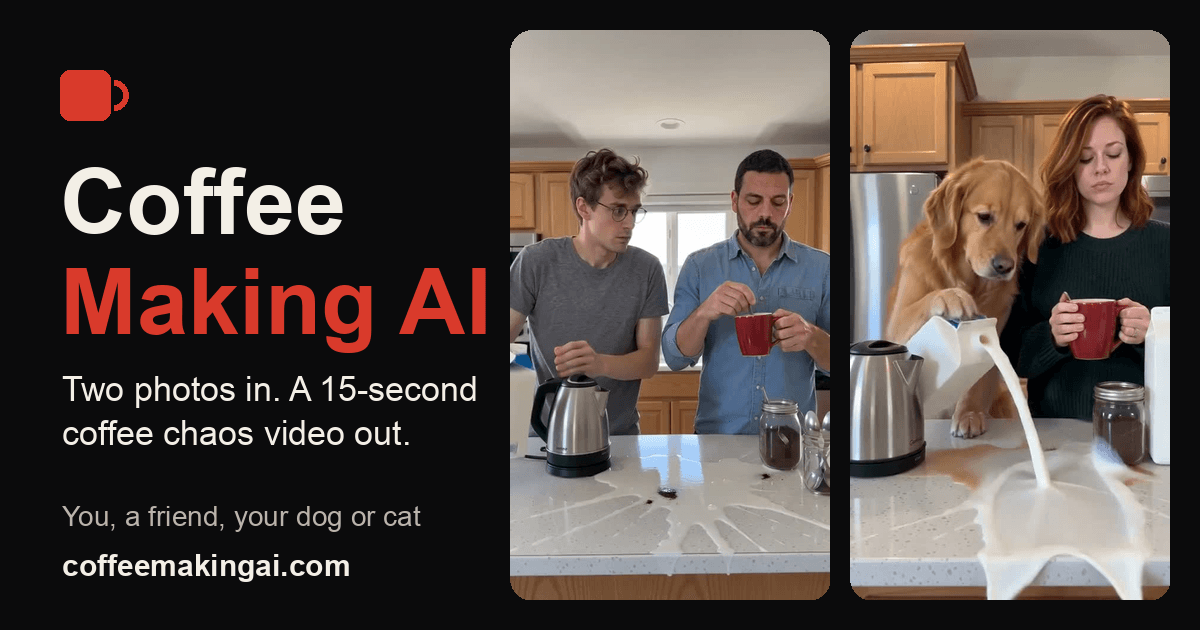
About this app
Coffee Making AI recreates the TikTok coffee-making trend with your own cast. Upload one photo of the person who spoons the coffee and one of the person who pours the milk (people, pets or toys all work). It makes a new 10 or 15-second vertical MP4 in a home kitchen where the grounds miss the red mug, the milk floods the counter and both keep a straight face. No prompts, no account needed, no watermark. A 10-second 480p video is $4.99, 720p is $9.99, or use credits.
Key features
- 1Two-photo upload (coffee maker + milk pourer) generates a 10–15s vertical 9:16 MP4, no prompt required.
- 2Pay-per-video from €4.99 (10s 480p) or €9.99 (720p), plus credit packs and monthly plans; no subscription required.
- 3No account needed to start, no watermark, sound included, photos auto-deleted within 30 days and never used for training.
Target customer profile
Drawn from the product itself, not from a survey.
Demographic
TikTok and Instagram creators (18-34)
Pain points
Want to join a viral trend but have no time to film or edit it
Primary needs
A trend-ready vertical video made from two photos
Demographic
Friends, couples and families
Pain points
No easy way to put themselves in a popular meme
Primary needs
A funny shareable clip starring themselves
Demographic
Pet owners
Pain points
Pets can't act out viral trends on cue
Primary needs
Turn pet photos into a meme video
Demographic
Meme page and community managers
Pain points
Producing trend videos by hand is slow
Primary needs
Pay per video, no subscription needed
Scout Review
Written by AI from measured evidence, scored out of 100.
Coffee Making AI does one thing and does it cleanly: two photos in, a 10–15 second vertical coffee-fail clip out, no prompt, no account, no watermark, from €4.99. The landing page is genuinely well built — strong type, real output shown up front, price stated before checkout, Stripe payments, and a security header set that beats most tools at this stage. The weaknesses are structural rather than sloppy: mobile LCP at 4.7s, a long page that buries the second CTA, one accessibility label mismatch, and a product whose entire value is tied to a single TikTok format. For creators who want the meme without filming it, the price and the friction are right.
Measure by measure
Usability
68Two upload boxes, numbered steps, price shown before payment, no account needed, QR handoff for phone photos. The path to a video is short; the page then buries the second CTA under FAQ and spec tables.
Design
71Coherent poster-like identity: condensed all-caps display type, dark palette, one lime accent, and real result thumbnails up front. Orange SAVE badges and tiny grey micro-copy muddy an otherwise tight system.
Speed
68Lighthouse desktop 96/100 and mobile 83/100 with CLS 0 and TBT 22ms, but mobile LCP is 4.7s — the hero media is doing the damage. Fast enough, not snappy on a phone.
Security
74Full header set (HSTS, CSP, frame protection, Permissions-Policy), SPF and DMARC, Stripe checkout, stated 30-day photo deletion and no training on user photos. No published audit or bug bounty.
Accessibility
80Lighthouse accessibility 100/100 with one failing audit on mismatched accessible names. No WCAG statement or language options, but the automated baseline is clean and the layout is responsive.
Growth
58A real, specific trend with a clear wedge: two photos in, a fixed meme out, no prompt, pay-per-video. Narrow by design — it rides one format, and the format has a shelf life.
Improvement areas
- Mobile LCP of 4.7s — hero media needs compression or lazy-loading to reach the 2.5s threshold.
- Long page buries the second buy CTA under FAQ, guides and a dense spec table; CTA labels are inconsistent.
- No published security audit, accessibility statement or WCAG conformance claim to back the strong header set.
Design & Usability
The design is the strongest part of the product: a poster-like condensed headline, a restrained dark palette with a single lime accent, and real result thumbnails shown immediately instead of described. The cream torn-ticket upload widget turns the flow into the page's focal point. Usability follows the same logic — two photo boxes, numbered steps, price shown before payment, no account required, and a QR handoff for phone photos. The friction is downstream: the page stacks FAQ, guides and a dense spec table after pricing, so a ready buyer scrolls a long way to a second conversion point, and the CTA label shifts between three different phrasings.
Speed & Security
Speed is split by device. Lighthouse desktop scores 96/100, but mobile lands at 83/100 with an LCP of 4.7s — well past the 2.5s 'good' threshold, almost certainly the hero video and thumbnail row. CLS is 0 and TBT is 22ms, so the page is stable and not JS-heavy; it is media weight, not code. Security is a genuine strength for a tool this young: HTTPS enforced with HSTS, CSP, frame protection, X-Content-Type-Options, Referrer-Policy and Permissions-Policy all present, plus SPF and DMARC — 12/12 on the header checklist. Checkout runs through Stripe, photos are stated to auto-delete within 30 days, and the site says photos are never used to train models. What is missing is third-party proof: no SOC 2, ISO, pen-test summary or bug bounty.
Accessibility & Growth
Accessibility scores 100/100 on the Lighthouse audit, with a single failing check for elements whose visible text labels do not match their accessible names — a small, fixable gap. There is no WCAG conformance statement and no language switcher, so the automated score is the whole story. Growth is a judgement on the idea, not the traction: the domain is barely weeks old. The wedge is sharp — one fixed meme format, two photos in, no prompt, pay-per-video from €4.99 with no subscription. That is a real differentiator against CapCut (manual editing), Pika and Kling (prompt-driven generalists). The limit is the same as the strength: it is a single-format tool riding one trend, with no network effect and no accumulating data advantage. It can win a slice of the trend wave; it cannot outlive it without more formats.
Conclusion
If you want to be in this trend this week and you have two decent photos, this is the shortest path from photo to postable MP4 — and the pay-per-video model means you are not signing up for a subscription to find out. Go in knowing what you are buying: a new clip in the style of the trend, not a frame-for-frame copy, and a tool built around one format. If the format is what you need, it delivers. If you want a general video generator, this is not it — Pika and Kling are the prompt-driven options, and CapCut is there if you would rather edit it yourself.
Suggestions for improvement
- Cut mobile LCP below 2.5s — compress or lazy-load the hero video and thumbnail row; desktop is already at 96.
- Add a sticky or repeated buy CTA after the pricing section so ready buyers don't scroll past FAQ and spec tables.
- Fix the accessible-name mismatch flagged by Lighthouse and publish a short accessibility statement.
- Standardize the primary CTA to one label across hero, widget and result cards to reduce decision friction.
Alternatives comparison
Named competitors, point by point. Nobody paid to appear here or to be left out.
 Coffee Making AI |  CapCut | Pika |  Kling AI | |
|---|---|---|---|---|
| Input method | Two photos, no prompt | Manual editing + templates | Text prompt + effects | Text/image prompt |
| Fixed meme template | Yes — coffee-making trend only | Many trend templates | No fixed template | No fixed template |
| Pricing model | Pay-per-video from €4.99; credits; plans | Free tier + Pro subscription | Credit-based subscription | Credit-based subscription |
| Watermark on output | No watermark | May watermark free exports | Depends on plan | Depends on plan |
| Account required | No — start without signup | Yes | Yes | Yes |
CapCut
A popular video editing app with trend templates, but requires more manual editing and may include watermarks on free exports.
Pika
General AI video generator driven by prompts and effects, not a fixed coffee-making meme template.
Kling AI
General photo-to-video and text-to-video generator; you write the prompt yourself.
Comparing options? See Coffee Making AI alternatives, scored side by side
More AI Generations apps
View all AI Generations
Uni-1 by Luma AI
92Uni-1 is an advanced multimodal text-to-image AI model th...

Gerty
91Private, local AI assistant for Mac that runs offline

LTX 2.3 AI Video Generator
91Fast, open-source AI video generator with 4K support, mul...

DemoVexa
90Turn your code into professional product demo videos with AI-generated scripts, animated UI, and natural voiceovers.

AI Vocals Generator
89Add AI singers or rappers to your own beat, get two takes...

Voqusa
89Transcribe social media video and audio links into text (free signup, 5 free credits, then pay-as-you-go)

All of Us
89Add deceased loved ones to photos with AI and see free pr...

PodRescale
89Every episode becomes two weeks of posts. In your voice. Posted for you.

Pixelimg
88A free online AI-powered tool that instantly converts ima...

Cantoro
88Custom AI songs with a name, heard free before paying $4....

tradutor de mangá com IA
88O tradutor de mangá com IA traduz capítulos em lote, personaliza textos e oferece edição visual para estúdios.

IraVoice
88Private on-device dictation for Apple-silicon Macs.


A platform dedicated to providing unbiased reviews of newly launched applications, analyzing everything from their features to their full potential.
info@scoutforge.net© 2026 Scoutforge. All rights reserved.
