Cycling through all six. Tap any point to stop.
Measured on six things
Pick a color, roll three dice, and count your matches.
Security
52HTTPS enforced with SPF and DMARC, but no HSTS, CSP, frame protection, or Referrer-Policy — 4/12 checklist points. No published audits; standard for a small free game.
Screenshots
1 / 1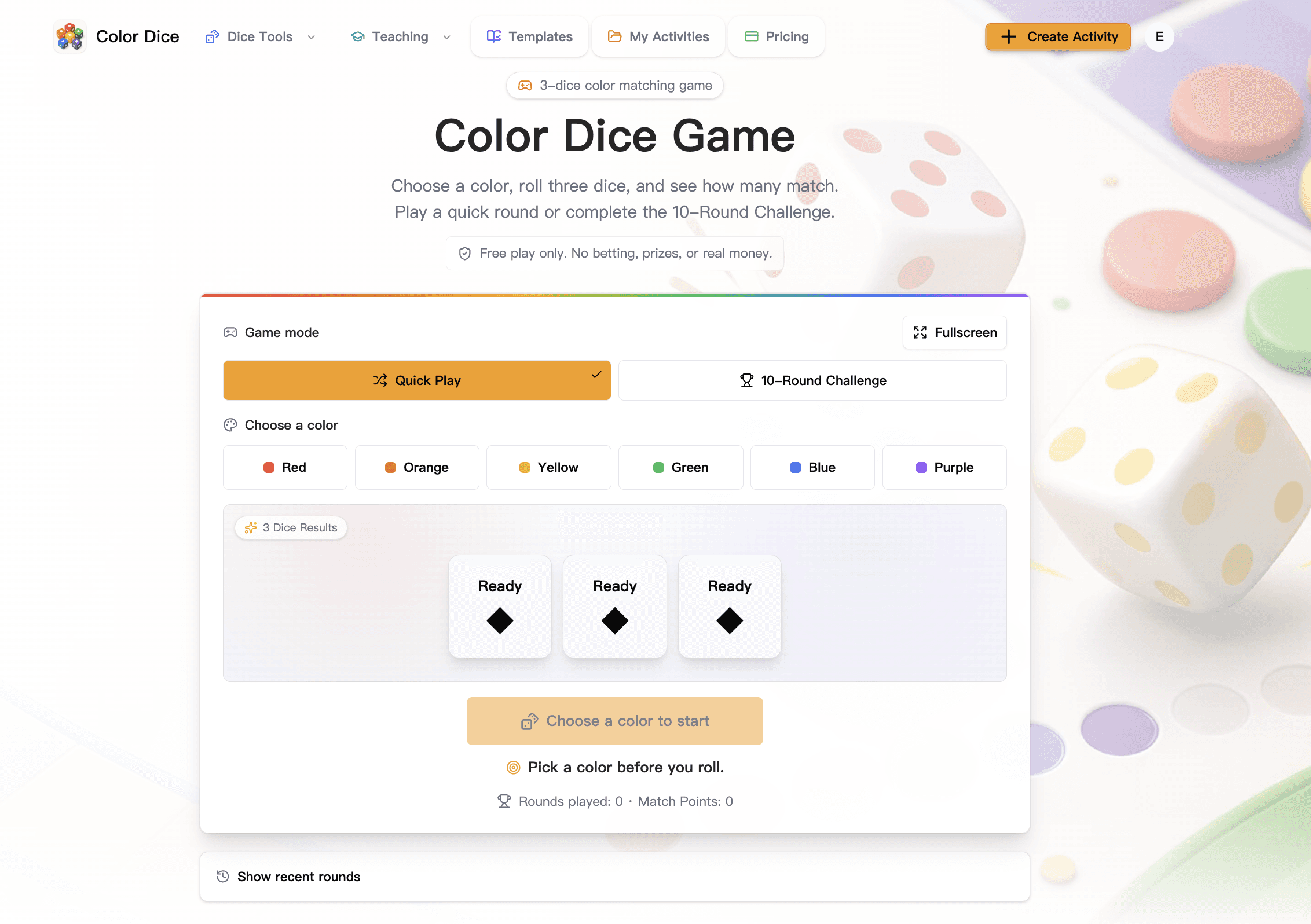
About this app
Choose one of six colors, roll three independent color dice, and earn a point for every match. Play unlimited Quick Play rounds or take the free 10-Round Challenge—no account or download needed.
Key features
- 1Free, no-account, no-download browser game: pick a color, roll three dice, count matches.
- 2Two modes: unlimited Quick Play and a structured 10-Round Challenge with a max score of 30.
- 3Classroom-oriented Pro tier at $24/year for saved activities, folders, and worksheet batches.
Target customer profile
Drawn from the product itself, not from a survey.
Demographic
Primary school teachers and educators
Pain points
Finding free, no-login classroom activities that work on school devices
Primary needs
Quick, safe, screen-based color and probability activities
Demographic
Parents and casual gamers
Pain points
Dice games are physical or cluttered; need quick digital fun
Primary needs
Free, instant-play browser game with no ads or betting
Demographic
Students learning basic probability
Pain points
Abstract probability concepts are hard to visualize
Primary needs
Hands-on demonstration of independent random events and expected scores
Scout Review
Written by AI from measured evidence, scored out of 100.
Color Dice Game is a focused, genuinely fast browser game that does one thing well: pick a color, roll three dice, count matches. It is free, needs no account, and its classroom-probability framing gives it a clearer purpose than a generic dice roller. The measured profile is strong on speed (mobile 87/100, 1.2s LCP) and accessibility (100/100 automated), competent on usability, and average on design polish. Security headers are thin and the growth ceiling is limited by a narrow education niche, but for a free teaching aid it is a tidy, honest piece of work.
Measure by measure
Usability
64Zero-friction play: no account, clear disabled-state prompt, and mode cards that explain Quick Play vs the 10-Round Challenge. Nav pills and a very long page add mild friction.
Design
58Clean card-grid rhythm and a hero that surfaces the playable mechanic above the fold. Undercut by black-diamond dice placeholders, twin orange CTAs, and washed-out background art.
Speed
70Lighthouse mobile 87/100 with 1.2s LCP and zero layout shift; desktop 73/100. TBT of 341ms is the one soft spot on an otherwise snappy page.
Security
52HTTPS enforced with SPF and DMARC, but no HSTS, CSP, frame protection, or Referrer-Policy — 4/12 checklist points. No published audits; standard for a small free game.
Accessibility
78Lighthouse accessibility 100/100 and a responsive board for phone, tablet, and desktop. No WCAG statement or keyboard-support documentation published, so the perfect automated score is the main evidence.
Growth
58A real, specific niche — free no-login probability demos for classrooms — with a $24/yr Pro tier for saved activities. Differentiated from generic dice rollers, but a narrow ceiling.
Improvement areas
- Dice placeholders render as black diamonds labeled 'Ready' instead of colored die faces.
- Security headers thin: no HSTS, CSP, frame protection, or Referrer-Policy (4/12 checklist points).
- No published accessibility statement or privacy documentation despite a 100/100 a11y score.
Design & Usability
The Color Dice Game leads with its best asset: a playable hero card where the mode toggle and six color chips sit above the fold, so a visitor understands the mechanic in seconds. The card-grid rhythm down the page is disciplined, and the plain-language mode descriptions make Quick Play vs the 10-Round Challenge an easy choice. The friction is in the details — dice placeholders rendered as black diamonds labeled 'Ready' waste the one chance to show color, two equal-weight orange buttons in the header blur the primary action, and tinted nav pills read like active states. The long FAQ and explainer sections are useful for teachers but make a single-purpose game feel heavier than it needs to be.
Speed & Security
Speed is a genuine strength: Lighthouse mobile scores 87/100 with a 1.2s LCP, zero cumulative layout shift, and a 1.2s FCP; desktop lands at 73/100. The 341ms total blocking time is the only blemish, suggesting a bit of main-thread work on load. Security is the weaker half: HTTPS is enforced and SPF/DMARC are present, but there is no HSTS, no Content-Security-Policy, no frame protection, and no Referrer-Policy — 4 of 12 checklist points. For a free browser game with no accounts required to play, that is a common posture, but the absence of any published security or privacy documentation leaves the hardening story thin.
Accessibility & Growth
Accessibility is the standout measured result: a perfect 100/100 on Lighthouse's automated audit, plus a board explicitly designed for phones, tablets, and desktop. The caveat is that automated checks cover only part of WCAG, and the site publishes no accessibility statement or keyboard-navigation notes, so the perfect score is the main evidence rather than a documented commitment. Growth is a judgement on the idea: the product names a real, specific problem — teachers needing free, no-login, safe screen activities that demonstrate independent random events — and differentiates from generic dice rollers like Google's and Roll20's by adding a color-matching game layer and a teaching-oriented Pro tier at $24/year. The wedge is credible but narrow; the ceiling is a classroom tool, not a mass-market game.
Conclusion
If you are a teacher who needs a two-click probability demo that will not ask for a login or show an ad, this earns its bookmark. If you are a casual player, it is a pleasant minute. The product's next wins are cheap ones: replace the black-diamond dice with actual colored faces, pick one primary header button, and publish a short privacy and accessibility note. None of those require new features — just finishing the edges of an already solid little game.
Suggestions for improvement
- Replace the 'Ready' black-diamond dice placeholders with actual colored die faces so the game surface shows color.
- Reduce the header to one primary CTA; demote 'Sign In' to a text link to clarify the main action.
- Add HSTS, a Content-Security-Policy, and frame protection headers to lift the 4/12 security checklist score.
- Publish a short accessibility statement and privacy note to back up the 100/100 automated a11y score.
Alternatives comparison
Named competitors, point by point. Nobody paid to appear here or to be left out.
 Color Dice Game |  Google Dice Roller |  Roll20 Dice Roller | |
|---|---|---|---|
| Core mechanic | Color-matching game: pick a color, roll three dice, score matches | Generic random dice results, no game layer | Multi-dice roller with modifiers for tabletop RPGs |
| Account required | No account needed to play | No account | Free account needed for full features |
| Educational framing | Explicit probability-teaching angle with classroom Pro tier | None | None; built for RPG play |
| Price | Free; Pro $24/year | Free | Free tier; paid subscriptions available |
Google Dice Roller
Built-in Google dice roller that generates random dice results; simple but without a color-matching game layer.
Roll20 Dice Roller
Free online dice roller with multiple dice types and modifiers, popular for tabletop role-playing games.
Comparing options? See Color Dice Game alternatives, scored side by side
More Entertainment & Fun apps
View all Entertainment & Fun
SheetScroll
90> You play; SheetScroll turns the page. It listens through the microphone or a MIDI piano and holds the page until it's sure where you are.

Pushup RPG: Fitness Quest
90Pushup RPG is a camera-based push-up counter and fitness RPG for home workouts. Real push-ups and squats become attacks as you defeat 48 foes across 8 biomes, earn XP and loot, join guilds, and battle in live 40-second duels. Free on iOS and Android.

TUNL - Cave Flyer
89A hold-to-thrust cave flyer with a new daily level, ghost races, and a global leaderboard.

Peanut Tennis
89Find tennis courts & tournaments in Australia

How Long Timer
88HowLongHowManyDays.com is a free online countdown timer that lets you track the time remaining until specific times, dates, holidays, and special even

i Word Unscrambler
88Free Word Unscramble for scrabble and words games.

manga translator AI
87Manga Translator AI translates manga and comics into the languages readers choose.

FaceSwapAI
87AI face swap for photos, videos, GIFs with free trial.

ZombieTrend AI
87ZombieTrend AI turns two photos into an emotional zombie love story video with a heartfelt hug, memory flashback, sound, no watermark, and a free scene preview.

DeepSwapAI
87AI face swap online with no subscription, pay per use.

67ez
86Free viral 67 (Six Seven) browser games, world counter & ...

VibeBot
86AI-powered no-code Discord bot maker


A platform dedicated to providing unbiased reviews of newly launched applications, analyzing everything from their features to their full potential.
info@scoutforge.net© 2026 Scoutforge. All rights reserved.
