

A platform dedicated to providing unbiased reviews of newly launched applications, analyzing everything from their features to their full potential.
info@scoutforge.net© 2026 Scoutforge. All rights reserved.
A platform dedicated to providing unbiased reviews of newly launched applications, analyzing everything from their features to their full potential.
info@scoutforge.net© 2026 Scoutforge. All rights reserved.
A platform dedicated to providing unbiased reviews of newly launched applications, analyzing everything from their features to their full potential.
info@scoutforge.net© 2026 Scoutforge. All rights reserved.
Cycling through all six. Tap any point to stop.
Measured on six things
Free AI color season analysis from a selfie.
HTTPS enforced with SPF and DMARC, and payments run through Creem's PCI-compliant hosted checkout. But zero HSTS, CSP, frame protection or Referrer-Policy — 4/12 on the header checklist. No published audits or security page.
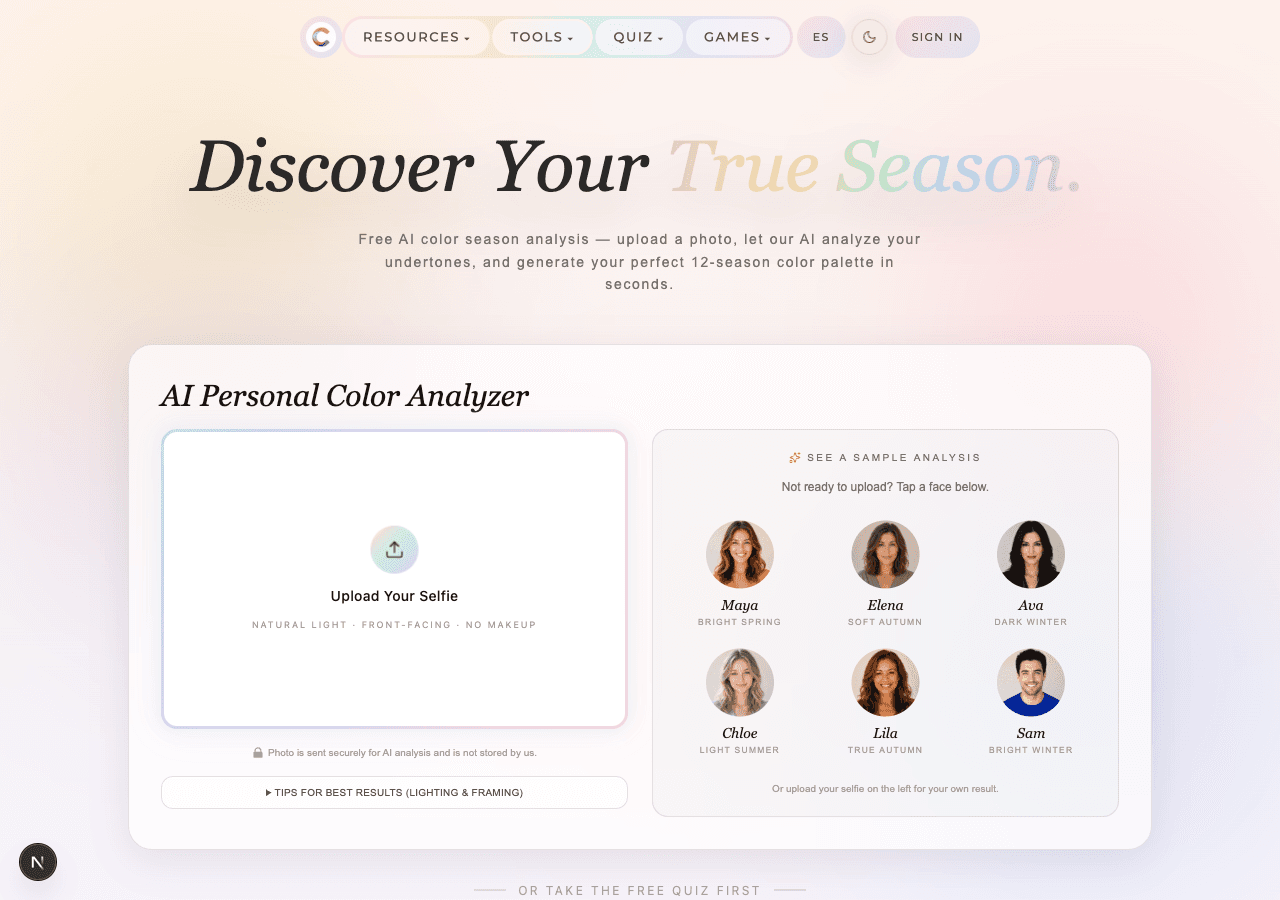
Color Season AI is a web-based tool that provides free AI-powered seasonal color analysis. By uploading a selfie, users receive a personalized 12-season color palette, along with makeup and outfit recommendations, in about 30 seconds. The app uses advanced AI models to analyze skin undertones, eye color, and hair color, and it also offers a range of additional tools like a face shape detector, AI hairstyle changer, and makeup generator. It's designed for anyone looking to discover their most flattering colors without expensive consultations. The platform emphasizes privacy, with signed-out photos not stored, and offers both free and paid options for multiple analyses.
Drawn from the product itself, not from a survey.
Demographic
Fashion enthusiasts aged 18-35
Pain points
Struggling to identify flattering colors, overwhelmed by wardrobe choices
Primary needs
Personalized color palette for shopping and outfit planning
Demographic
Beauty and makeup lovers
Pain points
Wasting money on wrong makeup shades, unsure which colors suit them
Primary needs
Accurate makeup color recommendations based on skin undertones
Demographic
Busy professionals seeking personal styling
Pain points
No time for in-person consultations, need quick and reliable advice
Primary needs
Instant, affordable color analysis to enhance professional appearance
Written by AI from measured evidence, scored out of 100.
Color Season AI is a well-executed take on a genuinely underserved niche. The design earns its theme, the speed is measurably excellent, and the free-to-credit funnel is honest about what costs what. Where it stumbles is the unglamorous stuff: security headers at 4/12 for a product that asks you to upload your face, three real accessibility failures including contrast on a color app, and a nav that buries a focused tool under twenty links. It's a product that clearly cares about the front of the house and hasn't finished the back. The idea has room; the execution needs a hardening pass before it deserves the trust the privacy copy is asking for.
Three ways to get value before committing — upload, sample faces, or a quiz — and no account needed to start. Credit pricing is spelled out clearly. Docs are thin and the nav is a wall of 20+ tool links.
Coherent pastel palette and soft gradients that actually match the product's theme, plus real UI screenshots instead of mockups. Held back by washed-out subhead text on pale gradients and a cluttered nav full of GAMES and language toggles.
Lighthouse mobile 92/100 with a 3.1s LCP and near-zero layout shift (CLS 0.001); desktop 86/100. Snappy for a media-heavy AI tool, though the mobile LCP is the one number keeping it out of the 80s.
HTTPS enforced with SPF and DMARC, and payments run through Creem's PCI-compliant hosted checkout. But zero HSTS, CSP, frame protection or Referrer-Policy — 4/12 on the header checklist. No published audits or security page.
Lighthouse a11y 93/100, but three real failures: insufficient color contrast, undersized touch targets, and visible labels without matching accessible names. No WCAG statement or a11y page found. Solid automated score, unaddressed manual gaps.
Real problem (color analysis is expensive and subjective), specific audience, and a free-to-credit funnel with a Chrome extension wedge. But the 12-season space is crowded and the differentiator is execution, not a moat.
Color Season AI's homepage is a rare case of a design that actually earns its theme: pastel gradients, mixed serif-and-script typography, and — crucially — real embedded screenshots of the analysis UI instead of stock mockups. The upload card is clean, the sample faces give you a zero-commitment preview, and the privacy note sits exactly where you'd want it. Usability follows the same logic: three paths to value (upload, sample, quiz), no account required to start, and a pricing page that spells out the credit math instead of hiding it. The cracks are in the details — a washed-out subhead that fails contrast, a nav stuffed with twenty-plus tool links and a GAMES tab that have nothing to do with the core job, and documentation that's more marketing than help. It's a well-built front door on a house with too many rooms.
Speed is the strongest measured dimension: Lighthouse mobile 92/100 with a 3.1s LCP, 118ms TBT and a CLS of 0.001, plus 86/100 on desktop. For a tool that ingests photos and runs vision inference, that's genuinely fast, and the site's ~30-second analysis claim is plausible against those numbers. Security is where the polish stops. HTTPS is enforced and SPF/DMARC are in place, and payments correctly run through Creem's PCI-compliant hosted checkout so card data never touches their servers — that's the right call. But the header probe returns 4/12: no HSTS, no CSP, no frame protection, no Referrer-Policy, no Permissions-Policy. For a product whose entire value proposition is 'upload your face,' the transport and framing hardening is thin, and there's no security page, audit, or bug bounty to compensate.
Accessibility lands at 66: the automated Lighthouse audit scores 93/100, but three concrete failures remain — insufficient color contrast (ironic for a color tool), touch targets that are too small or too tightly spaced, and visible text labels without matching accessible names. There's no WCAG conformance statement or accessibility page, so the manual gaps are unaddressed rather than unknown. Growth is a judgment on the idea, not the traction: seasonal color analysis is a real, expensive, subjective problem with a specific audience (18-35 fashion and beauty buyers) and a clear free-to-paid funnel — free analysis, credits for stylist replies and try-ons, $19.90/mo Pro. The wedge is a Chrome extension that checks any color against your palette, which is the one piece a competitor can't clone in an afternoon. But the 12-season category is crowded and the core differentiator is 'we used AI,' which is not a moat. Room to grow, no structural advantage yet.
Conclusion
If you're in the market for seasonal color analysis and don't want to pay a consultant, this is a legitimate free starting point — the sample faces let you see the output quality before you upload anything, and the 30-second turnaround is real. Just go in with clear eyes: your photo is processed by an AI model on Cloudflare, the site stores nothing for signed-out users, but the transport security is thinner than the privacy copy implies. Start free, see if the season it gives you matches what you already suspect, and only pay if the stylist chat earns it. The Chrome extension is the sleeper feature — checking a color against your palette while shopping is the actual daily use case, and it's free.
Named competitors, point by point. Nobody paid to appear here or to be left out.
 Color Season AI Color Season AI | Color Analysis Quiz | AI Hair Color Changer | AI Makeup Generator | |
|---|---|---|---|---|
| Primary method of analysis | AI vision model reads skin, eye and hair pixels from an uploaded selfie | Interactive quiz — answers questions instead of analyzing a photo | Virtual hair color try-on from a photo, not a season analysis | Generates makeup looks from a selfie based on color season |
| Requires a photo upload | Yes — selfie required, though six sample faces are offered as a preview | No — fully question-based, no photo needed | Yes — photo required to try hair colors | Yes — selfie required to generate makeup looks |
| Free to use | Yes — 1 free color analysis per day, no account needed to start | Yes — quiz is listed as unlimited on all plans | Listed as unlimited on all plans including free | Costs 4-6 credits per look; free tier starts with 10 credits |
| Output format | 12-season palette, confidence score, colors-to-avoid strip, shareable card with hex values | Seasonal palette result from quiz answers | Visual preview of hair colors on your photo | Generated makeup look images tailored to your season |
| Account required | No for first analysis (result kept 60 min); free account to save results permanently | No — quiz runs without signup | No for basic use; account needed to save results | No for basic use; credits tied to account for repeat use |
Color Analysis Quiz
Interactive quiz that determines your seasonal color palette through a series of questions.
AI Hair Color Changer
Virtually try different hair colors to see what suits you best before dyeing.
AI Makeup Generator
Generates makeup looks tailored to your color season from a selfie.
Comparing options? See Color Season AI alternatives, scored side by side

An AI-powered interior and exterior design tool that tran...

A locally-owned mattress store in Overland Park, KS offer...

A hold-to-thrust cave flyer with a new daily level, ghost races, and a global leaderboard.

A global travel eSIM app offering instant activation, no ...

AI-powered personalized face swap art platform creating c...

A massive collection of free printable coloring pages for...

Free online YouTube to MP3 converter with no signup or so...

InviteVia is a digital invitation platform for creating beautiful online invitations for weddings, birthdays, engagements, parties, and special events. Choose a template, customize your invitation, collect RSVPs, and share it instantly through WhatsApp, Instagram, SMS, or a simple link. No guest accounts or app downloads required.

Free, private tool to find your tarot birth cards instantly.

Drag-and-drop seating charts for weddings, quinceañeras and events. Import your guest list from Excel, export print-ready PDFs. Free up to 40 guests, no signup.

AI face swap for photos, videos, GIFs with free trial.

Try on a tattoo on your own body photo before you book.
A platform dedicated to providing unbiased reviews of newly launched applications, analyzing everything from their features to their full potential.
info@scoutforge.net© 2026 Scoutforge. All rights reserved.
