Cycling through all six. Tap any point to stop.
Measured on six things
Learn Design to Scale through 40 animated system design lessons. Explore caching, databases and distributed systems. First 2 free; lifetime access $5.
Security
52HTTPS enforced with SPF and DMARC, and Stripe handles payments so card data stays off the app. But the header probe found only 4/12 checklist items — no HSTS, CSP, frame protection or Referrer-Policy — and there's no security page or audit.
Screenshots
1 / 1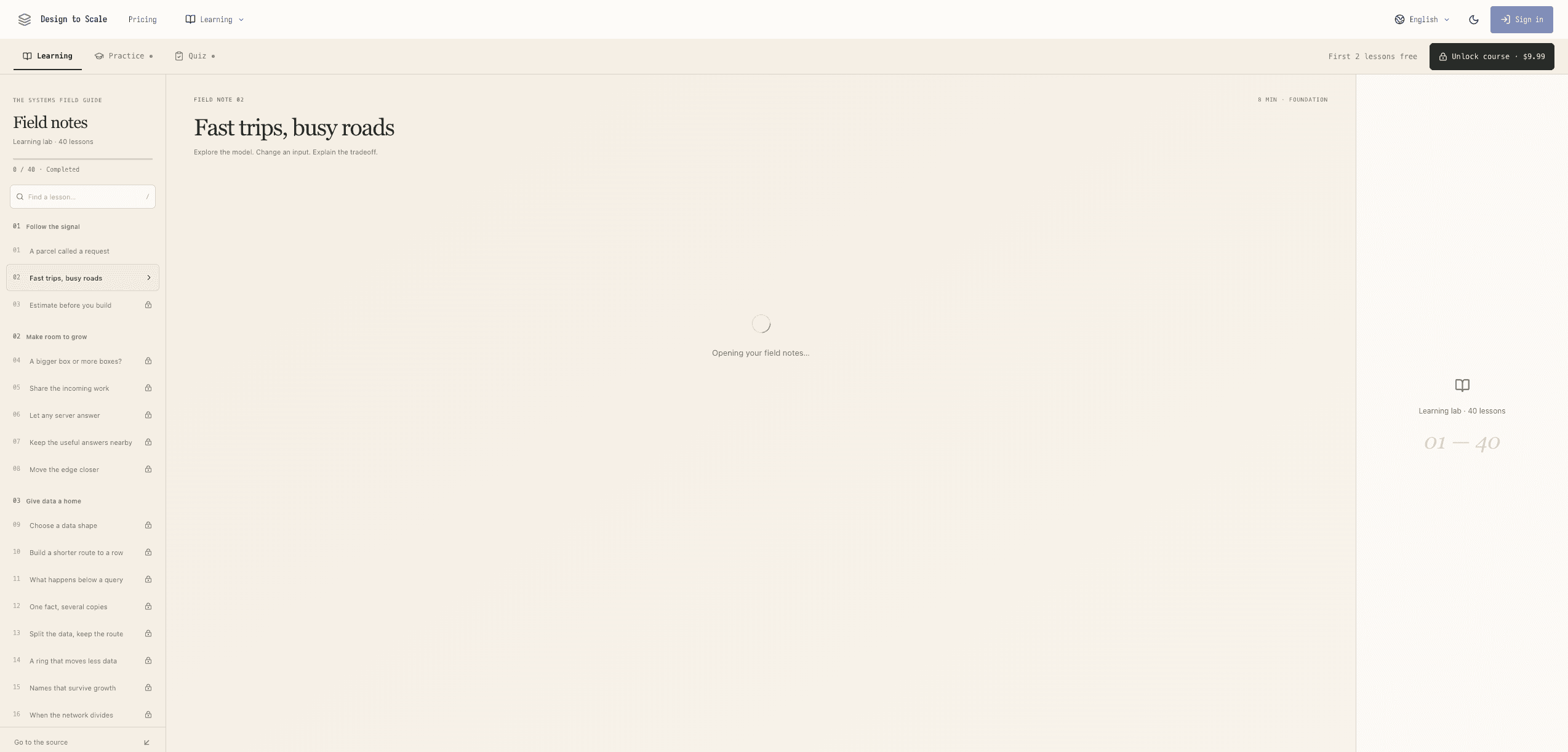
About this app
Design to Scale is an educational resource for learning system design through 40 animated lessons. It explains distributed-systems topics such as caching and databases with visual, step-by-step material for learners who want a more approachable way to study system architecture. The first two lessons are free, and lifetime access to the full course costs $5.
Key features
- 140 animated system design lessons across nine modules, from request basics to consensus and sharding.
- 2Interactive diagrams with adjustable assumption sliders and live metric readouts (latency, DNS, connect, app).
- 3Two free lessons with no signup wall; $9.99 one-time unlocks lifetime access via Stripe and Google sign-in.
Target customer profile
Drawn from the product itself, not from a survey.
Demographic
Junior to mid-level developers learning distributed systems
Pain points
Textbook definitions of load balancers and caches feel abstract and disconnected from real code
Primary needs
Concrete visual walkthroughs that connect application code to the infrastructure around it
Demographic
Engineers preparing for system design interviews
Pain points
Struggle to explain tradeoffs and constraints convincingly under pressure
Primary needs
Reusable examples of napkin math, availability, rate limiting, and partitioning to reason from
Demographic
Engineering teams and instructors running technical discussions
Pain points
Concepts like cache invalidation and service boundaries are hard to demo without infrastructure
Primary needs
Shared visual references the group can pause, advance, and debate in the room
Demographic
Experienced developers revisiting an unfamiliar topic
Pain points
Full courses waste time on material they already know
Primary needs
Modular lessons they can jump into directly without following the whole path
Scout Review
Written by AI from measured evidence, scored out of 100.
Design to Scale is a $9.99 one-time visual system design course with 40 animated lessons across nine modules, two free to start. The lesson workspace is genuinely well-designed and the site is fast — 99/100 mobile Lighthouse. The problems are execution details: a homepage that contradicts its own price, two 'Coming soon' nav tabs, thin security headers, and a contrast failure the automated audit caught. It's a competent, clearly positioned product that needs polish on the marketing surface and a real security pass before it earns trust at scale.
Measure by measure
Usability
62Two free lessons with no signup wall is the right call, and Google sign-in plus Stripe checkout is frictionless. But two of three nav tabs say 'Coming soon', and there's no help center beyond a support line — the product is thinner than the nav implies.
Design
68The lesson workspace is genuinely well-crafted: warm palette, serif headlines, monospace metrics and a clear three-column learning layout. But the homepage contradicts itself on price ($5.99 vs $9.99) and buries the visual product under a keyword-stuffed text wall.
Speed
88Lighthouse mobile 99/100 with a 905ms LCP, zero layout shift and 61ms blocking time; desktop 96/100. For an animated lesson product that's an unusually clean build — the animations clearly aren't wrecking the load.
Security
52HTTPS enforced with SPF and DMARC, and Stripe handles payments so card data stays off the app. But the header probe found only 4/12 checklist items — no HSTS, CSP, frame protection or Referrer-Policy — and there's no security page or audit.
Accessibility
78Lighthouse accessibility 97/100, with two real failures: insufficient color contrast and visible text labels without matching accessible names. Light/dark themes, smaller-screen support and translated content are claimed, but the contrast issue is the same one the visual audit flagged in the sidebar.
Growth
58A real problem (abstract distributed-systems concepts) with a concrete wedge: animated, interactive, browser-based lessons for $9.99 once. That undercuts ByteByteGo and Educative on price and beats the free Primer on interactivity — but the moat is thin and the category is crowded.
Improvement areas
- Homepage contradicts itself on price ($5.99 header vs $9.99 body) and reads as keyword-stuffed copy with a typo.
- Security headers are thin (4/12 checklist): no HSTS, CSP, frame protection or Referrer-Policy; no security page.
- Practice and Quiz nav tabs both show 'Coming soon', and there's no help center beyond a support contact.
Design & Usability
Design to Scale's strongest asset is the lesson workspace itself: a warm, editorial three-column layout where a numbered module tree, an animated request diagram and an explanation panel sit side by side, with sliders to change assumptions and watch metrics respond. It reads as deliberate design, not a template. The homepage is the weak link — it contradicts its own price ($5.99 in the header, $9.99 in the body and on the pricing page), repeats the product name into a keyword-stuffed wall, and shows almost none of the visual product it's selling. Usability is solid where it counts: two free lessons with no signup wall, Google sign-in, and Stripe checkout that opens automatically on return. But two of three nav tabs are 'Coming soon', and there's no help center beyond a support contact.
Speed & Security
Speed is the standout measured result: Lighthouse mobile 99/100 with a 905ms LCP, zero cumulative layout shift and 61ms total blocking time; desktop 96/100. For a product built around animated diagrams, that's a genuinely clean build — the interactivity isn't costing load performance. Security is the soft spot. HTTPS is enforced and SPF/DMARC are in place, and payments run through Stripe so card data never touches the app, which is the right architecture. But the header probe found only 4 of 12 checklist items: no HSTS, no CSP, no frame protection, no Referrer-Policy or Permissions-Policy. There's no security page, no SOC 2, no bug bounty. For a $9.99 course that's not alarming, but it's table stakes left on the table.
Accessibility & Growth
Accessibility scores 97/100 on Lighthouse, with two real failures: insufficient color contrast and visible text labels without matching accessible names. The contrast issue matches what the visual audit saw — small light-grey sidebar text that's hard to read at normal distance. The site claims light/dark themes, smaller-screen support and translated content, and a language switcher is present, which is more than most indie courses offer. Growth is a judgement on the idea: the problem is real, the target segments are named specifically (junior/mid devs, interview preppers, teams), and the wedge — animated, interactive, browser-based lessons at a one-time $9.99 — genuinely undercuts ByteByteGo and Educative on price while beating the free System Design Primer on interactivity. The limit is that the moat is thin: content is copyable, the category is crowded, and the domain is brand new.
Conclusion
If you're a junior dev who bounces off textbook definitions of load balancers, the free two lessons are a low-risk way to see whether the animated format clicks for you. If it does, $9.99 for lifetime access is a fair price against ByteByteGo's subscription. Just verify the price at checkout — the site currently shows two different numbers — and don't expect the Practice or Quiz tabs to do anything yet. The core product is real and the design is thoughtful; the wrapper around it needs another pass.
Suggestions for improvement
- Fix the price contradiction: the header button says $5.99 while the body and pricing page say $9.99. Pick one number everywhere.
- Add the missing security headers — HSTS, CSP, frame protection, Referrer-Policy — and publish a short security page.
- Replace the keyword-stuffed homepage text wall with screenshots or a short loop of the animated lessons actually in action.
- Fix the light-grey sidebar contrast and the accessible-name failures Lighthouse flagged, and either ship or hide the 'Coming soon' tabs.
Alternatives comparison
Named competitors, point by point. Nobody paid to appear here or to be left out.
 Design to Scale | ByteByteGo |  Educative |  System Design Primer (GitHub) | |
|---|---|---|---|---|
| Pricing model | $9.99 one-time, lifetime access; first 2 lessons free | Subscription-based course and newsletter access | Subscription for interactive text-based courses | Free, open-source |
| Format | Animated, interactive browser lessons with adjustable sliders and metrics | Animated diagrams plus video and newsletter deep dives | Interactive text-based courses with embedded exercises | Static markdown study guide with diagrams |
| Content depth | 40 lessons across 9 modules; Practice and Quiz modes 'Coming soon' | Large course library plus weekly newsletter and deep dives | Broad multi-course catalogue including Grokking the System Design Interview | Comprehensive free guide with community contributions |
| Interview prep focus | Napkin math, availability, rate limiting and partitioning lessons as a learning aid | Explicitly built around system design interview preparation | Dedicated Grokking interview prep path | Interview questions and study guide sections |
ByteByteGo
System design interview course and newsletter with animated diagrams and deep dives into distributed systems topics.
Educative
Interactive text-based courses including Grokking the System Design Interview, a popular prep path for engineers.
System Design Primer (GitHub)
Free, community-maintained open-source study guide covering scaling, caching, databases, and interview prep.
Comparing options? See Design to Scale alternatives, scored side by side
More Education apps
View all Education
The Stack Newsletter
92A weekly newsletter delivering curated tech jobs, intervi...

Enlyo
90Video analysis for team-sport coaches: tag matches as they play, cut clips, record reviews and share the moments that matter.

SheetScroll
90> You play; SheetScroll turns the page. It listens through the microphone or a MIDI piano and holds the page until it's sure where you are.

Tracé slides
89Interactive math & physics slides with live graphs and an...

English Test Coach
89English Test Coach checks your IELTS essays and letters, gives an estimated band score across all four criteria, and tells you exactly what to revise next.

Cross Stitch Pattern Maker
89Free on-device photo-to-DMC/Anchor chart with skein counts.

Ready for My Interview
89Practice your marriage green card interview out loud

Startup Science
88A unified platform replacing 12-20 disconnected tools for...

Cromagnon
88Free, private browser-based PDF, Word, Excel, and study t...

NOSTRES
88Free step-by-step guides for moving to Berlin: documents,...

TranscriptYou
88Free YouTube transcript generator with timestamps and AI ...

Random Movie Generator
88Free random movie picker from 142k+ films—no sign-up.


A platform dedicated to providing unbiased reviews of newly launched applications, analyzing everything from their features to their full potential.
info@scoutforge.net© 2026 Scoutforge. All rights reserved.
