Cycling through all six. Tap any point to stop.
Measured on six things
Native SSH client for Apple Silicon Mac that brings connections, terminal tabs, split panes, SFTP, and host monitoring into one workspace.
Security
52HTTPS not enforced, no HSTS, no SPF, no DMARC — 6/12 header checklist points. On the plus side: CSP, frame protection, referrer and permissions policies present; AI keys stay with the user's own provider; password exports are opt-in encrypted. No SOC 2 or audit claims.
Screenshots
1 / 1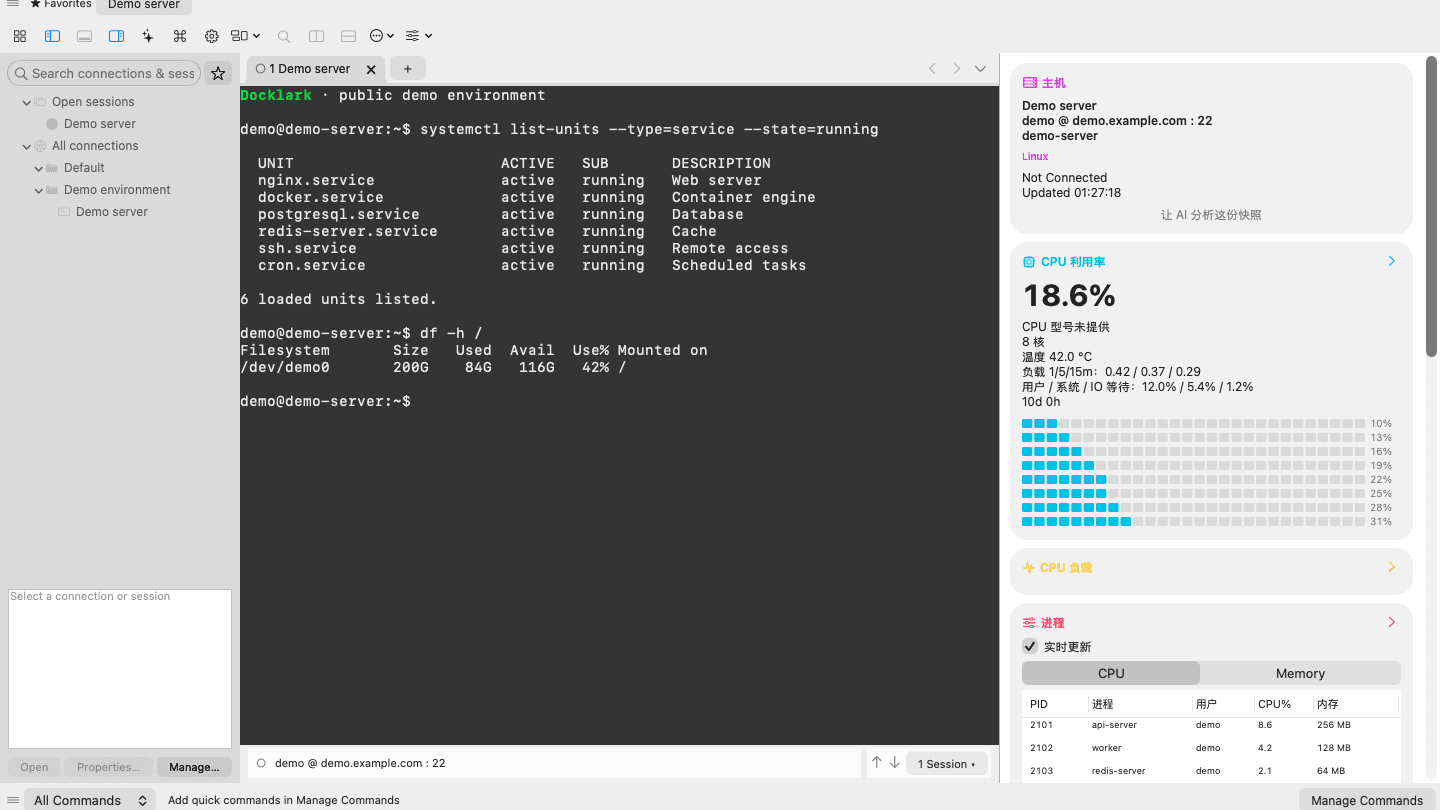
About this app
Docklark is a native SSH client for Mac built for direct server connections and access through JumpServer. It turns day-to-day remote work into a single graphical workspace: saved hosts, multi-session terminals, file transfer, and light host monitoring side by side. A desktop SSH workspace for Apple Silicon Mac. Organize connections in folders and favorites, keep several sessions in tabs and split panes, browse local and remote files over SFTP, and check CPU, memory, and load for the SSH entry host without leaving the app. What makes Docklark stand out: Native Mac app aimed at Apple Silicon; direct SSH and JumpServer / bastion-style workflows; tabs and split panes for multi-session work; SFTP file browser beside the terminal; remote monitoring for the entry host (CPU, memory, and load). Docklark is completely free. No purchase or subscription is required. The public download is a native Mac DMG for Apple Silicon (arm64). Intel support is not confirmed.
Key features
- 1Native Apple Silicon Mac SSH workspace with tabs, split panes and saved hosts in folders/favorites.
- 2AI assistant beside the terminal using your own provider key (OpenAI, Anthropic, Gemini, Ollama).
- 3SFTP file browser with remote editor, find/replace and diff-before-save.
- 4Host monitoring for the SSH entry host: CPU, memory, load, processes, containers, network.
- 5Direct SSH and JumpServer/bastion workflows; command palette (Shift+Cmd+P).
Target customer profile
Drawn from the product itself, not from a survey.
Scout Review
Written by AI from measured evidence, scored out of 100.
Docklark is a free, native Apple Silicon SSH workspace that folds terminal sessions, SFTP, host monitoring and an AI assistant into one window, with JumpServer/bastion support as a differentiator. The marketing site is fast (Lighthouse 100/100) and visually disciplined, and the docs are deeper than most paid competitors. Weak spots: security headers are half-done (no HSTS, SPF or DMARC), the hero carousel makes the app unreadable, and Chinese labels leak into English screenshots. As an idea it's specific and genuinely useful, but Mac-only, Apple Silicon-only and free caps how far it can grow without a monetisation story.
Measure by measure
Usability
66Docs are genuinely deep — connection prep, JumpServer vs direct SSH, AI context, workspace restore, SFTP, automation, command palette. Download CTA is obvious with the Apple Silicon caveat right below. Dense screenshots and tiny grey captions raise the reading effort.
Design
70Restrained monochrome palette with indigo accents and a tight grotesque/mono type system reads premium. In-app three-pane workspace looks credible. Hero carousel shrinks the app window to unreadable, and Chinese metric labels leak into English screenshots.
Speed
86Lighthouse 100/100 on both mobile and desktop: LCP 902ms, CLS 0.02, TBT 0ms. Static-feeling, snappy marketing site with no measurable jank. Nothing in the collected evidence suggests lag complaints.
Security
52HTTPS not enforced, no HSTS, no SPF, no DMARC — 6/12 header checklist points. On the plus side: CSP, frame protection, referrer and permissions policies present; AI keys stay with the user's own provider; password exports are opt-in encrypted. No SOC 2 or audit claims.
Accessibility
80Lighthouse 96/100 with two real fails: contrast and mismatched accessible names. Ships English & Simplified Chinese, light & dark themes, and reduced-motion-respecting animation. Small low-contrast grey captions on the marketing site drag it down from the top of the band.
Growth
58Real problem, specific wedge: native Apple Silicon SSH workspace with AI assistant, JumpServer support, SFTP and monitoring in one window — free. Differentiated, but the Mac-only + free combo caps the ceiling.
Improvement areas
- Security headers: enforce HTTPS, add HSTS, publish SPF and DMARC records.
- Hero carousel readability — the app window is too small to read at normal size.
- Localisation leak: Chinese metric labels appear in English marketing screenshots.
- Contrast on small grey captions and disclaimers fails Lighthouse accessibility.
Design & Usability
Docklark's site is a genuinely well-crafted piece of marketing: monochrome palette, indigo accents, tight grotesque display type with monospace eyebrows. The in-app screenshots show a real, dense three-pane SSH workspace — connections tree, dark terminal, light metric cards — that reads as a serious tool, not a mockup. The problems are in the presentation: the hero carousel shrinks the app window so far that terminal text is unreadable, and Chinese metric labels ('内存', 'CPU 信号未提供') leak into the English screenshots. Usability is stronger than the visuals suggest — the docs are unusually deep for a free app, covering direct SSH vs JumpServer, AI context preview, workspace restore, SFTP, automation and a command palette. The download CTA is obvious and the Apple Silicon caveat sits right beneath it. Dense screenshots and tiny grey captions are the main friction.
Speed & Security
Speed is the standout: Lighthouse 100/100 on both mobile and desktop, LCP 902ms, CLS 0.02, TBT 0ms. The marketing site is essentially static and snappy, with no evidence of lag complaints. Security is the weakest dimension. The HTTP probe found HTTPS not enforced, no HSTS, no SPF and no DMARC — 6 of 12 checklist points. CSP, frame protection, X-Content-Type-Options, Referrer-Policy and Permissions-Policy are all present, which is better than many indie sites. On the product side, Docklark keeps AI keys in the user's own provider account and makes encrypted password backups opt-in, both sensible choices. But for an app whose entire job is holding SSH credentials, missing HSTS and DMARC is a real gap, and there are no published audits, SOC 2 or bug bounty to offset it.
Accessibility & Growth
Accessibility lands at 80: Lighthouse 96/100 with two concrete fails — insufficient colour contrast and visible text labels without matching accessible names. The site ships English and Simplified Chinese, light and dark themes, and animation that respects reduced-motion settings, which is more than most indie tools bother with. The low-contrast grey captions scattered across sections are the main drag. Growth is a judgement on the idea: Docklark names a real problem (SSH work is fragmented across terminals, SFTP clients and monitoring tools) and offers a specific wedge — a native Apple Silicon Mac workspace with an AI assistant, JumpServer/bastion support, SFTP and host monitoring in one window, free. That's differentiated against generic terminal apps. The ceiling is real though: Mac-only, Apple Silicon-only, free with no obvious monetisation, and a domain registered in October 2026. The Windows 'coming soon' note is the right instinct.
Conclusion
If you live in a terminal on a Mac and juggle bastions, SFTP and host metrics, Docklark is worth a download — it's free and the docs show the maker actually uses it. Before you trust it with production credentials, ask for HSTS, DMARC and a security page. And fix the carousel: your best asset is the app itself, so stop shrinking it to thumbnail size.
Suggestions for improvement
- Enforce HTTPS with HSTS and publish SPF/DMARC records — table stakes for a credential-holding tool.
- Fix the hero carousel: render the app window at a readable size, or replace it with a full-width screenshot.
- Clean the localisation leak — Chinese metric labels in English screenshots undermine the polish.
- Raise contrast on grey captions and disclaimers to clear the Lighthouse contrast fail.
Alternatives comparison
Named competitors, point by point. Nobody paid to appear here or to be left out.
 Docklark |  | |
|---|---|---|
| Platform support | macOS (Apple Silicon arm64); Windows 10/11 'coming soon' | Not specified in provided details |
| Pricing | Free, no subscription | Not specified in provided details |
| AI assistant in terminal | Yes — bring-your-own provider (OpenAI, Anthropic, Gemini, Ollama) | Not specified in provided details |
| JumpServer / bastion support | Yes — direct SSH and JumpServer workflows | Not specified in provided details |
| SFTP file browser | Yes — with remote editor, find/replace and diff | Not specified in provided details |
| Host monitoring | CPU, memory, load, processes, containers, network for entry host | Not specified in provided details |
Comparing options? See Docklark alternatives, scored side by side
More Development & Engineering apps
View all Development & Engineering
Vibe Coding Agent Skills
92A free, open-source platform offering 110 AI agent skills...

CreateMyCoin
92A no-code Solana token creator that deploys SPL tokens in...

CC Switch
91Open-source desktop app for switching AI coding providers...

TaxID
90Fast EU VAT validation API for developers, covering 27 EU...

DemoVexa
90Turn your code into professional product demo videos with AI-generated scripts, animated UI, and natural voiceovers.

FontPlop
89Browser-based font viewer & tester for TTF, OTF, WOFF, WO...

deed.page
89Permanent web hosting for AI agents, no human step

Webfetch
89Web scraping API that turns any URL into HTML, text, Mark...

Denpex
89AI-powered GPU failure diagnosis for distributed ML training

BeartIMAGE
88BeartIMAGE is a free, web-based image processing platform engineered for fast, bulk photo editing and conversion directly in your browser.

Claw Messenger
88Claw Messenger is an iMessage API service that gives AI a...

DataHabibi
88AI-powered Dubai real estate data platform with 12M+ DLD ...


A platform dedicated to providing unbiased reviews of newly launched applications, analyzing everything from their features to their full potential.
info@scoutforge.net© 2026 Scoutforge. All rights reserved.
