Cycling through all six. Tap any point to stop.
Measured on six things
Convert .eml, .msg and .mbox emails to PDF in your browser
Growth
63Real, narrow pain (bulk email-to-PDF for cases and records) with concrete wedges — Bates numbering, merged sorted PDFs, no-upload processing — that Outlook and Thunderbird can't match. Legal vertical is a specific payer. Very early (domain ~0.1 years).
Screenshots
1 / 1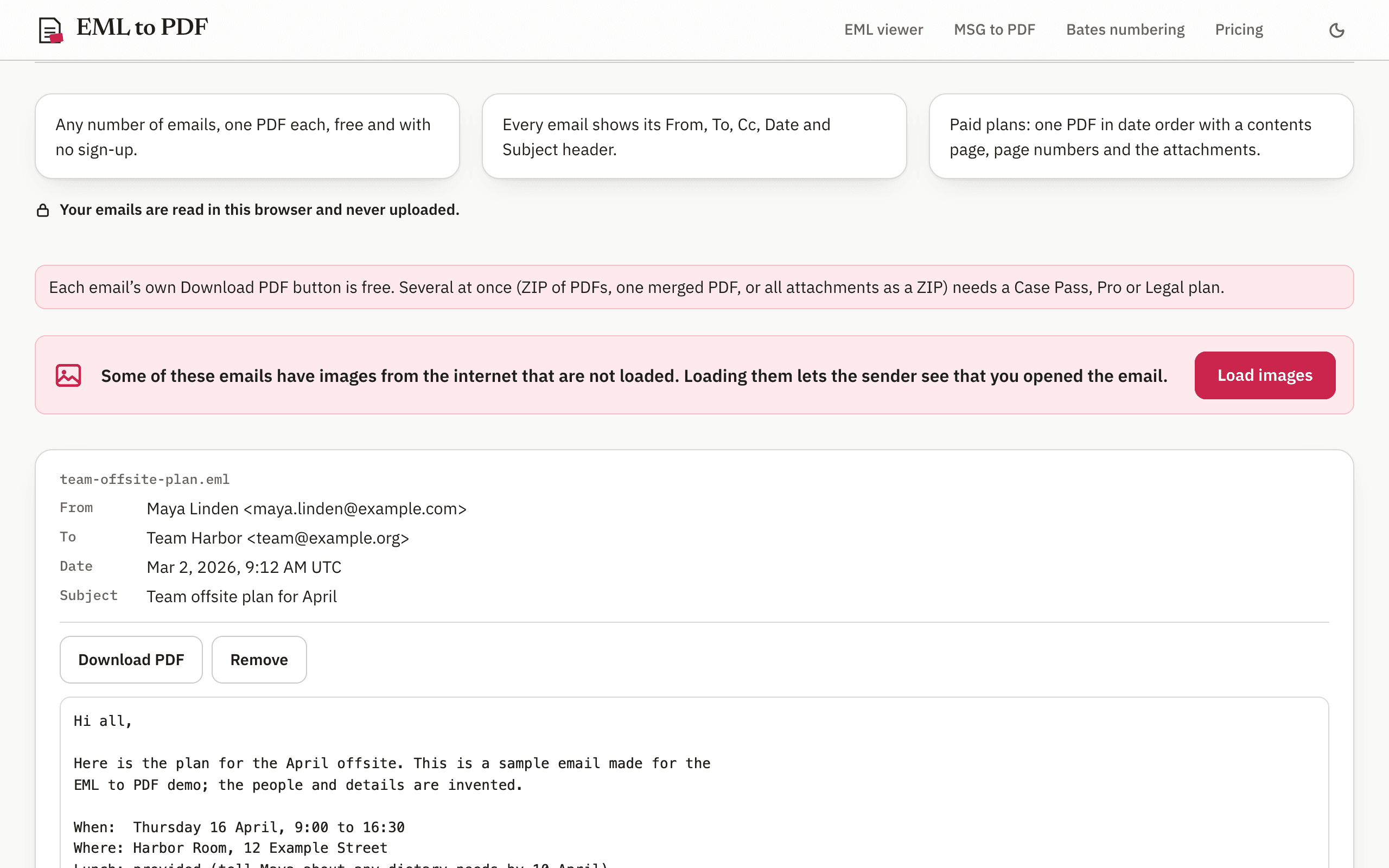
About this app
EML to PDF opens .eml and Outlook .msg email files, whole folders, ZIP files and .mbox archives in your browser and saves the emails as PDFs with selectable text. Each email is shown with its From, To, Cc, Date and Subject headers, the message body and its attachments; images from the internet are off by default, so senders can't tell you opened the email, and one click loads them. Everything runs on your device, so the emails are never uploaded. Converting each email to its own PDF is free, with no sign-up and no limit on the number of emails. Paid plans add bulk export: a ZIP of all PDFs, one merged PDF sorted by date with a contents page and page numbers, and a ZIP of all attachments. The Case Pass is a one-time $29.90 payment for 90 days, with no renewal; Pro is $14.90 a month or $99 a year; Legal is $24.90 a month or $199 a year and adds Bates numbering of emails with their attachments in one step.
Key features
- 1Opens .eml, .msg, .mbox, folders and ZIP archives entirely in the browser — emails never uploaded.
- 2Free single-email-to-PDF with no sign-up and no limit; selectable text, A4/US Letter, CJK/Greek/Russian support.
- 3Paid bulk export: ZIP of PDFs, one merged date-sorted PDF with contents page and page numbers, attachment ZIP.
- 4Legal plan adds one-step Bates numbering of emails with attachments, plus CSV number list.
Target customer profile
Drawn from the product itself, not from a survey.
Demographic
People who saved emails as .eml or .msg
Pain points
No mail app to open the file
Primary needs
Read the email and keep it as a PDF
Demographic
Paralegals and office staff
Pain points
Need many emails as PDFs for a case or record
Primary needs
One sorted, page-numbered PDF of a whole folder
Demographic
People leaving an old mailbox
Pain points
An .mbox archive they can't open
Primary needs
Turn the archive into PDFs they can keep
Scout Review
Written by AI from measured evidence, scored out of 100.
EML to PDF is a focused browser-based converter for .eml, .msg, .mbox and ZIP email archives. Free single-email-to-PDF with no sign-up and no limit; paid plans ($29.90 Case Pass, $14.90/mo Pro, $24.90/mo Legal) add bulk ZIP export, merged sorted PDFs with contents pages, attachment ZIPs, and Bates numbering. The site is fast (Lighthouse 100/100), well-designed with an editorial voice, and unusually transparent about its privacy model — it tells you to verify the no-upload claim in DevTools. Weak spots: no published compliance certifications for a legal-facing product, one contrast failure, no WCAG statement, and a lot of prose explaining free vs paid.
Measure by measure
Usability
68Upload CTA under the hero, a 'Try sample emails' link, and no sign-up for free single-email conversion make first value fast. Paid unlock via emailed code works but the repeated free/paid notices add reading load to a tool page.
Design
71Editorial serif/sans pairing, real PDF mockups in the hero, and a restrained single-accent palette give this a distinct voice well above typical utility-tool templates. The in-app screenshot's competing reds and the dense 'Check for Yourself' prose hold it back.
Speed
88Lighthouse 100/100 on both mobile and desktop, LCP 1.2s, CLS 0, TBT 46ms. Conversion runs client-side so there's no server round-trip. Hard to fault a static page that scores perfect on both profiles.
Security
7611/12 security headers including HSTS, CSP and DMARC; the no-upload claim is architectural and user-verifiable via the Network panel. No SOC 2, ISO or bug-bounty program published, which caps it below the top of the band.
Accessibility
79Lighthouse accessibility 97/100 with one failing audit: insufficient color contrast. Responsive layout and readable typography, but no WCAG statement or accessibility page, and the UI itself isn't localized.
Growth
63Real, narrow pain (bulk email-to-PDF for cases and records) with concrete wedges — Bates numbering, merged sorted PDFs, no-upload processing — that Outlook and Thunderbird can't match. Legal vertical is a specific payer. Very early (domain ~0.1 years).
Improvement areas
- No published security/compliance page (SOC 2, pen test, bug bounty) despite targeting law firms.
- One Lighthouse contrast failure and no WCAG accessibility statement.
- Permissions-Policy header missing (11/12 security checklist).
- Free-vs-paid boundaries restated across multiple sections, adding reading load.
Design & Usability
The site has a real point of view: serif display headings, monospace code samples, and a hero that shows actual PDF output instead of an abstract illustration. The single crimson upload button makes the primary action obvious, and the '01'/'02' section numerals tie the page together. Usability is solid where it counts — the CTA sits under the hero, 'Try sample emails' lets you test without a file, and free single-email conversion needs no sign-up. The friction is reading load: free-vs-paid boundaries are restated in the feature cards, the notice band, and a whole 'Who Needs the Paid Plans' section, which is a lot of prose for a tool page. The in-app screenshot also has competing reds that flatten the action hierarchy.
Speed & Security
Speed is the standout: Lighthouse 100/100 on mobile and desktop, LCP 1.2s, CLS 0, TBT 46ms, and conversion runs entirely client-side so there's no server round-trip. Security is strong on the fundamentals — HTTPS enforced, HSTS, CSP, frame protection, DMARC, and 11/12 header checklist points (Permissions-Policy is the gap). The privacy claim is the interesting part: emails are read in the browser and never uploaded, and the site tells you to verify it yourself in the Network panel. What's missing is the compliance layer — no SOC 2, ISO, pen-test summary or bug bounty published, which matters if law firms are the target buyer.
Accessibility & Growth
Accessibility scores 97/100 in Lighthouse with a single failing audit for insufficient color contrast — an easy fix. The layout is responsive with comfortable typography, but there's no WCAG statement or accessibility page, and the UI isn't localized even though the PDF engine handles CJK, Greek and Russian. Growth is a judgment on the idea: the problem is real and specific (paralegals and office staff who need many emails as sorted, numbered PDFs), and the wedges are concrete — bulk ZIP export, merged date-sorted PDFs with a contents page, one-step Bates numbering, and no-upload processing. Outlook and Thunderbird print one email at a time. The legal vertical is a clear payer. The limit is reach: it's a narrow utility, very early (domain ~0.1 years), with no network effects.
Conclusion
If you have a folder of .eml files, an .mbox archive you can't open, or a case that needs 300 emails as one numbered PDF, this is a genuinely well-built tool at a fair price — and the free tier is real, not a teaser. The gap is trust infrastructure for the legal buyer: publish a security page, a pen-test summary or SOC 2 roadmap, and a WCAG statement, and the Legal plan becomes an easy sell. As it stands, it's a strong indie utility that punches above its weight on speed and design and is still building the compliance story its best customers will ask for.
Suggestions for improvement
- Publish a security/compliance page: pen-test summary, SOC 2 roadmap, and data-handling details for the Legal plan buyers.
- Fix the single Lighthouse contrast failure and add a short WCAG 2.1 AA accessibility statement.
- Add Permissions-Policy to the header set to complete the 12/12 checklist.
- Tighten the free-vs-paid explanation into one comparison table instead of repeating it across three sections.
Alternatives comparison
Named competitors, point by point. Nobody paid to appear here or to be left out.
 EML to PDF |  Microsoft Outlook |  Mozilla Thunderbird | |
|---|---|---|---|
| Bulk conversion of many emails at once | Yes — whole folders, ZIPs and .mbox archives in one pass | No — one email at a time via print to PDF | No — one email at a time via print to PDF |
| Merged PDF sorted by date with contents page and page numbers | Yes (paid plans) | No | No |
| Bates numbering of emails with attachments | Yes — one step, on Legal plan | No | No |
| Opens .eml and .mbox without installing a mail app | Yes — in the browser, nothing to install | Partial — .msg only, requires Outlook install | Yes — but requires installing Thunderbird |
| Files never uploaded (client-side processing) | Yes — verifiable in browser Network panel | Local app, but cloud sync in Microsoft 365 | Local app; no upload for local accounts |
| Price for bulk email-to-PDF | Free single; $29.90 Case Pass / $14.90/mo Pro / $24.90/mo Legal | Requires Microsoft 365 subscription; no bulk feature | Free; no bulk feature |
Microsoft Outlook
Opens .msg and can print to PDF one email at a time.
Mozilla Thunderbird
Free mail app. It opens .eml and .mbox files, and you print to PDF one email at a time.
Comparing options? See EML to PDF alternatives, scored side by side
More E-Mail apps
View all E-Mail
youtubetomp3.ink
87Free online YouTube to MP3 converter with no signup or so...

PitchCentric
86AI podcast booking intelligence with probability scoring.

EmailFig
85Email marketing that gets out of your way, with all featu...

PCDOTS PST Converter
85Convert Outlook PST files to 16 formats and clouds withou...

Postfleet
83Email infrastructure that turns inbound mail into safe JS...

Mailwell
83A calm, fast Mac mail app for all your accounts. Your mail stays on your Mac, with no servers in between.

CaptainVerify
82.5CaptainVerify is a powerful email and mobile number verif...

Mailmodo
82Mailmodo revolutionizes email marketing with AMP-powered interactive emails, AI tools, and automation to boost engagement and ROI.

VerifiedEmail
82A specialized tool for real-time email verification and list cleaning, boosting deliverability and compliance.

Gblock
81A Chrome extension that blocks hidden email trackers in Gmail, ensuring privacy by detecting spy pixels and anonymizing links.

Mailto Live
81AI-driven email management tool for Gmail that automates tasks like unsubscribing and organizing emails to boost productivity.

PromptLy
81An AI-powered email assistant that automates drafting, personalizes replies, and streamlines inbox management for professionals and teams.


A platform dedicated to providing unbiased reviews of newly launched applications, analyzing everything from their features to their full potential.
info@scoutforge.net© 2026 Scoutforge. All rights reserved.
