Cycling through all six. Tap any point to stop.
Measured on six things
Browser-based CAD, FEA, and industrial statistics suite.
Speed
58Desktop Lighthouse hits 96/100, but mobile drops to 69 with a 6.1s LCP — well past the 2.5s 'good' line. CLS is a clean 0 and TBT a modest 316ms, so it's the hero load that's dragging.
Screenshots
1 / 1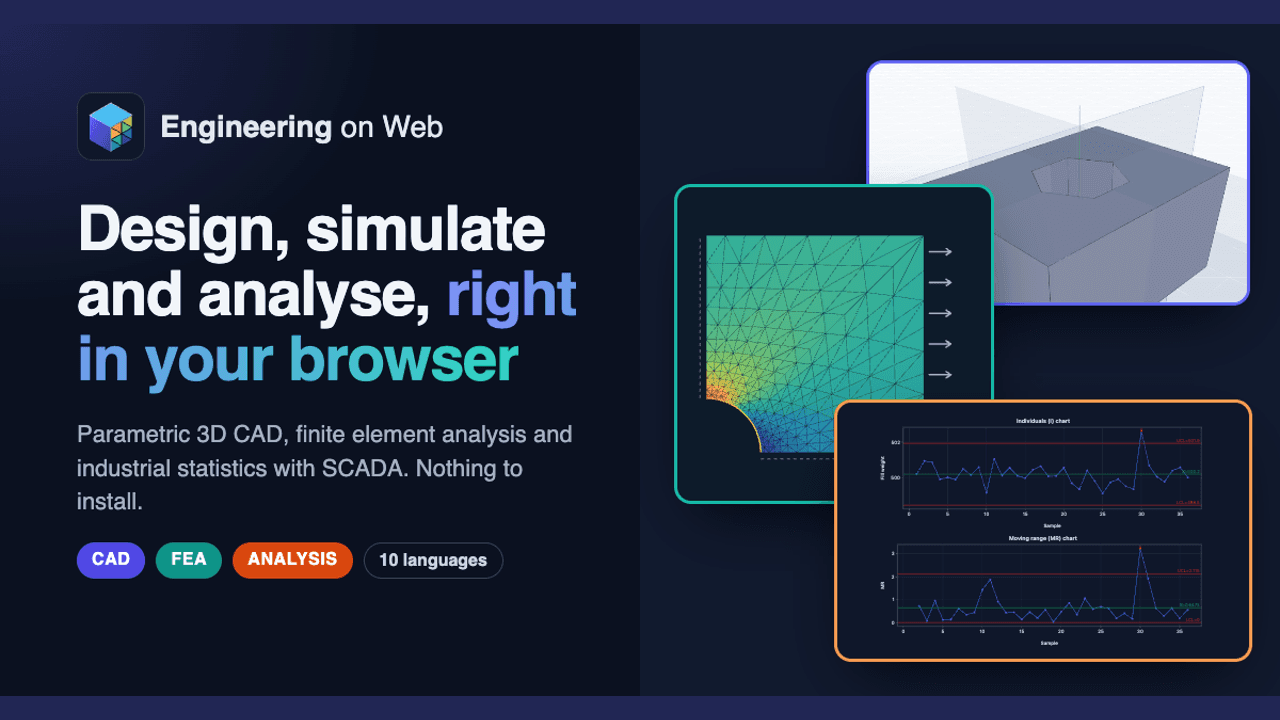
About this app
Engineering on Web is a browser-based platform that combines three powerful engineering tools: a parametric 3D CAD modeler, a finite element analysis (FEA) simulator, and an industrial statistics & SCADA generator. It runs entirely in your browser using WebAssembly and WebGPU, so there's nothing to install. You can design parts with sketches and constraints, export to STL/STEP/IGES/DXF, then simulate structural, thermal, fluid, or electromagnetic behavior with live convergence graphs. The Analysis module offers Six Sigma tools, control charts, capability analysis, and even SCADA export for factory floors. With support for ten languages, it's accessible to engineers worldwide. Whether you're a mechanical engineer prototyping a new part or a quality manager monitoring production, Engineering on Web provides a seamless workflow from design to analysis.
Key features
- 1Parametric 3D CAD with sketches, constraints, assemblies, technical drawings and STL/STEP/IGES/DXF export.
- 2Multi-physics FEA (structural, thermal, fluid, electromagnetic) with live convergence graphs and WebGPU acceleration.
- 3Industrial statistics and SCADA: control charts, capability analysis, DOE and SCADA export for Windows/macOS/Linux.
Target customer profile
Drawn from the product itself, not from a survey.
Demographic
Mechanical design engineers
Pain points
Expensive desktop CAD licenses, complex installations, limited access on Chromebooks/Linux.
Primary needs
Parametric 3D modeling, assembly creation, technical drawing, and export to standard formats.
Demographic
Simulation and analysis engineers
Pain points
High cost of FEA software, steep learning curves, hardware dependencies.
Primary needs
Mesh generation, multi-physics simulation, live convergence feedback, WebGPU acceleration.
Demographic
Manufacturing quality managers
Pain points
Fragmented tools for SPC, difficulty creating SCADA dashboards, manual data analysis.
Primary needs
Control charts, capability analysis, DOE, SCADA export for Windows/macOS/Linux.
Scout Review
Written by AI from measured evidence, scored out of 100.
Engineering on Web is an ambitious browser-native engineering suite: parametric CAD, multi-physics FEA and industrial SPC/SCADA in one WebAssembly/WebGPU package. The homepage is well-designed and the security headers are immaculate, but mobile load times are slow, documentation and pricing are absent from the site, and the product is brand new against three entrenched competitors. A promising, clearly-positioned idea that still needs the supporting infrastructure — docs, pricing, trust signals — to convert curious engineers into users.
Measure by measure
Usability
60Three color-matched 'Abrir o app' buttons and a four-step CAD→FEA→ANALYSIS workflow make the offering easy to grasp and trial. But there's no visible pricing, docs or help center, and the site defaults to Portuguese.
Design
71Dark navy homepage with color-coded CAD/FEA/ANALYSIS cards, real app previews and matching CTAs. Polished and coherent, but the footer is a wall of tiny badges and the PT/EN language mix muddles the brand.
Speed
58Desktop Lighthouse hits 96/100, but mobile drops to 69 with a 6.1s LCP — well past the 2.5s 'good' line. CLS is a clean 0 and TBT a modest 316ms, so it's the hero load that's dragging.
Security
76Full marks on the header probe — HTTPS, HSTS, CSP, frame protection, secure cookies, SPF and DMARC all present (13/13). No published SOC 2, ISO, audit or bug bounty, which is normal for a new product but caps the score.
Accessibility
80Lighthouse accessibility 96/100 with only a color-contrast failure flagged, and the interface ships in ten languages including RTL Arabic. No WCAG statement or a11y docs published, so it sits mid-band rather than top.
Growth
58A real, specific problem — desktop CAD/FEA/SPC is expensive and siloed — with a genuine wedge: one browser workflow across all three. But it's brand new (domain registered Oct 2026) and faces Onshape, SimScale and Minitab head-on.
Improvement areas
- No pricing page or documentation visible on the site — visitors can't assess cost or learn the tools before committing.
- Mobile Lighthouse performance 69/100 with a 6.1s LCP; the hero imagery needs compression and lazy-loading.
- No security page, SOC 2/ISO claim or explanation of how uploaded CAD models are stored and processed.
Design & Usability
The homepage is a genuinely well-composed piece of marketing: a dark navy canvas, a big cyan headline, and three feature cards each color-coded to a tool — purple CAD, teal FEA, orange ANALYSIS — with real cropped app screenshots and matching 'Abrir o app' buttons. A four-step 'Da peça à análise' strip explains how the tools chain together, which is the clearest thing on the page. Where it slips is the details: the footer is a dense two-row wall of 'featured on' badges and legal links, the workflow cards are cramped and text-heavy, and the whole page renders in Portuguese while the promo art is English. Usability-wise the CTAs are obvious and the narrative is clear, but there's no pricing page, no documentation and no help center in sight — you're asked to open a CAD app before you know what it costs.
Speed & Security
Speed is a tale of two devices. Desktop Lighthouse scores 96/100, but mobile lands at 69 with a 6.1-second Largest Contentful Paint — more than double the 2.5s 'good' threshold — while CLS stays a clean 0 and TBT a modest 316ms. The heavy hero is the culprit; the WebGPU/WebAssembly app itself may well be snappier than the marketing shell. Security is the strongest measured dimension: the HTTP probe returned 13/13, with HTTPS enforced, HSTS, a Content-Security-Policy, frame protection, secure cookies, SPF and DMARC all in place. What's missing is the paperwork — no SOC 2, ISO certification, security page, audit or bug bounty — and no clear explanation of where uploaded CAD models are stored or processed, which matters for engineers handling proprietary parts.
Accessibility & Growth
Accessibility is solid: Lighthouse scores 96/100 with a single failing audit for insufficient color contrast, and the interface is offered in ten languages including right-to-left Arabic. There's no published WCAG conformance statement, so it lands in the upper-middle rather than the top. Growth is the interesting question. The problem is real and specific — desktop CAD, FEA and SPC tools are expensive, siloed and hardware-bound — and the wedge is genuine: one browser workflow that carries a part from sketch to mesh to control chart. But the domain was registered in October 2026, there are no traction signals in the collected evidence, and the alternatives are Onshape, SimScale and Minitab, each a category heavyweight. The idea has room; the execution has to earn it against three incumbents at once.
Conclusion
If you're a mechanical engineer on a Chromebook or a Linux box who's been priced out of SolidWorks and ANSYS, this is worth a click — the CAD→FEA→ANALYSIS loop is exactly the workflow that's usually split across three expensive licenses. Go in expecting an early product: try the free apps, export a STEP file, and see whether the solvers hold up on your geometry. But until there's a pricing page and real documentation, treat it as a promising prototype rather than a replacement for your production toolchain.
Suggestions for improvement
- Publish a pricing page — even 'free during beta' — so visitors know the cost before opening a CAD app.
- Add a docs/help center covering the CAD constraint workflow, FEA setup and SCADA export.
- Fix the 6.1s mobile LCP by compressing and lazy-loading the hero imagery.
- Add an accessibility statement and fix the flagged color-contrast failure.
Alternatives comparison
Named competitors, point by point. Nobody paid to appear here or to be left out.
 Engineering on Web Engineering on Web | Onshape | SimScale |  Minitab Minitab | |
|---|---|---|---|---|
| Runs fully in the browser with no install | Yes — WebAssembly + WebGPU, works on Chromebook/Linux | Yes — cloud-native CAD in the browser | Yes — cloud simulation in the browser | No — desktop install required |
| Parametric 3D CAD modeling | Yes — sketches, constraints, assemblies, drawings | Yes — full professional parametric CAD | No — simulation only, imports CAD | No |
| FEA / multi-physics simulation | Yes — structural, thermal, fluid, EM with live convergence | Limited — via integrated partner apps | Yes — deep FEA/CFD, industry-grade solvers | No |
| Industrial statistics / SPC / SCADA | Yes — control charts, capability, DOE, SCADA export | No | No | Yes — the category standard for SPC/DOE |
| CAD-to-simulation workflow in one product | Yes — CAD → STL/STEP → FEA → ANALYSIS in one suite | Partial — needs third-party simulation apps | Partial — imports CAD, no native modeler | No |
Onshape
Cloud-based CAD platform with collaboration features.
SimScale
Cloud-based simulation platform for FEA and CFD.
Minitab
Statistical analysis software for quality improvement.
Comparing options? See Engineering on Web alternatives, scored side by side
More Development & Engineering apps
View all Development & Engineering
CreateMyCoin
92A no-code Solana token creator that deploys SPL tokens in...

Vibe Coding Agent Skills
92A free, open-source platform offering 110 AI agent skills...

CC Switch
91Open-source desktop app for switching AI coding providers...

DemoVexa
90Turn your code into professional product demo videos with AI-generated scripts, animated UI, and natural voiceovers.

TaxID
90Fast EU VAT validation API for developers, covering 27 EU...

BeartIMAGE
88BeartIMAGE is a free, web-based image processing platform engineered for fast, bulk photo editing and conversion directly in your browser.

Claw Messenger
88Claw Messenger is an iMessage API service that gives AI a...

DataHabibi
88AI-powered Dubai real estate data platform with 12M+ DLD ...

ButterKit
82macOS app for App Store screenshots: 3D mockups, auto-tra...

PERM Processing Time: Current DOL Queue & History
88PERM Processing Time is an independent data analysis platform that helps users navigate the U.S. Department of Labor’s permanent labor certification process.

StockFit API
87A developer-first financial data API providing structured...

ProcessSpy
87A native macOS process explorer and advanced monitor that...


A platform dedicated to providing unbiased reviews of newly launched applications, analyzing everything from their features to their full potential.
info@scoutforge.net© 2026 Scoutforge. All rights reserved.
