Cycling through all six. Tap any point to stop.
Measured on six things
Turn one photo into a viral POV cafe meme video in minutes.
Growth
58Rides a specific, named TikTok trend with a real wedge — two-person casting, pets, no watermark, royalty-free beat, pay-per-video from €3.99. Trend-chasing caps the ceiling; the non-expiring credits and multi-effect roadmap are the durable part.
Screenshots
1 / 1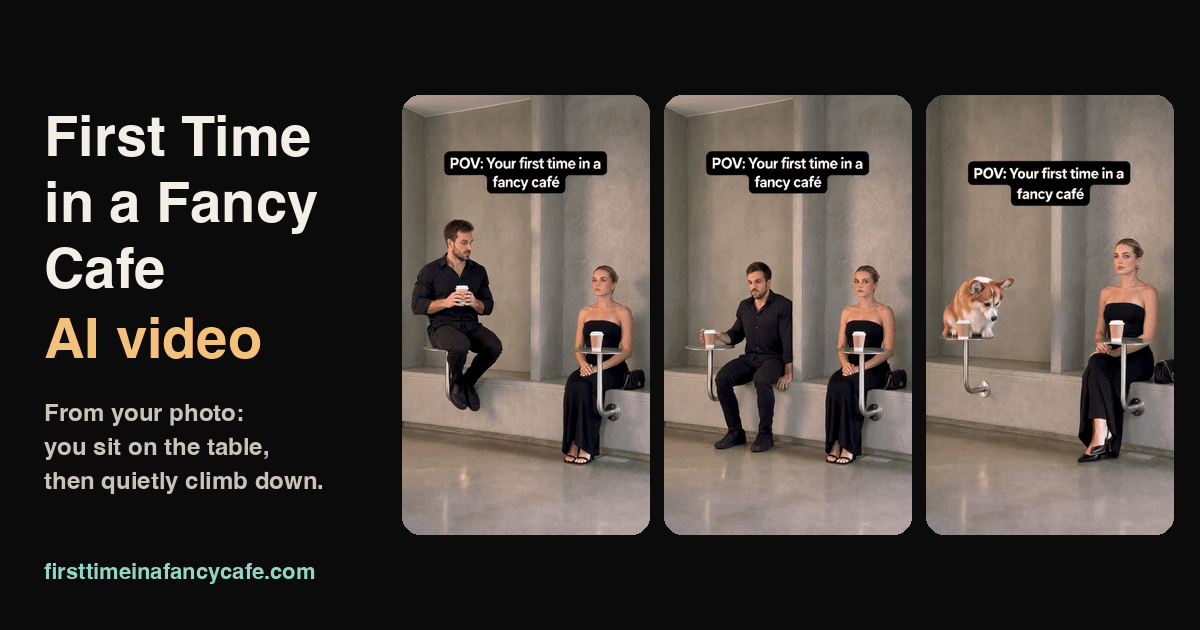
About this app
First Time in a Fancy Cafe AI (Fancy Cafe AI) is a web-based generative video tool that takes a single photo of you, a friend, or even your pet and produces a 10–15-second vertical 9:16 clip recreating the viral “POV: your first time in a fancy cafe” TikTok trend. Instead of pasting your face onto the original clip, the AI — built on Seedance 2.0 — generates an entirely new video: you perch awkwardly on a tiny concrete cafe table like it’s a stool, a guest walks in and sits correctly on the bench, and you quietly slide down as if nothing happened. You can choose to be the table-sitter, the walking-in guest, or cast both roles with two photos. Pets work too, and the output includes an original upbeat house beat with soft cafe ambience so TikTok won’t mute it, plus no watermark and a 2–5 minute turnaround. The site offers pay-per-video pricing from €3.99, credit packs (60 credits for €9.99, non-expiring), a €14.90/month subscription option, Stripe checkout with Apple Pay and Google Pa...
Key features
- 1One-photo, no-prompt generation of a 10–15s vertical 9:16 clip recreating the fancy cafe trend.
- 2Two-person casting (on the table + walking in) and pet support from one or two photos.
- 3No watermark, original royalty-free house beat with cafe ambience so TikTok won't mute.
- 4Pay-per-video from €3.99, non-expiring credit packs, or €14.90/month subscription via Stripe.
Target customer profile
Drawn from the product itself, not from a survey.
Demographic
TikTok and Reels creators aged 18–30 chasing viral trends
Pain points
CapCut templates feel stale; face-paste tools look cheap and get flagged
Primary needs
Fast, watermark-free trend videos from their own photos
Demographic
Casual social media users who want in on memes without editing skills
Pain points
No video editing experience; confused by prompt-based AI tools
Primary needs
One-photo, no-prompt generation with clear pricing
Demographic
Pet owners and friend groups making shareable content
Pain points
Most meme apps only accept solo human faces
Primary needs
Two-person casting and pet support for group posts
Demographic
Small social media managers and meme page admins
Pain points
Subscription fatigue and unreliable output from cheap AI tools
Primary needs
Pay-per-video or non-expiring credits with refunds on failures
Scout Review
Written by AI from measured evidence, scored out of 100.
Fancy Cafe AI is a focused, well-executed trend tool: one photo in, a 10–15s vertical clip out, no prompt, no watermark, from €3.99. The design is confident and the configurator works as a real product preview. Security is quietly excellent (12/12 headers, Stripe, 30-day photo deletion) and accessibility hits 100/100 on automated checks. The weak spots are density and contrast in the lower sections, a 4.2s mobile LCP, and a growth story that leans hard on a single trend. For creators chasing the fancy cafe meme, it's a genuinely good fit — just read the FAQ before you assume the refund rules are obvious.
Measure by measure
Usability
68Upload needs no sign-in, the configurator is above the fold and a persistent nav CTA keeps the tool one click away. QR-to-phone upload is a nice touch. Long small-type FAQ buries refund and limits rules users actually need.
Design
71Confident poster-like hero with a working configurator card, consistent gold-on-black palette and clear numbered steps. Held back by low-contrast grey metadata, a dense spec line and an inconsistent '€99' price format.
Speed
74Desktop Lighthouse 97/100 and mobile 86/100 with CLS 0 and TBT 34ms — snappy and stable. The 4.2s mobile LCP is the one real drag, likely a heavy hero asset.
Security
78Full 12/12 header checklist: HSTS, CSP, frame protection, Referrer and Permissions policies, SPF and DMARC. Stripe handles all payments. Photos auto-deleted in 30 days and not used for training. No SOC 2/ISO page found.
Accessibility
80Lighthouse accessibility 100/100 with only one flagged audit on visible-text/accessible-name mismatch. No WCAG statement or multi-language support found in collected evidence, so the automated score is the main signal.
Growth
58Rides a specific, named TikTok trend with a real wedge — two-person casting, pets, no watermark, royalty-free beat, pay-per-video from €3.99. Trend-chasing caps the ceiling; the non-expiring credits and multi-effect roadmap are the durable part.
Improvement areas
- Mobile LCP 4.2s — compress or lazy-load the hero asset to bring it under 2.5s.
- Low-contrast grey metadata and dense FAQ copy — raise contrast and add scannable summaries.
- No WCAG/accessibility statement and one failing accessible-name audit.
- Inconsistent price formatting ('€99' vs '€14.90'/'€9.99') looks like a typo.
Design & Usability
The design is the strongest part of the product: a poster-like condensed headline, a gold-on-black palette used sparingly and consistently, and a hero configurator that actually works as a product preview rather than a decorative mockup. The numbered steps and pill selectors make the flow obvious. Usability follows the same logic — no sign-in to upload, a QR code to move a phone photo to desktop, and 'Make one like this' links on results so users can start from an example. The weak spots are density and contrast: the hero spec line packs too many claims into one run, and the FAQ's small grey type buries the refund and limits rules users most need to read.
Speed & Security
Speed is genuinely good on desktop (Lighthouse 97/100) and solid on mobile (86/100) with CLS 0 and TBT 34ms — the only real drag is a 4.2s mobile LCP, almost certainly a heavy hero asset. Security is the quiet overachiever: 12/12 on the header checklist including HSTS, CSP, frame protection, SPF and DMARC, with Stripe handling all payments so no card data touches the app. The privacy story is also concrete — photos auto-deleted within 30 days (2 days if no video is made) and never used for training. No SOC 2 or ISO page, but for a trend-video tool that's a reasonable trade.
Accessibility & Growth
Accessibility scores 100/100 on Lighthouse with a single flagged audit on accessible-name matching — impressive for an indie tool, though there's no WCAG statement or multi-language support to back it up. Growth is the more interesting question: the product rides a specific, named TikTok trend with a real wedge — two-person casting, pet support, no watermark, a royalty-free house beat so TikTok won't mute, and pay-per-video from €3.99 with non-expiring credits. That's a genuine differentiator against CapCut templates and prompt-based tools like Pika. The honest limit is that trend-chasing caps the ceiling; the non-expiring credits and multi-effect roadmap are the durable part if the trend fades.
Conclusion
If you're a TikTok or Reels creator who wants in on the fancy cafe trend without editing skills or a CapCut template hunt, this does exactly what it says: one photo, a few minutes, a watermark-free vertical clip with a royalty-free beat. The two-person casting and pet support are real advantages over face-paste tools. The caveats are honest — it's trend-dependent, the mobile LCP is slow, and the FAQ needs a read. But at €3.99 for a single video with non-expiring credits and refunds on failures, the risk is low and the payoff is a video that actually looks like the trend.
Suggestions for improvement
- Fix the mobile LCP — 4.2s is the one real speed drag; compress or lazy-load the hero asset.
- Raise contrast on the small grey metadata under results thumbnails and in the FAQ.
- Add a WCAG/accessibility statement and fix the one failing accessible-name audit.
- Standardize price formatting — '€99' next to '€14.90' and '€9.99' looks like a typo.
Alternatives comparison
Named competitors, point by point. Nobody paid to appear here or to be left out.
 Fancy Cafe AI |  CapCut |  Viggle AI |  Pika | |
|---|---|---|---|---|
| Photo-to-video generation | Yes — one or two photos, no prompt, Seedance 2.0 | Template-based; requires manual editing and trend template hunting | Yes — animates characters from photos, but focused on character motion | Yes — image-to-video, but requires prompt crafting |
| Trend-specific template | Built-in fancy cafe trend with on-table / walking-in / both roles | Community meme templates including fancy cafe, but manual | Meme motion mimicry, not trend-specific templates | No trend-specific templates |
| Two-person casting | Yes — cast both roles with two photos | Possible via manual editing | Limited; character-focused | Not a native feature |
| Pet support | Yes — cats and dogs supported | Possible via manual editing | Not a stated feature | Not a stated feature |
| Watermark | No watermark | Free tier watermarks; paid removes | Watermark on free tier | Watermark on free tier |
| Pricing model | Pay-per-video from €3.99; non-expiring credits; €14.90/mo subscription | Freemium with Pro subscription | Freemium with subscription tiers | Freemium with credit-based subscription |
| Original royalty-free audio | Yes — original house beat + cafe ambience, no copyright flags | Licensed music library; trend audio varies | Not a stated feature | Not a stated feature |
CapCut
Popular mobile/desktop editor with community meme templates, including fancy cafe trend templates, but requires manual editing and trend-specific template hunting.
Viggle AI
AI video tool that animates characters from photos and can mimic meme motions, though it focuses on character animation rather than photo-to-scene meme generation.
Pika
Generative AI video platform for creating short clips from images or text prompts, but lacks trend-specific templates and requires more prompt crafting.
Comparing options? See Fancy Cafe AI alternatives, scored side by side
More AI Generations apps
View all AI Generations
Uni-1 by Luma AI
92Uni-1 is an advanced multimodal text-to-image AI model th...

Gerty
91Private, local AI assistant for Mac that runs offline

LTX 2.3 AI Video Generator
91Fast, open-source AI video generator with 4K support, mul...

DemoVexa
90Turn your code into professional product demo videos with AI-generated scripts, animated UI, and natural voiceovers.

AI Vocals Generator
89Add AI singers or rappers to your own beat, get two takes...

Voqusa
89Transcribe social media video and audio links into text (free signup, 5 free credits, then pay-as-you-go)

All of Us
89Add deceased loved ones to photos with AI and see free pr...

PodRescale
89Every episode becomes two weeks of posts. In your voice. Posted for you.

Pixelimg
88A free online AI-powered tool that instantly converts ima...

Cantoro
88Custom AI songs with a name, heard free before paying $4....

tradutor de mangá com IA
88O tradutor de mangá com IA traduz capítulos em lote, personaliza textos e oferece edição visual para estúdios.

IraVoice
88Private on-device dictation for Apple-silicon Macs.


A platform dedicated to providing unbiased reviews of newly launched applications, analyzing everything from their features to their full potential.
info@scoutforge.net© 2026 Scoutforge. All rights reserved.
