Cycling through all six. Tap any point to stop.
Measured on six things
Turn sketches into realistic AI images instantly online f...
Growth
3211-month-old domain with Twitter mention only; zero reviews, community signals, or traction found across major platforms.
Screenshots
1 / 1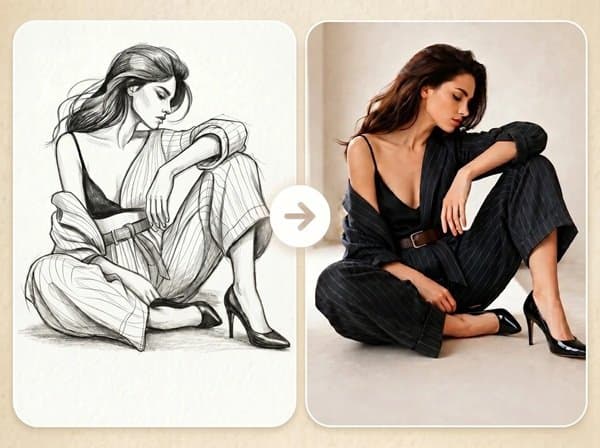
About this app
Fast Image AI's Sketch to Image tool is a game-changer for anyone who's ever had a rough idea but lacked the skills or time to fully render it. I've tried many AI image generators, but this one stands out for its commitment to preserving the original sketch's structure while letting you control the final style via prompts. It feels like having a personal illustrator who understands your vision. The interface is incredibly intuitive—just upload your drawing, drop a prompt, and seconds later you have a high-quality, realistic image. Whether it's concept art, product design, character concepts, or interior visuals, the AI handles it all. Plus, it's free for basic use, which is amazing for exploring ideas without commitment. The commercial license option makes it viable for professional work too. If you're tired of starting from a blank canvas or spending hours on details, this tool is a must-try.
Key features
- 1Upload sketch and preserve original structure, shape, and composition while AI adds details
- 2Control final style, color, lighting, and background via text prompts
- 3Free basic use with commercial license option for professional workflows
Target customer profile
Drawn from the product itself, not from a survey.
Demographic
Concept artists and illustrators
Pain points
Need to quickly visualize rough sketches into polished art; time-consuming manual rendering
Primary needs
Fast turnaround, style control, structure preservation
Demographic
Product designers and architects
Pain points
Difficulty communicating early design concepts; need rapid prototyping visualizations
Primary needs
Convert hand-drawn drafts into realistic product or architectural visuals
Demographic
Hobbyist creators and social media enthusiasts
Pain points
No advanced design skills; want to bring simple drawing ideas to life for fun or content
Primary needs
Free, easy-to-use tool with instant results
Demographic
Game developers and character designers
Pain points
Need to generate multiple character concepts quickly; limited budget for professional artists
Primary needs
AI-generated character images from sketches; consistent art quality
Scout Review
Written by AI from measured evidence, scored out of 100.
Fast Image AI Sketch to Image offers a genuinely useful niche feature—structure-preserving sketch-to-image conversion with prompt-based style control—at a claimed free tier that appeals to concept artists, product designers, and hobbyists. The interface is simple and the core promise (rough sketch to polished visual in seconds) is delivered in the marketing copy. However, the young product shows typical early-stage rough edges in design polish, performance, and especially visibility. It sits behind more mature competitors on community and documentation depth while matching them on the basic sketch-to-image workflow.
Measure by measure
Usability
58Simple 5-step flow claimed on site with free access, but no example sketch, confusing $0 pricing display, and low-contrast nav hurt first impressions.
Design
55Average visual execution with clear before/after hierarchy but noisy low-res hero gradient, permanent CTA spinner, and narrow example aesthetic.
Speed
55Lighthouse scores 61 mobile / 51 desktop with very slow LCP at 22.5s; no user complaints or benchmarks surfaced.
Security
48Basic HTTPS + SPF/DMARC present but missing HSTS, CSP, and all advanced headers; zero compliance claims or audits found.
Accessibility
78Strong 96 Lighthouse score but one contrast failure; no WCAG statement, keyboard docs, or language support discovered.
Growth
3211-month-old domain with Twitter mention only; zero reviews, community signals, or traction found across major platforms.
Improvement areas
- Slow page performance (LCP 22.5s) and missing security headers need attention
- Pricing display shows $0 across all tiers; real credit-based plans exist elsewhere
- Zero community traction or reviews after nearly a year; needs visibility push
Design & Usability
The landing page delivers a clean upload card and clear before/after examples with good visual hierarchy, yet the noisy hero gradient, permanent spinner on the main CTA, and low-contrast navigation create a slightly unfinished feel. Usability is straightforward on paper—upload, prompt, generate—but the absence of example sketches, confusing all-$0 pricing display, and lack of drag-and-drop hints make the first-time experience less welcoming than claimed. The tool positions itself as beginner-friendly for concept artists and hobbyists, which the simple flow supports, but small polish issues hold it back from feeling polished.
Speed & Security
Performance is middling per Lighthouse data (61 mobile, 51 desktop) driven by a painfully slow 22.5s LCP, though no widespread user complaints about lag appear in searches. Security is basic: HTTPS and SPF/DMARC are present while HSTS, CSP, and most protective headers are absent, with no SOC 2, audits, or transparency reports located. For a young freemium AI image tool this profile is typical—functional but not enterprise-grade. The credit-based pricing mentioned in third-party sources suggests the site itself may not reflect current billing reality.
Accessibility & Growth
Accessibility scores well on automated checks (96/100) despite one contrast issue, but the lack of any WCAG statement, keyboard navigation details, or multi-language support keeps it from standing out. Growth is the weakest area: an 11-month-old domain with essentially zero public reviews, community presence, or traction signals across Reddit, Product Hunt, or G2. The product is still early-stage, so trajectory matters more than absolute numbers, yet current footprint remains minimal compared with established alternatives like Midjourney or Stable Diffusion.
Conclusion
For users who want quick, structure-faithful results without technical setup, this tool is worth testing while the free tier lasts. Just don't expect the depth, speed, or ecosystem of category leaders yet.
Suggestions for improvement
- Add real example sketches with drag-and-drop hints on the upload card to reduce first-use friction.
- Fix the permanent spinner on the primary CTA and clean up the noisy hero gradient for better first impressions.
- Publish actual pricing tiers and a clear privacy/data policy instead of placeholder $0 plans.
- Create a public changelog or simple docs page to build trust and help early users.
Alternatives comparison
Named competitors, point by point. Nobody paid to appear here or to be left out.
 Fast Image AI Sketch to Image |  Stable Diffusion (with img2img) |  DALL-E 3 by OpenAI |  Midjourney | |
|---|---|---|---|---|
| Sketch structure preservation | Strong emphasis on keeping original shape and composition | High control via img2img but requires technical setup | Supports image prompts but less focus on exact structure | Style customization strong but sketch-to-image not primary |
| Free tier availability | Basic use free (site claims $0 plans) | Open-source self-hosted free; hosted plans paid | Limited free via ChatGPT; paid for higher volume | Paid subscription only (Discord-based) |
| Commercial license | Available on paid plans | Depends on hosting; self-hosted often permissive | Allowed under OpenAI terms for most uses | Allowed on paid plans |
Stable Diffusion (with img2img)
Open-source AI model that can be used for sketch-to-image with more control but requires technical setup.
DALL-E 3 by OpenAI
Generates images from text, but can also use image prompts; less focus on preserving sketch structure.
Midjourney
Popular AI art generator with strong style customization; sketch-to-image not a primary feature.
Comparing options? See Fast Image AI Sketch to Image alternatives, scored side by side
Sources
What the review was written against. A verdict with no sources is an opinion.
More AI Generations apps
View all AI Generations
Uni-1 by Luma AI
92Uni-1 is an advanced multimodal text-to-image AI model th...

Gerty
91Private, local AI assistant for Mac that runs offline

LTX 2.3 AI Video Generator
91Fast, open-source AI video generator with 4K support, mul...

DemoVexa
90Turn your code into professional product demo videos with AI-generated scripts, animated UI, and natural voiceovers.

AI Vocals Generator
89Add AI singers or rappers to your own beat, get two takes...

Voqusa
89Transcribe social media video and audio links into text (free signup, 5 free credits, then pay-as-you-go)

All of Us
89Add deceased loved ones to photos with AI and see free pr...

PodRescale
89Every episode becomes two weeks of posts. In your voice. Posted for you.

Pixelimg
88A free online AI-powered tool that instantly converts ima...

Cantoro
88Custom AI songs with a name, heard free before paying $4....

tradutor de mangá com IA
88O tradutor de mangá com IA traduz capítulos em lote, personaliza textos e oferece edição visual para estúdios.

IraVoice
88Private on-device dictation for Apple-silicon Macs.


A platform dedicated to providing unbiased reviews of newly launched applications, analyzing everything from their features to their full potential.
info@scoutforge.net© 2026 Scoutforge. All rights reserved.
