Cycling through all six. Tap any point to stop.
Measured on six things
Free tool to compute weighted average grades, GPA, CGPA, ...
Security
52HTTPS and HSTS in place, but header probe scores 5/12: no CSP, frame protection, or Referrer-Policy, and DMARC is missing. No published security or privacy depth.
Screenshots
1 / 1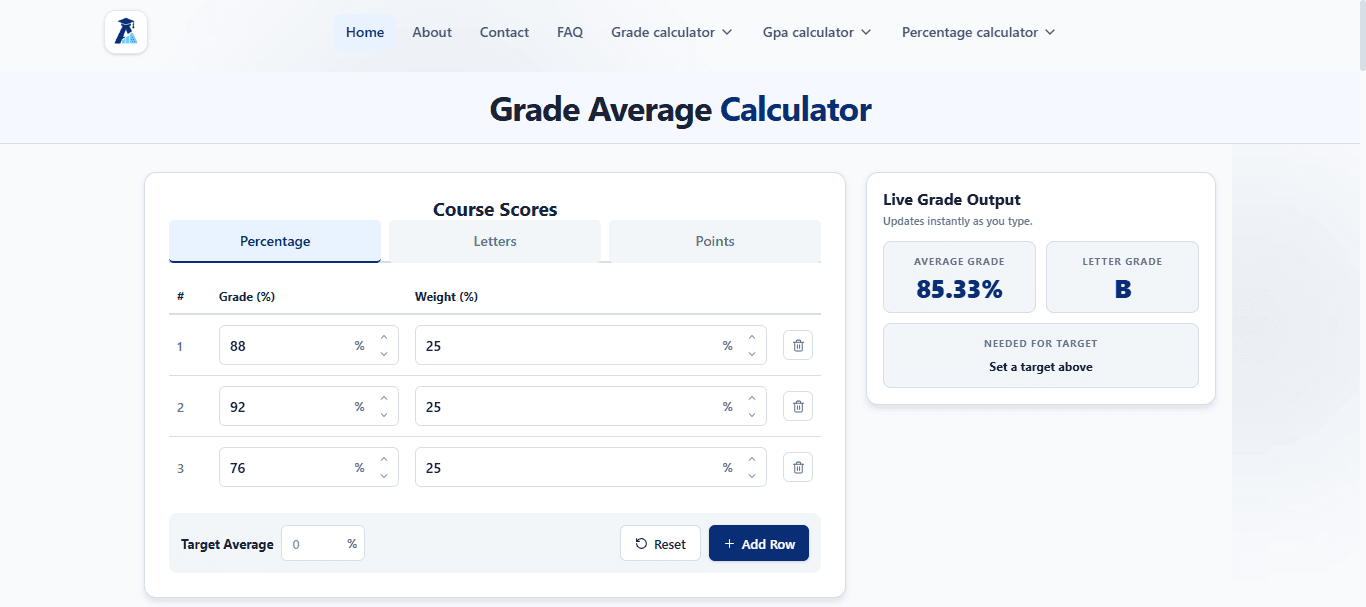
About this app
Grade Average Calculator is a free web-based tool that helps students and educators quickly compute average grades from quizzes, assignments, tests, and exams. It supports both simple and weighted averages, with live updates as you type. The tool also includes related calculators for GPA, CGPA, semester grades, final grades, and percentage conversions. Designed for ease of use, it allows you to enter scores in percentage, letter, or points format, set weights according to your syllabus, and add or remove rows as needed. The Target Average feature helps you plan what you need on future assessments. With no sign-up required, it's a handy companion for academic planning and grade tracking.
Key features
- 1Simple and weighted average calculation with live updates as you type.
- 2Target Average planner estimating the score needed on a future assessment.
- 3Related calculators for GPA, CGPA, semester grades, final grades, and percentages.
Target customer profile
Drawn from the product itself, not from a survey.
Demographic
High school and college students
Pain points
Struggling to manually calculate weighted grades and predict needed scores for target averages
Primary needs
Quick, accurate grade calculation with weighted categories and target planning
Demographic
Teachers and professors
Pain points
Time-consuming grade averaging and explaining grade calculations to students
Primary needs
Easy-to-use tool for demonstrating grade math and helping students understand their standing
Demographic
Parents of students
Pain points
Difficulty understanding their child's grades and how different assessments affect overall performance
Primary needs
Simple interface to compute averages and explore scenarios for academic support
Scout Review
Written by AI from measured evidence, scored out of 100.
Grade Average Calculator is a fast, free, no-sign-up tool that does one job well: compute simple and weighted averages with live updates and a Target Average planner. The site is clean, the instructions are thorough, and the performance is excellent. Where it falls short is differentiation and security hygiene — the header configuration is thin, accessibility has two real failures, and the product is functionally close to existing free calculators. It is a solid utility, not yet a standout.
Measure by measure
Usability
68Zero-friction: no sign-up, pre-filled samples, live updates, clear step-by-step instructions and worked formula examples. Related calculators linked, but no dedicated help center.
Design
58Clean single-column calculator with a live output panel and consistent spacing, but visually generic with minimal branding and no custom illustration or demo media.
Speed
88Lighthouse 100/100 on both mobile and desktop, LCP 935ms, CLS 0, TBT 31ms. Genuinely fast, lightweight page with no heavy framework overhead.
Security
52HTTPS and HSTS in place, but header probe scores 5/12: no CSP, frame protection, or Referrer-Policy, and DMARC is missing. No published security or privacy depth.
Accessibility
70Lighthouse accessibility 93/100 with two real failures: unnamed buttons and insufficient color contrast. No accessibility statement or multi-language support found.
Growth
56Real, recurring student need with a Target Average planning hook and a calculator cluster, but the category is crowded with free tools and the wedge is thin.
Improvement areas
- Thin HTTP security headers (no CSP, frame protection, Referrer-Policy, or DMARC).
- Two Lighthouse accessibility failures: unnamed buttons and insufficient color contrast.
- Limited differentiation from existing free grade calculators; no help center or docs site.
Design & Usability
The design is competent and unremarkable: a single-column calculator with a live output panel, consistent spacing, and a text logo. It works, but nothing signals craft or brand. Usability is the stronger half — no sign-up, pre-filled sample values, live updates as you type, and a genuinely useful 'How to use' section with worked weighted-average examples. Related calculators are linked from the homepage, though there is no dedicated help center or docs site. For a free utility aimed at students, this is above-average execution on the flow that matters most: land, enter scores, read result.
Speed & Security
Speed is the standout: Lighthouse 100/100 on both mobile and desktop, LCP 935ms, CLS 0, TBT 31ms. The page is lightweight and snappy, exactly what a calculator should be. Security is the weak spot. HTTPS and HSTS are enforced, but the header probe scores only 5/12 — no CSP, no frame protection, no X-Content-Type-Options, no Referrer-Policy, no Permissions-Policy, and DMARC is missing. There is no published security page, audit, or privacy-policy depth to inspect. For a no-login tool handling no sensitive data the risk is modest, but the hygiene is thin.
Accessibility & Growth
Accessibility lands at 93/100 on Lighthouse, with two concrete failures: buttons without accessible names and insufficient color contrast. There is no accessibility statement and no multi-language support. Growth is a judgement on the idea: the problem is real and recurring, the Target Average planning field is a genuine differentiator, and the cluster of related calculators (GPA, CGPA, semester, final grade) gives users a reason to stay. But the category is crowded with free tools like GradeCalc.info, and the wedge is a feature rather than a moat. The domain is roughly three months old with only a Facebook profile listed — early, not disqualifying.
Conclusion
If you need a quick weighted-average check before an exam, this does the job without friction and loads instantly. If you are choosing between free grade calculators, the Target Average field and the related-calculator cluster are the reasons to pick this one. It is early, competent, and worth bookmarking — just do not expect it to replace your institution's official grade policy.
Suggestions for improvement
- Add a Content-Security-Policy, X-Frame-Options, Referrer-Policy, and DMARC record to close the obvious header gaps.
- Fix the two Lighthouse accessibility failures: give every button an accessible name and raise text contrast to WCAG AA.
- Publish a short privacy policy and an accessibility statement to build trust with schools and parents.
- Differentiate harder: expand the Target Average planner into a full 'what do I need on the final' scenario tool with saved/shareable links.
Alternatives comparison
Named competitors, point by point. Nobody paid to appear here or to be left out.
 Grade Average Calculator Grade Average Calculator |  GradeCalc.info GradeCalc.info | |
|---|---|---|
| Weighted average calculation | Yes — per-row weights with live output | Yes — weighted categories supported |
| Target Average / needed-score planning | Yes — Target Average field estimates needed score | Not a headline feature |
| Input formats (percentage / letter / points) | Percentage, Letters, Points with preset conversions | Numeric and letter grades |
| Related academic calculators | GPA, CGPA, semester, final grade, percentage | GPA and grade calculators |
| Sign-up required | No | No |
| Measured page performance | Lighthouse 100/100 mobile and desktop | Not measured in this review |
Comparing options? See Grade Average Calculator alternatives, scored side by side
More Education apps
View all Education
The Stack Newsletter
92A weekly newsletter delivering curated tech jobs, intervi...

SheetScroll
90> You play; SheetScroll turns the page. It listens through the microphone or a MIDI piano and holds the page until it's sure where you are.

English Test Coach
89English Test Coach checks your IELTS essays and letters, gives an estimated band score across all four criteria, and tells you exactly what to revise next.

Tracé slides
89Interactive math & physics slides with live graphs and an...

Startup Science
88A unified platform replacing 12-20 disconnected tools for...

TranscriptYou
88Free YouTube transcript generator with timestamps and AI ...

Cromagnon
88Free, private browser-based PDF, Word, Excel, and study t...

CertWorthIt
87Data-driven tool revealing which certifications actually ...

RBQ Exam
87Online practice for the RBQ contractor licence exams in Québec: original questions, timed mock exams and lessons, in French or English.

Coloring Pages Pro
87A massive collection of free printable coloring pages for...

HireVue Practice
85AI-powered HireVue practice with timed mock interviews, role-specific questions, transcripts, scoring, and actionable feedback.

Case Cub
85AI-powered law school study platform with 20,000+ case br...


A platform dedicated to providing unbiased reviews of newly launched applications, analyzing everything from their features to their full potential.
info@scoutforge.net© 2026 Scoutforge. All rights reserved.
