Cycling through all six. Tap any point to stop.
Measured on six things
Paste HTML, open a file or load page source. Live preview with console, markup checks, format/minify. Free, no signup.
Growth
58A real, specific wedge — zero-friction HTML preview with console, problems and quoted-printable decoding for devs and email builders — but CodePen and JSFiddle already own the playground mindshare and this is a single-file viewer with no collaboration hook.
Screenshots
1 / 1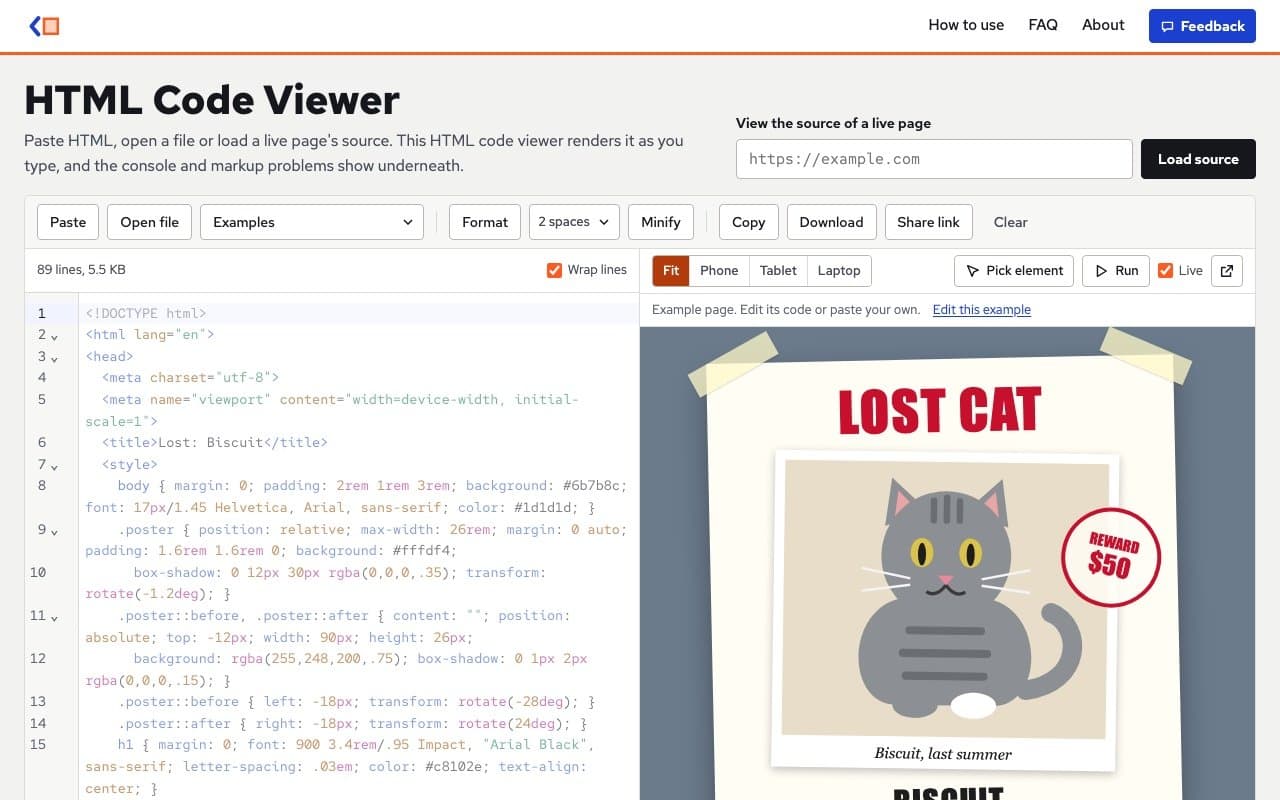
About this app
HTML Code Viewer is a free browser tool to paste HTML, open files up to 10 MB, or fetch a live page's source. It renders as you type, shows console output and markup problems, formats or minifies with Prettier, and runs previews in a sandbox. No account, ads or usage limit; code stays in your browser (share links use the URL hash only).
Key features
- 1Live HTML rendering as you type, with sandboxed preview and Phone/Tablet/Laptop widths.
- 2Console, Problems and Page info tabs that flag unclosed tags, duplicate ids, missing alt, relative paths and quoted-printable email source.
- 3Paste, open files up to 10 MB, or fetch a live page's source (5 MB / 12 s cap), with Prettier formatting and minify that keeps Outlook comments.
Target customer profile
Drawn from the product itself, not from a survey.
Demographic
Front-end developers and web designers
Pain points
Need fast previews without switching to a full IDE
Primary needs
Live HTML rendering, error highlighting, quick formatting
Demographic
Email marketers and newsletter builders
Pain points
HTML email templates break in different clients
Primary needs
Preview email HTML, catch broken markup, decode quoted-printable
Scout Review
Written by AI from measured evidence, scored out of 100.
HTML Code Viewer is a focused, well-built browser tool that does one thing properly: paste, open or fetch HTML and see it render with console output and markup problems underneath. The split editor/preview is the hero, the toolbar is disciplined, and the engineering details — sandboxed previews, loop protection, encoding detection, quoted-printable decoding, Prettier formatting that preserves Outlook comments — show someone who actually uses this stuff. Speed is excellent and security headers are thorough. The weak points are a repetitive, small-print homepage, missing SPF/DMARC, an unaddressed touch-target audit, and a growth story that leans on convenience rather than community. For a developer or email builder who wants a fast, private, no-account preview, it's a genuinely good tool.
Measure by measure
Usability
74Paste, open file, or load a URL are all above the fold, and 12 named examples get you to value in one click. Console, Problems and Page info tabs plus a shortcut bar make it genuinely usable without docs.
Design
71Split editor/preview is the hero, with a working demo rendered before any copy is read. Toolbars are tidy and consistent, but small grey body text and repetitive 'the HTML code viewer' phrasing drag the lower page down.
Speed
88Lighthouse mobile 96 and desktop 97, with LCP under a second and near-zero layout shift. The app also pauses live preview above ~400 KB and kills infinite loops after a second, so it stays snappy under load.
Security
76Full header suite present — HSTS, CSP, frame protection, Referrer and Permissions policies — for 10/12 checklist points. Code stays client-side and previews are sandboxed, but SPF and DMARC are missing and no audit is published.
Accessibility
80Lighthouse accessibility 97/100 with only touch-target sizing failing. Keyboard shortcuts and responsive preview widths are solid, but there's no published WCAG statement and no multi-language support.
Growth
58A real, specific wedge — zero-friction HTML preview with console, problems and quoted-printable decoding for devs and email builders — but CodePen and JSFiddle already own the playground mindshare and this is a single-file viewer with no collaboration hook.
Improvement areas
- No SPF or DMARC records — email authentication is the one security gap in an otherwise strong header suite.
- Touch-target sizing fails the only accessibility audit Lighthouse flags; no WCAG statement or multi-language support.
- Homepage copy is repetitive and small-print; Clear sits unseparated at the end of the toolbar.
Design & Usability
The homepage puts the product where the hero image usually goes: a split editor and live preview with a 'Lost Cat' poster already rendered, so you can use it before reading a word. The toolbar is a single tidy row of consistent controls, and the editor has line numbers, syntax tinting and a status line that reads like a real dev tool rather than a textarea. Usability follows the same logic — Paste, Open file and Load source are all above the fold, twelve named examples give instant starting points, and the Console/Problems/Page info tabs plus a shortcut bar mean you rarely need documentation. The weak spots are cosmetic but real: small grey body copy in the lower sections, the phrase 'the HTML code viewer' repeated dozens of times, and a Clear button sitting at the end of the toolbar with no visual separation from the routine actions.
Speed & Security
Speed is the standout. Lighthouse scores 96 mobile and 97 desktop with LCP at 949ms and CLS at 0.022, and the app is engineered to stay fast under load: live preview pauses above roughly 400 KB, endless loops are stopped after a second, and Load source is capped at 5 MB and 12 seconds. Security is strong on the transport and browser side — HTTPS enforced, HSTS, CSP, frame protection, X-Content-Type-Options, Referrer-Policy and Permissions-Policy all present, 10 of 12 checklist points — and the architecture is privacy-friendly, with code staying in the browser and previews sandboxed. The gap is email authentication: no SPF and no DMARC records, so the domain can be spoofed, and there's no published audit or security page to point to.
Accessibility & Growth
Accessibility scores 97/100 on Lighthouse with a single failing audit for touch-target sizing, and the app backs that up with keyboard shortcuts, responsive preview widths and a generally clean structure — though there's no WCAG statement and no multi-language support. Growth is the harder call. The product names a real, specific problem (fast HTML preview without an IDE or account) and serves two concrete segments: front-end devs who want instant rendering and email marketers who need to catch broken markup and decode quoted-printable source. That's a genuine wedge. But the alternatives — CodePen and JSFiddle — own the category through community and collaboration, and this is a single-file viewer with no account, no sharing graph and no reason to return beyond convenience. It can win a bookmark; it's harder to see it winning a habit.
Conclusion
If you live in a full IDE, this won't replace it — but for the ten-second 'does this email template break' or 'what does this fetched page's source actually look like' moment, it's faster than spinning up anything else. The lack of an account is the feature: nothing to sign up for, nothing stored server-side, share links that live in the URL hash. The trade-off is that there's no collaboration, no saved library, no community to learn from. It's a sharp utility, not a platform, and it seems comfortable with that.
Suggestions for improvement
- Publish SPF and DMARC records for the domain — the header suite is strong but email authentication is the obvious gap.
- Fix the touch-target sizing flagged by Lighthouse; it's the only accessibility audit failing.
- Tighten the homepage copy: cut the repeated 'the HTML code viewer' phrasing and raise the body text size and contrast.
- Separate the Clear button visually from routine toolbar actions, or add a confirm/undo affordance to prevent accidental data loss.
Alternatives comparison
Named competitors, point by point. Nobody paid to appear here or to be left out.
 HTML Code Viewer |  CodePen | JSFiddle | |
|---|---|---|---|
| Live HTML preview | Yes — renders as you type, sandboxed, with Fit/Phone/Tablet/Laptop widths | Yes — live preview of HTML/CSS/JS in a collaborative pen | Yes — live result pane for HTML/CSS/JS snippets |
| Account required | No — no account, no ads, no usage limit | Optional for saving; account needed to keep and share pens | Optional; account needed to save fiddles long-term |
| Markup error / console diagnostics | Yes — Problems tab flags unclosed tags, duplicate ids, missing alt, relative paths; Console captures logs and errors | Console available via browser devtools; no built-in markup linter | Console output pane; no built-in markup linter |
| Fetch a live page's source | Yes — Load source, 5 MB / 12 s cap, status code shown, scripts not executed | No — you paste or write code yourself | No — you paste or write code yourself |
| Collaboration / community | None — share links use the URL hash only; no accounts or forks | Strong — public pens, forks, comments, community feed | Moderate — shareable fiddles, less community-centric than CodePen |
| Formatting / minify | Yes — Prettier format (preserves inline styles, <pre>) and minify that keeps Outlook conditional comments | Yes — built-in formatter for HTML/CSS/JS | Yes — Tidy/format button for HTML/CSS/JS |
CodePen
Collaborative front-end playground for HTML, CSS, and JavaScript with live preview and sharing.
JSFiddle
Online code editor for testing HTML, CSS, and JavaScript snippets with shareable results.
Comparing options? See HTML Code Viewer alternatives, scored side by side
More Development & Engineering apps
View all Development & Engineering
Vibe Coding Agent Skills
92A free, open-source platform offering 110 AI agent skills...

CreateMyCoin
92A no-code Solana token creator that deploys SPL tokens in...

CC Switch
91Open-source desktop app for switching AI coding providers...

TaxID
90Fast EU VAT validation API for developers, covering 27 EU...

DemoVexa
90Turn your code into professional product demo videos with AI-generated scripts, animated UI, and natural voiceovers.

FontPlop
89Browser-based font viewer & tester for TTF, OTF, WOFF, WO...

deed.page
89Permanent web hosting for AI agents, no human step

Webfetch
89Web scraping API that turns any URL into HTML, text, Mark...

Denpex
89AI-powered GPU failure diagnosis for distributed ML training

BeartIMAGE
88BeartIMAGE is a free, web-based image processing platform engineered for fast, bulk photo editing and conversion directly in your browser.

Claw Messenger
88Claw Messenger is an iMessage API service that gives AI a...

DataHabibi
88AI-powered Dubai real estate data platform with 12M+ DLD ...


A platform dedicated to providing unbiased reviews of newly launched applications, analyzing everything from their features to their full potential.
info@scoutforge.net© 2026 Scoutforge. All rights reserved.
