

A platform dedicated to providing unbiased reviews of newly launched applications, analyzing everything from their features to their full potential.
info@scoutforge.net© 2026 Scoutforge. All rights reserved.
A platform dedicated to providing unbiased reviews of newly launched applications, analyzing everything from their features to their full potential.
info@scoutforge.net© 2026 Scoutforge. All rights reserved.
A platform dedicated to providing unbiased reviews of newly launched applications, analyzing everything from their features to their full potential.
info@scoutforge.net© 2026 Scoutforge. All rights reserved.
Cycling through all six. Tap any point to stop.
Measured on six things
Professional self-hosted network monitoring for Windows a...
Standard desktop application accessibility (keyboard navigation, screen reader support likely present but unmentioned). Mobile push via dedicated Android app and cross-platform alerts (Telegram, SMS) improve reach. No explicit WCAG or advanced accessibility claims.
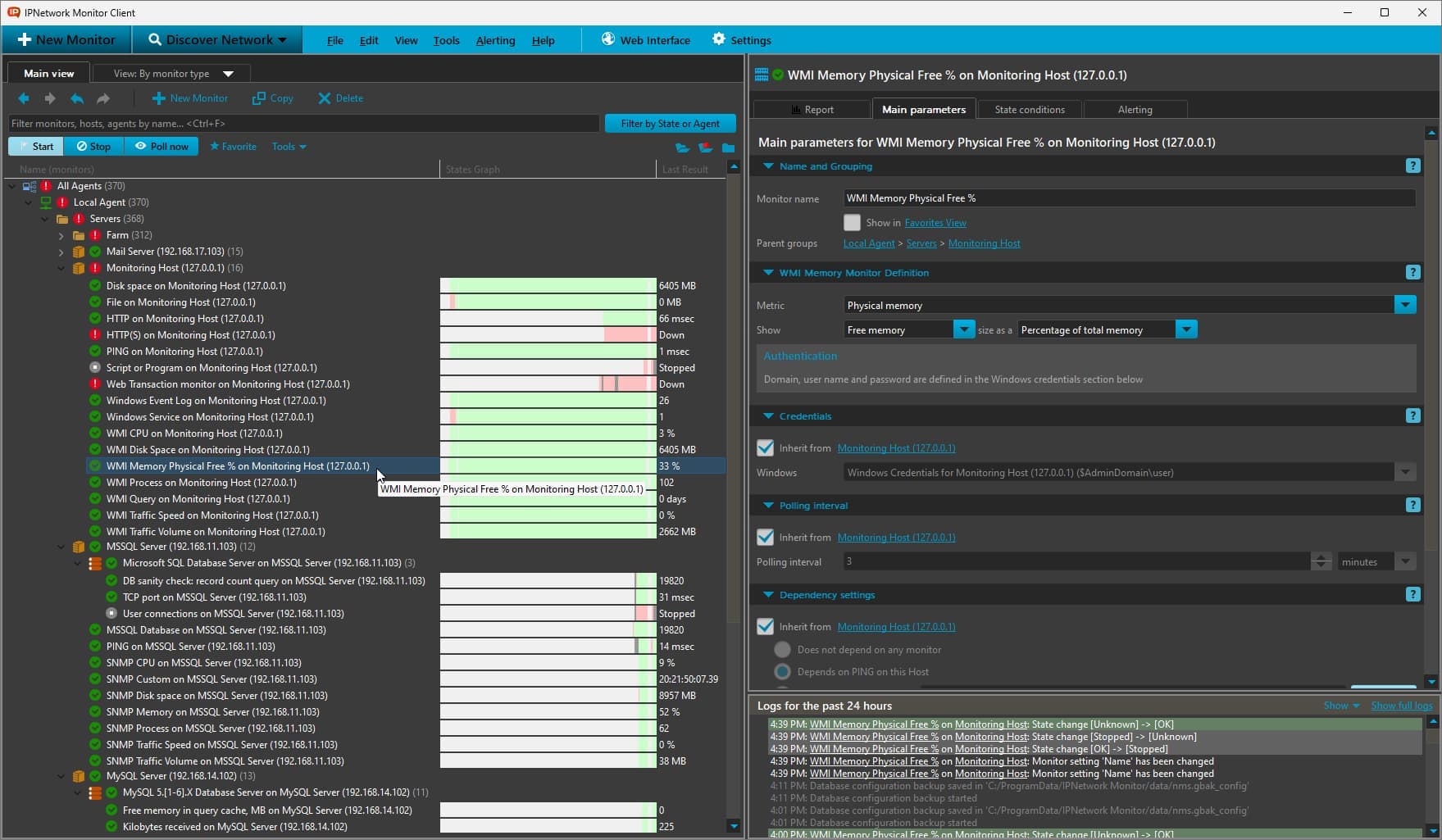
IPNetwork Monitor is a robust, on-premises network monitoring tool that gives you complete control over your infrastructure. Supporting Windows, Linux, and other OSes, it tracks uptime, device health via SNMP and WMI, and TCP/UDP connectivity with traffic analysis. With over 65 application templates, 40+ monitor types (PING, SNMP, WMI, custom scripts, etc.), and 10+ alert methods (email, push to Android, Telegram, SMS, scripts), it's built for IT pros who want 24/7 visibility without cloud dependencies. The 30-day fully featured trial is a great way to test drive, and the free forever tier with 50 monitors is perfect for small setups. I especially love the new MCP Server for AI integration—it lets you automate monitoring tasks via ChatGPT or Cursor, which is a game-changer for DevOps.
Drawn from the product itself, not from a survey.
Demographic
Small to medium business IT administrators
Pain points
Limited budget for SaaS subscriptions, need for data privacy, manual monitoring of mixed OS environments
Primary needs
Affordable, self-hosted solution with broad protocol support and quick setup
Written by AI from measured evidence, scored out of 100.
IPNetwork Monitor is a capable, privacy-first on-premises network monitoring solution that punches above its weight with broad protocol support, easy discovery/setup, diverse alerting, and innovative MCP Server for AI automation. It delivers excellent value through one-time pricing and a usable free tier, making it ideal for small-to-medium IT teams managing mixed Windows/Linux environments who want full data control without cloud costs or complexity. While the UI isn't the most modern, the functionality, security, and recent AI capabilities make it a smart choice over more expensive or labor-intensive alternatives.
Quick setup via Network Discovery and New Monitor Wizard. Over 65 templates and 40+ monitor types (PING, SNMP, WMI, SSH scripts, databases) make it approachable for IT admins. MCP Server adds natural language AI automation via ChatGPT/Cursor.
Clean, functional Windows-based desktop client with clear dashboards, reporting views, and wizard-driven setup. Network discovery and status visualizations are practical but lack modern web polish or highly customizable drag-and-drop maps seen in competitors.
Self-hosted on your hardware delivers responsive local performance for monitoring and alerts. Distributed agents support scaled environments without cloud latency. No specific benchmarks available, but on-prem nature avoids SaaS delays.
100% on-premises with zero data leaving your network. Credentials, metrics, and alerts stay local. Deployable behind firewalls or in VPCs. No third-party processing. MCP Server is disabled by default for controlled AI access.
Standard desktop application accessibility (keyboard navigation, screen reader support likely present but unmentioned). Mobile push via dedicated Android app and cross-platform alerts (Telegram, SMS) improve reach. No explicit WCAG or advanced accessibility claims.
Perpetual one-time licenses (starting ~$50 for 200 monitors) with generous 50-monitor free forever tier after 30-day full trial. MCP Server (Feb 2026) adds AI automation potential. Scalable to unlimited via Enterprise. Targets SMBs avoiding subscriptions.
IPNetwork Monitor delivers a no-nonsense, highly functional experience tailored for IT administrators who value control and privacy over SaaS polish. The combination of 40+ monitor types, network discovery, wizard-based configuration, and 65+ application templates makes initial deployment significantly faster than traditional open-source options like Nagios or Zabbix. The standout addition is the new MCP Server, which exposes 33 tools for AI agents (ChatGPT, Cursor, etc.) to create/update monitors, check status, analyze trends, and orchestrate recovery actions using natural language. This bridges traditional monitoring with modern DevOps automation in a self-hosted package. The desktop UI is straightforward and effective rather than beautiful, prioritizing clarity in reporting and real-time status over flashy visualizations.
Running entirely on your infrastructure, performance scales with your hardware and benefits from zero external latency for alerts and data access. Security is a major strength: all configurations, credentials, historical metrics, and alert rules remain behind your firewall with no cloud dependency or data exfiltration risk. This makes it particularly suitable for regulated industries or privacy-conscious teams. Alert options are broad (email with failover, Android push, Telegram/Slack, SMS via modem, custom SSH scripts, even SNMP SET for auto-remediation), giving true 24/7 coverage without relying on external services. The recent MCP integration maintains security by being opt-in and locally controlled.
Accessibility is adequate for a desktop monitoring tool, with mobile notifications and a dedicated Android app extending usability beyond the main console. Growth potential is strong due to the affordable perpetual licensing model and the free-forever 50-monitor tier, which lowers the barrier for small teams. Compared to alternatives, it offers a compelling balance of features and cost for SMB IT departments tired of subscription fatigue or complex open-source setups. The addition of AI-driven automation via MCP positions it well for future expansion into proactive, intelligent monitoring without sacrificing on-prem principles.
Conclusion
If you're done with SaaS monitoring bills and want something that stays in your network while still getting modern AI smarts, IPNetwork Monitor is worth the 30-day trial. The MCP integration might just be the future of on-prem tools.
Named competitors, point by point. Nobody paid to appear here or to be left out.
 IPNetwork Monitor IPNetwork Monitor |  PRTG Network Monitor PRTG Network Monitor |  Nagios Core Nagios Core |  Zabbix Zabbix | |
|---|---|---|---|---|
| Deployment & Pricing Model | Self-hosted, one-time perpetual license (~$50+), 50 monitors free forever | Self-hosted, sensor-based licensing (often subscription-like for scale), 100 sensors free | Open-source Core (free), paid XI for better UI; time investment high | Fully open-source free, enterprise support paid; low license cost but high setup |
| Ease of Setup & UI | Network discovery + wizard, functional desktop UI, moderate learning curve | Auto-discovery, polished web UI + maps, fastest to production | Plugin-heavy, steep learning curve, text/config heavy | Modern web UI but requires significant manual configuration |
| AI / Automation Features | MCP Server with 33 tools for natural language AI agents (ChatGPT/Cursor) | Limited scripting/HTTP API, no native AI agent integration | Extensive plugins but no built-in AI or natural language support | Strong automation/scripts, emerging AI but no dedicated MCP-style server |
| Data Privacy & Self-Hosting | Excellent — 100% on-prem, no data leaves your network | Strong on-prem option but some features encourage cloud components | Fully self-hosted possible, depends on implementation | Strong open-source self-hosted with full data control |
PRTG Network Monitor
Comprehensive on-prem monitoring with similar sensor-based architecture, but more expensive for large setups.
Nagios Core
Open-source monitoring with extensive plugin ecosystem, but steeper learning curve and less intuitive UI.
Zabbix
Enterprise-grade open-source monitoring with distributed capabilities, but requires more manual configuration.
Comparing options? See IPNetwork Monitor alternatives, scored side by side
What the review was written against. A verdict with no sources is an opinion.

A no-code Solana token creator that deploys SPL tokens in...

A free, open-source platform offering 110 AI agent skills...

Open-source desktop app for switching AI coding providers...

Fast EU VAT validation API for developers, covering 27 EU...

Claw Messenger is an iMessage API service that gives AI a...

PERM Processing Time is an independent data analysis platform that helps users navigate the U.S. Department of Labor’s permanent labor certification process.

AI-powered Dubai real estate data platform with 12M+ DLD ...

BeartIMAGE is a free, web-based image processing platform engineered for fast, bulk photo editing and conversion directly in your browser.

macOS app for App Store screenshots: 3D mockups, auto-tra...

Real-time monetization infrastructure for AI products tha...

A native macOS process explorer and advanced monitor that...

A developer-first financial data API providing structured...
A platform dedicated to providing unbiased reviews of newly launched applications, analyzing everything from their features to their full potential.
info@scoutforge.net© 2026 Scoutforge. All rights reserved.
