Cycling through all six. Tap any point to stop.
Measured on six things
AI study companion that turns your course materials into ...
Growth
62Real, specific problem with a clear wedge: course-grounded citations plus study packs for Ghanaian STEM students. Differentiated and well-targeted, but the moat is thin against ChatGPT and Quizlet.
Screenshots
1 / 1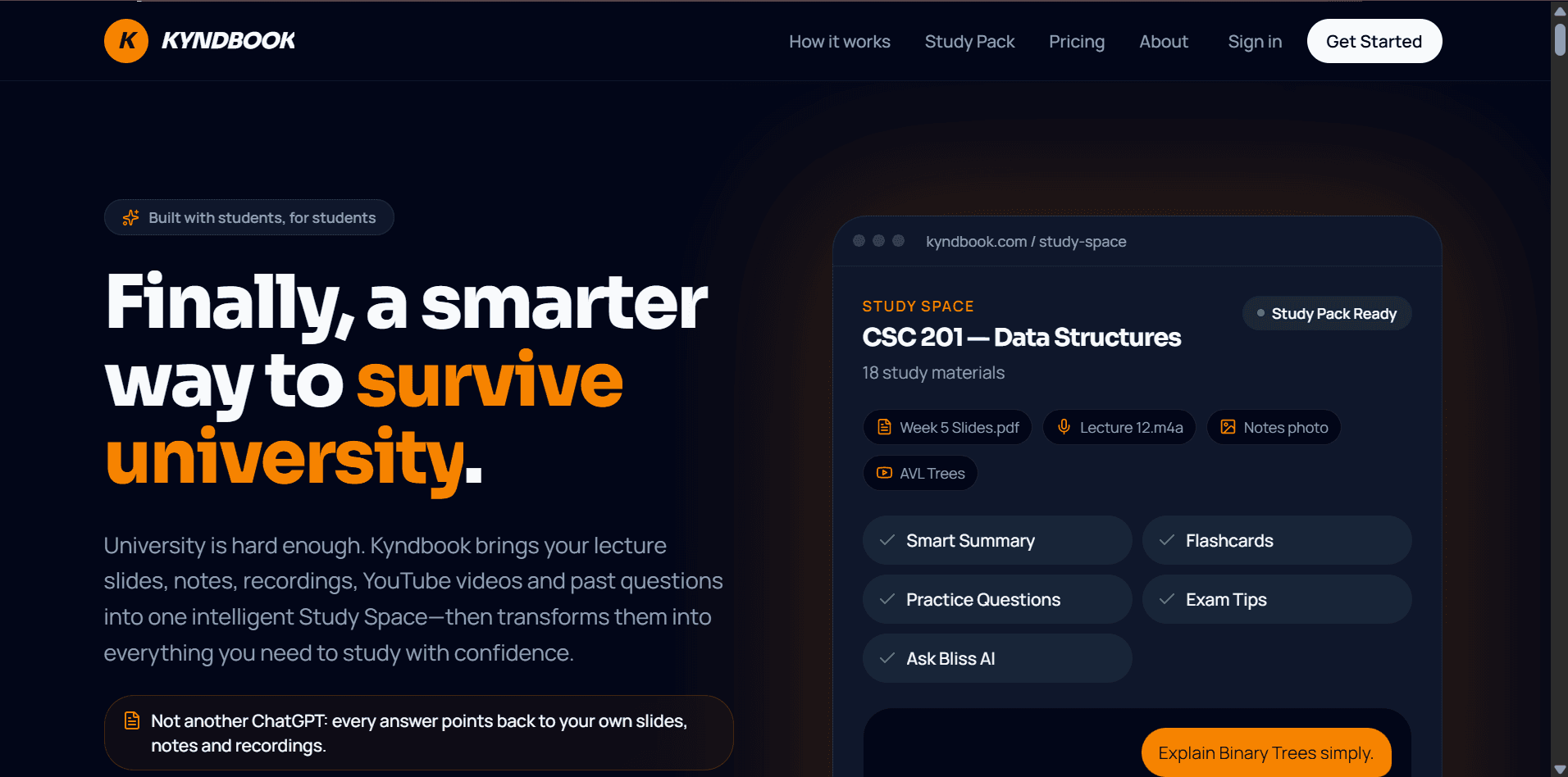
About this app
Kyndbook isn't just another AI chatbot; it's a dedicated study companion built specifically for university students. I found it to be a refreshingly focused take on AI-powered learning. The core idea is simple: you create a 'Study Space' for each course and then upload your own materials—lecture slides, handwritten notes, recordings, even YouTube links. Its AI, called Bliss, then ingests these to build a 'Course Brain'. This means every answer it gives you is grounded in your actual course content, with citations pointing back to your own slides or notes. This is a massive step up from generic chatbots, as it builds trust that the information is academically relevant. The standout features for me are the automatic generation of study packs, including summaries, flashcards, and practice questions, plus a personalised study plan based on your exam date. The pricing model is also very sensible for students, offering short-term 'passes' for crunch periods instead of a recurring subscrip...
Key features
- 1Per-course Study Spaces that ingest PDFs, PowerPoint, Word, photos, recordings, past questions and YouTube links.
- 2Bliss AI 'Course Brain' answers grounded in your own materials with citations back to specific slides and recordings.
- 3Auto-generated study packs: summaries, flashcards, practice questions, key concepts and exam tips.
- 4Personalised day-by-day study plans from your exam date, plus Watch Mode chalkboard teaching and WhatsApp sharing.
Target customer profile
Drawn from the product itself, not from a survey.
Demographic
University students in STEM fields (e.g., Computer Science, Engineering)
Pain points
Struggling to understand complex topics from dense lecture slides and messy notes; needing step-by-step explanations for mathematical or technical problems.
Primary needs
A tool that can simplify complex concepts, generate practice problems from course materials, and verify its answers against their own lectures.
Demographic
Final-year students preparing for exams across multiple subjects
Pain points
Overwhelmed by the sheer volume of information from different courses and lacking a clear, structured revision plan; feeling anxious about exam readiness.
Primary needs
An organised system to manage all course materials, a day-by-day study schedule, and tools like flashcards and past-question analysis to study efficiently and build confidence.
Demographic
Students who are falling behind or feel disorganised
Pain points
Scattered notes across various apps and notebooks; never finding the time to re-watch recorded lectures; feeling like they are constantly playing catch-up.
Primary needs
A single, central 'Study Space' to consolidate all learning materials, and an AI assistant that can provide quick, reliable answers to get them back on track.
Scout Review
Written by AI from measured evidence, scored out of 100.
Kyndbook is a focused AI study companion for university students, built around per-course 'Study Spaces' that ingest slides, notes, recordings, photos and YouTube links into a 'Course Brain' that answers with citations back to your own materials. The pitch is sharp and the execution on the marketing side is above average: a fast, polished site with a demo-quality hero mock. The product claims are specific — study packs, exam-date study plans, Watch Mode chalkboard teaching, maths/engineering support, WhatsApp revision sharing. Where it is thinner: security headers are incomplete with no published audit, accessibility has three concrete Lighthouse failures, and the growth story depends on a differentiator that larger players can replicate.
Measure by measure
Usability
66Clear primary CTA, no-card reassurance, and a demo link make the path to value obvious. The auto-playing story carousel with speed and sound controls adds friction, and it ends without a clear next step.
Design
71Polished, coherent landing page: strong hero, disciplined single orange accent, and a realistic Study Space mock that actually demonstrates the workflow. Held back by repeated card grids and small, faint secondary copy.
Speed
88Lighthouse 99/100 on both mobile and desktop, LCP 1.7s, CLS 0, TBT 34ms. Genuinely fast, well-optimized page with no layout shift and minimal main-thread blocking.
Security
63HTTPS enforced with HSTS, secure cookies, SPF and DMARC in place (9/13 header checks). Missing CSP, frame protection and Permissions-Policy; no published audit or bug bounty found.
Accessibility
68Lighthouse 89/100 with real failures: prohibited ARIA attributes, insufficient color contrast, and out-of-order headings. The faint grey secondary copy the visual audit flagged lines up with the contrast issue.
Growth
62Real, specific problem with a clear wedge: course-grounded citations plus study packs for Ghanaian STEM students. Differentiated and well-targeted, but the moat is thin against ChatGPT and Quizlet.
Improvement areas
- Incomplete security headers (no CSP, frame protection or Permissions-Policy) and no published audit or bug bounty.
- Three Lighthouse accessibility failures: prohibited ARIA, insufficient contrast, non-sequential headings.
- Auto-playing story carousel with speed/sound controls adds friction and ends without a clear next step.
- No public help center, changelog or roadmap to set expectations for what Bliss can and cannot do.
Design & Usability
The landing page is the strongest part of Kyndbook. A heavy display headline, one disciplined orange accent, and a hero mock that shows a real CSC 201 Study Space with file chips and a cited answer ('From: Week 5 Slides.pdf · Lecture 12 recording') — it demonstrates the product rather than describing it. Usability follows: 'Get Started Free', 'No card needed', and a university trust strip sit right under the fold. The friction is the auto-playing story carousel with speed and sound controls, which adds interaction cost and then ends without a clear next step. The repeated card grids and faint grey body copy are the main craft gaps.
Speed & Security
Speed is the standout measured result: Lighthouse 99/100 on both mobile and desktop, LCP 1.7s, CLS 0, TBT 34ms — a genuinely lightweight, well-built page. Security is competent but incomplete: HTTPS enforced, HSTS, secure cookies, SPF and DMARC all present (9/13 header checks), but no CSP, no frame protection, and no Permissions-Policy. The site makes a clear privacy promise ('only you can access your Study Spaces, we never sell your data'), yet there is no published SOC 2, ISO, pen-test or bug bounty to back it. For an early-stage student tool that is normal, but it caps the score in the low 60s.
Accessibility & Growth
Accessibility lands at 89/100 on Lighthouse with three real failures: prohibited ARIA attributes, insufficient color contrast, and non-sequential heading order. The visual audit independently flagged small light-grey secondary copy, which matches the contrast failure — so this is a fixable craft issue, not a systemic one. No WCAG statement was found. Growth is the more interesting question: Kyndbook names a specific, underserved segment (Ghanaian university STEM students at KNUST, UG, UPSA, Ashesi, UCC) and a concrete wedge — answers grounded in your own slides with citations, plus study packs, exam-date plans and WhatsApp sharing. That is a real differentiator against generic ChatGPT. The limit is that the wedge is copyable and the category is crowded; the traction signals (domain ~0.3 years old, one LinkedIn profile) show it is early.
Conclusion
If you are a STEM student drowning in 400-slide decks and half-watched lecture recordings, Kyndbook's core promise — one place per course, answers that cite your own slides — is exactly the right shape of tool, and the free-to-start, no-card entry makes trying it low-risk. Go in expecting a young product: no published security certifications, some accessibility rough edges, and a landing page that leans on repeated card grids. The speed and the citation-grounded approach are the reasons to look; the missing CSP and the thin moat are the reasons to keep your notes backed up elsewhere too.
Suggestions for improvement
- Publish a security page with CSP, frame protection and Permissions-Policy headers, plus a clear data-handling and retention statement.
- Fix the three Lighthouse accessibility failures: ARIA attributes, color contrast on grey body copy, and heading order.
- Replace the auto-playing story carousel with a static or click-to-play demo and end it with a clear CTA.
- Add a public roadmap or changelog and a help center so students can see what Bliss can and cannot do before signing up.
Alternatives comparison
Named competitors, point by point. Nobody paid to appear here or to be left out.
 Kyndbook |  ChatGPT |  Notion |  Quizlet | |
|---|---|---|---|---|
| Answers grounded in your own uploaded course materials with citations | Yes — core feature; answers cite specific slides, notes and recordings | Partial — can read uploaded files but answers draw on general knowledge, no course organisation | No — AI assists writing/summarising but no grounded course Q&A with citations | No — flashcard-focused, no deep contextual explanation from mixed sources |
| Dedicated per-course organisation (Study Spaces) | Yes — one Study Space per course with all materials consolidated | No — flat chat history, no course structure | Yes — highly customisable workspaces, but manual setup required | Partial — sets and folders, not full course material management |
| Auto-generated study packs (summaries, flashcards, practice questions) | Yes — generated from uploaded materials in minutes | Partial — can generate on request but not automated per course | No — requires manual templates and setup | Yes — flashcards and practice tests, but rote-memorisation focused |
| Personalised study plan from exam date | Yes — day-by-day plan showing what to study next | No — no built-in scheduling or plan tracking | Partial — can build manually with databases and templates | No — no study planning features |
| Ingests audio recordings and YouTube links | Yes — lecture recordings, YouTube links, photos, screenshots supported | Partial — file uploads supported, no dedicated lecture-recording workflow | No — embeds links but no ingestion or transcription | No — text-based card creation only |
| Student-friendly short-term pricing (passes, no recurring lock-in) | Yes — short-term passes for crunch periods, free to start, no card needed | Partial — free tier plus monthly subscription, no exam-period passes | Partial — free personal tier, subscription for AI features | Partial — free tier plus monthly/annual subscription |
ChatGPT
A general-purpose AI chatbot that can answer questions and generate summaries. While highly capable, it lacks a dedicated course organisation system and its answers are based on its vast internet knowledge, not just your private course materials.
Notion
A powerful all-in-one workspace for notes, databases, and project management. It's highly customizable but requires significant manual setup and doesn't have a built-in AI that automatically generates study aids from uploaded files.
Quizlet
A popular flashcard and study tool. It's excellent for rote memorization but doesn't provide the same level of deep, contextual explanation or automated summary generation from a wide variety of sources like PDFs and audio recordings.
Comparing options? See Kyndbook alternatives, scored side by side
More Education apps
View all Education
The Stack Newsletter
92A weekly newsletter delivering curated tech jobs, intervi...

Enlyo
90Video analysis for team-sport coaches: tag matches as they play, cut clips, record reviews and share the moments that matter.

SheetScroll
90> You play; SheetScroll turns the page. It listens through the microphone or a MIDI piano and holds the page until it's sure where you are.

Tracé slides
89Interactive math & physics slides with live graphs and an...

English Test Coach
89English Test Coach checks your IELTS essays and letters, gives an estimated band score across all four criteria, and tells you exactly what to revise next.

Cross Stitch Pattern Maker
89Free on-device photo-to-DMC/Anchor chart with skein counts.

Ready for My Interview
89Practice your marriage green card interview out loud

Startup Science
88A unified platform replacing 12-20 disconnected tools for...

Cromagnon
88Free, private browser-based PDF, Word, Excel, and study t...

NOSTRES
88Free step-by-step guides for moving to Berlin: documents,...

TranscriptYou
88Free YouTube transcript generator with timestamps and AI ...

Random Movie Generator
88Free random movie picker from 142k+ films—no sign-up.


A platform dedicated to providing unbiased reviews of newly launched applications, analyzing everything from their features to their full potential.
info@scoutforge.net© 2026 Scoutforge. All rights reserved.
