Cycling through all six. Tap any point to stop.
Measured on six things
Mentor is an online learning platform for beauty professionals. Learn makeup, nail art, hair colour, lashes, brows and skincare through structured video courses taught by vetted working professionals, sorted by skill level, with instructor Q&A under every lesson, on web, iPhone and Android in four languages.
Design
57Judging the app UI and store material: tidy mobile patterns and a coherent editorial homepage, but store screenshots carry placeholder instructor names, a stray hyphen, clipped banners and a palette that doesn't match the web.
Screenshots
1 / 1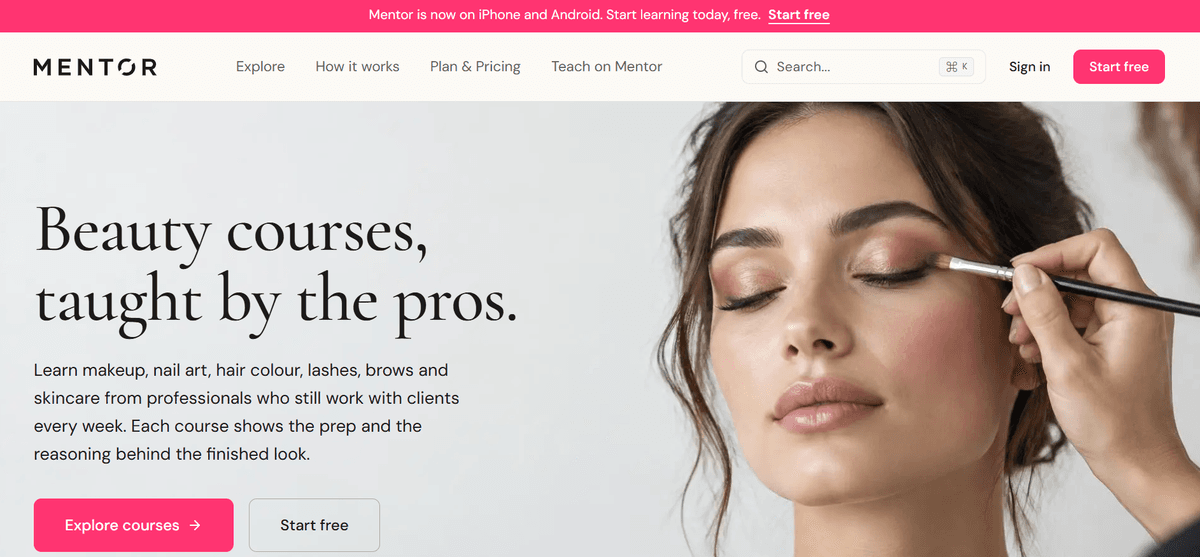
About this app
Mentor (mybeautymentors.com) is an online learning platform for beauty professionals that offers structured video courses in makeup, nail art, hair colour, lashes, brows and skincare. Every course is taught by a vetted working professional with five or more years of experience and follows a fixed order from hygiene and prep to the finished technique. Courses are organised into four skill levels — Beginner, Intermediate, Advanced and Expert. Learners can ask the instructor questions under any lesson on web, iPhone and Android. The platform runs in English, Spanish, French and Russian. Mentor is freemium: free courses included, single courses bought once and kept forever, All Access subscription, and a Team plan for salons. App Store: https://apps.apple.com/us/app/mentor-beauty-courses/id6768606863 — Google Play: https://play.google.com/store/apps/details?id=com.mybeautymentors.app
Key features
- 1Level-matched courses (Beginner to Expert) in makeup, nails, hair colour, lashes, brows and skincare, taught in fixed order from hygiene to finished technique.
- 2Instructor Q&A under every lesson, plus notes, bookmarks and transcripts — on web, iPhone and Android.
- 3Four-language support (EN/ES/FR/RU) with dubbed audio and regional captions on Premium.
- 4Freemium pricing: free courses, single-course purchases kept forever, $19.99–$49.99/month plans including a Team tier for salons.
Target customer profile
Drawn from the product itself, not from a survey.
Demographic
Beauty school graduates and career-switchers entering the industry
Pain points
Free tutorials lack structure and skip hygiene and prep fundamentals
Primary needs
Beginner-level courses taught slowly and in the correct order
Demographic
Working freelance lash, nail and makeup artists
Pain points
Retention and lifting issues that viral reels never explain
Primary needs
Technique deep-dives and direct access to working instructors
Demographic
Non-English-speaking beauty professionals in Spain, France or Russia
Pain points
Quality beauty education is mostly English-only
Primary needs
Dubbed audio, captions and a fully localised app
Demographic
Established stylists and colourists moving into teaching
Pain points
No clear path from client work to instructing others
Primary needs
Advanced and expert courses plus a route to teach on the platform
Scout Review
Written by AI from measured evidence, scored out of 100.
Mentor is a beauty-education platform with a genuinely good editorial homepage and a real point of view: structured, level-matched courses taught by working professionals, in four languages, with instructor Q&A under every lesson. The pricing is legible — free tier, $19.99 Basic, $29.99 Premium, $49.99 Team, plus single-course purchases you keep forever. What holds it back is execution polish: the app store screenshots look unfinished (placeholder instructor name, stray hyphen, clipped banner), the app's visual system doesn't match the web, mobile LCP is 6.5s, and the store listing admits you can't buy in-app. None of these are fatal — they're all fixable — but together they make a product that reads more 'promising beta' than 'finished platform.'
Measure by measure
Usability
62Clear CTAs, an explicit single-course vs subscription split, and a sensible bottom tab bar. Undercut by store copy admitting you can't buy in the app, so the 'learn on iPhone' promise dead-ends at a browser.
Design
57Judging the app UI and store material: tidy mobile patterns and a coherent editorial homepage, but store screenshots carry placeholder instructor names, a stray hyphen, clipped banners and a palette that doesn't match the web.
Speed
57Lighthouse mobile 65/100 with a 6.5s LCP — the page technically works but the hero image drags first paint well past the three-second patience window. CLS 0 and 294ms TBT are genuinely clean.
Security
7612/13 header checklist: HSTS, CSP, frame protection, Referrer-Policy, Permissions-Policy, SPF and DMARC all present, payments via Stripe. No published SOC 2 or security page found, and secure-cookie flag is the one gap.
Accessibility
80Lighthouse a11y 96/100 with one contrast failure, plus real multi-language coverage (EN/ES/FR/RU) with dubbed audio and captions — a stronger inclusion story than most peers. Small low-contrast text in the pink band and mockups is the visible weak spot.
Growth
63A real problem (unstructured free tutorials skip prep and hygiene) with a specific wedge: level-matched, ordered courses, working instructors, four languages, and a teach-on-platform path. Category has headroom; execution is early.
Improvement areas
- App Store screenshots contain placeholder data ('Kites Mentor', 'Skin- single purchase') and clipped UI — replace before scaling acquisition.
- Mobile LCP of 6.5s is the biggest conversion leak; compress and lazy-load hero imagery.
- App and web design systems diverge (maroon/beige vs pink/cream) — unify for brand consistency.
- No in-app purchase despite mobile-first messaging; either enable it or soften the claim.
Design & Usability
The homepage is the strongest asset here — serif headlines, restrained pink accent, real professional photography, and a level selector that immediately frames the product. The app is where it slips: store screenshots show a placeholder instructor ('Kites Mentor'), a course title with a stray hyphen, a clipped banner and a cut-off button, and the maroon/beige app palette doesn't match the pink/cream web system at all. Usability is better than design: CTAs are obvious, the single-course vs subscription split is spelled out, and the bottom tab bar is conventional and clear. The one real friction is structural — the store listing says you can't purchase in-app, so the 'learn on iPhone and Android' headline ends in a browser redirect.
Speed & Security
Speed is the weakest measured dimension: Lighthouse mobile 65/100 with a 6.5s LCP, meaning the hero image is the bottleneck and first meaningful content arrives well after most users would bail. CLS of 0 and 294ms TBT show the underlying build is competent — this is an image-weight problem, not an architecture problem, and it's fixable. Security is genuinely above average for the stage: 12 of 13 header checks pass (HSTS, CSP, frame protection, Referrer-Policy, Permissions-Policy), SPF and DMARC are configured, and payments run through Stripe. The gaps are the unset secure-cookie flag and the absence of any published security page, SOC 2 or bug bounty — normal for a young product, but it caps the score below the excellent band.
Accessibility & Growth
Accessibility is a quiet strength: 96/100 on Lighthouse with a single contrast failure, and the product actually delivers on multi-language — English, Spanish, French and Russian with dubbed audio and regional captions, which is more than most beauty-education competitors bother with. The visible weak spot is small, low-contrast type in the pink band and the phone mockups. Growth is a judgement on the idea: the problem is real (free tutorials skip prep and hygiene, viral reels never explain retention), the target customer is specific (career-switchers, working lash/nail/colour artists, non-English speakers), and the wedge — level-matched ordered courses, working instructors, four languages, a route to teaching — is concrete. Against YouTube, Udemy and MasterClass, that positioning holds. The limit is that course platforms are copyable and the moat is thin; the teach-on-platform path is the most interesting long-term lever.
Conclusion
The bones are right. The category is real, the wedge is specific, and the multi-language commitment is a genuine differentiator against YouTube and Udemy. What Mentor needs now is a polish pass: replace the placeholder store screenshots, unify the app and web design systems, compress the hero image to fix the 6.5s LCP, and either enable in-app purchase or stop leading with 'learn on iPhone and Android' when checkout lives in a browser. Do those four things and this jumps a tier. Leave them and it stays a well-intentioned platform that looks like it shipped a week early.
Suggestions for improvement
- Replace the App Store screenshots — 'Kites Mentor' and 'Skin- single purchase' read as unfinished placeholder data.
- Compress and lazy-load the hero image; a 6.5s mobile LCP is costing you signups before the page even renders.
- Unify the app palette (maroon/beige) with the homepage system (pink/cream) so the product feels like one brand.
- Either enable in-app purchase or soften the 'learn on iPhone and Android' claim so checkout doesn't dead-end at a browser.
Alternatives comparison
Named competitors, point by point. Nobody paid to appear here or to be left out.
 Mentor |  YouTube |  Udemy |  MasterClass | |
|---|---|---|---|---|
| Structured, level-matched curriculum | Yes — four skill levels, fixed order from hygiene to finished technique | No — unstructured clips, rarely cover prep or hygiene | Partial — some beauty courses, not level-matched to the profession | No — inspiration-focused, not step-by-step technical training |
| Instructor Q&A and feedback | Yes — ask the instructor under any lesson | No — comments only, no guaranteed instructor response | Varies by course — instructor Q&A not guaranteed | No — no direct instructor access |
| Multi-language with dubbed audio | Yes — EN/ES/FR/RU dubbed audio and regional captions on Premium | Auto-captions only, no dubbed audio | Some courses offer captions; dubbed audio rare | Limited — primarily English |
| Pricing model | Free tier; single-course purchase; $19.99–$49.99/month plans | Free with ads; Premium subscription | Per-course purchase; frequent discounts | Annual subscription only |
| Mobile app experience | iOS and Android apps; purchases must be made on web | Full-featured native apps | Full-featured native apps with in-app purchase | Native apps with offline download |
YouTube
Free beauty tutorials are abundant, but clips are unstructured, rarely cover prep and hygiene, and offer no instructor feedback or certificate.
Udemy
A broad general-purpose course marketplace with some beauty content, though courses are not level-matched to the beauty profession and rarely include dubbed languages.
MasterClass
Premium video lessons from famous names, but focused on inspiration rather than step-by-step, level-matched technical training for beauty pros.
Comparing options? See Mentor alternatives, scored side by side
More Education apps
View all Education
The Stack Newsletter
92A weekly newsletter delivering curated tech jobs, intervi...

Enlyo
90Video analysis for team-sport coaches: tag matches as they play, cut clips, record reviews and share the moments that matter.

SheetScroll
90> You play; SheetScroll turns the page. It listens through the microphone or a MIDI piano and holds the page until it's sure where you are.

English Test Coach
89English Test Coach checks your IELTS essays and letters, gives an estimated band score across all four criteria, and tells you exactly what to revise next.

Tracé slides
89Interactive math & physics slides with live graphs and an...

Cross Stitch Pattern Maker
89Free on-device photo-to-DMC/Anchor chart with skein counts.

Startup Science
88A unified platform replacing 12-20 disconnected tools for...

Cromagnon
88Free, private browser-based PDF, Word, Excel, and study t...

Random Movie Generator
88Free random movie picker from 142k+ films—no sign-up.

TranscriptYou
88Free YouTube transcript generator with timestamps and AI ...

RBQ Exam
87Online practice for the RBQ contractor licence exams in Québec: original questions, timed mock exams and lessons, in French or English.

Coloring Pages Pro
87A massive collection of free printable coloring pages for...


A platform dedicated to providing unbiased reviews of newly launched applications, analyzing everything from their features to their full potential.
info@scoutforge.net© 2026 Scoutforge. All rights reserved.
