Cycling through all six. Tap any point to stop.
Measured on six things
MiFoto is a free AI photo editor to remove backgrounds, erase objects, enhance, retouch, restore, upscale, and create images online in seconds.
Growth
38Homepage touts millions of edits but zero external reviews, no GitHub, and no G2 presence; early-stage indie tool with self-reported traction only.
Screenshots
1 / 1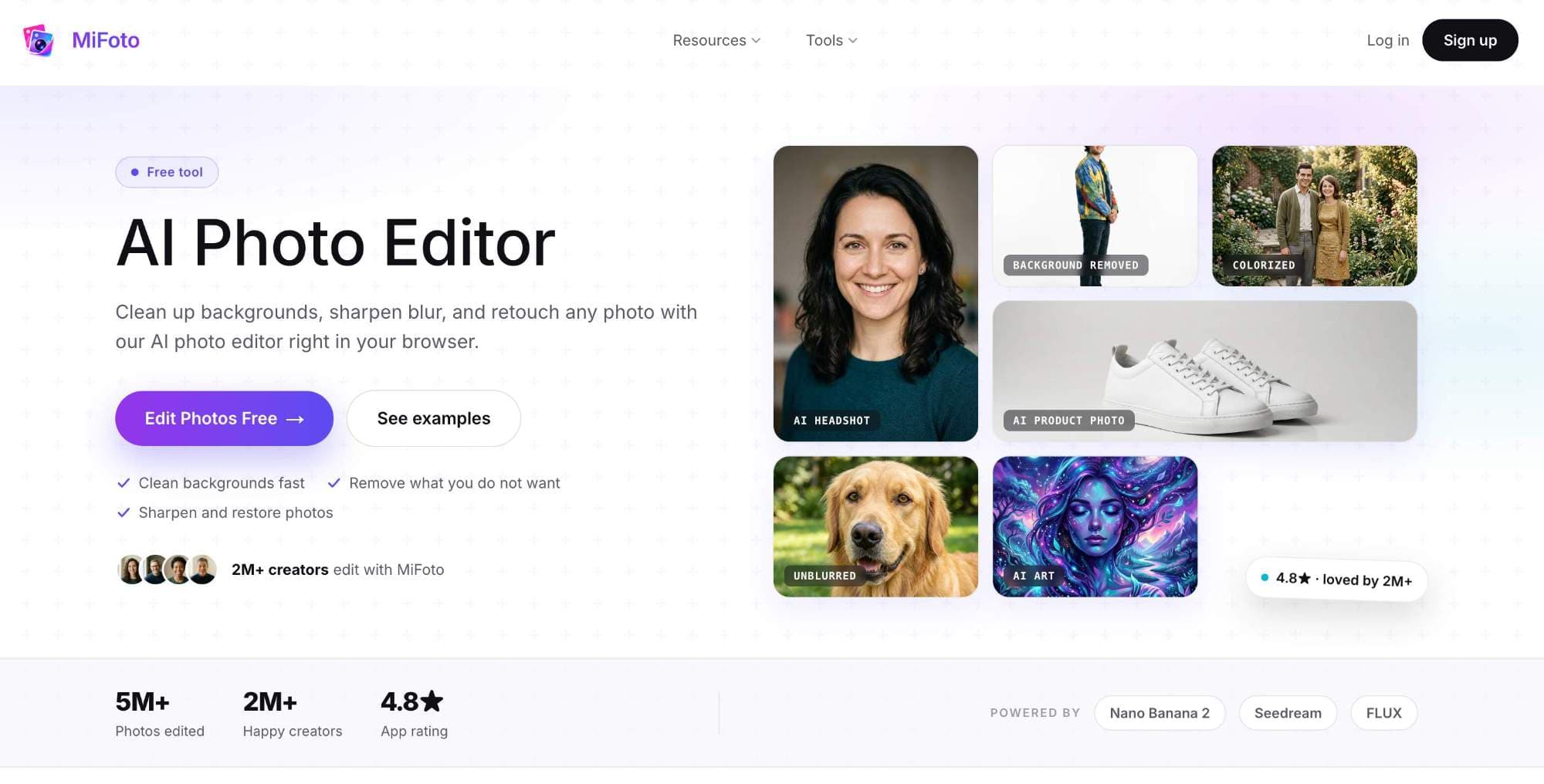
About this app
MiFoto is an all-in-one free AI photo editor that makes image editing fast and accessible from a browser. Upload a photo and use AI to remove backgrounds, erase unwanted objects or people, sharpen blurry images, upscale resolution, retouch portraits, restore and colorize old photos, or generate new images from text. MiFoto also includes tools for AI headshots, avatars, product photography, passport photos, face swaps, background generation, and photo enhancement. It is built for creators, small businesses, online sellers, job seekers, families, and anyone who wants polished results without learning complex software. Edit selfies, travel photos, product images, pet pictures, social media content, and old family photographs in a few simple steps. MiFoto keeps faces, products, and details looking natural while automating time-consuming edits. It is free to start, works on phones and computers, requires no design experience, and brings more than 50 AI-powered photo tools together.
Key features
- 150+ AI tools in one browser: background removal, object erase, photo unblur, colorizer, AI headshots, product photos
- 2No signup required for most edits; three-step workflow from upload to download
- 3Natural-looking results emphasized for portraits, products, and old photos without heavy filtering
Target customer profile
Drawn from the product itself, not from a survey.
Demographic
Small business owners and e-commerce sellers
Pain points
Need clean product photos for listings but lack design skills or budget for expensive software
Primary needs
Quick background removal, object erasing, and image enhancement to improve store visuals
Demographic
Job seekers and professionals
Pain points
Want a polished headshot for LinkedIn or resumes but can't afford a professional photographer
Primary needs
Portrait retouching, background cleanup, and natural-looking enhancements
Demographic
Hobbyists and casual users (e.g., parents, travelers)
Pain points
Have blurry, cluttered, or old photos they want to restore or improve easily
Primary needs
Simple fix for everyday photos: remove distractions, sharpen, colorize, and retouch
Scout Review
Written by AI from measured evidence, scored out of 100.
MiFoto positions itself as an all-in-one, no-experience-needed AI photo editor that bundles background removal, object erasing, upscaling, colorization, headshots, and more than 50 other tools into a single browser experience. The product excels at lowering friction for small business owners, job seekers, and hobbyists who need quick, natural-looking results without Photoshop. Design and usability benefit from clear examples and a simple three-step flow, while speed metrics support the instant-edit promise. Security and accessibility sit at competent but unremarkable levels, and growth currently rests entirely on homepage statistics rather than independent validation. It competes directly with specialized tools like Remove.bg while offering broader functionality than a pure design platform.
Measure by measure
Usability
68Three-step flow and no-signup trials lower the barrier; 50+ tools in one browser tab but dropdown navigation hides options.
Design
70Clean hero with example grid and consistent purple accents; minor visual weight issues in hero images and whimsical footer text.
Speed
70Solid Lighthouse scores (84 mobile, 94 desktop) with quick LCP and zero CLS; real-time sliders match the performance claims.
Security
50Basic HTTPS and HSTS in place but missing CSP, DMARC, and any compliance badges; privacy policy exists but thin on details.
Accessibility
70Strong 93 Lighthouse score undercut by contrast and ARIA issues; responsive across devices but no a11y statement or screen-reader specifics found.
Growth
38Homepage touts millions of edits but zero external reviews, no GitHub, and no G2 presence; early-stage indie tool with self-reported traction only.
Improvement areas
- External validation: zero independent reviews or G2 presence despite self-reported millions of edits
- Security transparency: missing CSP, DMARC, and any compliance certifications or audit links
- Navigation depth: Tools dropdown hides secondary options; accessibility contrast issues remain
Design & Usability
MiFoto delivers a polished, example-heavy landing page that immediately shows what the AI can do through a clean 2x3 grid of before/after style cards. Rounded corners, soft shadows, and restrained purple accents create visual cohesion without feeling generic. The three-step workflow and prominent 'Edit Photos Free' CTA make it feel approachable for the exact non-designer audience it targets. Navigation stays minimal, though the collapsed Tools dropdown hides the full 50+ tool list until clicked. Trust signals sit right under the value proposition, reinforcing the 2M+ creators claim. Overall the experience feels modern and task-focused rather than overwhelming.
Speed & Security
Measured performance lands comfortably in the good range with Lighthouse mobile at 84 and desktop at 94, driven by fast FCP and zero layout shift. Real-time before/after sliders on the site align with the snappy editing promise. Security is table-stakes only: HTTPS and HSTS are present, but the absence of CSP, DMARC, and any third-party audits keeps it average for a consumer AI tool. No breach history surfaced, and the privacy policy is referenced but not deeply detailed. For a free browser-based editor aimed at everyday users, the current posture is adequate yet leaves room for stronger enterprise-grade signals if the product scales.
Accessibility & Growth
Automated accessibility scores well at 93, though two specific failures around ARIA attributes and color contrast prevent a higher mark. The site is responsive across phones and computers as claimed, but lacks an explicit accessibility statement or multi-language support. Growth remains the weakest dimension: self-reported metrics of 5M+ edits and 2M+ creators have no corroboration on review platforms or social channels. No GitHub activity or Product Hunt launch trail was located, suggesting an early-stage product still building external proof. The combination of strong on-site claims and thin third-party validation paints a typical indie AI tool profile.
Conclusion
For users who want one tab to handle everything from product shots to old family photos, MiFoto delivers a genuinely useful free starting point. The gap between self-reported scale and external proof is the main caveat for anyone evaluating long-term reliability.
Suggestions for improvement
- Add a public security page listing any audits or compliance status to build trust beyond basic headers.
- Expand the Tools navigation so secondary options are visible without an extra click.
- Publish real user case studies with verifiable before/after examples to strengthen growth signals.
- Fix the two Lighthouse accessibility failures around contrast and ARIA to push the score higher.
Alternatives comparison
Named competitors, point by point. Nobody paid to appear here or to be left out.
 MiFoto MiFoto |  Remove.bg Remove.bg |  Canva Canva |  Adobe Photoshop Express Adobe Photoshop Express | |
|---|---|---|---|---|
| Background Removal | One-click AI cutout with transparent or clean background options | Specialized one-click background removal only | Background remover plus full design suite | AI-powered background tools in mobile editor |
| Number of AI Tools | 50+ tools (headshots, colorize, unblur, product photos, face swap, etc.) | Primarily background removal only | Broad design tools with some AI features | Photo editing plus templates and AI enhancements |
| Pricing Model | Free to start, no signup for most tools | Free tier with paid credits for high-res | Free tier + Pro subscription | Free tier + Premium subscription |
| Target Use Case | Everyday users, e-commerce, job seekers, hobbyists needing quick natural edits | E-commerce sellers needing fast background removal | Designers and marketers creating full assets | Mobile users wanting quick photo edits and templates |
Remove.bg
Focused mainly on background removal; MiFoto offers more comprehensive editing tools.
Canva
Design platform with photo editing; MiFoto is simpler for quick AI edits.
Adobe Photoshop Express
Mobile-friendly editor; MiFoto provides AI-powered features without subscription.
Comparing options? See MiFoto alternatives, scored side by side
Sources
What the review was written against. A verdict with no sources is an opinion.
- mifoto.ai×7
- reddit.com×2
- github.com×2
- instax.cl×2
- stackoverflow.com
- dpreview.com
- margaritagomez.github.io
- alaimolabs.com
- everpresent.com
- shipyardhq.dev
- seranking.com
- whatsmydns.net
- promoteproject.com
- gist.github.com
- digitalocean.com
- engineering.virginia.edu
- radiogrilleouverte.com
- originality.ai
- aftershoot.com
- mifoto.hu
- ipinfo.io
- cl.linkedin.com
- saasbranch.com
- youtube.com
- smallseotools.com
- sec.gov
- photoaistudio.com
- abstractapi.com
- apivoid.com
- promotoai.com
- imagen-ai.com
- alliai.com
More Writing Assistants apps
View all Writing Assistants
Voice Memo Exporter
87Export all your Apple Voice Memos to one text file.

eety.ai — AI Patent Drafting Assistant
87An AI-powered patent drafting assistant that acts like a ...

Book Cover Generator
87AI book cover generator for indie authors—turn your story...

ContentIQ
87AI writer that fact-checks before writing, with real sour...

Boost My Resume
85Build and export a base resume for free, then use AI to tailor it and a matching cover letter to each job from your real experience.

Voq
83Free text to speech for Chrome: listen to any webpage in a natural AI voice.

PopTranslate
82AI-powered macOS translation app with OCR, multi-engine comparisons, and keyboard-friendly design for professionals and learners.

Hold Your Voice
82An AI-powered writing assistant that analyzes and fixes v...

HighGround
82An AI-powered WordPress plugin that automates content cre...

WriteVoice
81A speech-to-text app that lets you dictate text into any computer app, boosting productivity with voice input.

AGI Workforce
81Choose your AI model for chat, research and code

Weesper Neon Flow
81Professional offline voice dictation software for Mac and Windows, boosting productivity with privacy-first speech-to-text.


A platform dedicated to providing unbiased reviews of newly launched applications, analyzing everything from their features to their full potential.
info@scoutforge.net© 2026 Scoutforge. All rights reserved.
