Cycling through all six. Tap any point to stop.
Measured on six things
Turn code into self-running software in your own cloud
Security
52HTTPS is enforced and SPF/DMARC are set, but HSTS, CSP, frame protection, and the rest of the header checklist are missing (4/12). No SOC 2, ISO, or pen-test claims found. For a tool that provisions infrastructure in your AWS account, that's a thin public security story.
Screenshots
1 / 1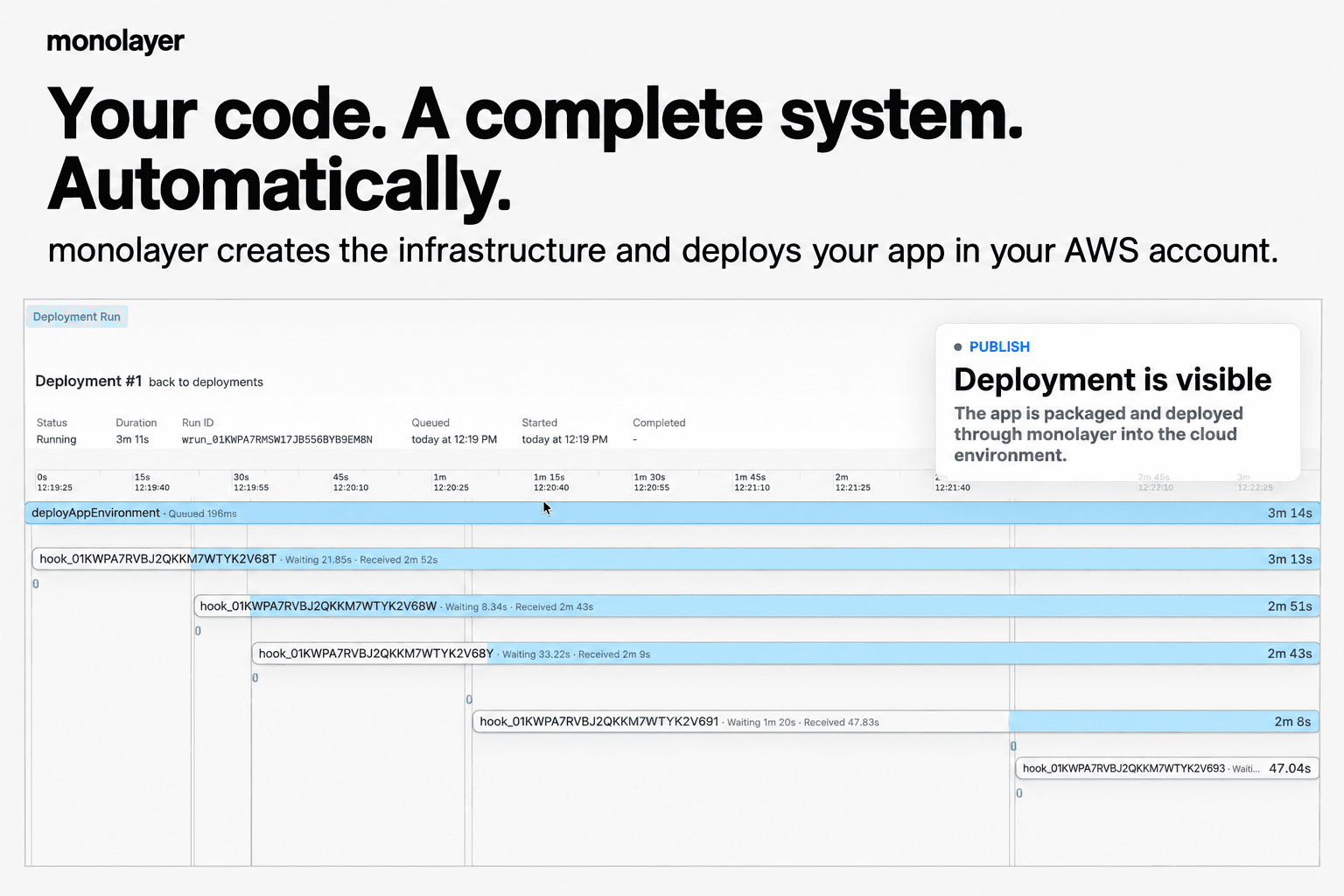
About this app
Start from a prompt, an AI-generated application, or an existing repo. monolayer reads the application's intent, determines the compute, data, storage, service, and event relationships it needs, validates the proposed state, provisions the infrastructure, deploys the application, and keeps reading runtime feedback after launch. This replaces work that is normally spread across cloud setup, CI/CD, environment configuration, database provisioning, secrets, monitoring, scaling, recovery, and operational handoffs. Developers describe relationships and desired behavior instead of designing infrastructure by hand. Everything runs inside your AWS account, including the control plane. Application workloads, databases, storage, logs, infrastructure resources, CloudFormation stacks, and AWS billing remain under your ownership and control. There is no shared hosting model, hidden infrastructure markup, or platform tax on AWS usage. Designed for developers whose code velocity > delivery.
Key features
- 1Prompt, AI-generated app, or existing repo as the starting point for provisioning and deployment.
- 2Control plane runs inside the user's own AWS account; workloads, databases, logs, and billing stay under user ownership.
- 3Reads application intent to determine compute, data, storage, service, and event relationships, then validates and provisions.
Target customer profile
Drawn from the product itself, not from a survey.
Demographic
Solo developers and indie hackers
Pain points
Time-consuming infrastructure setup, managing AWS services, and repetitive deployment tasks.
Primary needs
Rapid prototyping, low operational overhead, and easy deployment from idea to live app.
Demographic
Startups and small engineering teams
Pain points
Limited DevOps resources, slow release cycles, and high complexity in managing cloud environments.
Primary needs
Accelerate product iterations, automate deployments, and reduce cloud management burden.
Demographic
Non-technical founders and product managers
Pain points
Difficulty in turning ideas into functional software, relying on technical teams for every iteration.
Primary needs
Easily create MVPs without deep technical knowledge, and have a platform that translates prompts into running applications.
Scout Review
Written by AI from measured evidence, scored out of 100.
monolayer Autopilot is a developer control plane that turns a prompt, an AI-generated app, or an existing repo into provisioned AWS infrastructure, with the control plane running inside the user's own AWS account. The pitch is sharp and the target customer is specific: solo devs and small teams whose code velocity outpaces their delivery pipeline. The product's differentiation against AWS CodeStar, Replit, and Vercel is real, and the 'no platform markup, your billing, your resources' angle is a genuine wedge. What's missing is the proof layer. No Lighthouse run completed, so speed and accessibility are unverified. The security probe found only 4/12 header checklist items and no compliance claims. No pricing, docs, or trial details were captured. The idea is stronger than the evidence currently supports.
Measure by measure
Usability
60The pitch is clear: prompt or repo in, provisioned AWS app out, control plane inside your account. That's a real workflow. But no pricing, docs, or trial details were captured, so onboarding depth is unverified. Solid positioning, thin proof.
Design
58No homepage render was available this run, so design is judged from site copy and a single promo card. The product is a developer control plane; the fragment shown is a log table, not a full UI. Category-typical for an early dev tool.
Speed
58No Lighthouse measurement completed this run, so there is no performance data to report. No user complaints or published benchmarks were found either. Score sits in the category-typical band on the strength of the product's positioning alone.
Security
52HTTPS is enforced and SPF/DMARC are set, but HSTS, CSP, frame protection, and the rest of the header checklist are missing (4/12). No SOC 2, ISO, or pen-test claims found. For a tool that provisions infrastructure in your AWS account, that's a thin public security story.
Accessibility
55No Lighthouse accessibility measurement was captured, and no WCAG statement, a11y docs, or screen reader claims appear in the collected material. Score sits mid-band on the absence of any verified flaw rather than any verified strength.
Growth
62Real problem (AWS provisioning is a slog), specific wedge (control plane runs inside your own account, no platform markup), and a clear target (solo devs and small teams without DevOps). Differentiated against CodeStar, Replit, and Vercel, but the wedge is narrow and the category is crowded.
Improvement areas
- No pricing page, docs site, or trial details were captured; the signup-to-value path is unverified.
- Security headers are largely absent (4/12) and no SOC 2, ISO, pen-test, or bug bounty claims were found.
- No accessibility measurement, WCAG statement, or a11y documentation appears in the collected material.
Design & Usability
Design could not be judged from a live render this run; only a maker-supplied promo card with a cropped deployment log table was available. From the site copy, the product is a developer control plane that reads application intent and provisions AWS infrastructure inside the user's own account. Usability-wise, the workflow is legible: prompt or repo in, running app out, with the control plane living in your AWS. That's a coherent story for solo devs and small teams. What's missing is the proof layer: no pricing page, no docs, no trial details were captured, so the actual signup-to-value path is unverified. The positioning is sharp, but a developer tool lives or dies on its docs, and we couldn't see them.
Speed & Security
No Lighthouse performance measurement completed this run, so there is no LCP, CLS, or TBT data to report, and no user complaints or published benchmarks were found either. Speed is therefore unverified and scored in the category-typical band. Security is more legible: HTTPS is enforced and SPF/DMARC are configured, but the HTTP probe found no HSTS, no CSP, no frame protection, no X-Content-Type-Options, no Referrer-Policy, and no Permissions-Policy, for a 4/12 checklist score. No SOC 2, ISO, pen-test, or bug bounty claims appear in the collected material. For a product that provisions infrastructure and holds credentials inside a customer's AWS account, that public security posture is thin, and it's the dimension most likely to block a serious buyer.
Accessibility & Growth
Accessibility was not measured this run, and no WCAG statement, a11y documentation, or screen reader support claims appear in the collected site content. The score sits mid-band on the absence of any verified flaw rather than any verified strength. Growth is the more interesting story: the problem is real (AWS provisioning is genuinely painful), the wedge is specific (the control plane runs inside your own AWS account, with no shared hosting model and no platform markup on AWS usage), and the target customer is named clearly (solo devs, indie hackers, small teams without DevOps). Against CodeStar, Replit, and Vercel, that's a defensible position. The limit is that the wedge is narrow: 'we run in your account' is a strong pitch to developers and a weak one to procurement teams who want a vendor with a compliance paper trail. The category has headroom, but the product needs to convert its positioning into visible traction before the incumbents copy the pitch.
Conclusion
If you're a solo dev or a small team drowning in AWS console tabs, monolayer's pitch is worth a look: describe the relationships, let it provision, keep the billing in your account. That's a real problem and a real wedge. But before you hand it your AWS credentials, ask for the docs, the pricing, and the security page. A tool that provisions your infrastructure should be able to show you its own. The idea earns a follow; the current public evidence doesn't yet earn a commitment.
Suggestions for improvement
- Publish a pricing page and a docs site. A developer tool without visible docs is a pitch, not a product.
- Add HSTS, CSP, frame protection, and the rest of the standard security headers. 4/12 is a red flag for a tool that touches AWS credentials.
- Publish a security page with your data handling model, since the control plane runs inside customer AWS accounts.
- Add an accessibility statement and run a WCAG audit; dev tools routinely skip this and it costs enterprise deals.
Alternatives comparison
Named competitors, point by point. Nobody paid to appear here or to be left out.
 monolayer Autopilot monolayer Autopilot |  AWS CodeStar AWS CodeStar |  Replit Replit |  Vercel Vercel | |
|---|---|---|---|---|
| Runs control plane inside user's own AWS account | Yes — control plane, workloads, and billing stay in the user's AWS account | Yes — native AWS service, runs in your account by definition | No — hosted on Replit's infrastructure | No — hosted on Vercel's edge and cloud infrastructure |
| Automatic infrastructure provisioning from application intent | Yes — reads intent and provisions compute, data, storage, services, events | Partial — templates and pipelines, but significant manual setup required | Partial — handles hosting, not full AWS infrastructure topology | Partial — frontend and serverless, not full-stack AWS infrastructure |
| Prompt-to-application starting point | Yes — prompt, AI-generated app, or existing repo | No — requires existing code and manual project setup | Partial — AI agent features exist but focus is on coding in-browser | Partial — v0 generates frontend, not full infrastructure |
| No platform markup on underlying cloud usage | Yes — AWS billing remains under user ownership, no platform tax | Yes — pay AWS directly for resources used | No — usage billed through Replit's pricing tiers | No — usage billed through Vercel's pricing tiers |
| Post-launch runtime feedback and operational automation | Yes — keeps reading runtime feedback after launch | Partial — integrates with CloudWatch but requires manual configuration | Partial — basic hosting metrics, not full operational automation | Partial — analytics and logs, not full infrastructure ops |
AWS CodeStar
AWS's integrated tool for developing, building, and deploying applications, but still requires significant manual setup and configuration.
Replit
A browser-based IDE that allows rapid application development, but focuses more on coding rather than automatic cloud deployment and management.
Vercel
A platform for deploying frontend applications, but primarily targets web apps and doesn't handle full-stack infrastructure in AWS.
Comparing options? See monolayer Autopilot alternatives, scored side by side
More Development & Engineering apps
View all Development & Engineering
CreateMyCoin
92A no-code Solana token creator that deploys SPL tokens in...

Vibe Coding Agent Skills
92A free, open-source platform offering 110 AI agent skills...

CC Switch
91Open-source desktop app for switching AI coding providers...

DemoVexa
90Turn your code into professional product demo videos with AI-generated scripts, animated UI, and natural voiceovers.

TaxID
90Fast EU VAT validation API for developers, covering 27 EU...

BeartIMAGE
88BeartIMAGE is a free, web-based image processing platform engineered for fast, bulk photo editing and conversion directly in your browser.

Claw Messenger
88Claw Messenger is an iMessage API service that gives AI a...

DataHabibi
88AI-powered Dubai real estate data platform with 12M+ DLD ...

ButterKit
82macOS app for App Store screenshots: 3D mockups, auto-tra...

PERM Processing Time: Current DOL Queue & History
88PERM Processing Time is an independent data analysis platform that helps users navigate the U.S. Department of Labor’s permanent labor certification process.

StockFit API
87A developer-first financial data API providing structured...

ProcessSpy
87A native macOS process explorer and advanced monitor that...


A platform dedicated to providing unbiased reviews of newly launched applications, analyzing everything from their features to their full potential.
info@scoutforge.net© 2026 Scoutforge. All rights reserved.
