Cycling through all six. Tap any point to stop.
Measured on six things
An AI creation agent for professional video production.
Usability
57Standard creative-tool shell with a clear prompt entry point and sensible sidebar IA. Seven category tabs plus a dozen chips dilute focus, and the placeholder is nearly invisible.
Screenshots
1 / 1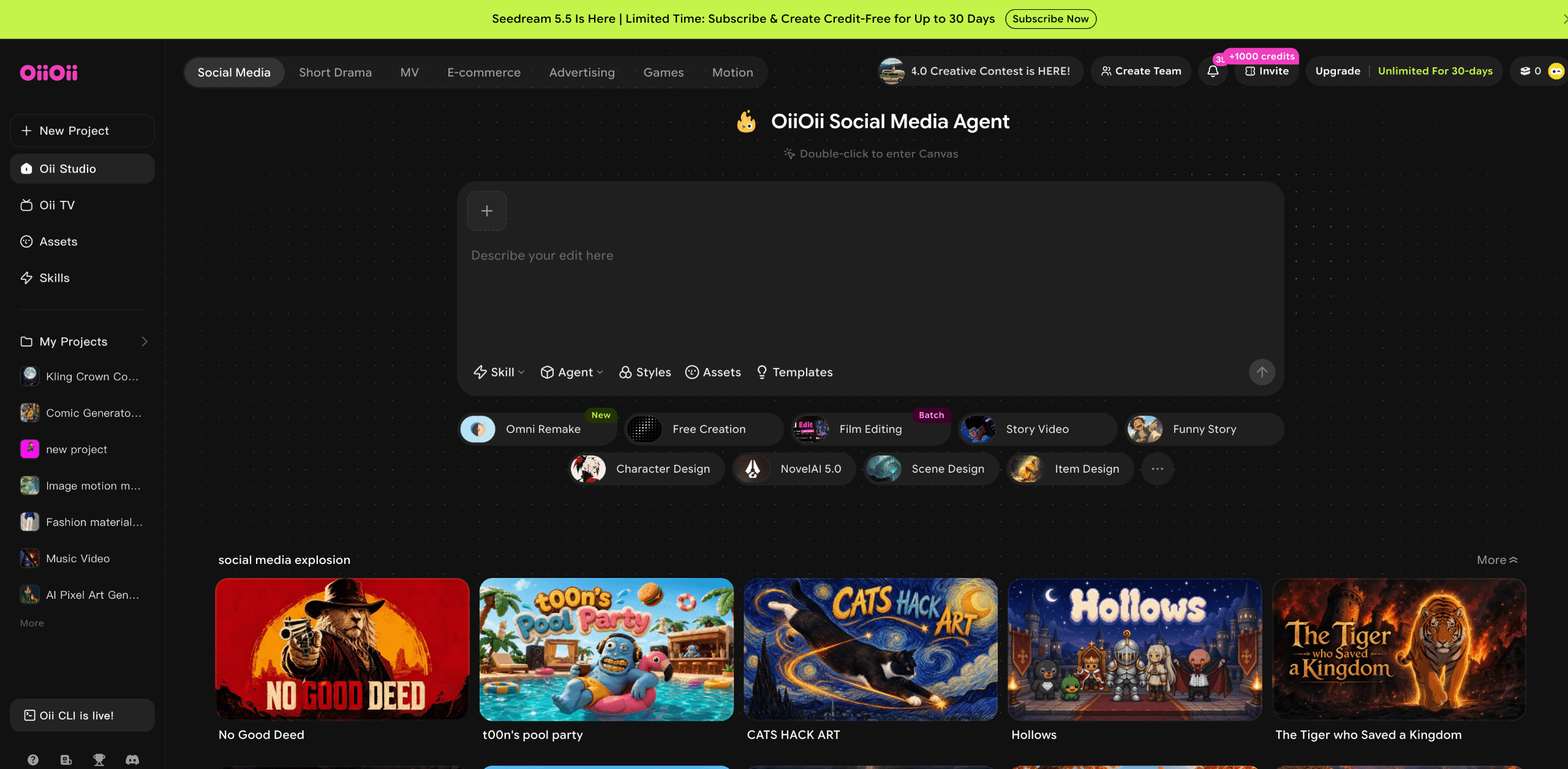
About this app
OiiOii is an AI creation agent for professional video production. Its connected agent workflows help creators and production teams develop concepts, design characters and scenes, build storyboards, generate shots, and edit videos in one workspace. Reusable Industry Skills let teams apply the same production workflows across projects, while support for multiple AI models gives them flexibility to choose the right model for each shot. OiiOii supports short dramas, social media videos, music videos, game content, ads, and e-commerce videos.
Key features
- 1Connected agent workflow: concept → character design → storyboard → shot generation → editing in one workspace.
- 2Reusable Industry Skills that apply the same production workflow across multiple projects.
- 3Multi-model support so teams can pick the right AI model per shot (Kling AI among them).
- 4Prompt-first UI with Skill / Agent / Styles / Assets / Templates toolbar for fast starts.
- 5Category templates for social media, short drama, MV, e-commerce, advertising, games and motion.
Target customer profile
Drawn from the product itself, not from a survey.
Demographic
Independent content creators and YouTubers (18-35)
Pain points
Video editing is slow and expensive; AI tools produce disjointed clips
Primary needs
Fast end-to-end video creation from a single prompt or idea
Demographic
E-commerce sellers and small brand marketers
Pain points
Product video ads cost too much and take weeks to produce
Primary needs
Affordable branded ad and product videos at scale
Demographic
Indie game studios and animation hobbyists
Pain points
Cutscenes and character assets require specialized 3D skills
Primary needs
Character turnaround, scene design, and cutscene generation
Demographic
Educators and explainer video producers
Pain points
Turning lesson material into engaging visuals is time-consuming
Primary needs
Quick explainer and animated educational videos
Scout Review
Written by AI from measured evidence, scored out of 100.
OiiOii is a young (domain registered July 2025) AI video production agent that tries to own the whole pipeline — concept, characters, storyboards, shots, editing — in one workspace, with reusable Industry Skills and multi-model flexibility as its pitch. The site is polished enough to look credible, the prompt-first UI is easy to grasp, and the security baseline is genuinely solid. The problems are focus and finish: a promo banner outshouts the product, the chip grid is noisy, mobile LCP is 4.5s, the viewport blocks zoom, and the target-customer list reads like a TAM slide rather than a wedge. It's a real product with a real idea, competing against Runway, Pika and Kling — and right now it's on par with them on ambition, behind on polish.
Measure by measure
Usability
57Standard creative-tool shell with a clear prompt entry point and sensible sidebar IA. Seven category tabs plus a dozen chips dilute focus, and the placeholder is nearly invisible.
Design
58Consistent dark theme with a single pink accent and a clear centred prompt box. Undermined by a screaming Black Friday bar, a cramped chip grid and truncated sidebar names.
Speed
57Lighthouse mobile 72/100 with a 4.5s LCP — the hero gallery of illustrated thumbnails is dragging first paint. Desktop is a healthier 79/100 with low CLS.
Security
74HTTPS enforced with HSTS, CSP, frame protection, SPF and DMARC — solid baseline. Missing X-Content-Type-Options, Referrer-Policy and Permissions-Policy, and no published audit or bug bounty.
Accessibility
70Lighthouse a11y 90/100, but contrast failures and a viewport that blocks pinch-zoom (user-scalable=no) are real WCAG problems, not just audit noise.
Growth
58Real problem (fragmented AI video pipelines), real differentiator (reusable Industry Skills + multi-model). But the target list is four segments wide, which is three too many.
Improvement areas
- Mobile performance: 4.5s LCP needs to come under 2.5s — compress or lazy-load the hero gallery.
- Accessibility: remove user-scalable=no and fix contrast on placeholder text and chip badges.
- Security headers: add X-Content-Type-Options, Referrer-Policy and Permissions-Policy (currently 9/12).
- Positioning: narrow the target from four segments to one sharp beachhead to sharpen the Skills story.
Design & Usability
OiiOii's interface reads as a competent creative-tool shell: dark theme, single pink accent, a centred prompt box with a Skill/Agent/Styles/Assets/Templates toolbar that makes the core action obvious. The sidebar IA (New Project, Oii Studio, Oii TV, Assets, Skills, Academy, My Projects) is tidy and familiar. What drags it down is clutter — a Black Friday banner louder than the product, a cramped chip grid with tiny NEW/Batch badges, truncated project names, and a header juggling sign-up, language and upgrade CTAs at once. The prompt placeholder is nearly invisible against the dark background, and icon-only controls lack labels. Usable, but the focus is diffuse for a professional audience.
Speed & Security
Speed is middling: Lighthouse mobile 72/100 with a 4.5s LCP — well past the 2.5s 'good' threshold — likely driven by the heavy illustrated thumbnail gallery on the homepage. Desktop is a healthier 79/100 with low CLS (0.069) and TBT of 131ms, so the app itself may feel snappier than the marketing page. Security is the strongest dimension: HTTPS enforced, HSTS, CSP, frame protection, SPF and DMARC all present (9/12 header checklist). Missing X-Content-Type-Options, Referrer-Policy and Permissions-Policy are easy wins. No SOC 2, ISO, pen-test or bug-bounty claim is published, which is normal for a product this young but caps the score in the mid-70s.
Accessibility & Growth
Accessibility lands at 70: Lighthouse 90/100 with two real failures — insufficient contrast on background/foreground pairs and a viewport meta using user-scalable=no, which blocks pinch-zoom. Those are genuine WCAG problems, not audit noise, and the low-contrast prompt placeholder compounds them. Growth is the interesting question. OiiOii names a real pain — AI video tools produce disjointed clips and pro pipelines are slow and expensive — and its wedge is concrete: reusable Industry Skills plus multi-model support (Kling AI is both a competitor and a model inside OiiOii). But the target list spans YouTubers, e-commerce sellers, indie game studios and educators, which is four segments and no sharp wedge. Against Runway, Pika and Kling, the workflow-integration story is the only real moat, and it needs a narrower beachhead to matter.
Conclusion
If you're an indie creator or small studio already stitching together three AI tools and a timeline, OiiOii's connected-workflow pitch is worth a trial — the Skills concept is the most interesting thing on the site. Go in expecting a young product: expect the marketing page to be slower than the app, expect accessibility rough edges, and expect to still need a real editor for the final cut. If you're an enterprise buyer, wait for published compliance and a narrower, documented workflow story. The bones are here; the discipline isn't yet.
Suggestions for improvement
- Kill or shrink the Black Friday banner — it's the loudest element on the page and it's selling a discount, not the product.
- Fix mobile LCP (4.5s): lazy-load or compress the illustrated thumbnail gallery below the fold.
- Remove user-scalable=no from the viewport meta and raise contrast on the prompt placeholder and chip badges.
- Add X-Content-Type-Options, Referrer-Policy and Permissions-Policy headers — three lines, three checklist points.
Alternatives comparison
Named competitors, point by point. Nobody paid to appear here or to be left out.
 OiiOii |  Runway |  Pika |  Kling AI | |
|---|---|---|---|---|
| End-to-end workflow (concept → storyboard → shot → edit) in one workspace | Yes — connected agent workflow across the full pipeline | Partial — strong generation and editing, less concept/storyboard structure | No — focused on short clip generation | No — model-first, clip generation focus |
| Reusable workflow presets ('Industry Skills') | Yes — named Industry Skills reusable across projects | Partial — presets and templates, not named skills | Limited — style presets only | Limited — effect presets |
| Multi-model flexibility (choose model per shot) | Yes — multiple AI models including Kling AI | Yes — multiple in-house models | No — single proprietary model | No — Kling models only |
| Target audience breadth | Broad: YouTubers, e-commerce, indie games, educators | Pro filmmakers, VFX and creative studios | Social creators and hobbyists | General creators and developers via API |
| Published security/compliance posture | HTTPS/HSTS/CSP/SPF/DMARC; no published SOC 2 or bug bounty | Enterprise security page; SOC 2 posture for business tiers | Standard HTTPS; limited public compliance detail | Standard HTTPS; limited public compliance detail |
Runway
Established AI video generation suite with strong editing tools and model variety.
Pika
Lightweight AI video generator popular for short, stylized social clips.
Kling AI
Kuaishou's video model known for realistic motion; also available as a model inside OiiOii.
Comparing options? See OiiOii alternatives, scored side by side
More AI Generations apps
View all AI Generations
Uni-1 by Luma AI
92Uni-1 is an advanced multimodal text-to-image AI model th...

Gerty
91Private, local AI assistant for Mac that runs offline

LTX 2.3 AI Video Generator
91Fast, open-source AI video generator with 4K support, mul...

DemoVexa
90Turn your code into professional product demo videos with AI-generated scripts, animated UI, and natural voiceovers.

AI Vocals Generator
89Add AI singers or rappers to your own beat, get two takes...

Voqusa
89Transcribe social media video and audio links into text (free signup, 5 free credits, then pay-as-you-go)

All of Us
89Add deceased loved ones to photos with AI and see free pr...

PodRescale
89Every episode becomes two weeks of posts. In your voice. Posted for you.

Pixelimg
88A free online AI-powered tool that instantly converts ima...

Cantoro
88Custom AI songs with a name, heard free before paying $4....

tradutor de mangá com IA
88O tradutor de mangá com IA traduz capítulos em lote, personaliza textos e oferece edição visual para estúdios.

IraVoice
88Private on-device dictation for Apple-silicon Macs.


A platform dedicated to providing unbiased reviews of newly launched applications, analyzing everything from their features to their full potential.
info@scoutforge.net© 2026 Scoutforge. All rights reserved.
