Cycling through all six. Tap any point to stop.
Measured on six things
Make paper cutout and newspaper text animations in your browser
Security
52HTTPS enforced with SPF and DMARC, but no HSTS, CSP, frame protection, or any of the standard hardening headers — 4/12 on the probe. No security page or compliance claims published.
Screenshots
1 / 1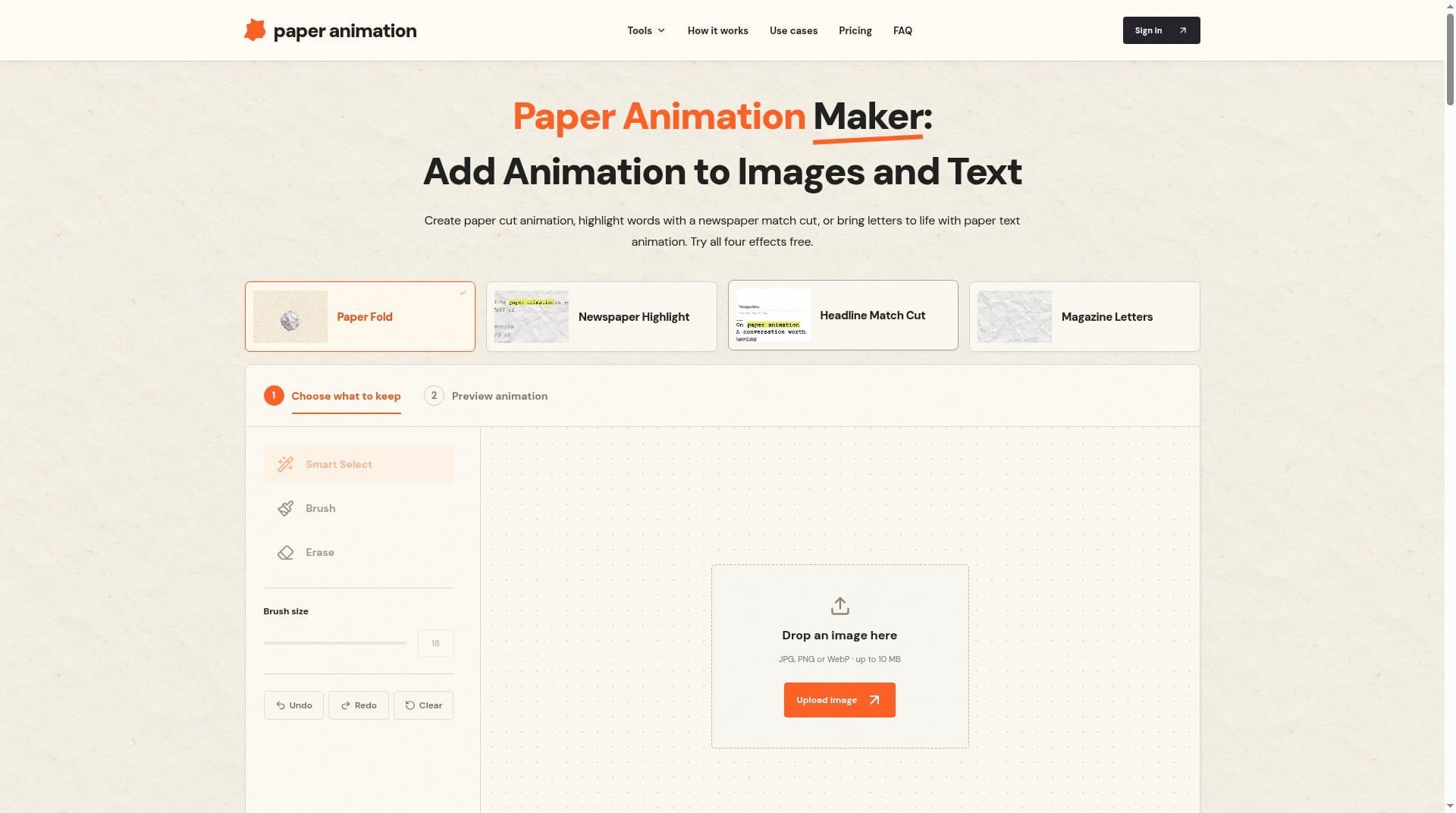
About this app
Paper Animation is a browser-based motion graphics tool for making paper cutout and newspaper text animations in seconds. Upload an image, choose a preset such as Tear Reveal, Newspaper Cutout, Stop-Motion Collage, or Match Cut, and export ready-to-share videos with no complex editing timeline required. Free plan includes all 4 effects and unlimited 720p exports; Pro unlocks 1080p and removes the watermark.
Key features
- 1Four paper-style effects: Paper Fold, Newspaper Highlight, Headline Match Cut, Magazine Letters.
- 2Upload an image, Smart Select the subject, and export MP4 or GIF with green screen option.
- 3Free plan with all effects and unlimited 720p exports; Pro $4.99/mo for 1080p no watermark; $14.99 lifetime.
Target customer profile
Drawn from the product itself, not from a survey.
Demographic
Social media content creators (TikTok, Instagram, YouTube)
Pain points
Need engaging, scroll-stopping visuals but lack animation skills
Primary needs
Quick, template-based paper animations for videos and posts
Demographic
Ecommerce sellers and small business owners
Pain points
Product photos look static; video ads require expensive editing
Primary needs
Simple way to turn product images into animated paper cutouts
Demographic
Video editors and motion graphics freelancers
Pain points
Creating paper-style overlays from scratch is time-consuming
Primary needs
Ready-made paper animation effects with green screen export
Scout Review
Written by AI from measured evidence, scored out of 100.
Paper Animation is a focused, on-theme browser tool that turns images and text into paper cutout and newspaper-style motion graphics without a timeline. The design concept is coherent and the four effects are genuinely differentiated from Canva and After Effects. Execution gaps hold it back: washed-out primary buttons, a blank first-visit canvas, no docs, a 4.1s mobile LCP, and thin security headers. The pricing ladder is smart and the niche is real. It's a promising early-stage tool that needs polish on onboarding, performance, and hardening before it earns a Pro subscription from skeptical creators.
Measure by measure
Usability
63Obvious upload entry point and a workflow-mirroring tool panel make the first step clear. But the canvas sits blank until upload, and there's no docs or tutorial library beyond a pricing FAQ.
Design
71Cohesive paper-texture palette, two-tone hero, and a tool panel that previews the real workflow. Undermined by washed-out primary buttons that look disabled and tiny low-contrast body copy.
Speed
58Lighthouse mobile 66/100 with a 4.1s LCP and 4.1s FCP; desktop 75/100. CLS is clean at 0.014. Multiple embedded video previews likely drag the largest paint.
Security
52HTTPS enforced with SPF and DMARC, but no HSTS, CSP, frame protection, or any of the standard hardening headers — 4/12 on the probe. No security page or compliance claims published.
Accessibility
58Lighthouse a11y 81/100, but failing audits include insufficient color contrast, unlabeled form elements, broken ARIA roles, and non-sequential headings. No WCAG statement or multi-language support.
Growth
62A real, specific problem — paper-style motion graphics without a timeline — with four named effects and green screen export that Canva and After Effects don't package this way. Early stage (domain 0.2 years).
Improvement areas
- Primary 'Create animation' and 'Smart Select' buttons render washed-out and look disabled.
- No docs or tutorial library — only a pricing FAQ; first-visit canvas is blank.
- Thin security headers (4/12) and 4.1s mobile LCP from embedded video previews.
Design & Usability
The design is genuinely on-theme: cream paper texture, burnt orange accents, and a tool panel that mirrors the actual workflow with numbered steps. The problem is execution details — the primary 'Create animation' and 'Smart Select' buttons render in a washed-out pale orange that reads as disabled, and the feature copy is tiny and low-contrast. Usability is decent: the upload dropzone is the clearest thing on the page, and the tool panel shows exactly what you'll do. But the canvas is blank until you upload, so first-timers see an empty grid rather than a sample transformation. There's no docs or tutorial library beyond a pricing FAQ, which leaves new users to figure out the four effects by trial.
Speed & Security
Speed is middling: Lighthouse mobile 66/100 with a 4.1s LCP and 4.1s FCP, desktop 75/100, CLS clean at 0.014. The multiple embedded video previews (each a 0:00/0:03 player) likely drag the largest paint. For a tool promising 'animations in seconds,' a 4-second first paint is a rough first impression. Security is thin: HTTPS is enforced and SPF/DMARC are present, but there's no HSTS, CSP, frame protection, X-Content-Type-Options, Referrer-Policy, or Permissions-Policy — 4/12 on the header probe. No security page, no SOC 2, no compliance claims. For a tool that handles uploaded images and payments, that's a gap worth closing.
Accessibility & Growth
Accessibility scores 81/100 on Lighthouse but the failing audits are telling: insufficient color contrast, form elements without labels, broken ARIA role hierarchies, non-sequential headings, and visible text labels that don't match accessible names. There's no WCAG statement and the site is English-only. Growth is the strongest dimension: the problem is real and specific — creators and ecommerce sellers want paper cutout and newspaper text animations without a timeline or After Effects skills. The four named effects plus green screen export are a genuine wedge against Canva's generic animation and AE's skill barrier. The $0/$4.99/$14.99 ladder targets exactly the low-budget, low-skill segment. The limit: it's a template tool, so the moat is the effect quality and the export pipeline, not network effects. Domain is 0.2 years old — very early, but the idea has room.
Conclusion
If you're a creator who wants paper-style animations without learning After Effects, this is worth a free-plan test — the four effects are the real deal and the lifetime price is aggressive. But go in expecting to figure things out yourself: there's no tutorial library, the first canvas is blank, and the site loads slower than the animations it promises. For the maker: fix the disabled-looking buttons, add a sample transformation on first load, publish a real docs page, and add the standard security headers. The idea deserves better execution than it currently has.
Suggestions for improvement
- Fix the washed-out 'Create animation' and 'Smart Select' buttons — they read as disabled and kill the primary action.
- Show a pre-loaded sample transformation on first visit instead of a blank dotted canvas.
- Add HSTS, CSP, frame protection, and Referrer-Policy headers; publish a basic security page.
- Build a docs/tutorial library for the four effects — a pricing FAQ is not onboarding.
Alternatives comparison
Named competitors, point by point. Nobody paid to appear here or to be left out.
 Paper Animation |  Canva |  Adobe After Effects | |
|---|---|---|---|
| Paper cutout / newspaper text animation effects | Yes — 4 dedicated effects (Paper Fold, Newspaper Highlight, Headline Match Cut, Magazine Letters) | No dedicated paper cutout effects; general animation presets only | Possible but requires manual setup and advanced skills |
| Skill level required | Low — upload, select, export; no timeline | Low to medium — template-based but general purpose | High — professional motion graphics expertise needed |
| Green screen export for overlays | Yes — dedicated green screen export option | Limited; not a native paper-overlay workflow | Yes, via chroma key — but manual setup |
| Pricing model | Free 720p; $4.99/mo Pro; $14.99 lifetime | Free tier; Pro ~$15/mo; broader design suite | ~$22.99/mo subscription; professional suite |
| Export formats | MP4 and GIF, up to 1080p on paid plans | MP4 video, GIF, and various image formats | Broad codec and format support; professional output |
Canva
A general design platform with animation features, but lacks specialized paper cutout effects.
Adobe After Effects
Professional motion graphics software that can create paper animations but requires advanced skills.
Comparing options? See Paper Animation alternatives, scored side by side
More 3D & Animation apps
View all 3D & Animation
Uni-1 by Luma AI
92Uni-1 is an advanced multimodal text-to-image AI model th...

LTX 2.3 AI Video Generator
91Fast, open-source AI video generator with 4K support, mul...

Tracé slides
89Interactive math & physics slides with live graphs and an...

HeyVid AI
88HeyVid AI is a free all-in-one AI video and image generat...

CADProps
88Browser CAD viewer and measurement — 90+ formats

ButterKit
82macOS app for App Store screenshots: 3D mockups, auto-tra...

Kinomo
87The Mac motion studio your AI agent drives.

Shanshenbu Dance AI Generator
87Turn one full-body photo into a viral shan shen bu flash ...

DeepSwapAI
87AI face swap online with no subscription, pay per use.

MyRaxAI
87Generate unique AI-powered visuals for creative, personal, and commercial projects.

Music Visualizer
86Online music visualizer for audio-reactive videos.

AI Game Makers
85Roblox AI game maker: type one sentence and the AI builds a full game with map, scripts and UI. No coding. Preview it in 3D, then open it in Roblox Studio.


A platform dedicated to providing unbiased reviews of newly launched applications, analyzing everything from their features to their full potential.
info@scoutforge.net© 2026 Scoutforge. All rights reserved.
