Cycling through all six. Tap any point to stop.
Measured on six things
The Mac motion studio your AI agent drives.
Growth
62Real, specific wedge: native Mac + MCP agent control + local GPU export, aimed at creators and agent-using developers. Differentiated from cloud-first Remotion and HyperFrames, but the Mac-only, Apple-silicon-only gate caps the addressable market hard.
Screenshots
1 / 3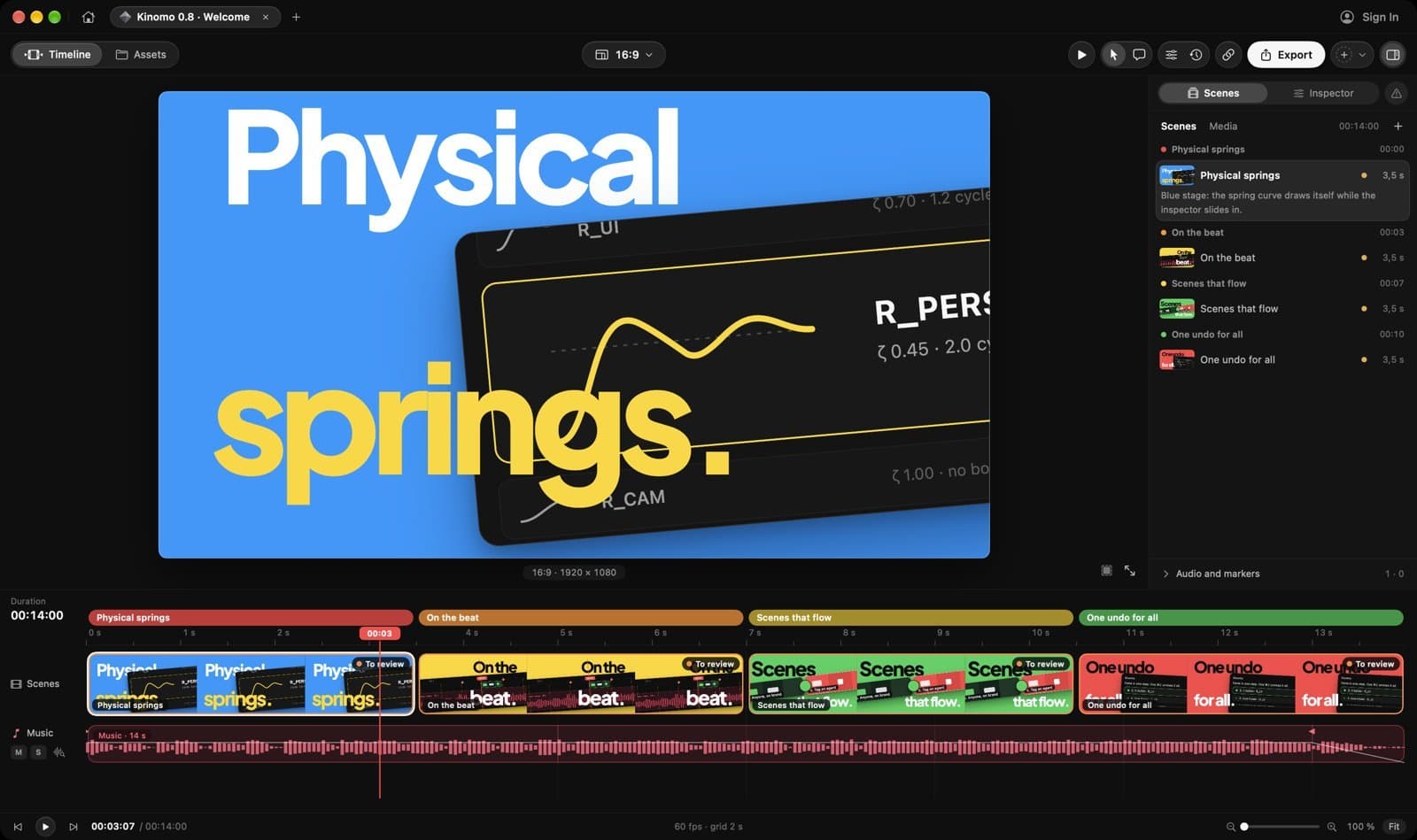
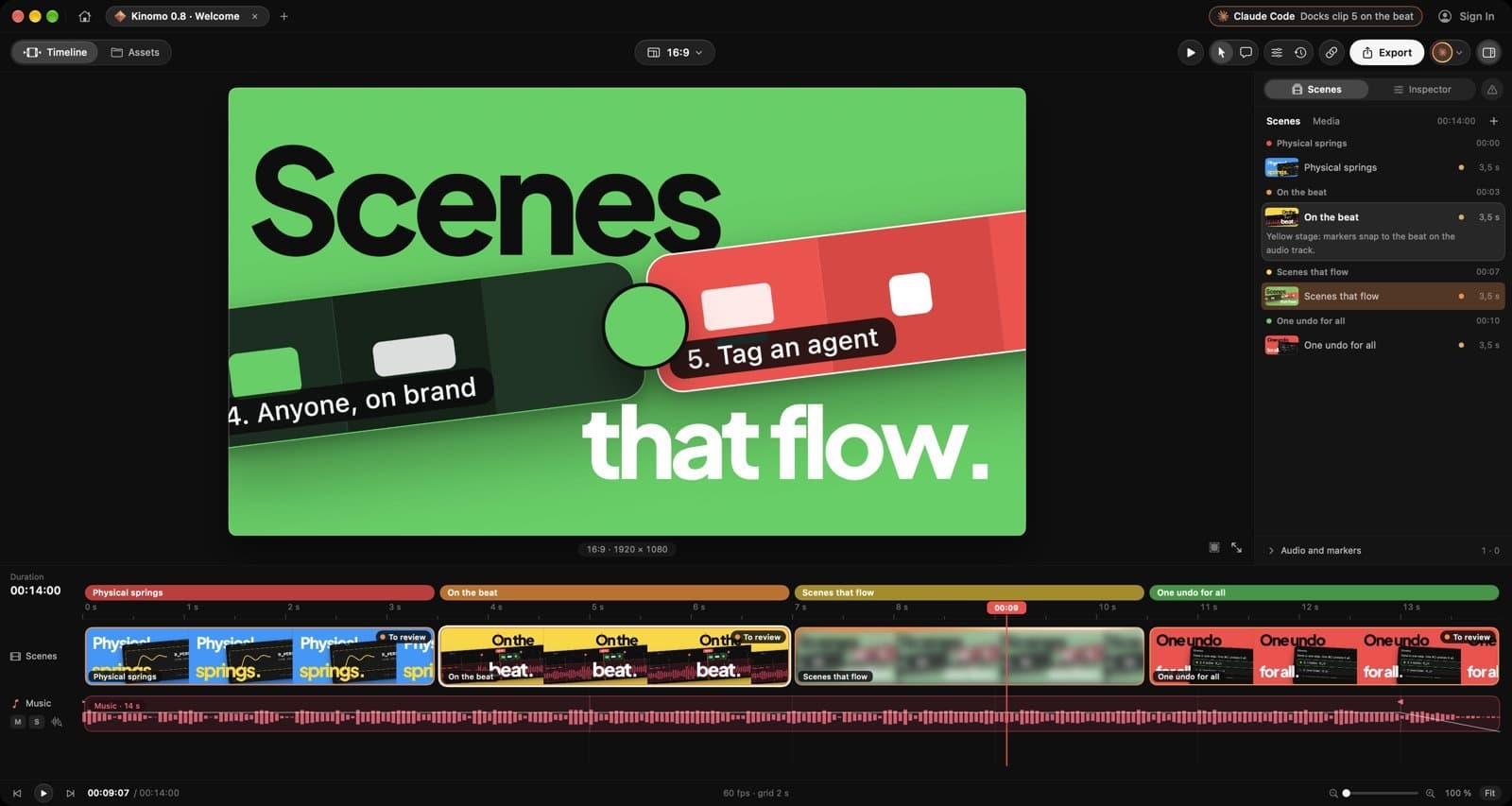
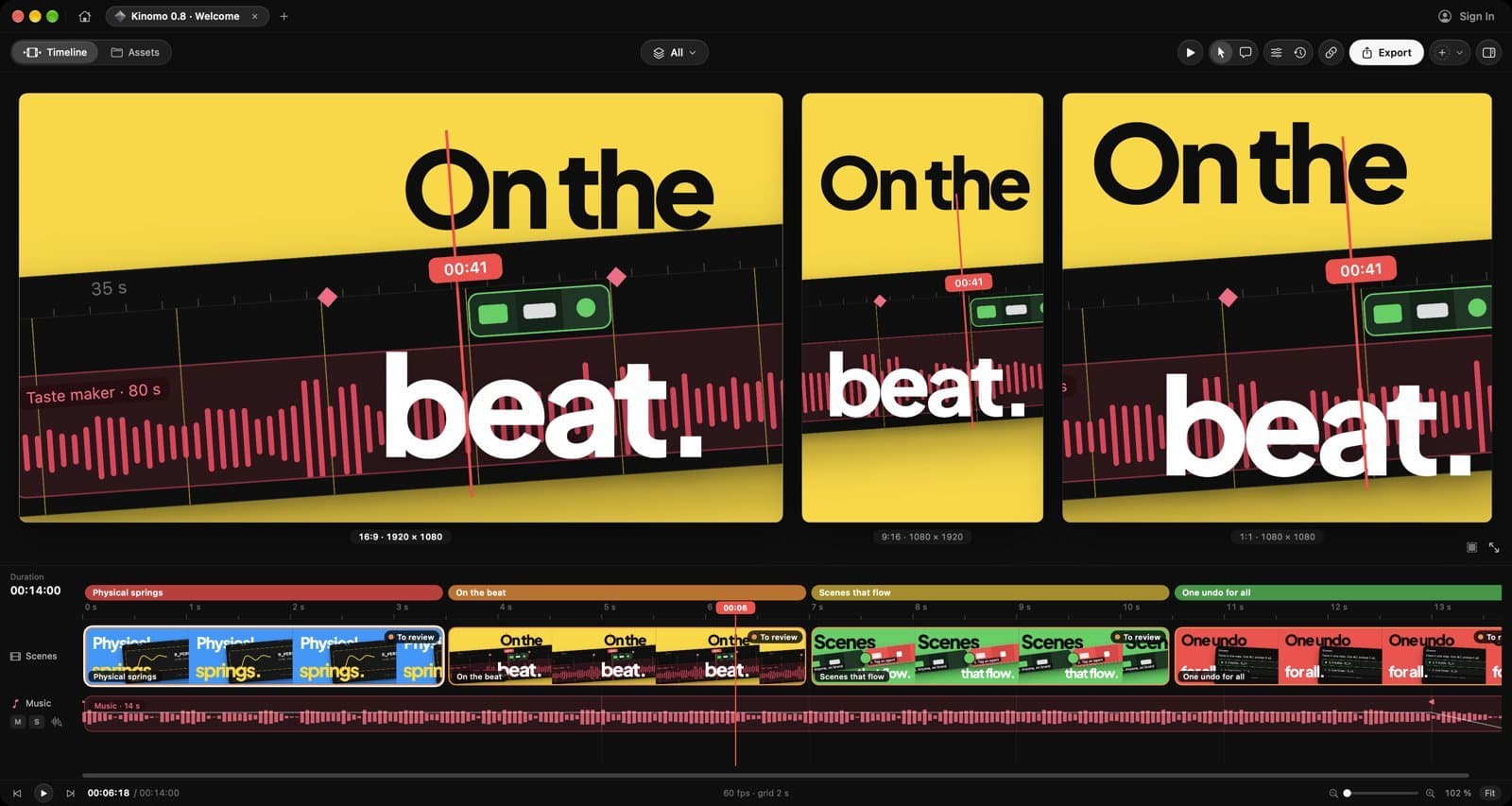
About this app
Kinomo is a native Mac motion studio driven by AI agents. Direct your videos in plain words and your agent (Claude, Cursor or any MCP client, local or via the remote MCP server at https://kinomo.app/mcp) builds the animation on a real timeline with named chapters and live preview. Aspect ratios 16:9, 9:16, 1:1, 4:5 and 3:2; export to H.264, HEVC or ProRes; share review links. Free with 1080p export; paid upgrade adds 4K and HDR export. Requires macOS 15+ on Apple silicon.
Key features
- 1MCP agent control: Claude, Cursor or any MCP client builds animations on a real timeline from plain-language direction
- 2Native Apple silicon rendering: GPU-painted frames encoded by the M-chip media engine to H.264, HEVC or ProRes
- 3Multi-format canvas: 16:9, 9:16, 1:1, 4:5 and 3:2 edited side by side with per-format layouts and subject-aware reframing
Target customer profile
Drawn from the product itself, not from a survey.
Demographic
Mac-based content creators and social media managers
Pain points
Slow rendering, juggling multiple aspect ratios, manual beat-syncing
Primary needs
Fast local export, multi-format support, beat-synced editing
Demographic
Product marketers and launch teams
Pain points
Complex animation tools, slow feedback loops, version control
Primary needs
AI-assisted scene building, easy client review, versioned sharing
Demographic
Developers and technical founders using AI agents
Pain points
Manual video editing, limited agent integration, cloud dependency
Primary needs
MCP agent control, native Mac performance, local processing
Scout Review
Written by AI from measured evidence, scored out of 100.
Kinomo is a native Mac motion studio where AI agents — Claude, Cursor, any MCP client — build animations on a real timeline from plain-language direction. The pitch is sharp and the execution backs it up: a 100/100 desktop Lighthouse score, a published benchmark showing 3.4-4.0x faster rendering than HyperFrames and Remotion, Developer ID signing and Apple notarization, and a landing page that explains the product in one screen. The 0.8.1 changelog is unusually honest, listing six specific fixes with real user impact. Where it's thin: no pricing page surfaced in the captured content despite a free/paid split being advertised, no SOC 2 or bug bounty, no WCAG statement, and a below-fold homepage that goes sparse. The bigger constraint is structural — macOS 15+ on Apple silicon only. For Mac-based creators and agent-using developers, that's the target audience, not a bug. For everyone else, it's a wall.
Measure by measure
Usability
68Download-to-value path is short and honest: version, 17 MB size and macOS 15+/Apple silicon requirements sit right under the CTA. Changelog is unusually detailed. No visible pricing page or free-trial detail in captured content.
Design
71Confident dark hero with one clear CTA and a real app-window demo that explains the product instantly. Editor mockup is disciplined, but timeline labels are too small to read and the below-fold area renders sparse.
Speed
79Lighthouse desktop 100/100, mobile 90/100 with CLS 0 and TBT 0ms. LCP 3.2s on mobile is the one soft spot. Native GPU rendering claims (80s video in 27s) are backed by a published benchmark chart against named competitors.
Security
7611/12 security headers present including HSTS, CSP, DMARC. App is Developer ID signed and Apple-notarized per changelog. No SOC 2, ISO or bug bounty program published, and Permissions-Policy is missing.
Accessibility
80Lighthouse accessibility 100/100 on automated checks, plus EN/FR/ES language toggle. No published WCAG statement, and the audit itself flagged low-contrast timeline metadata in the product screenshots.
Growth
62Real, specific wedge: native Mac + MCP agent control + local GPU export, aimed at creators and agent-using developers. Differentiated from cloud-first Remotion and HyperFrames, but the Mac-only, Apple-silicon-only gate caps the addressable market hard.
Improvement areas
- No pricing page surfaced in captured site content despite advertised free 1080p / paid 4K+HDR split
- Below-fold homepage renders sparse; timeline labels in demo screenshots are low-contrast and hard to read
- No SOC 2, ISO, bug bounty or WCAG conformance statement published; Permissions-Policy header missing
Design & Usability
Kinomo's site does the hard thing well: one headline, one button, one framed demo of actual output. The hero communicates 'AI agent builds your animation on a real timeline' in about four seconds, which is faster than most SaaS landing pages manage in four scrolls. The editor mockup is a disciplined dark UI with a color-coded scene strip that reads as a real product, not a Figma fantasy. Where it slips is below the fold — the captured page goes sparse, and the timeline labels inside the demo are too small and low-contrast to parse at normal scale. Usability is the stronger half: the download CTA carries version, file size and system requirements inline, so nobody wastes a click on an incompatible Mac. The changelog is genuinely excellent — six named fixes per release with real user-facing detail. The gap is pricing: the description promises a free 1080p tier and a paid 4K/HDR upgrade, but the captured pages don't surface a pricing page or trial detail.
Speed & Security
Speed is the standout. Lighthouse desktop 100/100 and mobile 90/100 with CLS 0 and TBT 0ms is a clean bill of health; the only blemish is a 3.2s mobile LCP, which is acceptable but not exceptional. More interesting is the product's own performance claim: an 80-second 1080p60 video rendering in 27 seconds, with a published benchmark chart putting it 3.4x ahead of HyperFrames and 4.0x ahead of Remotion on a MacBook Pro M1 Pro, median of six runs. That's a specific, falsifiable claim with methodology attached — rare and worth crediting. Security is solid table stakes: HTTPS enforced, HSTS, CSP, frame protection, DMARC and SPF all present, 11 of 12 checklist points. The app is Developer ID signed and Apple-notarized per the 0.8.0 changelog, which matters for a downloadable binary. What's missing is the enterprise layer — no SOC 2, no ISO, no bug bounty, no Permissions-Policy header. For a 0.8.1 indie Mac app that's normal, not damning, but it caps the score.
Accessibility & Growth
Accessibility lands at 80 on the strength of a perfect 100/100 Lighthouse automated audit plus an EN/FR/ES language toggle in the header. That's a strong automated baseline, but automated checks cover only part of WCAG — there's no published conformance statement, and the visual audit caught low-contrast timeline metadata in the product's own screenshots, which suggests the contrast discipline doesn't extend into the app UI. Growth is the most interesting dimension. The category is programmatic/AI video: Remotion (React-based, code-first, cloud or local) and HyperFrames (prompt-to-video, cloud rendering) are the named peers. Kinomo's wedge is genuinely distinct — native Mac, MCP agent control so Claude or Cursor can drive the timeline, local GPU rendering, and multi-format reframing in one canvas. That's a real answer to a real pain: cloud render queues and manual aspect-ratio juggling. The limit is structural: macOS 15+ on Apple silicon only, which excludes Windows, Intel Macs, and every mobile creator. The idea is differentiated and the segment is underserved, but the addressable market is a slice, not a market. Domain registered 2026-11-11 with only a twitter profile listed — early, and that's context, not a penalty.
Conclusion
If you're a Mac-based creator drowning in aspect-ratio exports, or a developer who wants Claude to build your launch video on a real timeline instead of hand-coding Remotion compositions, Kinomo is aimed squarely at you and the benchmarks suggest it delivers. The free 1080p tier lowers the try-it cost to a 17 MB download. What it isn't: a cross-platform tool, an enterprise-grade vendor with compliance paperwork, or a finished product — 0.8.1 is a pre-1.0 app shipping springs and morphing before a pricing page. Judge it as what it is: a fast, focused, native Mac tool with a real technical edge and a narrow door.
Suggestions for improvement
- Surface a pricing page — the free 1080p / paid 4K+HDR split is advertised but not visible in the captured site content.
- Fix the below-fold homepage: the captured render shows a sparse black field where feature detail and social proof should live.
- Increase contrast and size on timeline labels in the hero and editor screenshots — they're unreadable at normal scale.
- Publish a security.txt or bug bounty contact, and add the missing Permissions-Policy header to complete the 12/12 checklist.
Alternatives comparison
Named competitors, point by point. Nobody paid to appear here or to be left out.
 Kinomo |  Remotion | HyperFrames | |
|---|---|---|---|
| Platform / runtime | Native Mac app, macOS 15+ on Apple silicon only | React framework, runs in browser/Node, cross-platform | Cloud-based, browser-accessible |
| Authoring method | Plain-language direction via MCP agents (Claude, Cursor) on a real timeline | Write React/TypeScript components as video | Prompt-based AI generation |
| Rendering location | Local GPU + M-chip media engine; no cloud queue | Local or cloud (Remotion Lambda) | Cloud rendering |
| Multi-aspect-ratio editing | 16:9, 9:16, 1:1, 4:5, 3:2 side by side with per-format layouts and subject-aware reframing | Manual per-composition setup in code | Prompt-driven; format handling not specified |
| Export formats | H.264, HEVC, ProRes; 1080p free, 4K/HDR paid | H.264, ProRes, others via codec config | Standard video exports via cloud |
| Client review / sharing | Shareable review links with versioned sharing | Not built in; host the output yourself | Cloud-hosted output sharing |
Remotion
React-based framework for programmatic video creation; requires coding and runs in the cloud or locally.
HyperFrames
AI-powered animation tool for creating videos from prompts, with cloud rendering.
Comparing options? See Kinomo alternatives, scored side by side
More Design & Creativity apps
View all Design & Creativity
RoomCreator
92An AI-powered interior and exterior design tool that tran...

QRBliss
91Branded QR codes with AI Brand Sync, 15 free dynamic code...

ThumbnailMaker
90AI YouTube thumbnail maker: paste a video link, get the brief, the thumbnail, and a check at feed size.

FontPlop
89Browser-based font viewer & tester for TTF, OTF, WOFF, WO...

Cross Stitch Pattern Maker
89Free on-device photo-to-DMC/Anchor chart with skein counts.

What the GIF
89Frame-perfect video-to-GIF maker that runs entirely in yo...

All of Us
89Add deceased loved ones to photos with AI and see free pr...

English Test Coach
89English Test Coach checks your IELTS essays and letters, gives an estimated band score across all four criteria, and tells you exactly what to revise next.

AI Vocals Generator
89Add AI singers or rappers to your own beat, get two takes...

Tracé slides
89Interactive math & physics slides with live graphs and an...

ButterKit
82macOS app for App Store screenshots: 3D mockups, auto-tra...

BeartIMAGE
88BeartIMAGE is a free, web-based image processing platform engineered for fast, bulk photo editing and conversion directly in your browser.


A platform dedicated to providing unbiased reviews of newly launched applications, analyzing everything from their features to their full potential.
info@scoutforge.net© 2026 Scoutforge. All rights reserved.
