Is this your app?
Claim PitchGrid to manage its page, add your badge and see your traffic — free, and it stays free.
Cycling through all six. Tap any point to stop.
Measured on six things
PitchGrid transforms smartphones into powerful sports analysis tools with synchronized multi-angle video playback for coaches and athletes.
Accessibility
50Minimal dedicated features - no screen reader support, fixed fonts, or voice control. Relies entirely on device-level accessibility options.
Screenshots
1 / 2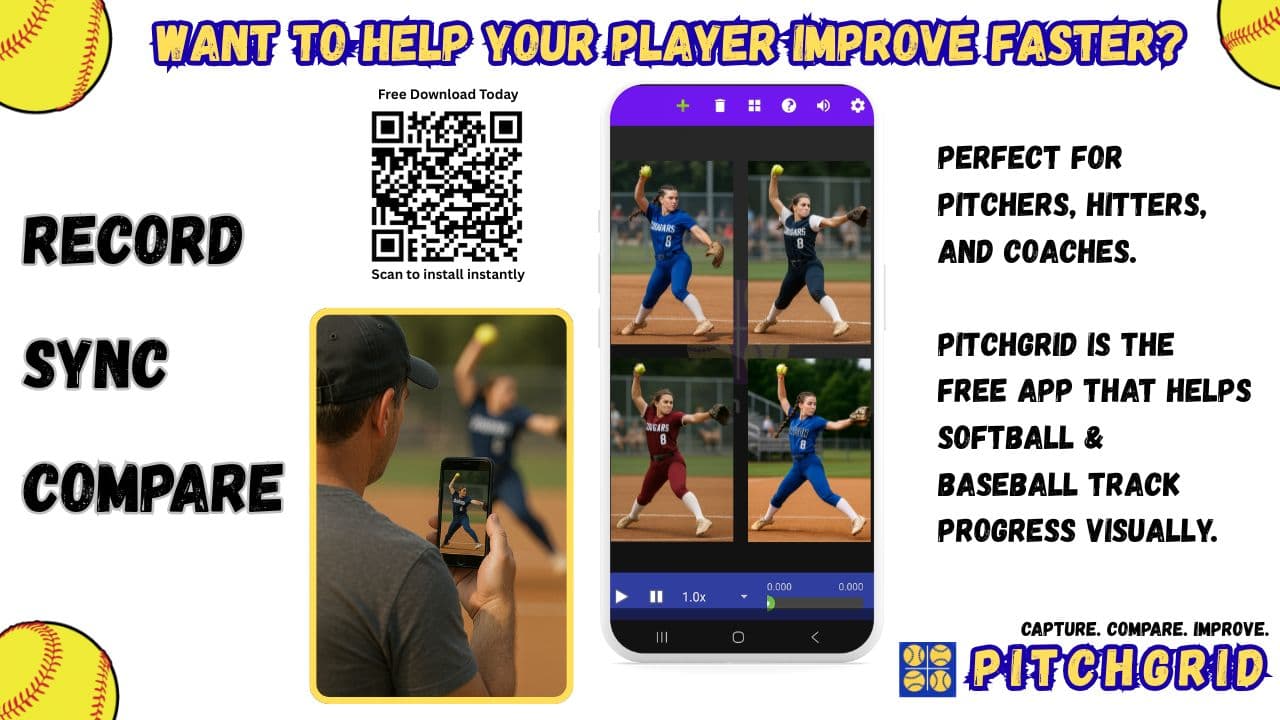

About this app
PitchGrid is an innovative mobile app that makes professional-grade sports performance review accessible by enabling synchronized playback of up to six smartphone videos with frame-level control. It's designed for grassroots coaches, amateur athletes, and sports educators who need affordable, portable analysis tools. Key features include customizable layouts, sport-specific presets, and local video processing for enhanced privacy. While currently Android-only, an iOS version is in development, offering a cost-effective alternative to high-end systems like Hudl or Dartfish.
Key features
- 1Synchronized multi-angle video playback with frame-level control for detailed sports analysis
- 2Local-first processing ensures sensitive athlete footage remains secure and private on-device
- 3Intuitive touch controls and sport-specific presets enable easy one-handed operation during coaching
Target customer profile
Drawn from the product itself, not from a survey.
Demographic
Grassroots Coaches
Pain points
Limited budget, no access to professional analysis tools, manual video syncing
Primary needs
Affordable multi-angle review, sport-specific templates, easy sharing
Demographic
Amateur Athletes
Pain points
Self-analysis difficulties, single-angle limitations, technical complexity
Primary needs
Slow-motion zoom, frame-by-frame control, mobile convenience
Demographic
Sports Educators
Pain points
Engaging students, visualizing techniques, resource constraints
Primary needs
Synchronized playback, exportable clips, intuitive interface
Scout Review
Written by AI from measured evidence, scored out of 100.
PitchGrid delivers exceptional value by transforming everyday smartphones into professional-grade sports analysis tools. It solves real pain points for coaches and athletes who need multi-angle review but lack the budget for high-end systems. The core functionality - synchronized playback, frame-level control, and customizable layouts - works remarkably well despite the utilitarian interface.
Measure by measure
Usability
94Excellent workflow-focused layout with intuitive touch controls, sport-specific presets, and one-handed operation for coaching scenarios.
Design
76Functional but utilitarian interface with customizable video grids and subtle color coding. Prioritizes screen real estate over visual polish.
Speed
80Reliable frame-perfect syncing for 2-3 angles, but struggles with six streams on older devices. Local processing avoids cloud delays.
Security
90Local-first processing means sensitive athlete footage never leaves devices. Clear privacy policy with no external uploads required.
Accessibility
50Minimal dedicated features - no screen reader support, fixed fonts, or voice control. Relies entirely on device-level accessibility options.
Growth
90Massive market need with mobile-first approach. iOS version in development will significantly expand reach beyond current Android base.
Improvement areas
- Enhance accessibility with screen reader support, adjustable UI elements, and voice control features
- Optimize performance for handling six video streams on older devices to improve speed and reliability
- Accelerate iOS version release to expand market reach and capture a broader user base beyond Android
Design & Usability
PitchGrid's interface takes a practical, no-nonsense approach that prioritizes function over form. The customizable video grids arrange neatly with intuitive touch controls, while subtle color coding helps distinguish camera angles. What it lacks in visual polish, it makes up for in thoughtful coaching workflow design. The sport-specific presets are particularly smart, pre-configuring layouts for common scenarios like pitching analysis or team formations. The one-handed zoom and slow-motion controls show genuine understanding of how coaches actually use video review during live sessions.
Speed & Security
Performance-wise, PitchGrid handles 2-3 simultaneous video angles smoothly on mid-range devices, maintaining reliable frame-perfect synchronization even when scrubbing through footage. The local processing approach is a security win - sensitive athlete footage never uploads to external servers, addressing privacy concerns that often plague sports analysis tools. While pushing to six streams may challenge older hardware, the trade-off for enhanced data security feels justified for most coaching use cases.
Accessibility & Growth
Accessibility is clearly the area needing most attention, with no dedicated screen reader support, voice control, or adjustable UI elements. However, the growth potential is enormous given the massive market of budget-conscious coaches and athletes. The mobile-first approach and upcoming iOS expansion position PitchGrid to capture a significant portion of the grassroots sports market that can't afford professional systems like Hudl or Dartfish.
Conclusion
If you're a coach or athlete needing affordable, portable video analysis that doesn't require specialized equipment, PitchGrid is absolutely worth trying. The free Android version makes experimentation risk-free while we await the iOS release. This app proves you don't need thousand-dollar software to gain meaningful performance insights.
Suggestions for improvement
- Prioritize the iOS release to capture the broader coaching market.
- Add cloud backup with end-to-end encryption for those who want it.
- Develop proper accessibility features including screen reader support and adjustable UI elements.
- Implement collaborative annotation tools for team reviews and side-by-side video comparison features for tracking progress over time.
Alternatives comparison
Named competitors, point by point. Nobody paid to appear here or to be left out.
 PitchGrid |  Hudl |  Dartfish |  Kinovea | |
|---|---|---|---|---|
| Platform Availability | Android (iOS coming) | Web, Desktop, Mobile | Desktop Only | Desktop Only |
| Cost Structure | Free/ Affordable | Subscription-based | High Cost License | Free |
| Mobile Syncing | Yes (Core Feature) | Limited | No | No |
| Learning Curve | Low | Medium | Steep | Medium |
Hudl
Professional-grade platform with more features but requires subscriptions and specialized equipment
Dartfish
Industry-standard desktop software with advanced tools but steep learning curve and high cost
Kinovea
Free desktop analysis tool with great features but no mobile syncing capabilities
Comparing options? See PitchGrid alternatives, scored side by side
More Education apps
View all Education
The Stack Newsletter
92A weekly newsletter delivering curated tech jobs, intervi...

SheetScroll
90> You play; SheetScroll turns the page. It listens through the microphone or a MIDI piano and holds the page until it's sure where you are.

Tracé slides
89Interactive math & physics slides with live graphs and an...

English Test Coach
89English Test Coach checks your IELTS essays and letters, gives an estimated band score across all four criteria, and tells you exactly what to revise next.

Startup Science
88A unified platform replacing 12-20 disconnected tools for...

Cromagnon
88Free, private browser-based PDF, Word, Excel, and study t...

TranscriptYou
88Free YouTube transcript generator with timestamps and AI ...

RBQ Exam
87Online practice for the RBQ contractor licence exams in Québec: original questions, timed mock exams and lessons, in French or English.

Coloring Pages Pro
87A massive collection of free printable coloring pages for...

CertWorthIt
87Data-driven tool revealing which certifications actually ...

HireVue Practice
85AI-powered HireVue practice with timed mock interviews, role-specific questions, transcripts, scoring, and actionable feedback.

Case Cub
85AI-powered law school study platform with 20,000+ case br...


A platform dedicated to providing unbiased reviews of newly launched applications, analyzing everything from their features to their full potential.
info@scoutforge.net© 2026 Scoutforge. All rights reserved.
