Is this your app?
Claim PlanWell to manage its page, add your badge and see your traffic — free, and it stays free.
Cycling through all six. Tap any point to stop.
Measured on six things
A technical alpha app for educators to manage lesson plans using plain markdown files with Obsidian compatibility.
Accessibility
40Minimal features for diverse needs, lacking screen reader support, language options, and adaptive interfaces for motor impairments.
Screenshots
1 / 4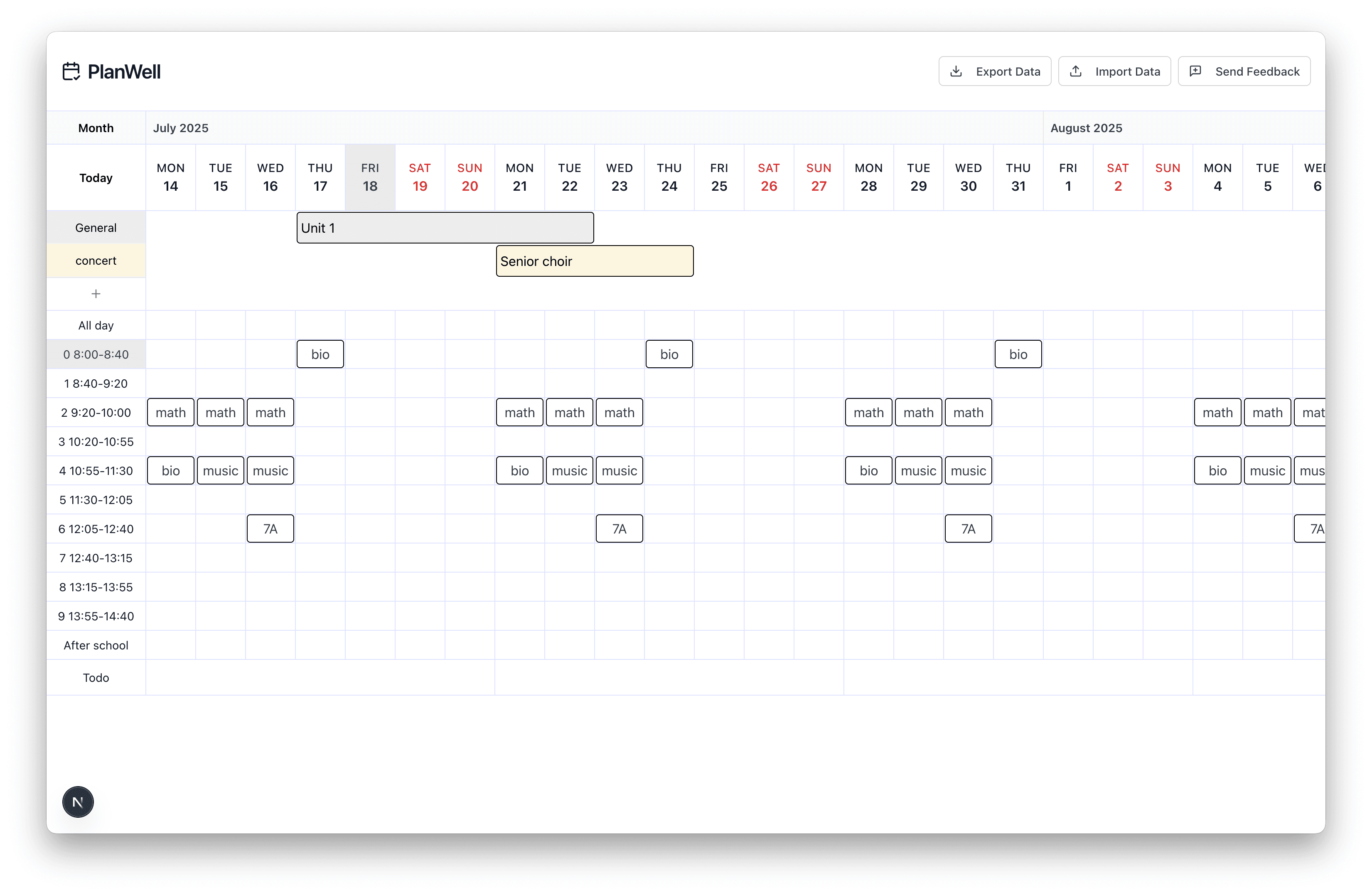
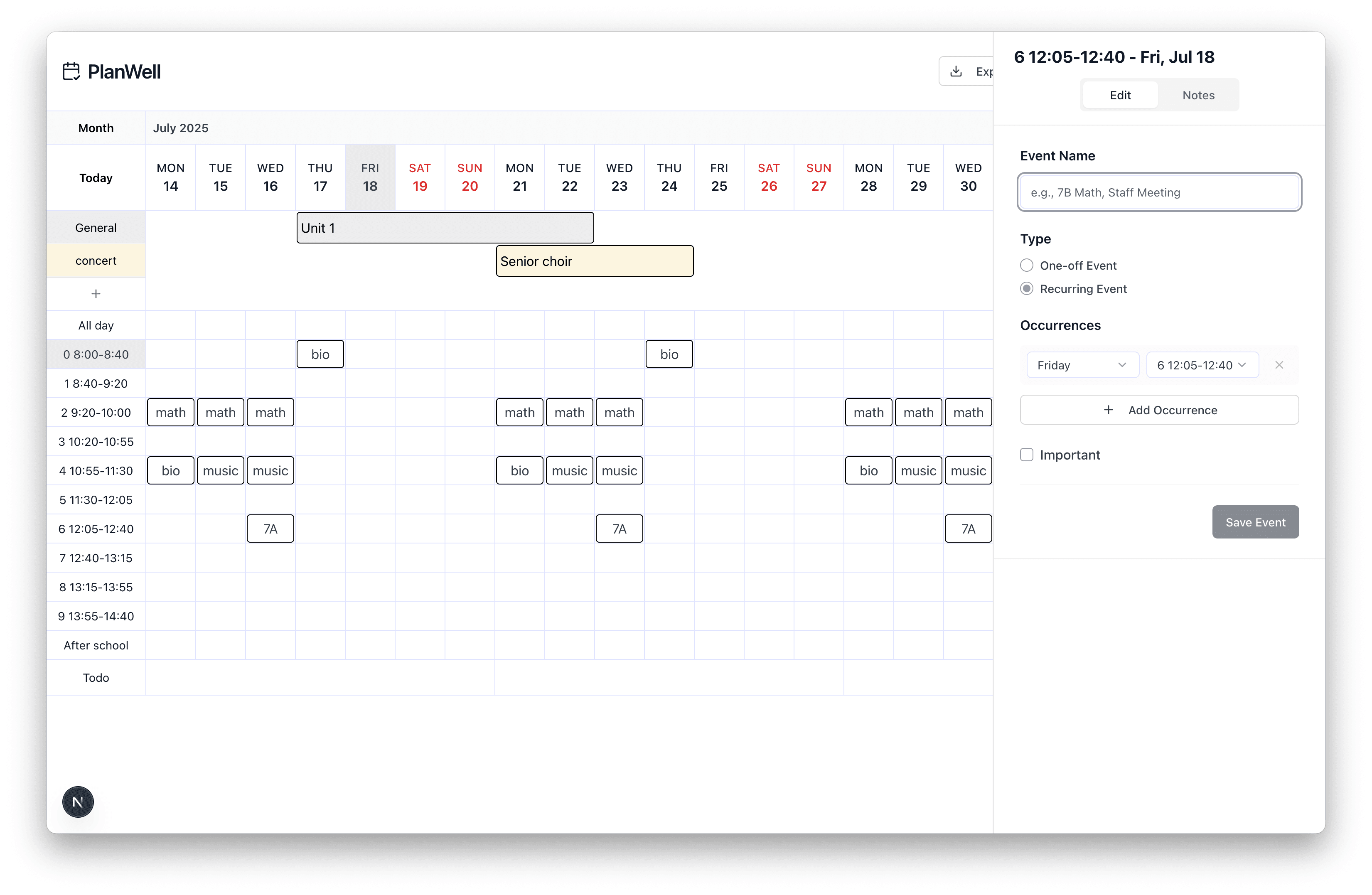
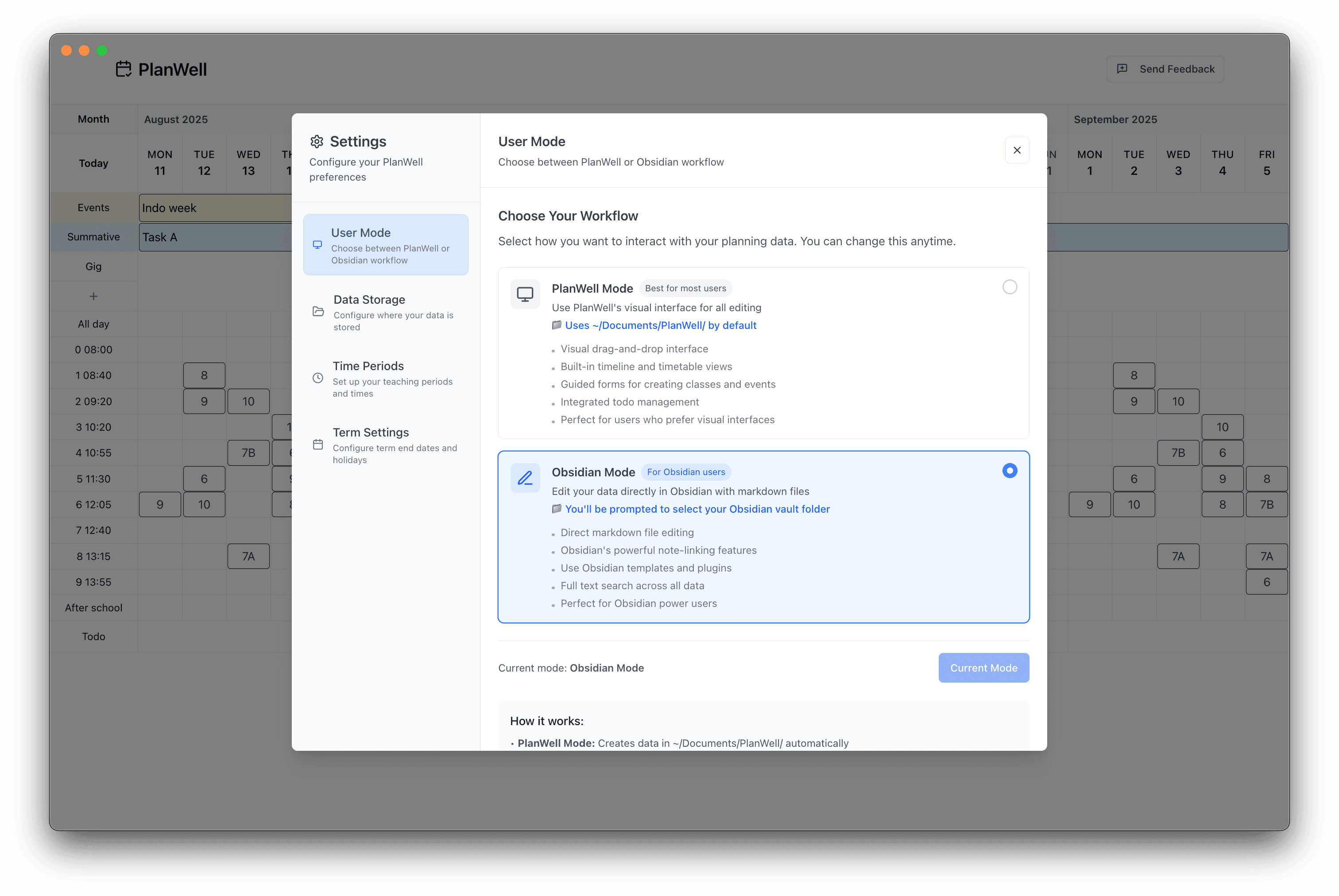
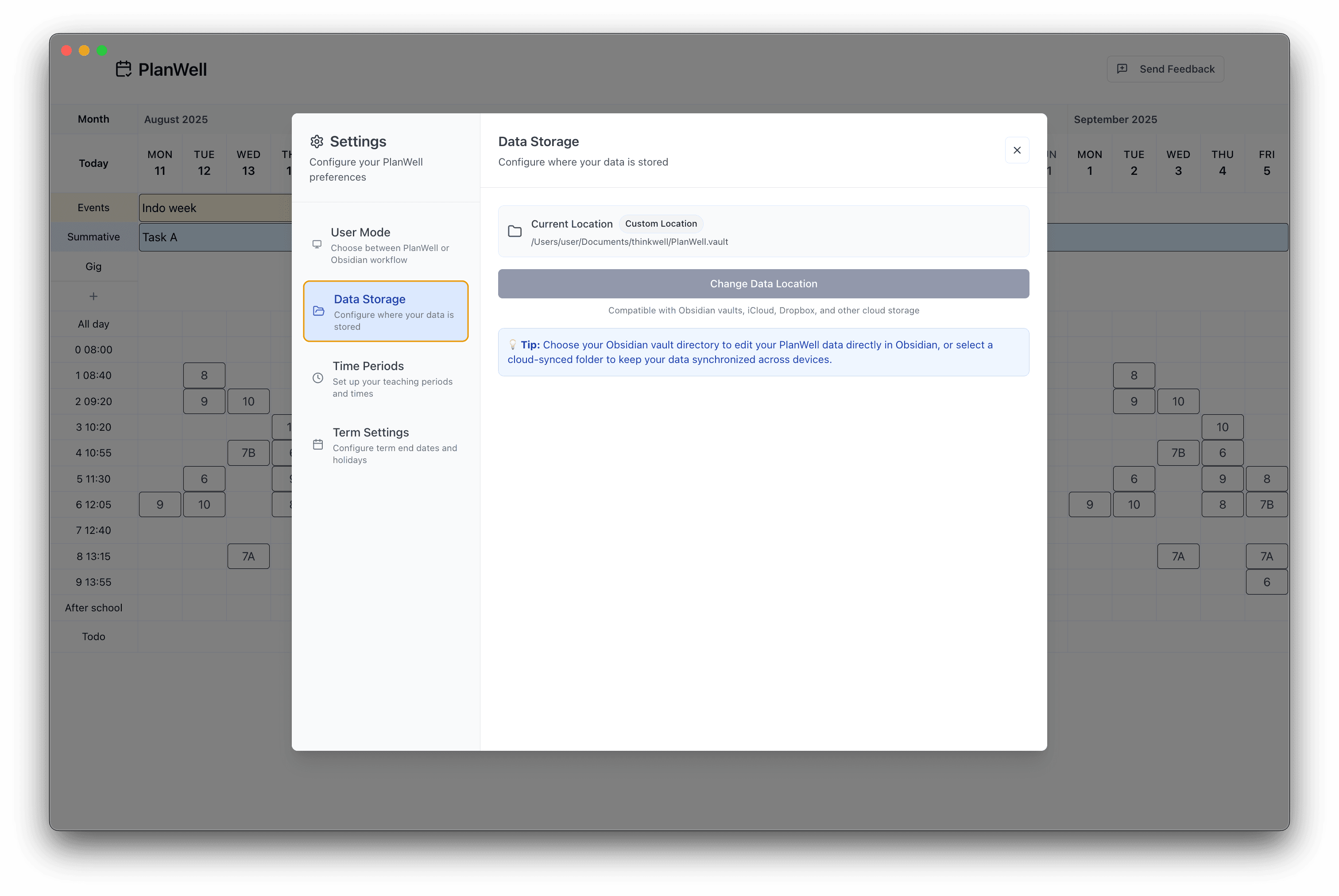
About this app
PlanWell.md is a browser-based and macOS application designed specifically for educators who prefer text-based workflows. It leverages Obsidian-compatible markdown files with YAML frontmatter to handle lesson planning, featuring a period-aware engine that automatically generates timeline blocks from notes. The app emphasizes user sovereignty, allowing data synchronization through personal storage like iCloud or git repositories, ensuring full control over content. While currently in technical alpha, it offers a refreshing alternative to proprietary planning software, though it has some rough edges in accessibility and interface polish. Ideal for tech-savvy teachers and markdown enthusiasts, it combines simplicity with powerful automation for educational scheduling.
Key features
- 1Obsidian-compatible markdown files with YAML frontmatter for maximum portability
- 2Period-aware engine automatically generates timeline blocks from plain text notes
- 3Local-first architecture with iCloud and git synchronization options for complete data control
Target customer profile
Drawn from the product itself, not from a survey.
Demographic
Tech-savvy educators and teachers
Pain points
Overly complex planning software, proprietary format lock-in, limited customization options
Primary needs
Text-based workflow flexibility, data portability, minimal learning curve for markdown users
Demographic
Markdown enthusiasts in education
Pain points
Adapting general note-taking apps for lesson planning, manual timeline management
Primary needs
Period-aware automation, Obsidian compatibility, personal storage integration
Demographic
Educators seeking data control and privacy
Pain points
Privacy concerns with cloud-based tools, reliance on external servers for data storage
Primary needs
Local-first data storage, security through personal cloud options like iCloud or git
Scout Review
Written by AI from measured evidence, scored out of 100.
PlanWell.md represents a compelling alternative to traditional lesson planning software for educators who value workflow control and data sovereignty. The combination of markdown simplicity with specialized educational automation creates a unique value proposition that resonates with tech-savvy teachers. While the technical alpha status means you'll encounter some rough edges, particularly in accessibility and interface polish, the core functionality delivers on its promise of combining plain text flexibility with purpose-built planning tools.
Measure by measure
Usability
70Excellent for markdown-proficient users with intelligent period-aware timeline generation, but YAML requirements create steep learning curves.
Design
70Clean macOS Tahoe aesthetic with minimal clutter, though alpha inconsistencies affect visual coherence and button placement.
Speed
80Local-first architecture ensures responsive performance with quick file rendering, though complex YAML processing causes occasional lag.
Security
80User-controlled data storage via local files or personal clouds eliminates third-party data risks and server-side privacy concerns.
Accessibility
40Minimal features for diverse needs, lacking screen reader support, language options, and adaptive interfaces for motor impairments.
Growth
70Strong niche appeal in markdown-education intersection with expansion potential through improved accessibility and platform support.
Improvement areas
- Limited accessibility features excluding many educators with disabilities
- Steep learning curve for teachers unfamiliar with YAML and advanced markdown
- Mobile platform support needed for planning on-the-go in educational settings
Design & Usability
PlanWell.md embraces a clean macOS Tahoe aesthetic that will feel familiar to Apple ecosystem users. The interface features subdued colors and minimal visual clutter, creating a focused environment for lesson planning. Navigation follows an intuitive folder-based structure that mirrors your markdown file organization, making it easy to find and manage your content. The standout feature is the period-aware engine that intelligently parses YAML metadata to automatically generate visual timeline blocks from your plain text notes. This creates a surprisingly seamless transition from writing markdown to viewing organized schedules. However, as a technical alpha, some interface elements feel unfinished - button placements occasionally lack consistency, and the learning curve steepens significantly for educators unfamiliar with YAML schemas or advanced markdown syntax.
Speed & Security
The local-first architecture delivers impressive security benefits - your data remains in markdown files stored either locally or in your chosen cloud service like iCloud or git repositories. This approach eliminates server-side privacy concerns and gives you complete control over your educational content. Performance-wise, the app handles basic operations like file rendering and timeline generation with responsive speed. The browser-based and macOS versions load quickly once initialized, though you might notice occasional lag when processing complex YAML structures or large collections of notes. Since the core functionality doesn't rely on external servers, you won't experience the typical cloud-based slowdowns during peak usage times.
Accessibility & Growth
Accessibility currently represents the app's most significant limitation. The markdown-heavy interface assumes strong visual capability for text navigation, with no mentioned support for screen readers, high-contrast modes, or voice commands. Language options appear confined to English, and the heavy reliance on keyboard shortcuts for advanced functions may challenge users with motor impairments. However, the growth potential is substantial - the niche focus on markdown-fluent educators provides a solid foundation, and expanding platform support to mobile devices along with basic accessibility features could significantly broaden its appeal. The Obsidian compatibility and text-based workflow philosophy position it well in the growing movement toward user-controlled, portable data formats.
Conclusion
If you're an educator already comfortable with markdown workflows or looking to escape the limitations of proprietary planning software, PlanWell.md offers a refreshing approach worth exploring during its development phase. The app's commitment to user control through local file storage and Obsidian compatibility makes it particularly appealing for teachers prioritizing data portability and long-term content accessibility. Give this one a try if you believe lesson planning tools should work with your existing text-based systems rather than forcing you into yet another proprietary ecosystem.
Suggestions for improvement
- Implement basic screen reader compatibility and high-contrast mode options to serve visually impaired educators
- Add visual YAML schema templates and wizards to reduce the learning curve for non-technical users
- Develop iOS and Android companion apps to enable mobile lesson planning and quick reference
- Create video tutorials specifically demonstrating the period-aware engine workflow for different subject types
Alternatives comparison
Named competitors, point by point. Nobody paid to appear here or to be left out.
 PlanWell PlanWell |  Planboard Planboard |  Planbook Planbook |  Obsidian Obsidian | |
|---|---|---|---|---|
| Data Portability & Format | Open markdown files with YAML, full user control | Proprietary format, limited export options | Proprietary format, cloud-dependent | Open markdown files, general purpose |
| Lesson Planning Specialization | Period-aware engine, timeline automation | Curriculum standards integration | Comprehensive planning features | General note-taking, requires plugins |
| Platform Availability | Browser & macOS only | Web-based, mobile apps | Web-based platform | Desktop & mobile apps |
Planboard
An established lesson planning app with curriculum standards support but less focus on markdown workflows and data portability.
Planbook
A popular online lesson planner with extensive features but proprietary format and less control over data storage.
Obsidian
A general markdown note-taking app that offers flexibility but lacks specialized lesson planning features out-of-the-box.
Comparing options? See PlanWell alternatives, scored side by side
More Education apps
View all Education
The Stack Newsletter
92A weekly newsletter delivering curated tech jobs, intervi...

SheetScroll
90> You play; SheetScroll turns the page. It listens through the microphone or a MIDI piano and holds the page until it's sure where you are.

Tracé slides
89Interactive math & physics slides with live graphs and an...

English Test Coach
89English Test Coach checks your IELTS essays and letters, gives an estimated band score across all four criteria, and tells you exactly what to revise next.

Startup Science
88A unified platform replacing 12-20 disconnected tools for...

Cromagnon
88Free, private browser-based PDF, Word, Excel, and study t...

TranscriptYou
88Free YouTube transcript generator with timestamps and AI ...

RBQ Exam
87Online practice for the RBQ contractor licence exams in Québec: original questions, timed mock exams and lessons, in French or English.

Coloring Pages Pro
87A massive collection of free printable coloring pages for...

CertWorthIt
87Data-driven tool revealing which certifications actually ...

HireVue Practice
85AI-powered HireVue practice with timed mock interviews, role-specific questions, transcripts, scoring, and actionable feedback.

Case Cub
85AI-powered law school study platform with 20,000+ case br...


A platform dedicated to providing unbiased reviews of newly launched applications, analyzing everything from their features to their full potential.
info@scoutforge.net© 2026 Scoutforge. All rights reserved.
