Cycling through all six. Tap any point to stop.
Measured on six things
Get better at Excel with short exercises in a real spreadsheet in your browser. See at once if your formula works, get a hint when stuck, and start free.
Growth
62Real problem (tutorials don't stick), specific segments (job seekers, career switchers), and a genuine wedge: graded interactive practice plus verifiable certificates the tutorial sites don't offer.
Screenshots
1 / 4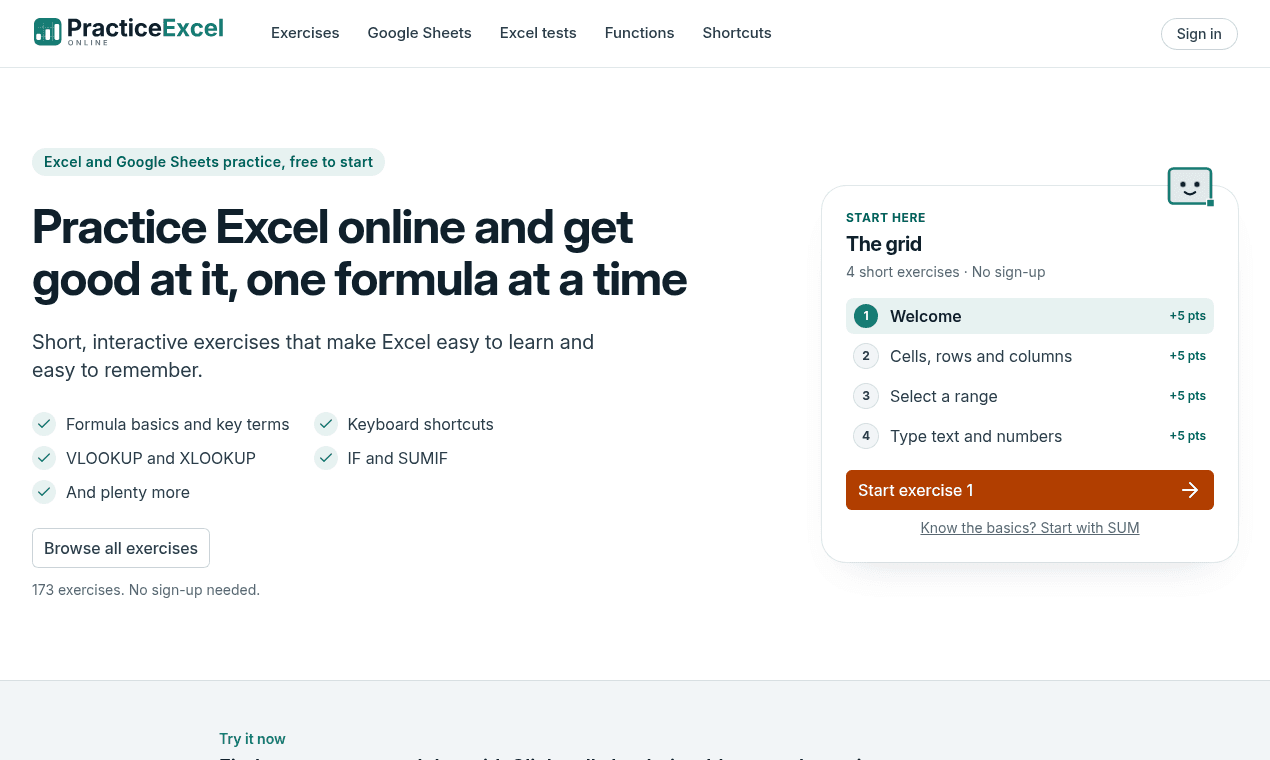
About this app
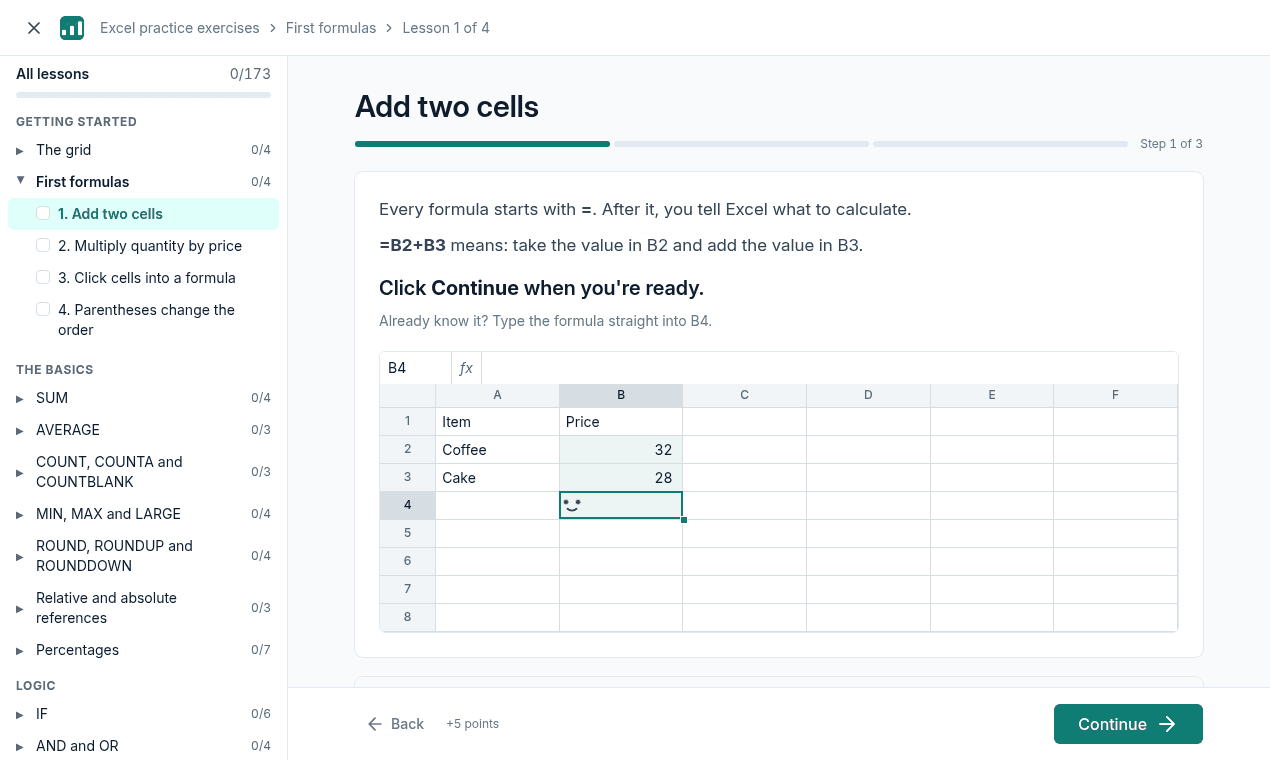
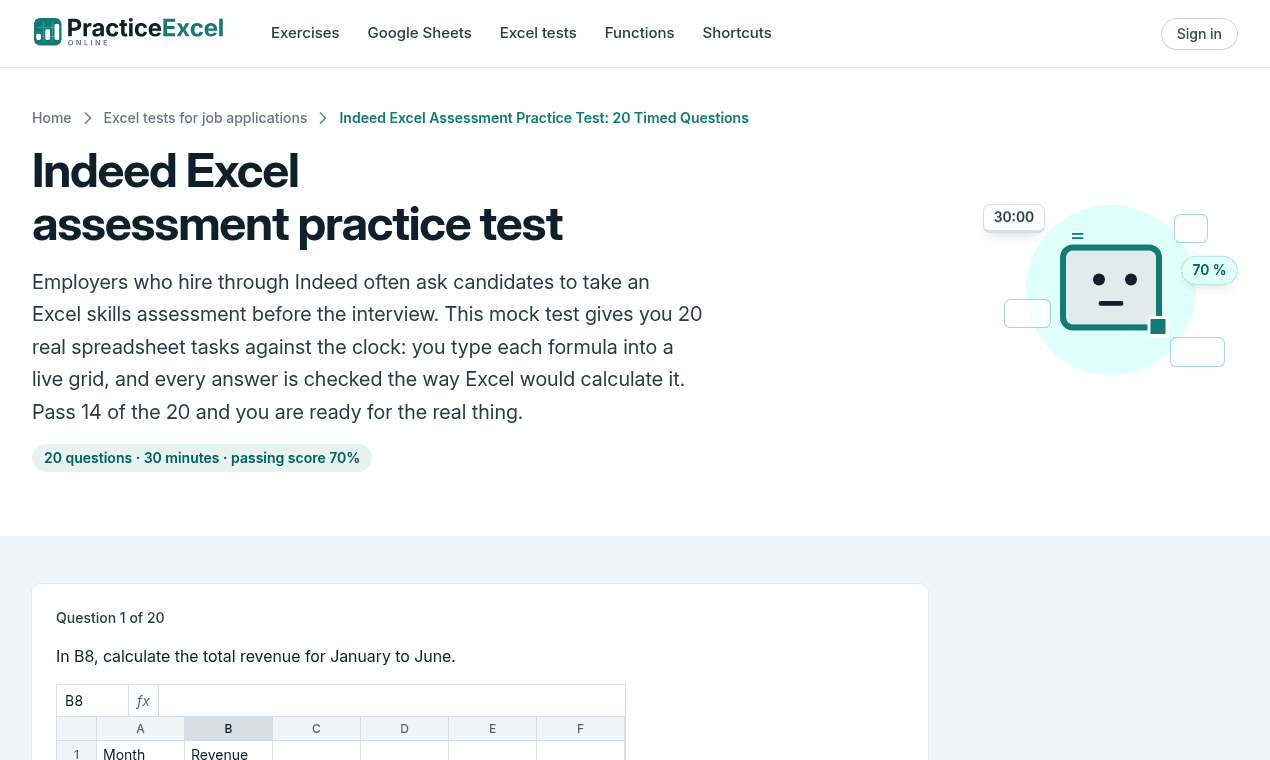
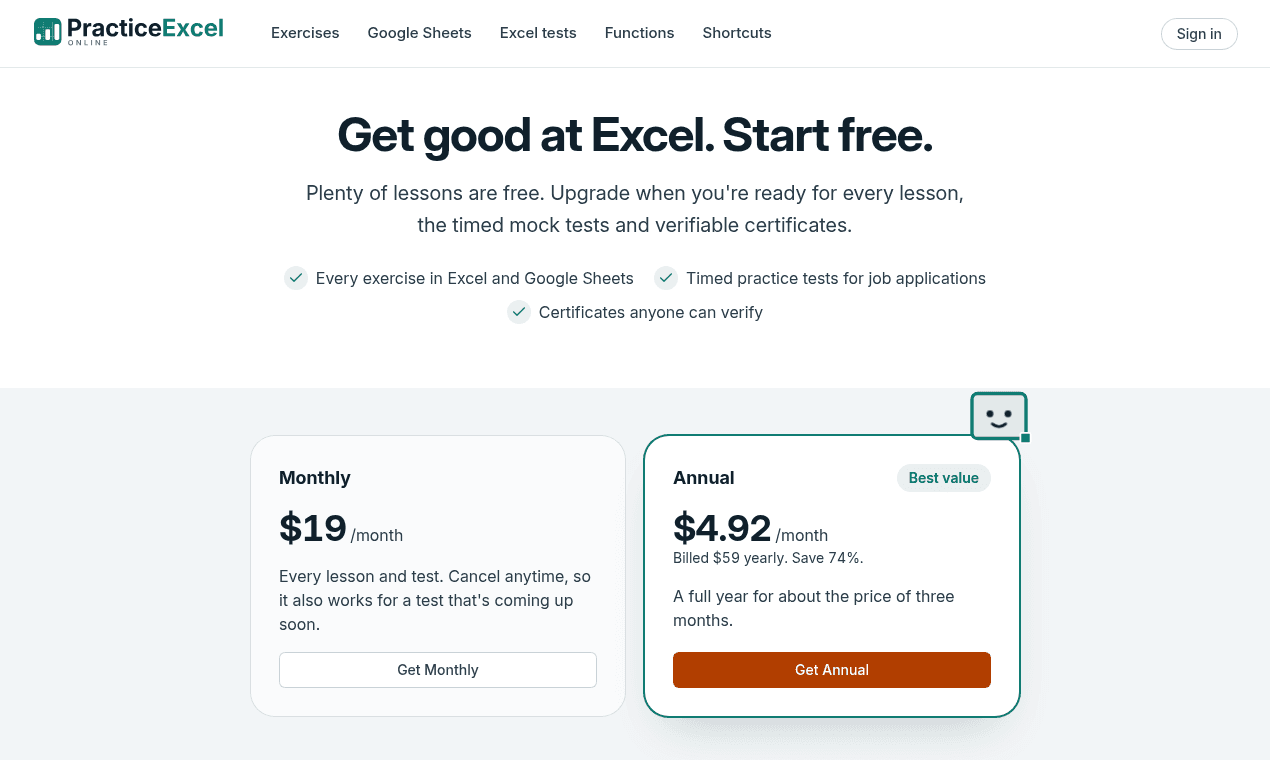
PracticeExcel helps you get better at Excel by using it. You work through short exercises in a real spreadsheet that runs in the browser, type the formulas yourself, and see right away whether you got it right. If you are stuck, you can get a hint. The site also has keyboard shortcut drills, timed mock tests for job applications, and certificates that other people can verify. Nothing to install. There is a separate section of Google Sheets practice. 173 exercises are listed. Pricing: Freemium. Free to start, no account needed. Free: Getting started, shortcuts, all SUM, AVERAGE and COUNT topics, the first lesson in every other topic. Premium unlocks everything else: $19 per month, or $59 per year.
Key features
- 1173 interactive Excel exercises in a real browser spreadsheet with instant feedback and hints.
- 2Keyboard shortcut drills, timed mock tests and verifiable certificates for job applications.
- 3Separate Google Sheets practice section; no install, works on Windows, Mac and Chromebook.
Target customer profile
Drawn from the product itself, not from a survey.
Demographic
Career switchers and job seekers (ages 20 to 35)
Pain points
Watching tutorials that don't stick, failing practical Excel tests
Primary needs
Graded practice and verifiable certificates to show employers
Demographic
Busy office professionals (ages 30 to 50)
Pain points
Forgotten formulas under pressure, slow spreadsheet workflows
Primary needs
Bite-sized daily drills, shortcuts, and real-world formulas
Demographic
Students and recent graduates (ages 18 to 25)
Pain points
No Excel install, budget constraints, low confidence with formulas
Primary needs
Free browser-based practice compatible with Google Sheets
Scout Review
Written by AI from measured evidence, scored out of 100.
PracticeExcel is a browser-based Excel trainer that bets on doing over watching: 173 short exercises in a real spreadsheet grid, keyboard shortcut drills, timed mock tests and verifiable certificates. The execution is genuinely polished — a 100/100 Lighthouse performance score, a 97/100 accessibility score, a full security header suite, and a homepage that lets you try a real exercise before signing up. The free tier is generous enough to be useful. The main friction points are a dense, hard-to-scan function index and a premium price ($19/month or $59/year) that has to justify itself against free tutorial sites.
Measure by measure
Usability
68Clear CTA path, no sign-up to start, 173 exercises, free tier covering SUM/AVERAGE/COUNT. The dense function index overwhelms beginners who need one starting point.
Design
71Disciplined teal/off-white palette with one orange CTA and an embedded live exercise preview. The function index's tiny truncated grey text is the weak spot.
Speed
88Lighthouse 100/100 mobile and desktop, LCP 1.1s, CLS 0, TBT 3ms. About as snappy as a browser spreadsheet trainer can get.
Security
74Full header suite: HSTS, CSP, frame protection, Referrer-Policy, Permissions-Policy, SPF and DMARC. No published SOC 2 or pen-test, which is normal at this stage.
Accessibility
79Lighthouse 97/100 with one contrast failure. Responsive across platforms, but no WCAG statement or multi-language support found.
Growth
62Real problem (tutorials don't stick), specific segments (job seekers, career switchers), and a genuine wedge: graded interactive practice plus verifiable certificates the tutorial sites don't offer.
Improvement areas
- Function index is dense and hard to scan; needs larger text and a clearer beginner path.
- One Lighthouse contrast failure and no WCAG accessibility statement.
- No published security/trust page (SOC 2, data handling) to back certificate claims.
Design & Usability
PracticeExcel's design is disciplined and product-forward: a teal/off-white palette, a single burnt-orange CTA, and — best of all — a live embedded exercise on the homepage that lets you click a real spreadsheet before signing up. The exercise UI itself is clean, with progress bars, step counters and +5 point badges that make the gamified structure obvious. Usability is strong on the entry path: 'Start exercise 1' is unambiguous, 'no sign-up needed' is stated plainly, and the free tier covers SUM, AVERAGE and COUNT plus the first lesson of every topic. The weak spot is the function index — 40+ topics in tiny truncated grey text that overwhelms beginners who need one clear starting point.
Speed & Security
Speed is the standout: Lighthouse scores 100/100 on both mobile and desktop, with LCP at 1.1s, CLS at 0 and TBT at 3ms. For a browser-based interactive spreadsheet, that is about as snappy as it gets, and there are no user complaints about lag in the collected evidence. Security is solid for the stage: HTTPS enforced, HSTS, CSP, frame protection, X-Content-Type-Options, Referrer-Policy and Permissions-Policy all present, plus SPF and DMARC — a 12/12 checklist. What's missing is the deeper trust layer: no published SOC 2, ISO or pen-test report, which is normal for an early-stage product but keeps it out of the top band.
Accessibility & Growth
Accessibility scores 97/100 on Lighthouse, with a single failing audit for insufficient color contrast — likely the same small grey function-index text that hurts design. The site is responsive and works across Windows, Mac and Chromebook, but there's no WCAG statement or multi-language support. Growth is a judgement on the idea: the problem is real (watching tutorials doesn't build muscle memory), the segments are specific (career switchers, job seekers, busy professionals), and the wedge — graded interactive practice plus verifiable certificates — is something the listed alternatives (Excel Easy, Exceljet, Excel Exposure) don't offer. The category has headroom, but the $19/month price against free tutorial competitors is the honest limit on how far it can carry.
Conclusion
If you're a job seeker who keeps failing practical Excel tests, or a career switcher who needs proof of skill, PracticeExcel's graded practice and verifiable certificates are a genuinely differentiated offer — and the free tier lets you test that claim without a card. If you just need a formula reference, Exceljet remains the better free tool. The product is fast, secure and well-built; the question is whether you'll pay $59/year for practice when tutorials are free. Try the free exercises first — they'll tell you quickly.
Suggestions for improvement
- Redesign the function index: larger text, no truncation, and a clear 'start here' path for beginners.
- Add a WCAG accessibility statement and fix the contrast failure flagged by Lighthouse.
- Publish a security/trust page with data handling details to support the certificate claims.
- Consider a cheaper entry tier or a one-time test-pass option to compete with free tutorial sites.
Alternatives comparison
Named competitors, point by point. Nobody paid to appear here or to be left out.
 PracticeExcel |  Excel Easy | Exceljet | Excel Exposure | |
|---|---|---|---|---|
| Interactive graded practice | Yes — 173 exercises with instant feedback | No — text and screenshots only | No — formula reference and guides | No — video course, no instant feedback |
| Verifiable certificates | Yes — premium certificates with public link | No | No | No |
| Free tier | Free to start, no account; premium $19/mo or $59/yr | Fully free | Free reference; paid training available | Fully free |
| Timed mock tests | Yes — premium feature | No | No | No |
| Google Sheets practice | Yes — separate section | No | No | No |
Excel Easy
Free text-and-screenshot tutorials with examples, but no interactive graded practice.
Exceljet
Excellent formula reference and concise guides, though learners still need their own practice environment.
Excel Exposure
Video-based free Excel course covering basics to advanced, without instant feedback on typed formulas.
Comparing options? See PracticeExcel alternatives, scored side by side
More Education apps
View all Education
The Stack Newsletter
92A weekly newsletter delivering curated tech jobs, intervi...

Enlyo
90Video analysis for team-sport coaches: tag matches as they play, cut clips, record reviews and share the moments that matter.

SheetScroll
90> You play; SheetScroll turns the page. It listens through the microphone or a MIDI piano and holds the page until it's sure where you are.

English Test Coach
89English Test Coach checks your IELTS essays and letters, gives an estimated band score across all four criteria, and tells you exactly what to revise next.

Tracé slides
89Interactive math & physics slides with live graphs and an...

Cross Stitch Pattern Maker
89Free on-device photo-to-DMC/Anchor chart with skein counts.

Startup Science
88A unified platform replacing 12-20 disconnected tools for...

Cromagnon
88Free, private browser-based PDF, Word, Excel, and study t...

Random Movie Generator
88Free random movie picker from 142k+ films—no sign-up.

TranscriptYou
88Free YouTube transcript generator with timestamps and AI ...

RBQ Exam
87Online practice for the RBQ contractor licence exams in Québec: original questions, timed mock exams and lessons, in French or English.

Coloring Pages Pro
87A massive collection of free printable coloring pages for...


A platform dedicated to providing unbiased reviews of newly launched applications, analyzing everything from their features to their full potential.
info@scoutforge.net© 2026 Scoutforge. All rights reserved.
