Cycling through all six. Tap any point to stop.
Measured on six things
One Platform for Courses, Cohorts, and Classrooms
Security
52HTTPS and HSTS are enforced, and SPF/DMARC are configured. But the header probe scored 6/12 — no CSP, no frame protection, no Referrer-Policy — and there's no public security page or compliance claim.
Screenshots
1 / 7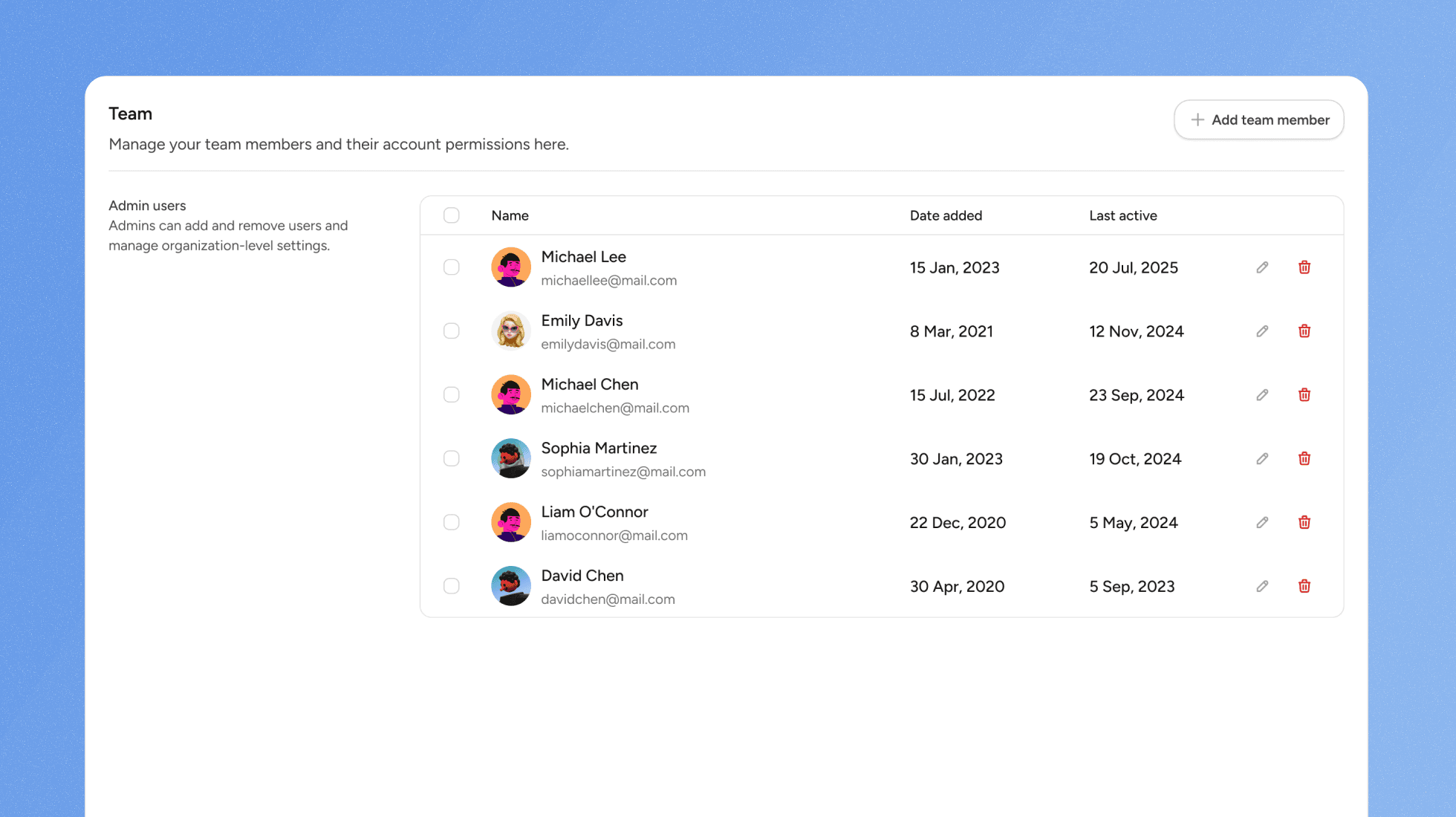
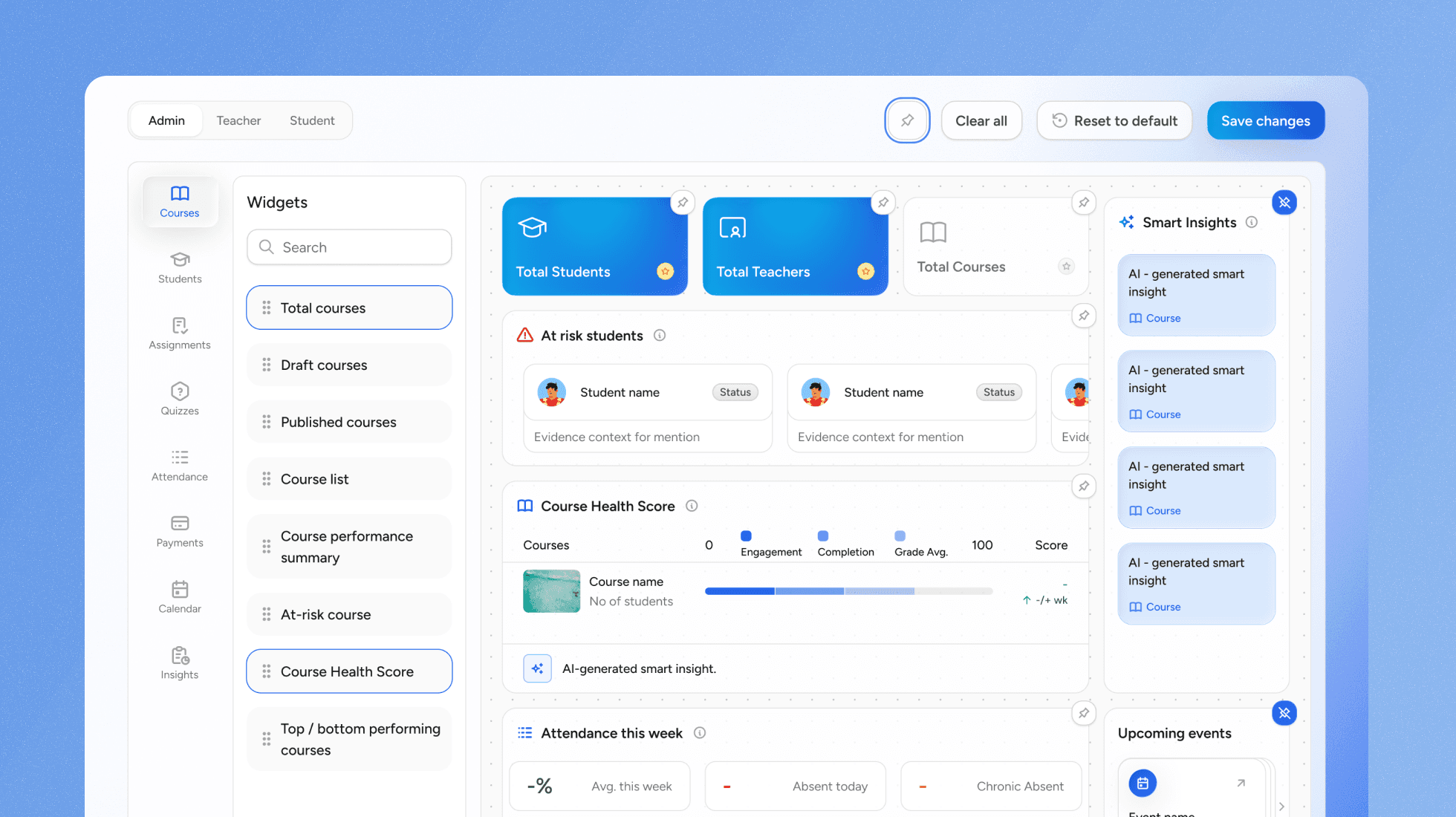
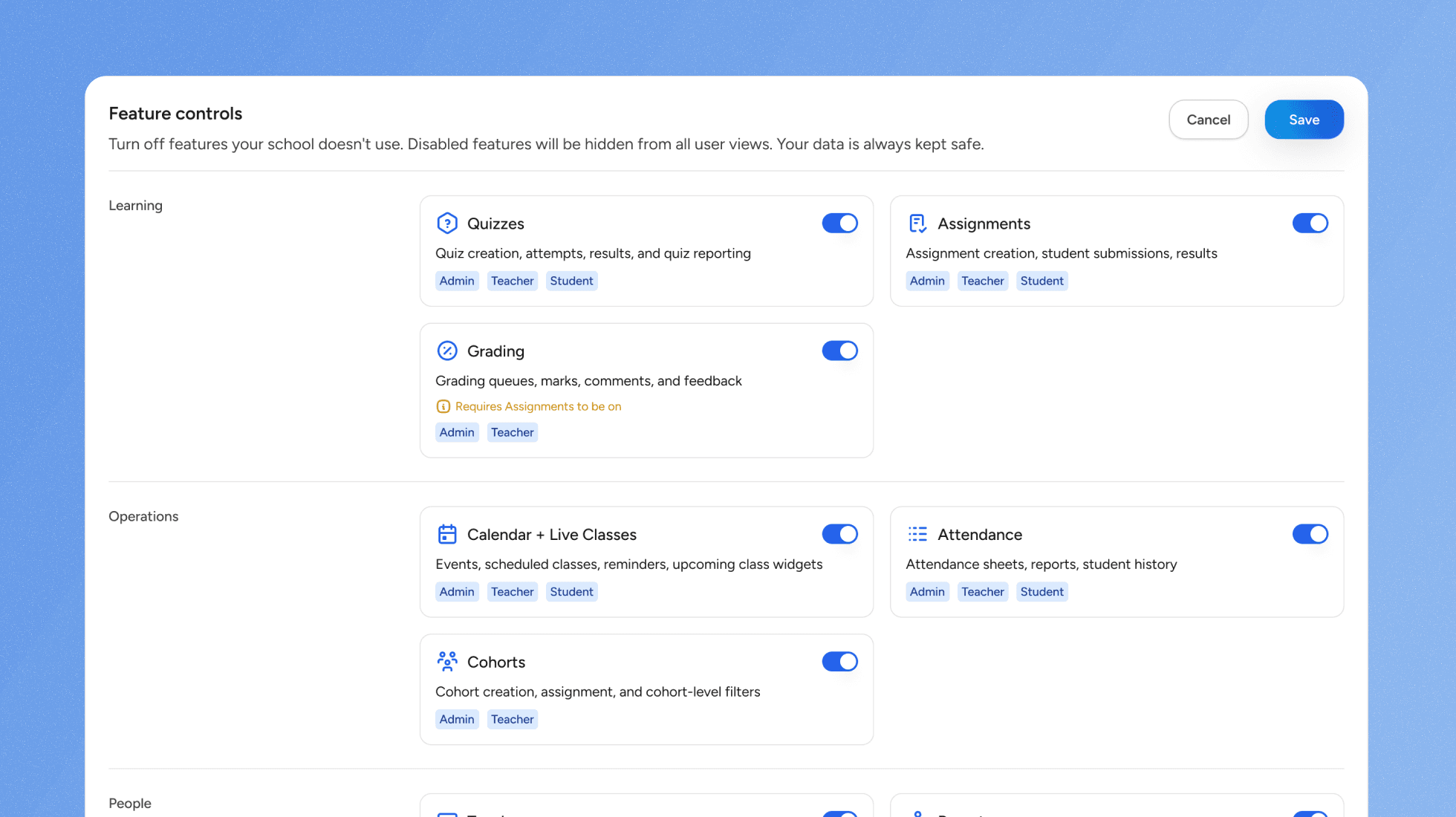
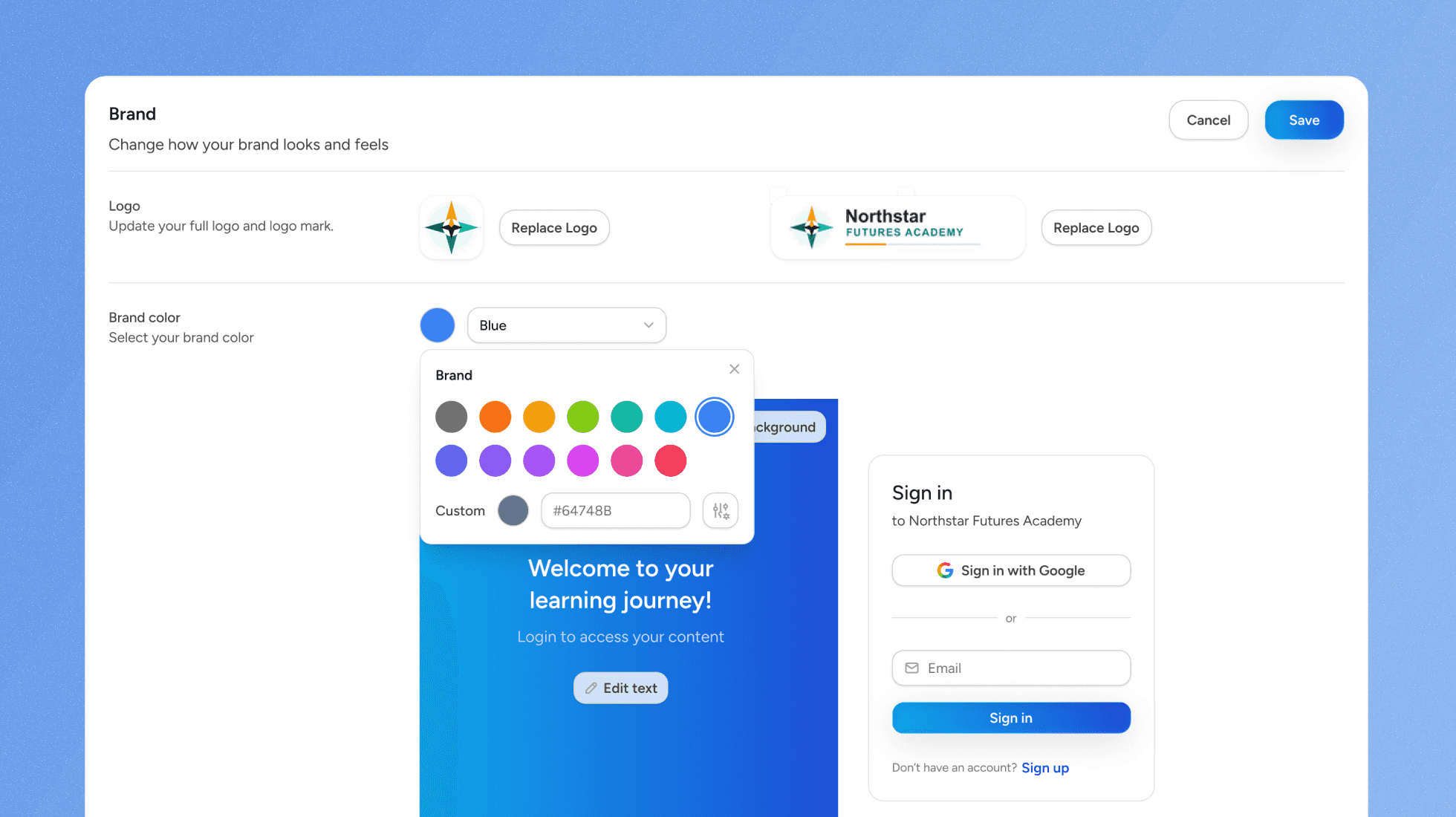
About this app
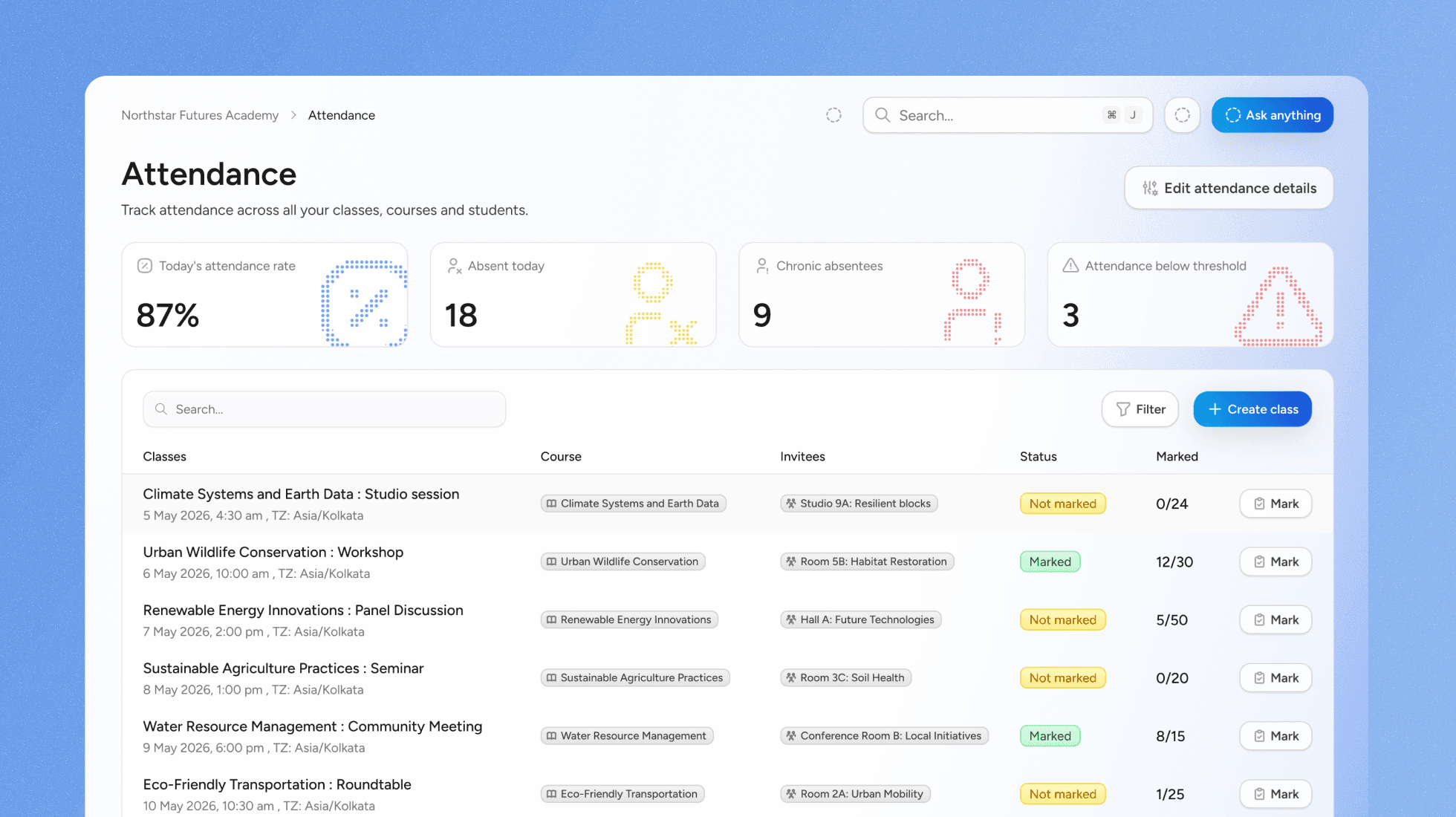
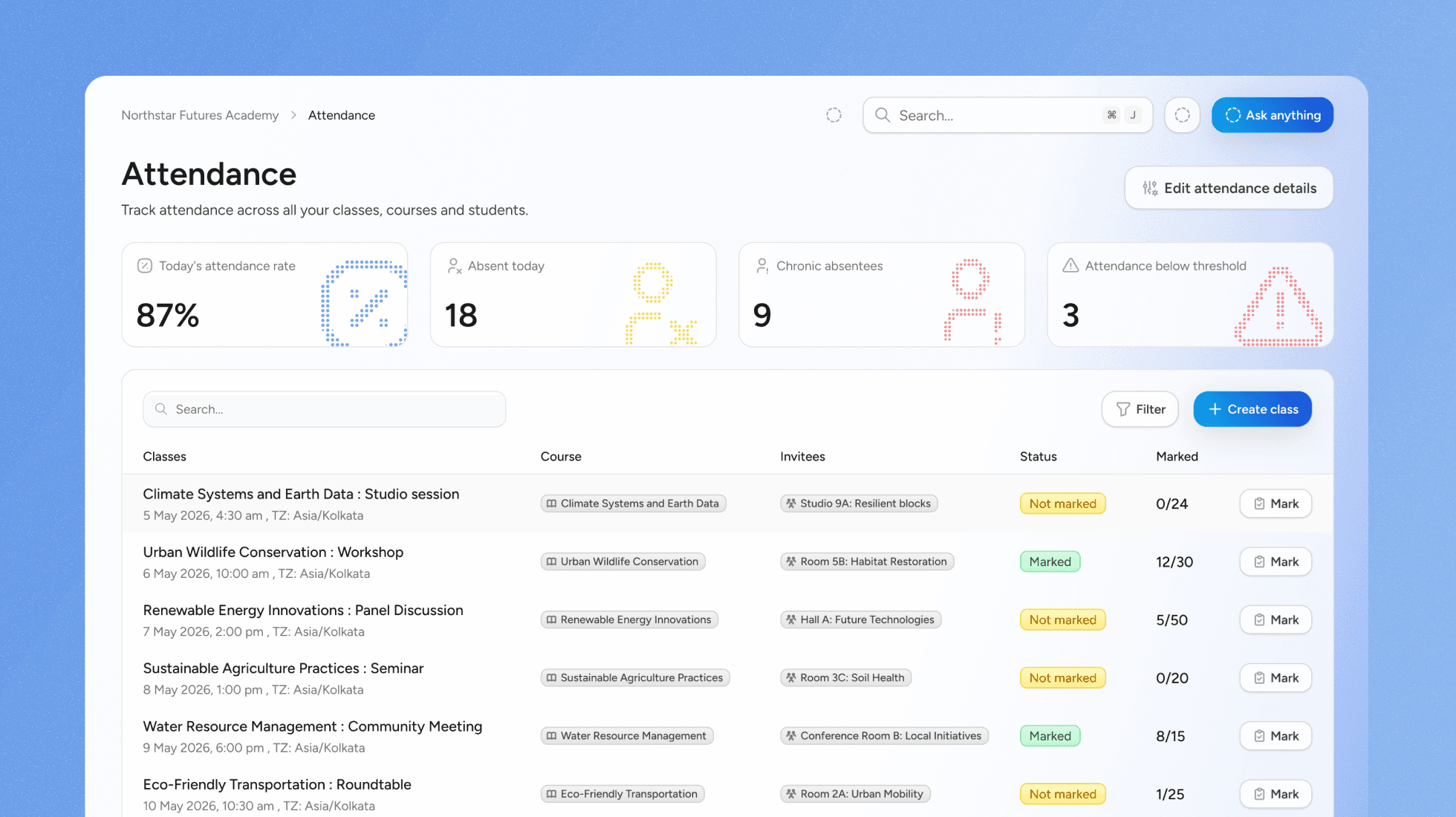
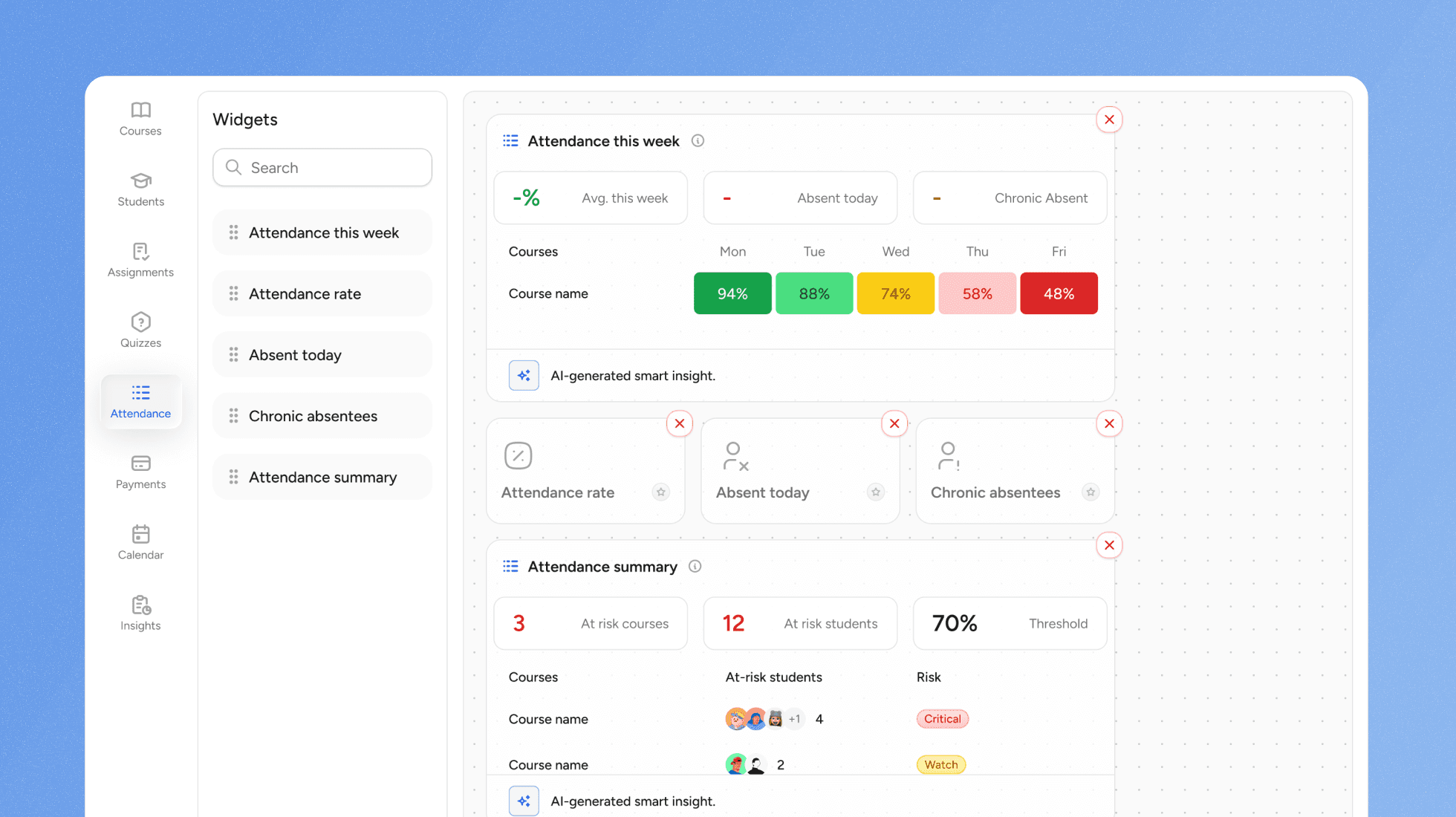
Quyl is a modern LMS for schools, colleges, coaching institutes, and education teams. It brings teaching, learning, assessments, and administration together in one learning management system.
Key features
- 1Fee management with invoice generation and financial tracking — a feature Google Classroom and Moodle don't offer.
- 2Assignments and quizzes with auto-grading and instant feedback for students.
- 3Cohort management with learning paths and group performance tracking.
- 4Live classes with built-in support for popular video platforms.
- 5Guided migration services with dedicated specialists for switching from another LMS.
Target customer profile
Drawn from the product itself, not from a survey.
Demographic
Coaching centre owners and instructors
Pain points
Struggling with manual fee collection, tracking student progress, and managing batches.
Primary needs
An affordable, easy-to-use LMS to manage courses, fees, and assessments in one place.
Demographic
College professors and administrators
Pain points
Lack of engagement tools, difficulty in tracking student performance, and managing large classes.
Primary needs
A scalable platform for online assessments, live classes, and cohort management.
Demographic
Ed-tech startups and corporate trainers
Pain points
High development costs for custom LMS, need for quick deployment, and integration with existing tools.
Primary needs
A flexible, mobile-ready LMS with easy migration and support for live and self-paced learning.
Scout Review
Written by AI from measured evidence, scored out of 100.
Quyl is a modern LMS aimed at coaching centres, colleges, and ed-tech teams, bundling courses, assessments, live classes, cohort management, and — unusually — fee collection into one platform. The landing page is clean and the feature breadth is real, but the site never shows the actual product, there's no free trial or public pricing, and the only path in is a demo request. Speed is excellent on desktop (97/100) and mediocre on mobile (71/100, 8.1s LCP). Security headers are half-configured with no public compliance posture. Accessibility scores 91/100 with three fixable failures. The growth thesis — serving the fee-collecting, batch-managing coaching centre that Google Classroom and Moodle both ignore — is the strongest thing here. Execution is early; the wedge is real.
Measure by measure
Usability
55Feature pages exist for courses, quizzes, live classes, cohorts, and fees, and migration support is offered. But there's no free trial, no self-serve signup, and no public pricing — you have to request a demo to learn anything.
Design
62Clean, modern landing page with consistent typography and card grids, but it's all marketing copy — no real product screenshots of the LMS itself. Duplicated feature blocks suggest a template.
Speed
57Desktop Lighthouse performance is 97/100 and CLS is a clean 0. Mobile is the problem: 71/100 with an 8.1s LCP — three times the 'good' threshold. Mobile-first classrooms deserve better.
Security
52HTTPS and HSTS are enforced, and SPF/DMARC are configured. But the header probe scored 6/12 — no CSP, no frame protection, no Referrer-Policy — and there's no public security page or compliance claim.
Accessibility
70Lighthouse accessibility scores 91/100 — a strong baseline. Failing audits: contrast ratios, heading order, and touch target sizing. No WCAG statement or a11y page published.
Growth
58Targets coaching centres and institutes with a real wedge — fee collection plus cohorts plus assessments in one LMS. Google Classroom has no fees, Moodle is a setup nightmare. The niche is real; the execution is early.
Improvement areas
- No public pricing, no free trial, and no self-serve signup — the only path in is a demo request.
- No product screenshots or walkthrough video on the homepage; the LMS interface is never shown.
- Mobile Lighthouse performance is 71/100 with an 8.1s LCP, contradicting the 'MOBILE-READY' claim.
- Security headers score 6/12 with no public security page, SOC 2, or compliance documentation.
Design & Usability
Quyl's landing page is polished in the way most modern SaaS landing pages are polished — clean gradients, consistent card grids, tidy typography. What it isn't is a product tour. There are zero screenshots of the actual LMS interface, and the 'What Sets Quyl Apart' section literally repeats the same four value props twice in a row. The feature set is genuinely broad — courses, quizzes with auto-grading, live classes, cohort management, and fee collection — and each has a 'Learn More' page. But the path to actually using any of it runs through 'Request a Demo'. No free trial, no self-serve signup, no public pricing. For a product aimed at coaching centre owners who are used to just signing up for tools, that's a friction wall where a door should be.
Speed & Security
The speed story is split cleanly down the middle. Desktop Lighthouse performance is 97/100 with a 0 CLS and 917ms FCP — genuinely fast. Mobile is 71/100 with an 8.1-second LCP, which is roughly three times the threshold Google considers 'good'. Since the homepage's first bullet point is 'MOBILE-READY', that gap matters. On security, the HTTP probe found HTTPS enforced, HSTS on, and SPF/DMARC configured — the basics are there. But the header checklist scored 6/12: no Content-Security-Policy, no X-Frame-Options, no Referrer-Policy, no Permissions-Policy. There's also no public security page, no SOC 2, no ISO, no bug bounty. For a platform that will hold student records and fee transactions, that's a thin public posture.
Accessibility & Growth
Accessibility lands at a solid 91/100 on Lighthouse, which is above average for the category. The failing audits are the usual suspects: insufficient color contrast, heading elements out of sequential order, and touch targets that are too small or too tightly spaced. None of those are catastrophic, but all three hit mobile users hardest — and mobile is where the product claims to shine. There's no accessibility statement or WCAG conformance claim published. On growth, the idea is more interesting than the traction. Quyl targets coaching centres and institutes — a segment Google Classroom ignores (no fee collection) and Moodle punishes (setup complexity). Bundling fee management, cohorts, and assessments into one LMS is a real wedge. The domain was registered in April 2024 and the only social profile listed is LinkedIn, so this is early. But the idea has room.
Conclusion
If you run a coaching centre and you're currently juggling WhatsApp for fees, a spreadsheet for attendance, and Google Forms for quizzes, Quyl is aimed squarely at you — and that's a genuinely underserved spot in the LMS market. But before you request that demo, ask the hard questions: where's the pricing, where's the free trial, where are the screenshots of the actual product, and what happens to your student data if something goes wrong? The idea deserves a look. The public-facing execution doesn't yet earn a signature.
Suggestions for improvement
- Publish pricing tiers publicly — 'Request a Demo' as the only path to knowing cost kills self-serve adoption for small coaching centres.
- Add real product screenshots or a short walkthrough video to the homepage; the current page describes the LMS without ever showing it.
- Fix the 8.1s mobile LCP — compress hero assets, defer non-critical JS, and test on a mid-range Android, not just desktop.
- Ship a security page with data handling, retention, and compliance posture; student records and fee transactions deserve a public answer.
Alternatives comparison
Named competitors, point by point. Nobody paid to appear here or to be left out.
 Quyl |  Google Classroom |  Moodle |  Canvas LMS | Teachable | |
|---|---|---|---|---|---|
| Pricing transparency | Not publicly listed; demo request required | Free with Google Workspace for Education | Free open-source; hosting costs vary | Quote-based; free tier for teachers | Public tiers from ~$39/mo |
| Fee collection and invoicing | Built-in fee management with invoices | Not supported | Not native; requires plugins | Not supported | Course payments only, not institutional fees |
| Live classes | Built-in with popular video platform support | Via Google Meet integration | Via BigBlueButton/Zoom plugins | Via Conferences (BigBlueButton/Zoom) | Not native; third-party integrations |
| Cohort and batch management | Native cohorts with learning paths | Classes only; no cohort tracking | Groups and cohorts supported | Sections and groups supported | Limited; course-level only |
| Target audience | Coaching centres, colleges, ed-tech teams | K-12 and higher-ed institutions | Schools, universities, enterprises | Higher-ed and K-12 institutions | Individual course creators |
Google Classroom
A free web service for schools that aims to simplify creating, distributing, and grading assignments.
Moodle
An open-source learning platform designed to provide educators, administrators, and learners with a single robust, secure, and integrated system.
Canvas LMS
A modern learning management system used by institutions worldwide for online and blended learning.
Teachable
A platform for creators and entrepreneurs to create and sell online courses.
Comparing options? See Quyl alternatives, scored side by side
More Education apps
View all Education
The Stack Newsletter
92A weekly newsletter delivering curated tech jobs, intervi...

SheetScroll
90> You play; SheetScroll turns the page. It listens through the microphone or a MIDI piano and holds the page until it's sure where you are.

Cross Stitch Pattern Maker
89Free on-device photo-to-DMC/Anchor chart with skein counts.

English Test Coach
89English Test Coach checks your IELTS essays and letters, gives an estimated band score across all four criteria, and tells you exactly what to revise next.

Tracé slides
89Interactive math & physics slides with live graphs and an...

Startup Science
88A unified platform replacing 12-20 disconnected tools for...

Cromagnon
88Free, private browser-based PDF, Word, Excel, and study t...

TranscriptYou
88Free YouTube transcript generator with timestamps and AI ...

Random Movie Generator
88Free random movie picker from 142k+ films—no sign-up.

RBQ Exam
87Online practice for the RBQ contractor licence exams in Québec: original questions, timed mock exams and lessons, in French or English.

Coloring Pages Pro
87A massive collection of free printable coloring pages for...

CertWorthIt
87Data-driven tool revealing which certifications actually ...


A platform dedicated to providing unbiased reviews of newly launched applications, analyzing everything from their features to their full potential.
info@scoutforge.net© 2026 Scoutforge. All rights reserved.
