Cycling through all six. Tap any point to stop.
Measured on six things
Free browser app that turns PowerPoint into SCORM 1.2 packages
Growth
58A real, specific pain — getting PPTX into an LMS without an authoring suite — with a genuine wedge: free, no account, local-only, preview included. SCORM 1.2-only and no quizzes cap the ceiling.
Screenshots
1 / 2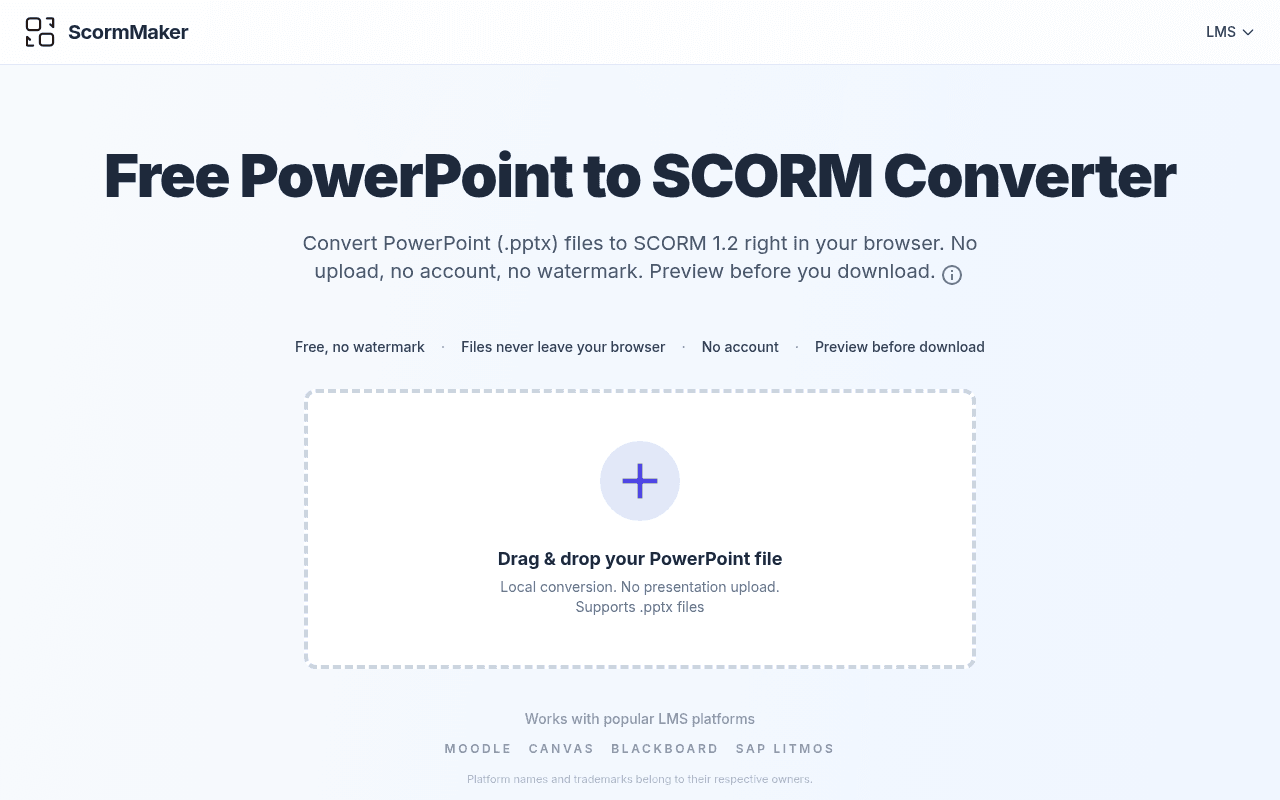
About this app
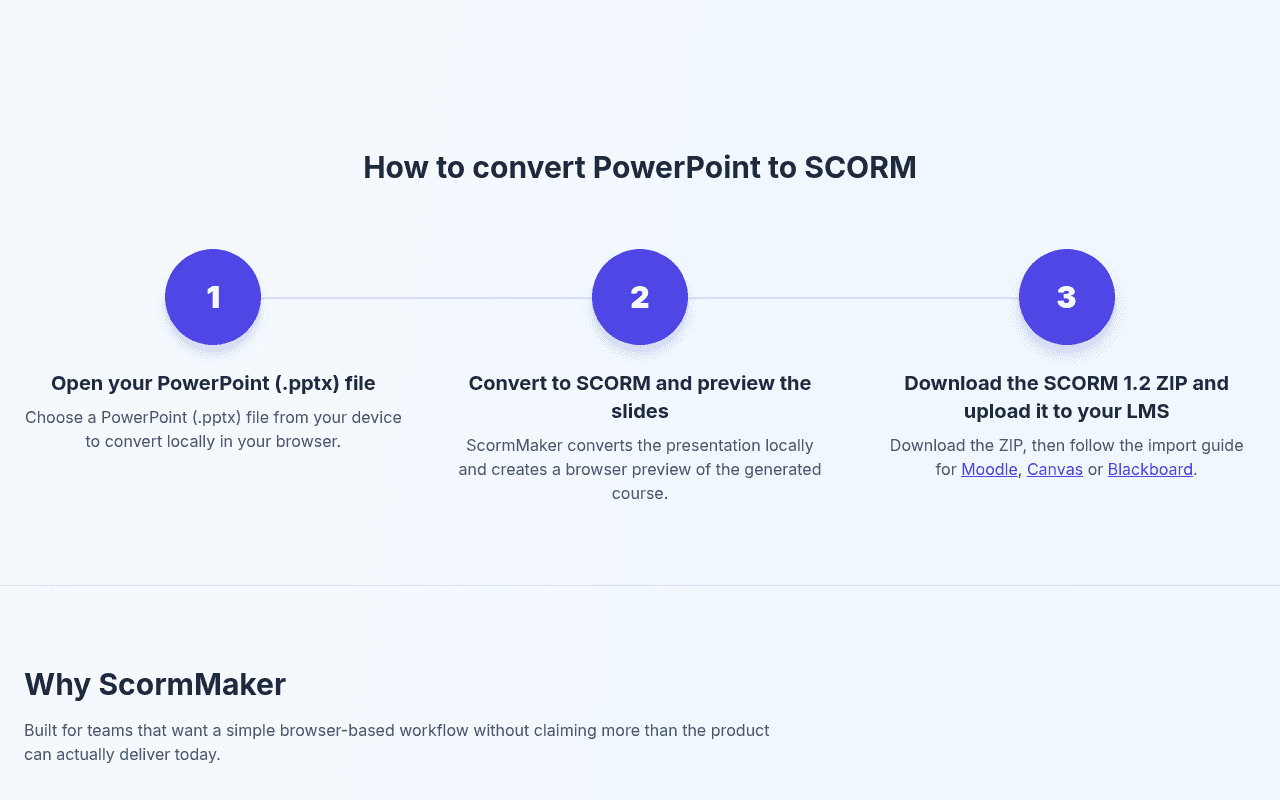
ScormMaker is a free browser app that turns PowerPoint (.pptx) files into SCORM 1.2 packages for Moodle, Canvas, Blackboard or any SCORM 1.2 LMS. Conversion runs in the browser: nothing is uploaded and no account is needed, and commercial use is allowed. Packages keep slide navigation and embedded video and audio, and report completion, bookmark/resume and session time. No animations, transitions or quizzes; SCORM 1.2 only.
Key features
- 1Converts .pptx to SCORM 1.2 entirely in the browser — no upload, no account, no watermark.
- 2Slide preview before download so you can check layout, text, images and media first.
- 3Keeps embedded MP4 video and common audio; reports completion, bookmark/resume and session time.
Target customer profile
Drawn from the product itself, not from a survey.
Scout Review
Written by AI from measured evidence, scored out of 100.
ScormMaker does one job and does it cleanly: drop a .pptx, convert locally in the browser, preview the slides, download a SCORM 1.2 ZIP for Moodle, Canvas or Blackboard. No account, no upload, no watermark, commercial use allowed. The landing page is honest to a fault — it publishes a 'Content to Check in Preview' list of everything that will not survive conversion, which is rarer than it should be. Speed is excellent, accessibility is strong on automated checks, security is table-stakes, and the design is polished with a few contrast and hierarchy slips. The main limits are scope (SCORM 1.2 only, no quizzes or animations) and a thin nav.
Measure by measure
Usability
68Drop zone front and center, no signup, preview before download, and a clear 1-2-3 explainer. The lone LMS dropdown in the nav is unexplained and the flow stops short of in-app import guidance.
Design
71Clean, disciplined landing page with a coherent indigo accent and honest copy. Faint footnotes, low-contrast secondary text and a drop zone that reads quieter than the decorative step circles hold it back.
Speed
88Lighthouse mobile 99/100 (LCP 948ms, CLS 0, TBT 127ms) and desktop 100/100. Local in-browser conversion also means no server round-trip for the actual work.
Security
64HTTPS with HSTS, X-Content-Type-Options, Referrer-Policy and SPF in place, and local-only processing keeps data exposure minimal. No CSP, frame protection, DMARC, or published compliance/audit claims.
Accessibility
79Lighthouse accessibility 97/100 with only contrast and accessible-name failures. No WCAG statement or a11y page, and the site is English-only, so the automated score is most of what we have.
Growth
58A real, specific pain — getting PPTX into an LMS without an authoring suite — with a genuine wedge: free, no account, local-only, preview included. SCORM 1.2-only and no quizzes cap the ceiling.
Improvement areas
- SCORM 1.2 only and no quiz authoring — limits fit for courses that need assessments or 2004.
- Animations, transitions, equations and some effects are dropped; media playback depends on browser support.
- Security headers incomplete (no CSP, frame protection, DMARC) and no accessibility statement.
Design & Usability
The homepage is genuinely well-built: a heavy, tightly set headline, one indigo accent used consistently across the drop zone, steps and links, and trust chips ('Free, no watermark · Files never leave your browser · No account') that state the value before you scroll. The three-step explainer and FAQ accordion make the workflow legible in seconds. Weaknesses are execution-level: the trademark footnotes are effectively invisible, secondary text is small light grey, and the primary drop zone is visually quieter than the decorative step circles below it. Usability is strong where it counts — no signup, no upload, preview before download — but the nav is a single unexplained 'LMS' dropdown, which is thin even for a one-tool site.
Speed & Security
Speed is the standout: Lighthouse mobile 99/100 with LCP 948ms, CLS 0 and TBT 127ms, desktop a clean 100/100. Because conversion happens locally in the browser, the heavy work never touches a server, which is both a performance and a privacy story. Security is competent but unremarkable: HTTPS enforced with HSTS, X-Content-Type-Options, Referrer-Policy and SPF present, but no CSP, no frame protection, no Permissions-Policy and no DMARC, for 7/12 on the header checklist. There are no published audits, SOC 2 or ISO claims — normal for an indie tool, but it means the 'nothing is uploaded' promise is the main security argument, and it is a good one.
Accessibility & Growth
Accessibility scores 97/100 on Lighthouse, with the only failures being insufficient color contrast and visible text labels not matching accessible names — both fixable and both visible in the design audit's note about faint grey text. There is no WCAG statement or accessibility page and the site is English-only, so the automated score carries most of the weight. Growth is a judgement on the idea: converting PowerPoint to SCORM is a real, recurring pain for trainers and educators stuck between authoring suites and upload-based converters. ScormMaker's wedge — free, no account, local-only, preview included — is concrete and defensible against upload-based rivals. The deliberate limits (SCORM 1.2 only, no quizzes, no animations) sharpen the pitch but cap how far it can grow beyond a focused utility.
Conclusion
If your workflow is 'I have a PowerPoint and an LMS that wants SCORM 1.2,' this removes an entire category of friction — no signup, no upload anxiety, no watermark upsell. Go in knowing what it does not do: no quizzes, no animations or transitions, SCORM 1.2 only, and media playback depends on browser support. Preview every package before importing, as the site itself advises. For a free tool with a narrow, honest scope, it is hard to argue with.
Suggestions for improvement
- Raise contrast on secondary text, footnotes and table copy to meet WCAG AA.
- Make the drop zone visually dominant — stronger border, fill or button treatment.
- Explain or remove the lone 'LMS' dropdown in the top nav.
- Add CSP, frame protection and DMARC to round out the security headers.
Alternatives comparison
Named competitors, point by point. Nobody paid to appear here or to be left out.
 ScormMaker | ||
|---|---|---|
| File upload required | No — converts locally in browser | Not specified in provided details |
| Account required | No account needed | Not specified in provided details |
| Pricing | Free, commercial use allowed, no watermark | Not specified in provided details |
| SCORM version support | SCORM 1.2 only | Not specified in provided details |
| Quiz authoring | Not supported | Not specified in provided details |
| Preview before download | Yes — in-browser slide preview | Not specified in provided details |
Comparing options? See ScormMaker alternatives, scored side by side
More Education apps
View all Education
The Stack Newsletter
92A weekly newsletter delivering curated tech jobs, intervi...

Enlyo
90Video analysis for team-sport coaches: tag matches as they play, cut clips, record reviews and share the moments that matter.

SheetScroll
90> You play; SheetScroll turns the page. It listens through the microphone or a MIDI piano and holds the page until it's sure where you are.

English Test Coach
89English Test Coach checks your IELTS essays and letters, gives an estimated band score across all four criteria, and tells you exactly what to revise next.

Cross Stitch Pattern Maker
89Free on-device photo-to-DMC/Anchor chart with skein counts.

Tracé slides
89Interactive math & physics slides with live graphs and an...

Startup Science
88A unified platform replacing 12-20 disconnected tools for...

Cromagnon
88Free, private browser-based PDF, Word, Excel, and study t...

Random Movie Generator
88Free random movie picker from 142k+ films—no sign-up.

TranscriptYou
88Free YouTube transcript generator with timestamps and AI ...

RBQ Exam
87Online practice for the RBQ contractor licence exams in Québec: original questions, timed mock exams and lessons, in French or English.

Coloring Pages Pro
87A massive collection of free printable coloring pages for...


A platform dedicated to providing unbiased reviews of newly launched applications, analyzing everything from their features to their full potential.
info@scoutforge.net© 2026 Scoutforge. All rights reserved.
