Cycling through all six. Tap any point to stop.
Measured on six things
AI video clipper that turns long videos into captioned ve...
Security
29HTTP probe shows HTTPS not enforced, no HSTS, CSP, or frame protection. SPF present but DMARC missing. No SOC 2 or security page found.
Screenshots
1 / 1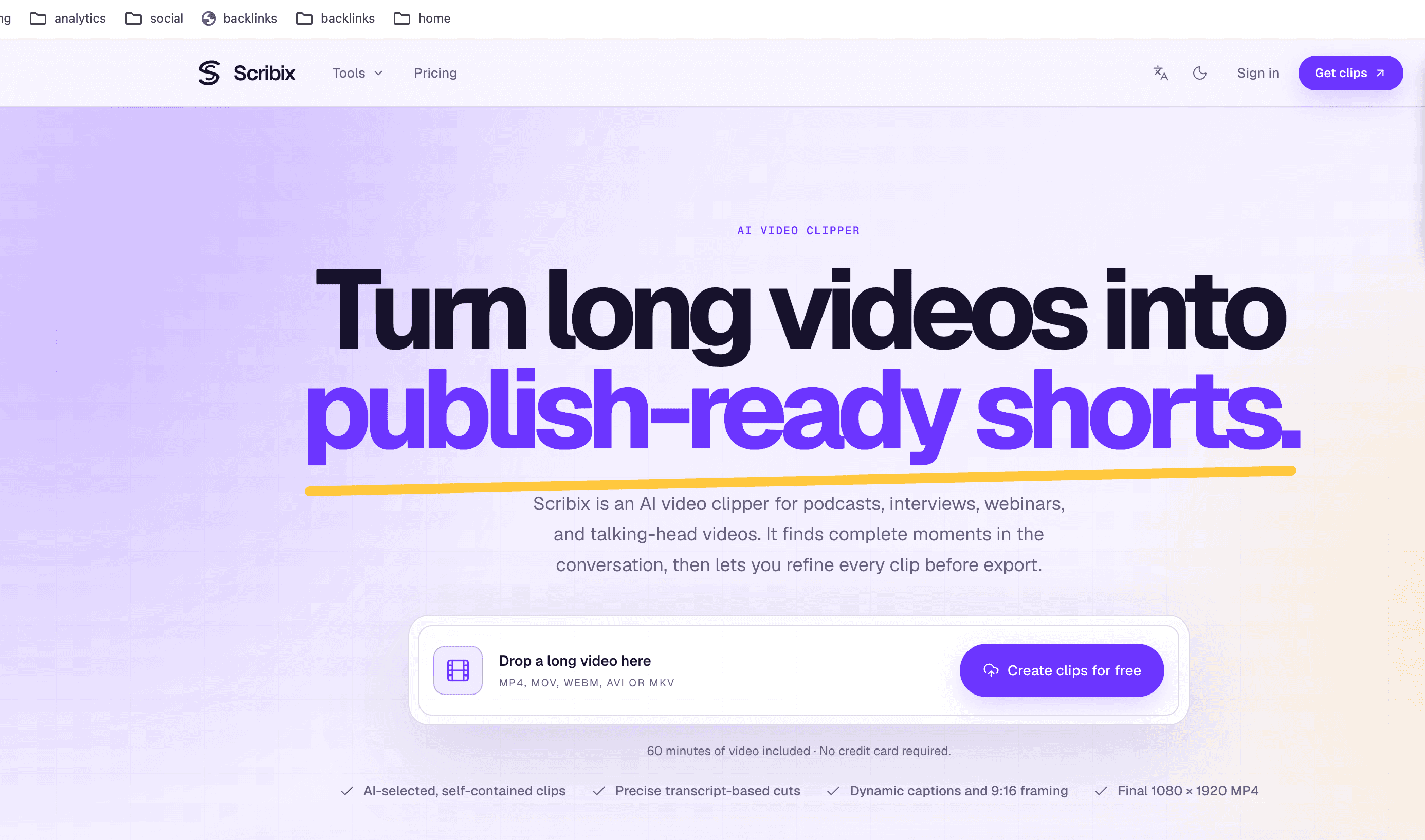
About this app
Scribix is a web-based AI video clipper built for spoken long-form content like podcasts, interviews, webinars, and talking-head videos. You upload a long recording in MP4, MOV, WebM, AVI, or MKV format, and the platform analyzes the transcript, speaker turns, and word-level timestamps to suggest self-contained moments with a hook and a clear theme. From there, you get to act as the editor: refine the clip boundaries, correct caption text, adjust the 9:16 vertical crop and zoom, apply reusable brand styling such as logo, font, and accent color, and pick a cover frame before export. The final output is a full-quality 1080 x 1920 H.264 MP4 with AAC audio plus a cover image, rendered from the original video in the cloud rather than a compressed browser preview. Standout touches include precise transcript-based cuts, dynamic caption treatments with control over line length, position, color, and emphasis, and a workflow designed for repeat publishing rather than one-off edits. Free users...
Key features
- 1AI-selected clips from long-form spoken video with transcript-precise cuts and word-level timestamps.
- 2Dynamic captions with control over line length, position, color, and emphasis, plus reusable brand styling.
- 3Vertical 9:16 reframing with crop position and zoom, exporting 1080x1920 H.264 MP4 with cover image.
Target customer profile
Drawn from the product itself, not from a survey.
Demographic
Video creators and YouTubers producing long interviews, explainers, and talking-head content
Pain points
Rebuilding every short from scratch in a full editor, losing hours to repetitive trimming and captioning
Primary needs
A steady stream of vertical clips with captions and consistent branding in one reviewable workflow
Demographic
Podcasters and producers running video and audio shows with frequent guest interviews
Pain points
Complete, compelling moments buried in hour-long episodes with no easy way to find and finish them
Primary needs
Fast identification of self-contained moments plus framing and captions suited to short-form feeds
Demographic
Marketing and media teams repurposing webinars, customer stories, and founder conversations
Pain points
More recorded footage than editing capacity, and inconsistent branding across social assets
Primary needs
Branded social clips from recorded content with reusable logo, font, and accent color styling
Scout Review
Written by AI from measured evidence, scored out of 100.
Scribix is a competent AI video clipper that turns long podcasts, interviews, and webinars into vertical shorts with captions and branding. The landing page is polished, the free tier is generous enough to try, and the workflow—AI-selected moments, transcript-based editing, 9:16 reframing—is well-conceived for repeat publishing. But the product stumbles on security: HTTPS isn't enforced, and critical headers like HSTS and CSP are missing. Speed is acceptable on desktop but slow on mobile. Accessibility is strong on automated checks but fails color contrast. Growth is the biggest question mark: the market is crowded with established players like Opus Clip and Descript, and Scribix's differentiators—transcript-precise cuts and brand styling—are features, not moats. For $10/month, it's a reasonable option for creators who want a focused tool, but it needs to tighten security and sharpen its unique value to compete long-term.
Measure by measure
Usability
68Free tier with 60 minutes and no credit card lowers onboarding friction. Clear pricing comparison and practical guides, but no API docs or live demo beyond feature previews.
Design
72Modern dark landing page with interactive previews and consistent branding across pages. Clean typography and clear value prop, though not visually groundbreaking.
Speed
70Lighthouse mobile 81/100, desktop 88/100. LCP 4.5s is slow on mobile, but CLS 0 and TBT 83ms show a stable, responsive page.
Security
29HTTP probe shows HTTPS not enforced, no HSTS, CSP, or frame protection. SPF present but DMARC missing. No SOC 2 or security page found.
Accessibility
80Lighthouse accessibility 96/100 with one contrast failure. No a11y statement or WCAG claim, but responsive layout and keyboard-friendly structure implied by high score.
Growth
58Real problem, specific audience, and a workflow differentiator, but crowded market with Opus Clip, Descript, and Vizard. No network effects or data moat visible.
Improvement areas
- Security: HTTPS not enforced, no HSTS, CSP, or secure cookies; only 1/13 checklist points met.
- Mobile speed: LCP 4.5s is slow; optimize images and critical CSS to improve first impression.
- Accessibility: fix color contrast failure and add an accessibility statement or WCAG conformance claim.
Design & Usability
Scribix presents a polished, modern landing page with interactive previews that effectively communicate its core value: turning long videos into vertical clips. The design is clean and consistent across homepage, pricing, and guides, though it doesn't break new visual ground. Usability is strong on paper: a free tier with 60 minutes and no credit card lowers the barrier to entry, and the pricing page clearly compares Free vs Creator across dozens of features. However, the free tier is limited to AI-generated cuts only—any editing, caption correction, or branding requires the $10/month Creator plan. The guides section offers practical how-to content, but there's no API documentation or live sandbox beyond the feature previews. For a creator tool, the onboarding flow from upload to first clip appears straightforward, but the paywall on editing controls may frustrate users who want to test the full workflow before committing.
Speed & Security
Speed is a mixed bag. Lighthouse mobile performance scores 81/100 with a 4.5-second LCP, which is slow enough to hurt first impressions on phones. Desktop fares better at 88/100, and a CLS of 0 with TBT of 83ms indicates a stable, responsive page once loaded. Security is the weakest dimension: the HTTP probe found HTTPS not enforced, no HSTS, no CSP, no frame protection, and no secure cookies. SPF is present but DMARC is missing. That's 1 out of 13 checklist points. There's no SOC 2, ISO, or bug bounty program mentioned on the site. For a tool that handles user-uploaded video and personal data, this is a significant gap. While early-stage products often lack formal compliance, the absence of basic transport security headers is a real flaw, not just an unverified signal.
Accessibility & Growth
Accessibility scores well on automated checks: Lighthouse gives 96/100, with the only failure being insufficient color contrast. There's no accessibility statement or WCAG conformance claim, but the responsive layout and high score suggest a keyboard-navigable, screen-reader-friendly site. Multi-language support isn't mentioned. Growth potential is moderate. Scribix targets a real, specific problem—turning long-form spoken video into short vertical clips—and differentiates through transcript-precise cuts, reusable brand styling, and a workflow designed for repeat publishing. However, it competes directly with Opus Clip, Descript, and Vizard, all of which offer similar AI clipping features. Scribix's wedge is its focus on spoken long-form and its $10/month price point, but there's no network effect, data moat, or unique integration that would make it hard to copy. The category has headroom as short-form video demand grows, but Scribix needs a sharper differentiator to stand out.
Conclusion
If you're a podcaster or creator drowning in long recordings and just want a fast way to get captioned vertical clips, Scribix is worth a look—especially with the free tier. But if you handle sensitive content or need enterprise-grade security, look elsewhere until they enforce HTTPS and add basic headers. The $10/month Creator plan is priced to try, not to commit. Scribix has the bones of a useful tool, but it's playing in a crowded sandbox where the competition is already shipping faster and safer.
Suggestions for improvement
- Enforce HTTPS and add HSTS, CSP, and secure cookies immediately—this is table stakes for any app handling user uploads.
- Improve mobile LCP below 2.5s by optimizing images and critical CSS; 4.5s is too slow for creator workflows.
- Fix the color contrast failure flagged by Lighthouse to reach full accessibility compliance.
- Add a live interactive demo or sandbox so users can test editing controls before hitting the paywall.
Alternatives comparison
Named competitors, point by point. Nobody paid to appear here or to be left out.
 Scribix | Opus Clip |  Descript |  Vizard | |
|---|---|---|---|---|
| Free tier limits | 60 minutes total, AI-generated cuts only, no editing controls | Free plan with limited minutes and watermark on exports | Free plan with 1 hour transcription/month, limited features | Free plan with 60 minutes/month and watermark |
| Starting paid price | $10/month (Creator, billed yearly) | $9/month (Starter, billed yearly) | $12/month (Hobbyist, billed yearly) | $20/month (Creator, billed yearly) |
| AI clip selection | Yes, up to 5 ranked clips per video | Yes, AI highlights with virality score | Yes, via AI-powered clip creation | Yes, AI highlights with keyword detection |
| Transcript-based editing | Yes, word-level precision on paid plan | Limited, mostly AI-driven with manual trim | Yes, full text-based editing | Limited, basic trim and caption edits |
| Brand styling (logo, font, colors) | Yes, reusable brand styling on Creator plan | Yes, brand templates on paid plans | Yes, custom branding on paid plans | Yes, brand kit on paid plans |
Opus Clip
AI-powered long-video-to-shorts tool that finds highlights and reformats them for vertical platforms.
Descript
Text-based video and podcast editor with AI features like filler word removal and clip creation.
Vizard
AI video clipping platform that turns long recordings into short clips with captions and resizing.
Comparing options? See Scribix alternatives, scored side by side
More Social Media apps
View all Social Media
Voqusa
89Transcribe social media video and audio links into text (free signup, 5 free credits, then pay-as-you-go)

TranscriptYou
88Free YouTube transcript generator with timestamps and AI ...

ZombieTrend AI
87ZombieTrend AI turns two photos into an emotional zombie love story video with a heartfelt hug, memory flashback, sound, no watermark, and a free scene preview.

BlueVetaUpright
86API that detects product photo rotation and tells you how...

Music Visualizer
86Online music visualizer for audio-reactive videos.

Xquik
85Search X tweets, export followers & monitor accounts through REST, MCP & SDKs.

CleanAudio AI
85Free AI background noise remover for audio and video with...

Maeve Social
85Plan, approve, publish to nine social platforms, manage your inbox, and report from one social media workspace.

SnitchFeed
85AI-powered social listening for startups & SMBs to find h...

Captions Bro: Auto Subtitles & Video Editor
84On-device AI captions, teleprompter and 4K video editor f...

insta4dl
84Download Instagram Reels, videos, photos, stories & more ...

EchoWi
83Track and optimize your brand's visibility in AI answers.


A platform dedicated to providing unbiased reviews of newly launched applications, analyzing everything from their features to their full potential.
info@scoutforge.net© 2026 Scoutforge. All rights reserved.
