Cycling through all six. Tap any point to stop.
Measured on six things
Instagram Reel transcripts (up to 2 min), TXT/SRT export.
Security
52HTTPS enforced with SPF, DMARC, X-Content-Type-Options and Referrer-Policy, but no HSTS, CSP or frame protection and no published security or privacy detail beyond the basics.
Screenshots
1 / 1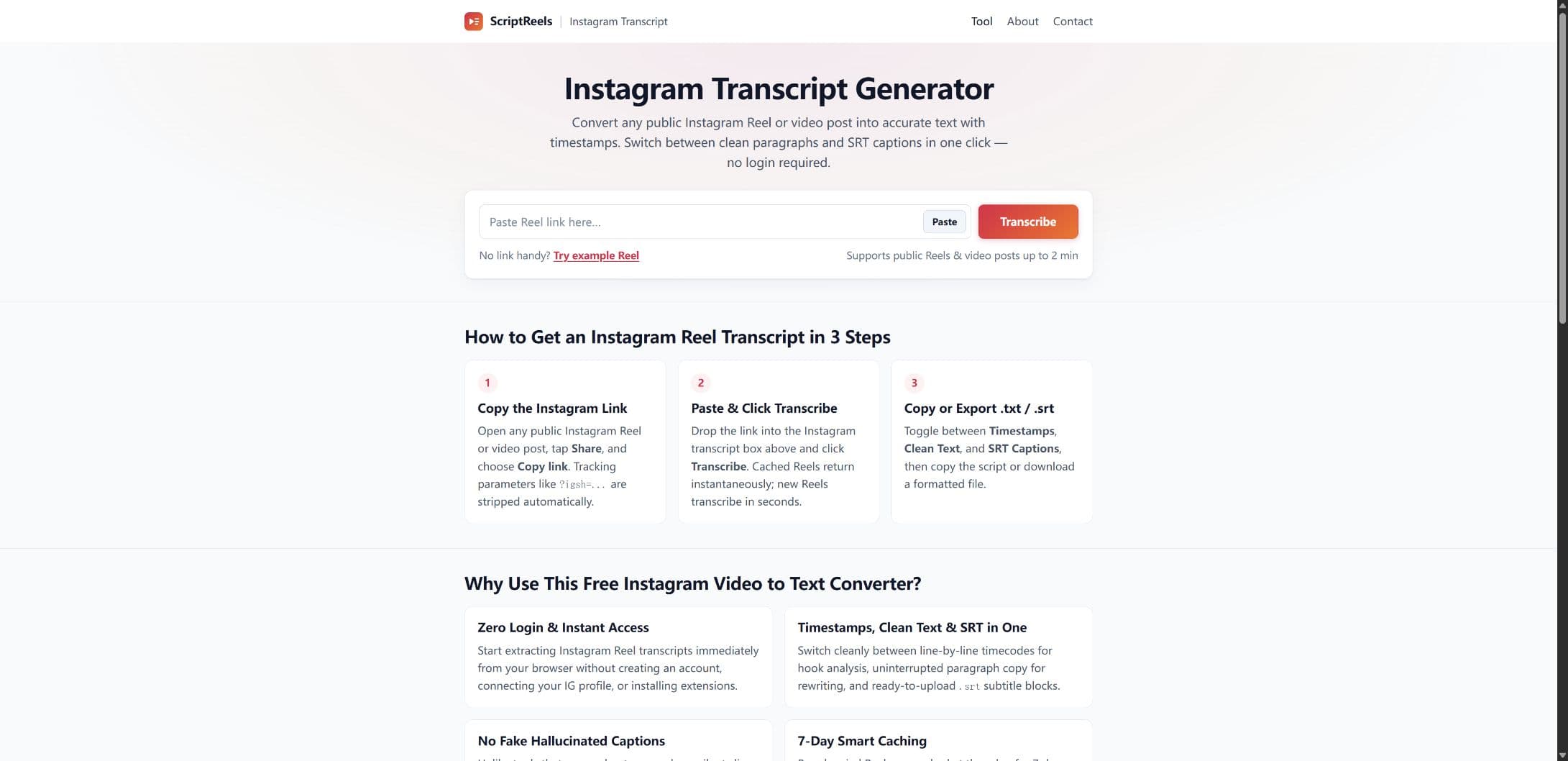
About this app
ScriptReels turns public Instagram Reels and video posts up to 2 minutes long into readable transcripts. No sign-up, Instagram account connection, or browser extension is required. Switch between timestamped lines, clean paragraphs, and SRT captions. Copy a single timestamped line or the current view, or download a TXT or SRT file. Free use allows up to 5 new transcription requests per IP per day; available cached transcripts do not count toward that allowance. Private accounts, Stories, and bulk transcription are not supported. Transcripts are generated automatically, so review the wording and timing before publishing.
Key features
- 1Paste any public Instagram Reel, /p/ video post or /tv/ link and get a transcript with no login or extension.
- 2Toggle between timestamped lines, clean paragraphs and SRT captions; copy a single line or download .txt/.srt.
- 3Detects music-only or muted Reels and says so instead of fabricating captions; 7-day edge cache for popular clips.
Target customer profile
Drawn from the product itself, not from a survey.
Demographic
Short-form video creators & scriptwriters
Pain points
Manually transcribing Reels is tedious and slow; hard to analyze hooks and pacing
Primary needs
Fast, timestamped text to study viral Reel structure and improve scripts
Demographic
Social media marketers & content repurposers
Pain points
Repurposing spoken Reel content into blogs, threads, or newsletters takes time
Primary needs
Clean paragraph transcripts for quick copy-paste into other formats
Demographic
Video editors
Pain points
Preparing subtitle files and reviewing their timing takes time
Primary needs
SRT export for review and editing
Demographic
Researchers, journalists & language learners
Pain points
Quoting spoken statements or reading fast-paced foreign-language videos is difficult
Primary needs
Readable transcripts to search and review, with wording checked against the source video
Scout Review
Written by AI from measured evidence, scored out of 100.
ScriptReels is a focused, genuinely useful single-purpose tool: paste a public Instagram Reel link, get timestamped text, clean paragraphs or an SRT file, with no account and no extension. It is fast (93 mobile Lighthouse), accessible (100/100) and frictionless to try. The weaknesses are craft and ceiling — SEO-flavored copy, no product screenshots, a thin security posture, and a 2-minute/no-bulk limit that caps who can use it seriously. As a free utility it earns its place in a bookmark bar; as a business it needs a reason for power users to stay.
Measure by measure
Usability
68Paste-and-go hero with a Paste button, an example Reel fallback and no signup — signup-to-value time is effectively zero. Three-step guide and FAQ cover the obvious questions.
Design
58Clean single-accent palette and orderly card rhythm, but keyword-stuffed headings and dense grey body copy read as SEO filler. No transcript or SRT preview shown anywhere.
Speed
82Lighthouse mobile 93/100 with LCP 2.5s, CLS 0 and TBT 0ms; desktop 99/100. Edge caching for popular Reels keeps repeat requests instant.
Security
52HTTPS enforced with SPF, DMARC, X-Content-Type-Options and Referrer-Policy, but no HSTS, CSP or frame protection and no published security or privacy detail beyond the basics.
Accessibility
78Lighthouse accessibility audit scored a clean 100/100, and the tool auto-detects spoken language across a dozen-plus languages. No published a11y statement or keyboard docs.
Growth
58Real, specific pain (manual Reel transcription) with a clear no-login wedge and SRT export. But the 2-minute cap and no bulk mode leave the highest-value users — agencies — underserved.
Improvement areas
- No product screenshots or transcript preview anywhere on the homepage — show the actual output.
- Security headers incomplete: no HSTS, CSP, frame protection or Permissions-Policy; no security or retention page.
- 2-minute video cap and no bulk transcription exclude agencies and high-volume marketers.
- SEO-stuffed headings and small light-grey body copy hurt scannability and brand voice.
Design & Usability
The homepage does the one thing that matters: it puts a paste box and a Transcribe button front and center, with a Paste helper and an example Reel so a first-time visitor can test without hunting for a link. The three-step guide and FAQ preempt the obvious questions, and there is no signup wall at all. Where it slips is craft — headings like 'Why Use This Free Instagram Video to Text Converter?' are written for a search engine, not a reader, and the card body text is small, light grey and dense. Most tellingly, a product whose entire output is formatted text never shows a single line of it. A screenshot of the timestamp view next to the SRT view would do more selling than the entire FAQ.
Speed & Security
Speed is the strongest measured dimension: Lighthouse mobile 93/100 with a 2.5s LCP, zero cumulative layout shift and zero total blocking time, and desktop at 99/100. The site also claims a 7-day edge cache for popular Reels, which is the right architecture for a tool where the same viral clip gets pasted a thousand times. Security is thinner. HTTPS is enforced and SPF, DMARC, X-Content-Type-Options and Referrer-Policy are all present, but there is no HSTS, no Content-Security-Policy, no frame protection and no Permissions-Policy — six of twelve checklist points. For a no-login tool that handles no accounts and stores no user data, that is a defensible posture, but there is no security page and no stated data-retention policy to confirm it.
Accessibility & Growth
Accessibility is the cleanest score on the board: a 100/100 Lighthouse audit with no failing checks, plus automatic language detection across English, Spanish, Portuguese, French, German, Japanese, Korean, Chinese and more. There is no published accessibility statement, so treat the 100 as a floor rather than a ceiling. Growth is a judgement on the idea. The problem is real and specific — manually transcribing a Reel to study its hook is genuinely miserable — and the wedge is concrete: no login, three output formats, SRT export, and music-only detection so it doesn't hallucinate captions on silent clips. Against DownSub, Kapwing and Notta it wins on friction and loses on depth: the 2-minute cap and the explicit 'no bulk transcription' rule cut out the agencies and marketers most likely to pay. It is a good free utility with a narrow paid path.
Conclusion
If you transcribe the occasional Reel to study a hook or pull a quote, this is the least annoying way to do it — no signup, no extension, an example link if you don't have one handy. If you process Reels in volume, the 2-minute cap and the no-bulk rule will send you elsewhere within a week. The fix is not more features; it is showing the output on the homepage and giving the people who'd pay a reason to.
Alternatives comparison
Named competitors, point by point. Nobody paid to appear here or to be left out.
 ScriptReels |  DownSub |  Kapwing |  Notta | |
|---|---|---|---|---|
| Instagram Reel support | Yes — Reels, /p/ video posts and /tv/, up to 2 min | No — downloads existing subtitles from supported sites | Yes — via editor upload, not link paste | Yes — via file or link upload |
| Signup required | No — fully anonymous, 5 free per IP per day | No | Yes for saving/exporting | Yes |
| SRT subtitle export | Yes — download .srt with timecodes | Yes — downloads existing SRT | Yes — full subtitle editor | Yes |
| Bulk / long-form transcription | No — 2 min cap, no bulk | Per-video, no batch queue | Yes — long videos, batch workflows | Yes — long recordings, batch import |
| Free tier | 5 new transcriptions per IP per day; cached free | Free, ad-supported | Free with watermarks and limits | Limited free minutes per month |
DownSub
A web tool for downloading video subtitles.
Kapwing
An online video editor with subtitle tools.
Notta
An audio and video transcription tool.
Comparing options? See ScriptReels alternatives, scored side by side
More Social Media apps
View all Social Media
PodRescale
89Every episode becomes two weeks of posts. In your voice. Posted for you.

Voqusa
89Transcribe social media video and audio links into text (free signup, 5 free credits, then pay-as-you-go)

Evoriqa
88White-label AI customer service agent for small businesse...

AI Comment Exporter
88YouTube comment exporter to CSV, Excel and JSON, with AI reports

AI Dance Trend
88Turn one photo into a 10-second AI dance video — no app, ...

TranscriptYou
88Free YouTube transcript generator with timestamps and AI ...

LurkAPI
88Public social media data as clean JSON, in one request

Outstanding AI Video
87You and 2 friends in the Outstanding Tiny Desk AI meme

TinyDesk-AI.fun
87Tiny Desk AI makes your own version of the viral "Outstanding" Tiny Desk meme. Add a photo to any of the five seats on the stage (lead mic, keys, two backing vocals, sax), from one person to the whole band, and get a fresh 19-second 9:16 720p clip cut like the original post, usually about 10 minutes after paying. $8.99 once, no account, no prompts. The MP4 is silent so you attach the licensed meme sound inside TikTok. Not affiliated with NPR.

ZombieTrend AI
87ZombieTrend AI turns two photos into an emotional zombie love story video with a heartfelt hug, memory flashback, sound, no watermark, and a free scene preview.

Music Visualizer
86Online music visualizer for audio-reactive videos.

BlueVetaUpright
86API that detects product photo rotation and tells you how...


A platform dedicated to providing unbiased reviews of newly launched applications, analyzing everything from their features to their full potential.
info@scoutforge.net© 2026 Scoutforge. All rights reserved.
