Cycling through all six. Tap any point to stop.
Measured on six things
Free website tracking checker. Paste a URL and Sonar crawls your site from the outside, then reports what's running and the problems it can prove.
Growth
58Real problem (broken tracking wastes ad spend), specific wedge vs Tag Assistant (whole-site crawl, non-Google pixels, scored evidence), and a free scan that funnels into a paid agency. Solid positioning, but the free tool is a lead magnet, not a standalone business.
Screenshots
1 / 1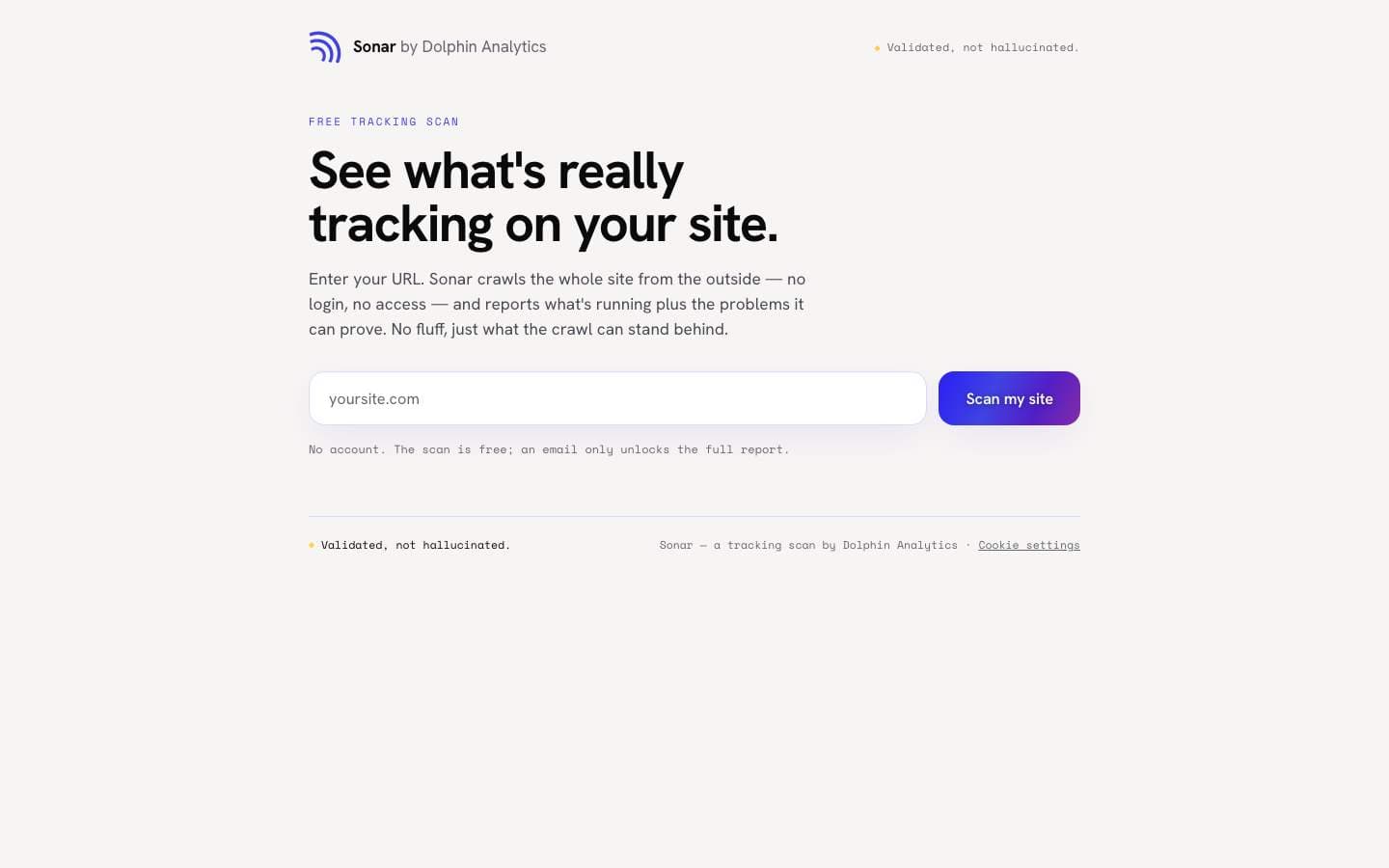
About this app
Sonar is a free tracking scanner for any website. Paste a URL and it crawls the whole site from the outside, the way a visitor's browser does, with no login, no account and no tag access. It captures every outbound tracking request on every page and reports what is actually running: GA4, Google Tag Manager, Google Ads, Meta Pixel and 20+ other ad pixels, analytics and session tools, consent platforms and the dataLayer. Then it lists the problems it can prove, such as duplicate GA4 hits, conflicting IDs, staging containers left on production, tags firing before consent, PII leaking into analytics, and a tag manager with no live tags. Every finding carries its evidence, so nothing is guessed. You get a tracking health score out of 100, a free on-page scorecard, and an email-unlocked full report with a branded PDF. Built by Dolphin Analytics, a London analytics agency, for marketers and founders who want to trust their tracking before they spend on ads. Validated, not hallucinated.
Key features
- 1External whole-site crawl: no login, no tag access, no snippet install — scans the site the way a visitor's browser sees it.
- 2Detects GA4, GTM containers, Meta and 20+ ad pixels, dataLayer events and consent tooling, with evidence attached to every finding.
- 3Tracking health score out of 100 plus a free on-page scorecard and an email-unlocked branded PDF report.
Target customer profile
Drawn from the product itself, not from a survey.
Demographic
Digital marketers and growth leads at mid-size brands
Pain points
Unsure if tags fire correctly; wasted ad spend from broken pixels
Primary needs
Quick proof of what tracking runs; audit-ready findings to justify fixes
Demographic
Marketing analytics and agency practitioners
Pain points
Manual tracking audits eat hours; client reporting lacks hard evidence
Primary needs
Automated first-pass audit; scored, shareable evidence to hand over or act on
Demographic
Web developers and eCommerce site owners
Pain points
Silent tag failures; unclear consent and GTM container interactions
Primary needs
External, install-free scan; clarity on dataLayer and consent accuracy
Scout Review
Written by AI from measured evidence, scored out of 100.
Sonar is a free external tracking scanner from Dolphin Analytics, a London agency with a domain dating to 2019. Paste a URL and it crawls the site the way a visitor's browser does — no login, no tag access — and reports what's actually running: GA4, GTM, Meta and 20+ other pixels, dataLayer events and consent setup. It then lists provable problems (duplicate GA4 hits, staging containers on production, tags firing before consent, PII in analytics) with evidence attached, plus a tracking health score out of 100 and an email-gated branded PDF. The site is fast (Lighthouse mobile 100/100, LCP 1.5s), secure on the basics (12/12 header/DNS probe, HSTS, CSP, SPF, DMARC) and fully accessible on automated checks. It's a well-executed lead-gen wedge for an agency, not a standalone product — which is fine, as long as you know that going in.
Measure by measure
Usability
68Zero-friction core flow: paste URL, get scan, no account or install. Email only gates the full report. FAQ answers eight real questions. Missing a sample report or demo video, so users can't preview output before scanning.
Design
71Focused single-purpose landing page: headline, URL input, brand logo wall, four-card feature grid, FAQ. Clean typography and spacing, consistent branding. No app UI to judge — the site is the product surface, and it's well-crafted but conventional.
Speed
88Lighthouse mobile 100/100 with LCP 1.5s, CLS 0.001, TBT 26ms; desktop 99/100. A genuinely fast, lightweight marketing page with no heavy SPA overhead. No lag complaints found in collected evidence.
Security
74Full security header set (HSTS, CSP, frame protection, X-Content-Type-Options, Referrer-Policy, Permissions-Policy), SPF and DMARC configured, 12/12 on the probe. FAQ states form inputs are never recorded. No published SOC 2, ISO or pen-test report found.
Accessibility
78Lighthouse accessibility audit 100/100 (axe-core). Responsive, text-based layout with readable contrast. No WCAG conformance statement or a11y page found, and content is English-only — automated checks pass but manual coverage is unverified.
Growth
58Real problem (broken tracking wastes ad spend), specific wedge vs Tag Assistant (whole-site crawl, non-Google pixels, scored evidence), and a free scan that funnels into a paid agency. Solid positioning, but the free tool is a lead magnet, not a standalone business.
Improvement areas
- No sample report or demo video on the homepage — users can't preview output before scanning.
- No published security documentation (SOC 2, ISO, pen-test summary, bug bounty) despite crawling third-party sites.
- No accessibility statement or WCAG conformance claim to back up the 100/100 automated audit.
Design & Usability
Sonar's site is a tight, single-purpose landing page: headline, URL input, brand logo wall (AKQA, WPP, Toyota, Tesco), a four-card feature grid, and an eight-question FAQ. There's no app UI to judge — the site is the product surface, and it's clean, consistent and conventional rather than distinctive. Usability is where it earns its keep: the core flow is paste-a-URL, no account, no install, no tag access, with email only gating the full report. The FAQ pre-empts the obvious objections (is it free, is it safe, how is it different from Tag Assistant). The gap is preview: no sample report or demo video, so users can't see the output before committing a URL. For a tool whose entire pitch is 'evidence, not guesses', showing a redacted example report would close the loop.
Speed & Security
Speed is a genuine strength. Lighthouse mobile performance is 100/100 with LCP 1.5s, CLS 0.001 and TBT 26ms; desktop lands 99/100. The page is lightweight, no heavy SPA, no lag complaints in the collected evidence — it loads before you finish reading the headline. Security is solid on the basics: HTTPS enforced with HSTS, CSP, frame protection, X-Content-Type-Options, Referrer-Policy and Permissions-Policy all present, SPF and DMARC configured, 12/12 on the header/DNS probe. The FAQ states form inputs are never recorded and the scan runs externally with no account access. What's missing is the deeper trust layer: no published SOC 2, ISO 27001, pen-test summary or bug bounty. For a tool that crawls other people's sites, that's a reasonable next step, not a red flag at this stage.
Accessibility & Growth
Accessibility scores 100/100 on the Lighthouse axe-core audit — a clean result for a text-based, responsive page with readable contrast. The caveat is that automated checks cover only part of WCAG: there's no published accessibility statement, no WCAG conformance claim, and content is English-only. Manual keyboard and screen-reader coverage is unverified. Growth is a judgement on the idea, not traction. The problem is real — broken pixels and misconfigured tags quietly burn ad budget — and the target is specific: marketers, growth leads, devs and eCommerce owners who need proof of what's actually firing. The wedge against Google Tag Assistant is concrete: whole-site crawl instead of one browser tab, non-Google pixels included, and a scored report with evidence attached to every finding. Against ObservePoint it's the price point — free first-pass vs enterprise contract. The honest limit is that Sonar is a lead magnet for Dolphin Analytics' paid services, not a standalone SaaS, so its growth ceiling is bounded by how many audits the agency can convert.
Conclusion
If you're a marketer or founder who suspects your tracking is quietly broken and you don't want to pay for an enterprise tag-governance platform or spend an afternoon in Tag Assistant, Sonar is a genuinely useful free first pass. The scan is fast, the findings come with evidence, and the score gives you something concrete to hand to whoever owns the tags. The trade-offs are clear: it's a Dolphin Analytics funnel, the full report costs an email, and there's no SOC 2 or pen-test published if you need that for procurement. Use it as the audit's first pass, not the audit itself. If the report surfaces something real, you'll know whether to fix it in-house or book the call.
Suggestions for improvement
- Publish a redacted sample report on the homepage so users can see the output before scanning.
- Add a short demo video (60-90s) walking through a scan and the resulting scorecard.
- Publish a security page: data handling, retention, sub-processors, and any pen-test or SOC 2 roadmap.
- Add an accessibility statement and WCAG conformance level to back up the 100/100 automated score.
Alternatives comparison
Named competitors, point by point. Nobody paid to appear here or to be left out.
 Sonar |  Google Tag Assistant |  GTmetrix |  ObservePoint | |
|---|---|---|---|---|
| Price | Free scan and scorecard; email unlocks full PDF report | Free | Free tier; paid plans from ~$15/mo | Enterprise pricing, quote-based |
| Coverage of non-Google tags | Yes — Meta and 20+ ad pixels, analytics, consent tools | No — Google tags only | Limited tag visibility, not the focus | Yes — broad tag and analytics governance |
| Scan scope | Whole-site external crawl, no install or account | Manual, page-by-page in your own browser | Single-page performance analysis | Automated multi-page audits and ongoing monitoring |
| Scored / shareable report | Yes — tracking health score out of 100 plus branded PDF | No — live inspection only | Performance grades, not tracking health | Yes — detailed audit reports and dashboards |
| Setup effort | Paste a URL — no install, no account, no tag access | Browser extension plus manual browsing | Paste a URL, no install | Onboarding, configuration and often tag access |
Google Tag Assistant
Google's official tool for inspecting Google tags in your own browser as you visit pages. It's free but limited to Google tags, requires you to browse manually, and doesn't produce a scored report.
GTmetrix
A popular site performance and diagnostics tool that analyzes page speed and loading. It offers some tag visibility but isn't focused on analytics or marketing tracking accuracy with proven findings.
ObservePoint
An enterprise-grade tag and analytics governance platform that audits and monitors tracking across sites. Far more powerful than Sonar but priced for large organizations, not for a free quick scan.
Comparing options? See Sonar alternatives, scored side by side
More Development & Engineering apps
View all Development & Engineering
Vibe Coding Agent Skills
92A free, open-source platform offering 110 AI agent skills...

CreateMyCoin
92A no-code Solana token creator that deploys SPL tokens in...

CC Switch
91Open-source desktop app for switching AI coding providers...

DemoVexa
90Turn your code into professional product demo videos with AI-generated scripts, animated UI, and natural voiceovers.

TaxID
90Fast EU VAT validation API for developers, covering 27 EU...

Webfetch
89Web scraping API that turns any URL into HTML, text, Mark...

deed.page
89Permanent web hosting for AI agents, no human step

FontPlop
89Browser-based font viewer & tester for TTF, OTF, WOFF, WO...

BeartIMAGE
88BeartIMAGE is a free, web-based image processing platform engineered for fast, bulk photo editing and conversion directly in your browser.

Claw Messenger
88Claw Messenger is an iMessage API service that gives AI a...

DataHabibi
88AI-powered Dubai real estate data platform with 12M+ DLD ...

ButterKit
82macOS app for App Store screenshots: 3D mockups, auto-tra...


A platform dedicated to providing unbiased reviews of newly launched applications, analyzing everything from their features to their full potential.
info@scoutforge.net© 2026 Scoutforge. All rights reserved.
