Cycling through all six. Tap any point to stop.
Measured on six things
Speakuma is an AI-powered English conversation practice app for Japanese adults — the interface is in Japanese, the conversation practice is in English.
Growth
62Sharp, specific wedge: Japanese A1-A2 adults who freeze when speaking, served with Japanese hints, sample replies, and structured scenarios. Real problem, real segment — but the category is crowded and the moat is thin.
Screenshots
1 / 1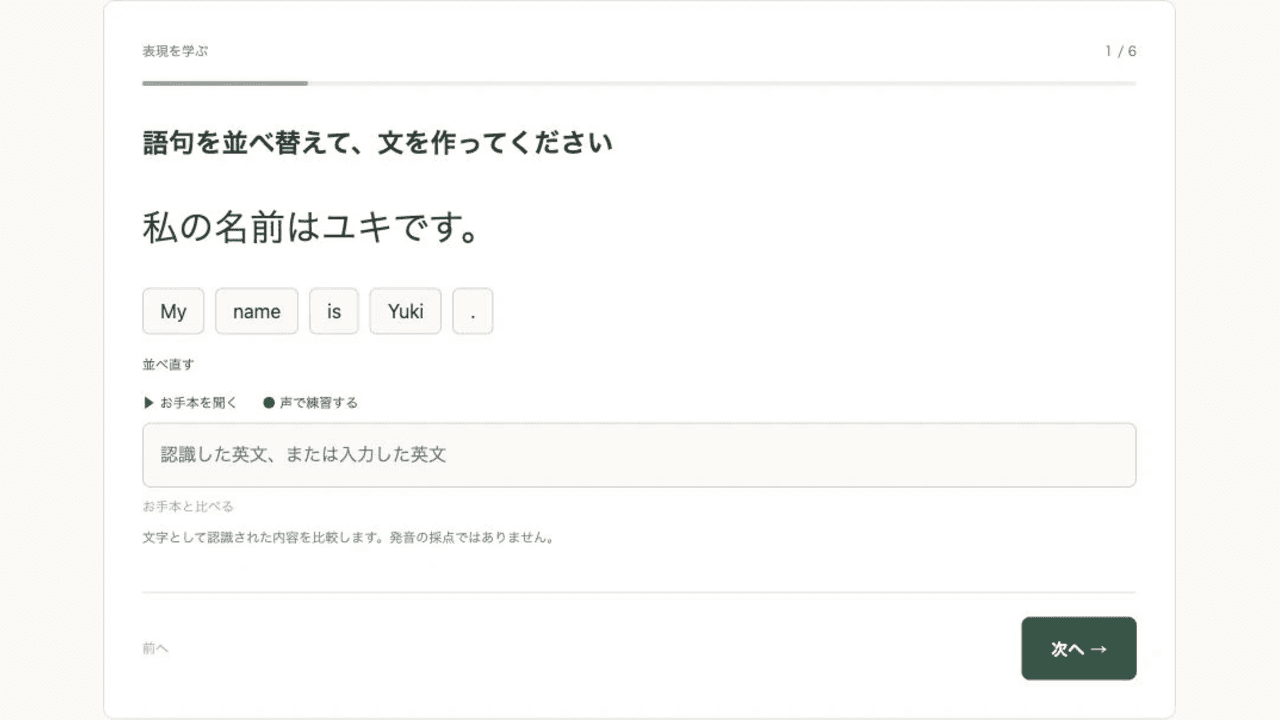
About this app
Speakuma is an AI English conversation practice tool built for Japanese adults learning English at beginner to intermediate levels. The interface is in Japanese, so it is easy to navigate, while the speaking practice itself is in English. Learners first review the key phrases in a course — self-introductions and ordering at a coffee shop are among the ready-made scenarios — then practice through role-play or free conversation with the AI. When they get stuck, a Japanese translation or a sample reply is one tap away; replies can be replayed or slowed down. After each session, learners get feedback on what they said in the conversation and can try the scenario again. Speakuma is a web app currently in free beta. AI conversation practice requires an account and has usage limits.
Key features
- 1AI English conversation practice with Japanese translations and sample replies one tap away
- 2Structured scenarios (self-introductions, café ordering) plus free conversation on chosen topics
- 3Replayable and slowable AI audio, with text fallback when a mic isn't available
- 4Post-session feedback on what you said, with the option to repeat the scenario
- 5Browser-based, no install, Google login only, no credit card required for free beta
Target customer profile
Drawn from the product itself, not from a survey.
Demographic
Japanese beginner English learners (A1-A2 level)
Pain points
Freeze up when speaking; don't know what to say; fear of mistakes
Primary needs
Japanese translations, suggested replies, low-pressure practice
Demographic
Busy professionals who want a small daily English habit
Pain points
No time for lessons; can't commit to scheduled tutors; app fatigue
Primary needs
Browser-based, no install, quick repeatable practice sessions
Demographic
Travelers preparing for trips abroad
Pain points
Need practical phrases for cafes, introductions; want scenario practice
Primary needs
Real-world role-plays (ordering, self-intro) with example answers
Scout Review
Written by AI from measured evidence, scored out of 100.
Speakuma is a browser-based AI English conversation tool built specifically for Japanese beginner-to-intermediate learners, and it shows: Japanese-first navigation, one-tap translations and sample replies, replayable and slowable audio, and structured scenarios like self-introductions and café ordering. The free beta requires only Google login, no credit card, with documented daily limits (20 AI exchanges, 10 feedback sessions, 30 ASR, 60 TTS). Design is coherent and calm with a few generic-illustration and contrast issues; speed is genuinely excellent (Lighthouse 100/100); security is solid but missing CSP and DMARC; accessibility is strong apart from contrast. Growth is the open question — the wedge is sharp but the moat is thin.
Measure by measure
Usability
68Clear path to value: prominent CTA, 'はじめての方へ' onboarding link, Google-only login, no credit card, and documented daily limits. Japanese-first navigation suits the A1-A2 audience well.
Design
71Coherent cream/sage/forest palette, a hero chat mockup that shows the real interaction, and a clean exercise card with clear progress. Undercut by generic AI-style illustrations and tiny low-contrast microcopy.
Speed
88Lighthouse 100/100 on both mobile and desktop: LCP 1.1s, CLS 0, TBT 36ms. Genuinely fast, lightweight browser app with no install and no heavy SPA baggage.
Security
74HTTPS + HSTS, frame protection, X-Content-Type-Options, Referrer-Policy, Permissions-Policy, SPF all present; Google OAuth means no stored passwords. Missing CSP and DMARC hold it back from the top.
Accessibility
80Lighthouse 96/100 with one failing audit: insufficient color contrast. Responsive layout, Japanese-language UI, and a text-conversation fallback when mic is unavailable. No public WCAG statement found.
Growth
62Sharp, specific wedge: Japanese A1-A2 adults who freeze when speaking, served with Japanese hints, sample replies, and structured scenarios. Real problem, real segment — but the category is crowded and the moat is thin.
Improvement areas
- Color contrast on microcopy, card footnotes, and ghost buttons fails Lighthouse accessibility
- Missing CSP header and DMARC record weaken the otherwise solid security posture
- Generic AI-style illustrations clash with the otherwise disciplined visual system
- No published pricing roadmap or higher-limit tier for users who outgrow the free beta
Design & Usability
Speakuma's design is the strongest part of the pitch: a restrained cream/sage/forest palette, a hero chat mockup that actually shows the AI conversation with Japanese glosses, and an exercise card with clear '1 / 6' progress and a single primary action. The weak spots are the generic AI-style illustrations (café scene, teddy bear) that don't match the UI's discipline, and microcopy so small and pale it nearly vanishes. Usability is genuinely thoughtful for the target user: prominent CTA, a 'はじめての方へ' onboarding link, Google-only login with no password or credit card, and daily limits documented on the pricing page. The friction is low and the audience is clearly understood.
Speed & Security
Speed is the standout: Lighthouse 100/100 on both mobile and desktop, LCP 1.1s, CLS 0, TBT 36ms. For a browser-based AI conversation app with audio, that's excellent and reflects a lightweight, well-built front end. Security is solid but not exceptional: HTTPS with HSTS, frame protection, X-Content-Type-Options, Referrer-Policy, Permissions-Policy, and SPF are all present, and Google OAuth means no stored passwords. The gaps are a missing CSP header and no DMARC record — both fixable, both worth fixing before any paid tier launches. No SOC 2, ISO, or pen-test claims were found in the collected evidence.
Accessibility & Growth
Accessibility scores 96/100 on Lighthouse with a single failing audit: insufficient color contrast — consistent with the site's habit of pale grey microcopy on cream backgrounds. The site is responsive, Japanese-first, and offers a text-conversation fallback when a mic isn't available, which is a real accessibility win. No public WCAG statement was found. Growth is a judgement call on the idea: Speakuma targets a genuinely underserved segment — Japanese A1-A2 adults who freeze when speaking — with Japanese hints, sample replies, and structured scenarios that ChatGPT, Duolingo, and ELSA don't package the same way. The problem is real and the wedge is specific, but the category is crowded and the differentiator is a workflow, not a moat. Domain registered 2026-11-01, so this is very early.
Conclusion
If you're a Japanese adult who has tried and bounced off Duolingo or felt paralyzed in a tutor session, Speakuma is worth a free afternoon. The scaffolding — Japanese hints, sample replies, slow replay, repeatable scenarios — is exactly what the 'I freeze when I speak' problem needs, and the price (zero, no card) makes the trial risk-free. The caveats are real: no paid plan yet, daily caps that will bite if you practice seriously, and a category full of well-funded competitors. But as a focused, well-built beta aimed at a specific learner, it earns a genuine look.
Suggestions for improvement
- Fix the color contrast on microcopy, card footnotes, and the ghost '前へ' button — it's the single failing Lighthouse audit and an easy win.
- Add a CSP header and a DMARC record before any paid tier launches; both are quick and close the two remaining security gaps.
- Replace the generic AI-style illustrations (café scene, teddy bear) with art that matches the UI's disciplined palette and tone.
- Publish a clear roadmap for pricing and higher limits so beta users know what happens when the free tier ends.
Alternatives comparison
Named competitors, point by point. Nobody paid to appear here or to be left out.
 Speakuma |  ChatGPT |  Duolingo |  ELSA Speak | |
|---|---|---|---|---|
| Built-in Japanese translations and sample replies | Yes — one-tap Japanese glosses and sample replies throughout | No — must prompt for translations manually | Partial — translations in lessons, not in free conversation | Limited — focus is pronunciation, not conversation hints |
| Structured scenario-based conversation practice | Yes — self-introduction, café ordering, topic-based free talk | Only via custom prompts; no built-in scenarios | Yes — scripted lessons, limited free-form AI conversation | Partial — scenario phrases, but focused on pronunciation drills |
| Free tier without credit card | Yes — free beta, Google login, no card, daily limits | Limited free tier; heavier use requires paid plan | Yes — generous free tier with ads | Limited free trial; full features paid |
| Browser-based, no install required | Yes — web only, no install | Yes — web and app | Yes — web and app | Yes — web and app |
| Post-session feedback on spoken conversation | Yes — feedback based on conversation transcript (not pronunciation scoring) | Only if prompted; no structured feedback | Lesson-level feedback, not free-conversation feedback | Yes — detailed pronunciation and fluency feedback |
ChatGPT
General AI chatbot that can be prompted to role-play English conversations, though it lacks built-in Japanese hints and structured scenarios.
Duolingo
Gamified language learning app with structured lessons, but limited free-form AI conversation practice.
ELSA Speak
AI pronunciation coach focused on accent and speaking feedback, rather than scenario-based conversation practice.
Comparing options? See Speakuma alternatives, scored side by side
More Education apps
View all Education
The Stack Newsletter
92A weekly newsletter delivering curated tech jobs, intervi...

Enlyo
90Video analysis for team-sport coaches: tag matches as they play, cut clips, record reviews and share the moments that matter.

SheetScroll
90> You play; SheetScroll turns the page. It listens through the microphone or a MIDI piano and holds the page until it's sure where you are.

Tracé slides
89Interactive math & physics slides with live graphs and an...

Cross Stitch Pattern Maker
89Free on-device photo-to-DMC/Anchor chart with skein counts.

English Test Coach
89English Test Coach checks your IELTS essays and letters, gives an estimated band score across all four criteria, and tells you exactly what to revise next.

Startup Science
88A unified platform replacing 12-20 disconnected tools for...

Cromagnon
88Free, private browser-based PDF, Word, Excel, and study t...

NOSTRES
88Free step-by-step guides for moving to Berlin: documents,...

TranscriptYou
88Free YouTube transcript generator with timestamps and AI ...

Random Movie Generator
88Free random movie picker from 142k+ films—no sign-up.

RBQ Exam
87Online practice for the RBQ contractor licence exams in Québec: original questions, timed mock exams and lessons, in French or English.


A platform dedicated to providing unbiased reviews of newly launched applications, analyzing everything from their features to their full potential.
info@scoutforge.net© 2026 Scoutforge. All rights reserved.
