Cycling through all six. Tap any point to stop.
Measured on six things
Real-time audio spectrum analyzer: FFT from 20 Hz to 20 kHz, octave RTA bars, peak hold, snapshots, feedback finder. Free, no ads, works offline.
Speed
47Lighthouse mobile 53/100 with a 6.7s LCP and 729ms TBT — the Play Store page is heavy on phones. Desktop scores 90/100. The app itself claims 60 updates/sec with background analysis, but that's a maker claim, not a benchmark.
Screenshots
1 / 3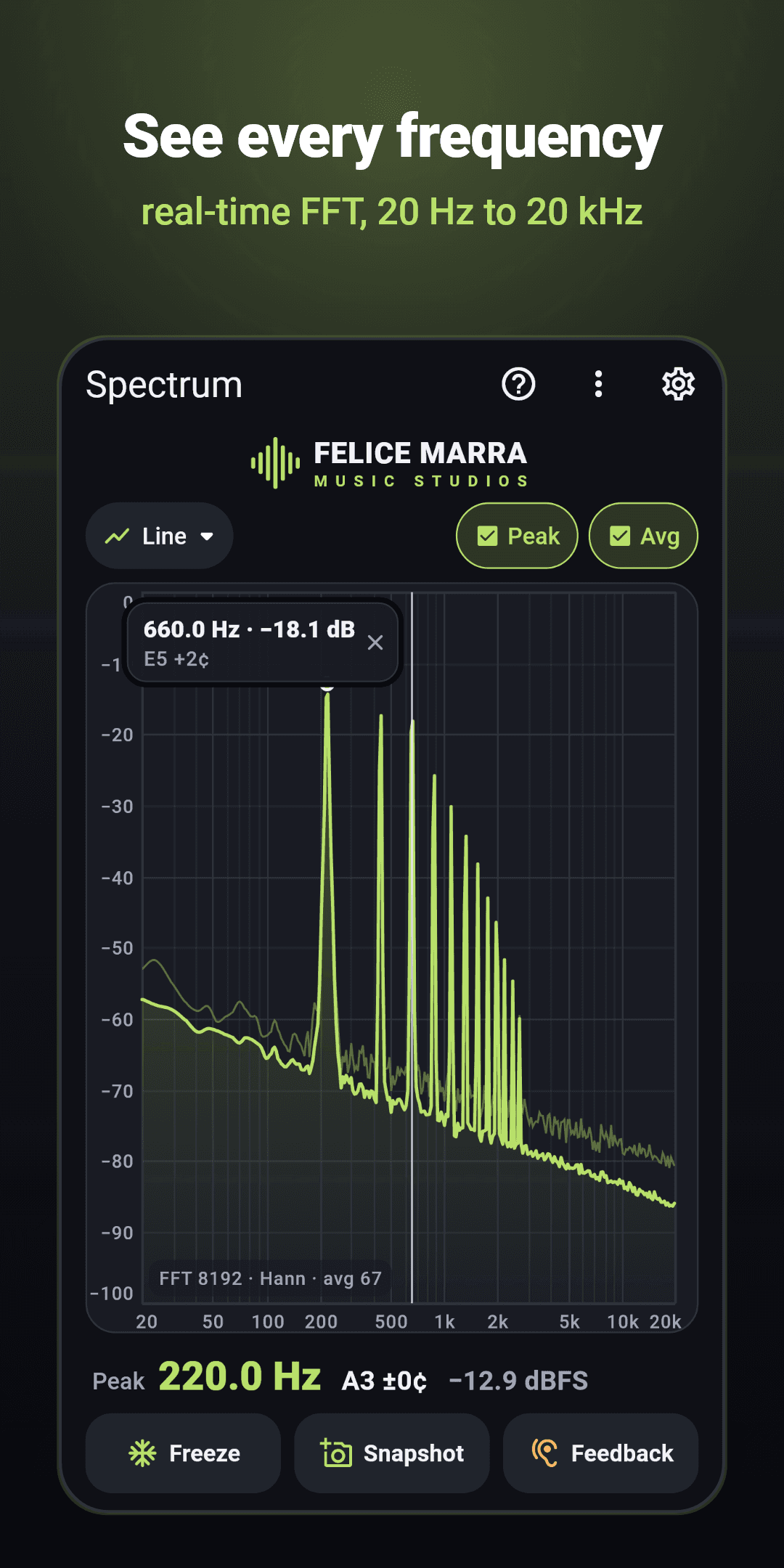
About this app
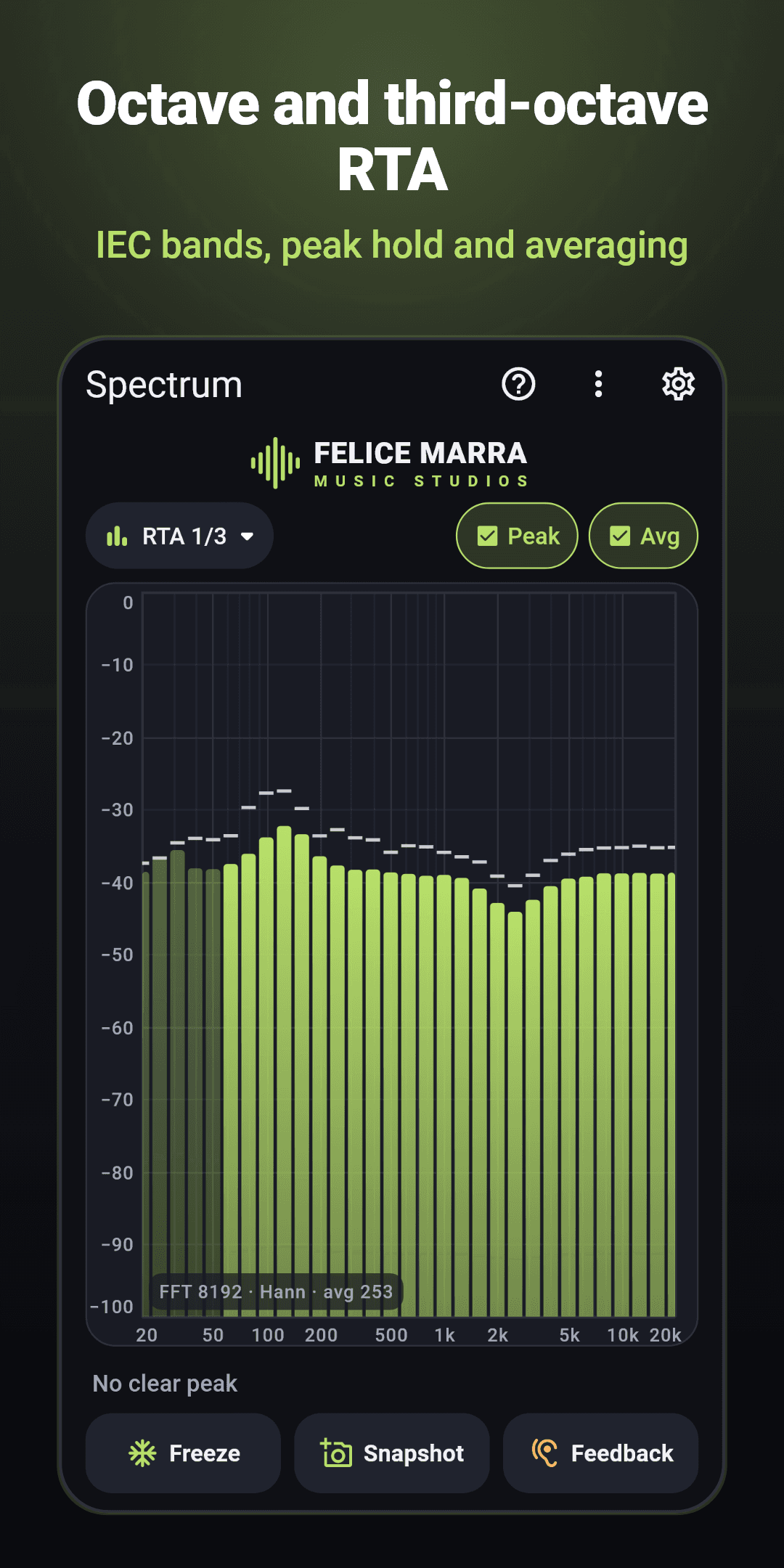
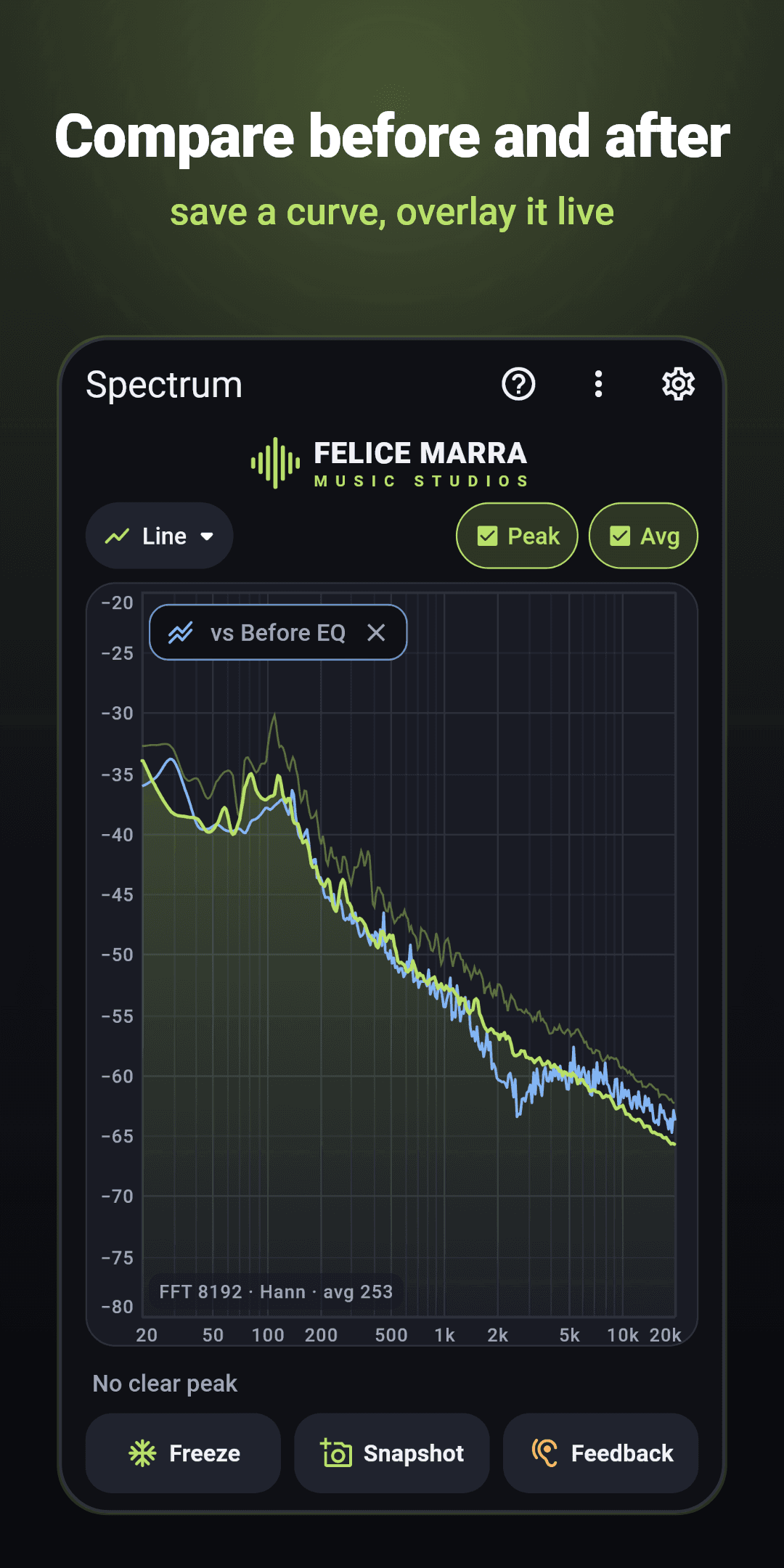
Spectrum Analyzer: Audio FFT turns your phone's microphone into a real-time frequency analyzer, for sound engineers, musicians, teachers and physics students. Live spectrum: a smooth FFT curve on a logarithmic axis from 20 Hz to 20 kHz, FFT sizes from 1024 to 32768 points, up to 60 updates per second. RTA view with octave, third-octave and sixth-octave bands. Measure: peak hold, averaging, A, C or Z weighting, and the dominant peak with its frequency, nearest note and cents. Touch the plot for a cursor, pinch to zoom. Compare: save a snapshot and see it over the live curve, before and after an EQ change; the cursor shows the difference in dB. Copy the curve as CSV. Feedback finder: spots narrow peaks that keep ringing and lists their frequencies and notes. Levels in dBFS, not dB SPL, with raw capture where the device allows it. Free, no ads, no in-app purchases, no subscription, no account. Works offline; the sound is never recorded or sent. For Android and Windows.
Key features
- 1Real-time FFT 1024–32768 points with Hann/Blackman-Harris/flat-top windows and 20 Hz–20 kHz log axis.
- 2RTA view with octave, third-octave (IEC) and sixth-octave bands, peak hold and averaging.
- 3Snapshot overlay for before/after EQ comparison with dB-difference cursor and CSV export.
- 4Feedback finder that lists ringing narrow peaks with frequencies and notes.
- 5Free, no ads, no IAP, no account, offline; sound never recorded or sent.
Target customer profile
Drawn from the product itself, not from a survey.
Demographic
Sound engineers and audio professionals
Pain points
Looking for a free tool with no ads and no account
Primary needs
Real-time FFT, RTA, peak hold, averaging, snapshot comparison, feedback detection.
Demographic
Musicians and music producers
Pain points
Looking for a free tool with no ads and no account
Primary needs
Dominant frequency with note, octave/third-octave bands, snapshot overlay, CSV export.
Demographic
Physics teachers and students
Pain points
Looking for a free tool with no ads and no account
Primary needs
Clear logarithmic frequency axis, multiple window options, freeze display, user-friendly interface.
Scout Review
Written by AI from measured evidence, scored out of 100.
Spectrum Analyzer: Audio FFT is a focused, honest tool that does one thing well and refuses to monetize you for it. The app UI is disciplined and readable, the feature set (FFT 1024–32768, RTA octave bands, peak hold, averaging, snapshot overlay, feedback finder, CSV export) is genuinely professional-grade, and the 'no ads, no account, no data collected' stance is rare and welcome. The Play Store page is the weak link — slow on mobile, truncated copy, clipped carousel — and small low-contrast labels undercut an otherwise strong accessibility story.
Measure by measure
Usability
68Install is the dominant CTA, mode switching is one dropdown, and Freeze/Snapshot/Feedback sit at the bottom where thumbs live. Data Safety 'No data collected' right under Install is a nice trust move. Axis labels are small and low-contrast, and the 'No clear peak' state is easy to miss.
Design
71Judging the app UI from store screenshots: a disciplined dark interface with one lime accent doing all the work, clear readout hierarchy, and consistent chrome across Line and RTA views. Minor blemishes: tooltip overlaps axis labels, caption chips float over the plot.
Speed
47Lighthouse mobile 53/100 with a 6.7s LCP and 729ms TBT — the Play Store page is heavy on phones. Desktop scores 90/100. The app itself claims 60 updates/sec with background analysis, but that's a maker claim, not a benchmark.
Security
638/13 on the header checklist: HSTS, CSP, frame protection, X-Content-Type-Options and Permissions-Policy present; Referrer-Policy and DMARC missing, HTTPS not strictly enforced. But the app collects nothing, needs no account, and works offline — a genuinely tiny attack surface.
Accessibility
79Lighthouse accessibility 99/100, with two failing audits: no main landmark and mismatched accessible names on visible labels. 71 languages and a light theme are real wins. Small low-contrast grey axis labels on near-black undercut it in practice.
Growth
58A real, specific problem (measure sound without paying or signing up) with concrete differentiators — snapshot overlay, feedback finder, dBFS honesty, offline. 500+ downloads is early. The wedge is clear but the category is crowded with free tools.
Improvement areas
- Mobile Play Store page performance (LCP 6.7s, TBT 729ms).
- Low-contrast small axis labels and easy-to-miss state text.
- Tooltip overlapping axis labels; caption chips floating over the plot.
- Two failing accessibility audits (main landmark, accessible names).
Design & Usability
Judged on the app UI, not the store template: the design is genuinely considered. A single lime accent carries data, toggles and subtitles, which keeps the analyzer readable in a dark studio, and the readout hierarchy (big frequency, small note/cents/dBFS) is exactly right. Usability is close behind — Install dominates the listing, mode switching is one chip, and Freeze/Snapshot/Feedback sit at the bottom. The friction is in the details: a tooltip covering axis labels, floating caption chips over the plot, and low-contrast grey axis text that fights you in dim light.
Speed & Security
Speed is the weak spot: Lighthouse mobile 53/100 with a 6.7s LCP and 729ms TBT, versus 90/100 on desktop — the Play Store page is heavy on phones. The app's own 60 updates/sec claim is unverified but plausible given the background-analysis design. Security is quietly strong for a free tool: no account, no ads, no IAP, no data collected, offline operation, and a Data Safety declaration to match. The header probe shows 8/13 with HSTS, CSP and frame protection in place, missing Referrer-Policy and DMARC — minor for an app that stores nothing.
Accessibility & Growth
Accessibility scores 99/100 on Lighthouse with only two failing audits (no main landmark, mismatched accessible names), plus 71 languages and a light theme — well ahead of most indie audio apps. The caveat is practical: small low-contrast grey axis labels on near-black. Growth is a judgement on the idea: the problem is real, the target user is specific (engineers, musicians, physics teachers), and the differentiators are concrete — snapshot overlay, feedback finder, dBFS honesty, no account. The category is crowded with free tools, so the wedge is real but narrow; 500+ downloads is early context, not the score.
Conclusion
If you need a free, private, offline spectrum analyzer on Android or Windows, this is a credible pick over Spectroid and Spectrum Analyzer Pro on feature depth alone. The snapshot overlay and feedback finder are the reasons to choose it. Fix the mobile store page speed, tighten the axis-label contrast, and clean up the tooltip overlap — then the product finally matches the polish of its own plot.
Suggestions for improvement
- Cut mobile LCP from 6.7s — compress the screenshot carousel and defer non-critical store assets.
- Raise axis-label contrast and enlarge the 'No clear peak' state text so it reads at a glance.
- Fix the 'Peak' tooltip overlapping the -10 dB label and top '0' tick on the chart.
- Add a main landmark and matching accessible names to clear the two failing Lighthouse audits.
Alternatives comparison
Named competitors, point by point. Nobody paid to appear here or to be left out.
 Spectrum Analyzer: Audio FFT | Spectroid | Spectrum Analyzer Pro | |
|---|---|---|---|
| Price model | Free, no ads, no IAP, no subscription | Free with ads | Paid / freemium |
| Real-time FFT with adjustable size | Yes, 1024–32768 points, multiple windows | Yes, fixed FFT size | Yes, configurable |
| RTA octave / third-octave bands | Octave, third-octave (IEC), sixth-octave | No dedicated RTA bands | Yes, octave and third-octave |
| Snapshot / before-after overlay | Yes, with dB-difference cursor and CSV export | No | Limited / not advertised |
| Feedback finder | Yes, lists ringing peaks with notes | No | No |
| Account / data collection | No account, no data collected, offline | No account; ad SDKs | No account; standard analytics |
| Platforms | Android and Windows | Android | Android |
Comparing options? See Spectrum Analyzer: Audio FFT alternatives, scored side by side
More Development & Engineering apps
View all Development & Engineering
Vibe Coding Agent Skills
92A free, open-source platform offering 110 AI agent skills...

CreateMyCoin
92A no-code Solana token creator that deploys SPL tokens in...

CC Switch
91Open-source desktop app for switching AI coding providers...

TaxID
90Fast EU VAT validation API for developers, covering 27 EU...

DemoVexa
90Turn your code into professional product demo videos with AI-generated scripts, animated UI, and natural voiceovers.

FontPlop
89Browser-based font viewer & tester for TTF, OTF, WOFF, WO...

deed.page
89Permanent web hosting for AI agents, no human step

Webfetch
89Web scraping API that turns any URL into HTML, text, Mark...

Denpex
89AI-powered GPU failure diagnosis for distributed ML training

BeartIMAGE
88BeartIMAGE is a free, web-based image processing platform engineered for fast, bulk photo editing and conversion directly in your browser.

Claw Messenger
88Claw Messenger is an iMessage API service that gives AI a...

DataHabibi
88AI-powered Dubai real estate data platform with 12M+ DLD ...


A platform dedicated to providing unbiased reviews of newly launched applications, analyzing everything from their features to their full potential.
info@scoutforge.net© 2026 Scoutforge. All rights reserved.
