Cycling through all six. Tap any point to stop.
Measured on six things
Daily 5-minute spelling practice from school lists
Security
52HTTPS enforced with HSTS, SPF and DMARC present, but no CSP, frame protection, or Referrer-Policy, and 6/12 checklist points. No SOC 2/ISO or security page found; privacy & safety is an Educational App Store rubric category.
Screenshots
1 / 1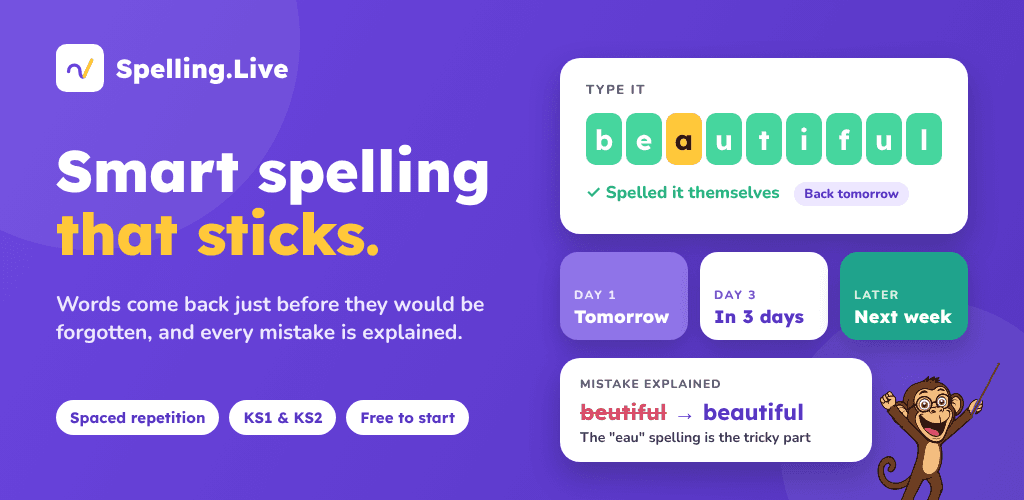
About this app
Spelling.Live turns the weekly school spelling list into a five-minute-a-day habit. You snap a photo of the list, and the app builds a structured weekly plan that mixes real handwriting practice, retrieval exercises, and built-in spaced repetition. It's designed for KS1 and KS2 families in the UK, but tutors and teachers can also run it with groups. Standout features include automatic review scheduling (words come back at widening intervals until they stick), a wide range of activity types so children don't just type but actually write, and class reports that mark every answer and flag the spelling rule behind each mistake. It's free to start with 200 credits, and there are iOS and Android apps alongside the browser version. The approach is grounded in retrieval and spaced-practice research, and the Educational App Store rated it 5.0/5 in August 2026.
Key features
- 1Photo-to-plan: snap the school spelling list and get a structured weekly practice plan.
- 2Handwriting, typing, speaking and recognition activities with built-in spaced repetition.
- 3Class reports for teachers and tutors that auto-mark answers and flag the spelling rule behind each mistake.
- 4Free tier with 200 credits (no card), plus £4.49/month one-child and £5.99/month family plans.
Target customer profile
Drawn from the product itself, not from a survey.
Demographic
UK parents of KS1/KS2 children (ages 5–11)
Pain points
Night-before cramming, fights over spelling homework, no idea which words are actually sticking
Primary needs
A short daily routine, handwriting practice that mirrors school tests, visible progress without extra marking
Demographic
Primary school teachers managing weekly spelling lists
Pain points
Time-consuming marking, tracking each pupil's tricky words, reporting to parents
Primary needs
Auto-marked practice, class reports with spelling-rule insights, pupil logins without email hassles
Demographic
Private tutors and dyslexia specialists
Pain points
Reinventing practice materials for each student, keeping spaced review on track between sessions
Primary needs
Reusable word lists, built-in spaced repetition, low-intensity activities that keep learners engaged
Demographic
Homeschooling families and teaching assistants
Pain points
Finding structured spelling resources that don't feel like busywork
Primary needs
Ready-made weekly plans, clear evidence of retention, free entry point to test the waters
Scout Review
Written by AI from measured evidence, scored out of 100.
Spelling.Live is a focused, well-built niche tool for UK primary spelling practice. The app UI is real and legible, the task flow is clear, and the speed is excellent — 99/100 mobile Lighthouse with sub-second LCP. The idea is specific and differentiated: snap the school list, get a weekly plan mixing handwriting, retrieval and spaced repetition, with class reports for teachers. Pricing is sensible with a genuine free tier and pay-as-you-go. The weak spots are security header hygiene (6/12, no CSP or frame protection) and accessibility beyond the automated 100 — unlabeled icon controls, single-language only. Design is good but has a floating Feedback button covering nav and a brand typography mismatch. A credible product with real substance and a few rough edges.
Measure by measure
Usability
68Clear task flow from profile to weekly plan to snap-test to marking, with a prominent free signup and 200 no-card credits. Large tap targets on the marking screen help. Docs/help center depth not verified from collected evidence.
Design
71Judging the app UI and store material: consistent purple brand, mascot, and legible real product screens with clear state cues. Weakened by a floating Feedback button overlapping nav and a typography mismatch between site and app.
Speed
88Lighthouse mobile 99/100 (LCP 933ms, CLS 0.053, TBT 37ms) and desktop 95/100. Genuinely fast, lightweight site with no lag complaints in the collected evidence.
Security
52HTTPS enforced with HSTS, SPF and DMARC present, but no CSP, frame protection, or Referrer-Policy, and 6/12 checklist points. No SOC 2/ISO or security page found; privacy & safety is an Educational App Store rubric category.
Accessibility
79Lighthouse accessibility 100/100, strong automated baseline. Offsets: icon-only controls without visible labels in screenshots, single-language localization, and no explicit WCAG statement found.
Growth
63Real, specific problem (UK KS1/KS2 spelling lists, cramming) with a demonstrable wedge: photo-to-plan, handwriting, spaced repetition, class reports. Free tier and class pilots lower friction. Early stage (domain 2026, 7 ratings) is context, not the score.
Improvement areas
- Security headers incomplete (6/12): no CSP, frame protection, Referrer-Policy or Permissions-Policy.
- Accessibility gaps beyond the automated 100: unlabeled icon-only controls and single-language localization.
- Design polish: floating Feedback button overlaps nav; site and app typography feel like different brands.
- No published security/privacy page or audit status for an app handling children's data.
Design & Usability
Judged on the app UI and store material, Spelling.Live looks like a real product rather than a landing page with delusions: consistent purple branding, a recurring mascot, and store screenshots showing actual screens with completed days, overdue tags and red/green marking. The task flow is legible before install — profile, weekly plan, snap the test, mark words — and the marking screen uses big tap targets. The cracks are small but visible: a Feedback button floating over the bottom nav and covering Support, icon-only controls with no labels, and a typography mismatch between the site's sans-serif and the app's rounded face. Onboarding is frictionless with 200 no-card credits and a one-minute setup claim. Solid, not flawless.
Speed & Security
Speed is the standout: Lighthouse mobile 99/100 with a 933ms LCP, 37ms TBT and near-zero layout shift, plus 95 on desktop. That's a genuinely snappy site and no lag complaints surfaced in the collected evidence. Security is the weak flank. HTTPS is enforced with HSTS, and SPF and DMARC are present, but there's no CSP, no frame protection, no X-Content-Type-Options, Referrer-Policy or Permissions-Policy — 6/12 on the header checklist. No SOC 2, ISO or security page was found, and privacy & safety appears only as an Educational App Store rubric category. For an app handling children's data, the header hygiene is thin.
Accessibility & Growth
Accessibility scores a perfect 100 on Lighthouse's automated audit, which is a strong baseline but only part of WCAG. The gaps are the human ones: icon-only controls (text-size A/A/+, check/cross marking) with no visible labels in screenshots, localization in a single language, and no explicit WCAG statement found. Growth is a judgement on the idea: the problem is real and specific — UK KS1/KS2 families fighting weekly spelling lists and night-before cramming — and the wedge is concrete: photo-to-plan, real handwriting practice, built-in spaced repetition, and class reports that flag the spelling rule behind each mistake. Against Spelling Shed (game-heavy, school-subscription), Sir Linkalot (memory hooks, less handwriting) and Spelling City (US-centric, no UK lists), that's a defensible position. The free tier and free class pilots lower adoption friction. The limit is willingness to pay £4.49–£5.99 a month when schools already push free schemes.
Conclusion
For UK parents tired of the Sunday-night spelling scramble, Spelling.Live is worth the free 200 credits to test. The photo-to-plan flow and handwriting practice are the differentiators that matter, and the speed means it won't be the thing that frustrates a seven-year-old. Teachers get free class tools and auto-marked reports, which is a smart wedge into schools. Before paying, check that the security posture matches the sensitivity of the data — the missing CSP and frame protection are fixable but currently absent. And if your child needs accessibility accommodations, test the icon-only controls with a screen reader first. The foundation is solid; the polish and hardening are the next chapter.
Suggestions for improvement
- Add CSP, frame protection, X-Content-Type-Options and Referrer-Policy headers to move security from 6/12 toward a full checklist.
- Publish a security/privacy page covering data handling for children's data, plus any audit or pen-test status.
- Fix the floating Feedback button overlapping the bottom nav and add visible labels or aria-labels to icon-only controls.
- Add at least one more language and an explicit WCAG/accessibility statement to back up the 100 Lighthouse score.
Alternatives comparison
Named competitors, point by point. Nobody paid to appear here or to be left out.
 Spelling.Live |  Spelling Shed |  Sir Linkalot |  Spelling City (VocabularySpellingCity) | |
|---|---|---|---|---|
| UK curriculum alignment | Yes — built for KS1/KS2 UK school lists | Yes — UK curriculum-aligned scheme | Yes — UK-focused memory hooks | No — US-centric lists |
| Handwriting practice | Yes — real handwriting practice included | Limited — game-based typing | No — animation/memory hooks | No — typing and games |
| Spaced repetition scheduling | Yes — per-word widening intervals | Limited — not core | No — memory-hook approach | Limited — test/game based |
| Photo scan of school list | Yes — snap photo to build plan | No — pre-set word lists | No | No — manual list entry |
| Free tier | Yes — 200 credits, no card | Limited — often school subscription | Limited free content | Limited free tier |
| Class reports for teachers | Yes — auto-marked with spelling-rule insights | Yes — teacher dashboards | Limited | Yes — teacher reporting |
Spelling Shed
Popular UK spelling scheme with games and word lists aligned to curriculum; more game-heavy and often school-subscription based.
Sir Linkalot
Memory-hook approach to spelling using animations and linking stories; strong for tricky words but less focused on handwriting and daily retrieval schedules.
Spelling City (VocabularySpellingCity)
Long-standing US platform for spelling and vocabulary practice with tests and games; broad but not tailored to UK school lists or handwriting.
Comparing options? See Spelling.Live alternatives, scored side by side
More Education apps
View all Education
The Stack Newsletter
92A weekly newsletter delivering curated tech jobs, intervi...

SheetScroll
90> You play; SheetScroll turns the page. It listens through the microphone or a MIDI piano and holds the page until it's sure where you are.

Tracé slides
89Interactive math & physics slides with live graphs and an...

English Test Coach
89English Test Coach checks your IELTS essays and letters, gives an estimated band score across all four criteria, and tells you exactly what to revise next.

Startup Science
88A unified platform replacing 12-20 disconnected tools for...

Cromagnon
88Free, private browser-based PDF, Word, Excel, and study t...

TranscriptYou
88Free YouTube transcript generator with timestamps and AI ...

RBQ Exam
87Online practice for the RBQ contractor licence exams in Québec: original questions, timed mock exams and lessons, in French or English.

Coloring Pages Pro
87A massive collection of free printable coloring pages for...

CertWorthIt
87Data-driven tool revealing which certifications actually ...

HireVue Practice
85AI-powered HireVue practice with timed mock interviews, role-specific questions, transcripts, scoring, and actionable feedback.

Case Cub
85AI-powered law school study platform with 20,000+ case br...


A platform dedicated to providing unbiased reviews of newly launched applications, analyzing everything from their features to their full potential.
info@scoutforge.net© 2026 Scoutforge. All rights reserved.
