Cycling through all six. Tap any point to stop.
Measured on six things
Private desktop analytics for Substack newsletters
Security
52HTTPS enforced and the local-only architecture is a real privacy win, but headers are thin (no HSTS, CSP, frame protection, DMARC) and no SOC 2/ISO/pen-test claims are published.
Screenshots
1 / 1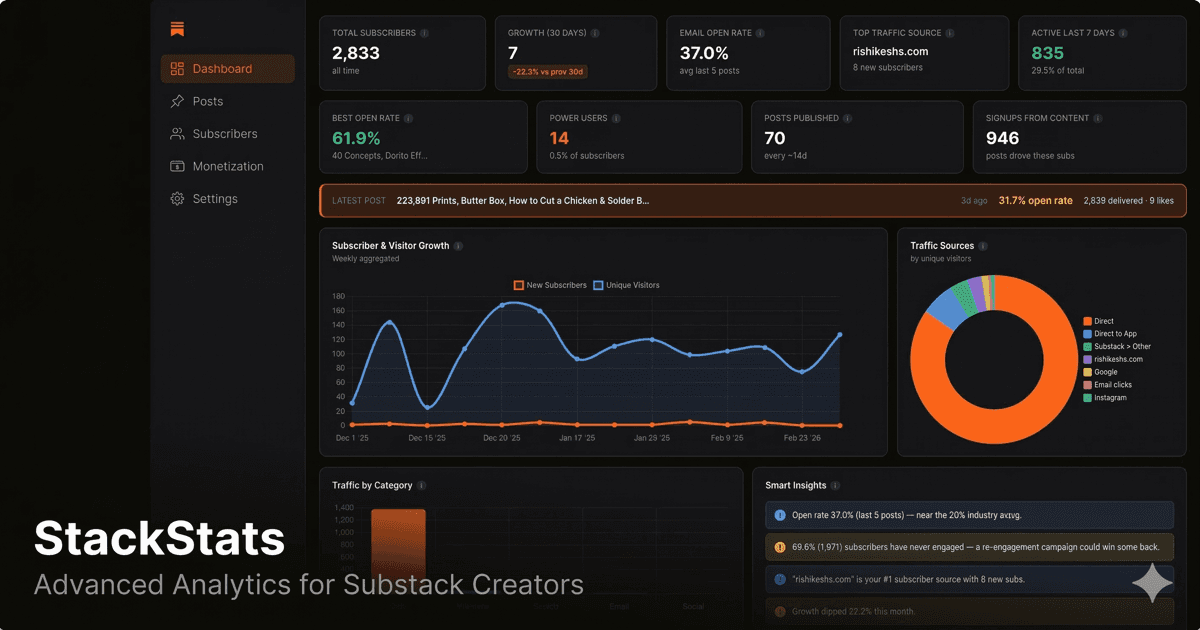
About this app
StackStats is a private desktop analytics app for Substack newsletter writers, available for Mac and Windows. It turns your Substack data into clear insights: see which subscribers are at risk of churning, find your superfans, and get a forecast of your newsletter's growth. All of your data is stored locally on your own computer, with no cloud and no subscription, so your subscriber list stays private.
Key features
- 1Local-only desktop analytics for Substack — no cloud, no account, data stays on your machine
- 2Churn risk scoring, superfan identification, cohort retention, and 180-day growth forecasting
- 3Optional AI via local Ollama or bring-your-own-key (Claude, GPT-4, Gemini, Groq, OpenRouter)
- 4One-click Auto-Sync pulls Substack data with no CSV exports; Mac and Windows apps
- 5One-time pricing: $39/year or $79 lifetime (early adopter), no subscription
Target customer profile
Drawn from the product itself, not from a survey.
Demographic
Substack writers with 1,000–10,000 subscribers
Pain points
Substack's dashboard lacks cohort retention, churn risk, and superfan identification
Primary needs
Deeper audience insights to reduce churn and grow subscribers
Demographic
Privacy-conscious newsletter creators
Pain points
Uncomfortable with cloud-based analytics storing subscriber data
Primary needs
Local, offline analytics with no data leaving their computer
Demographic
Budget-minded indie writers
Pain points
Subscription fatigue and recurring costs of analytics tools
Primary needs
One-time purchase analytics tool with lifetime updates
Scout Review
Written by AI from measured evidence, scored out of 100.
StackStats is a focused, well-argued desktop analytics tool for Substack writers, built by someone who clearly uses it on his own ~3,000-subscriber newsletter. The pitch is sharp: Substack's dashboard hides churn risk, cohort retention, and superfans; StackStats surfaces them, stores everything locally, and charges once instead of monthly. The execution mostly backs that up — a clean editorial landing page, a three-step install, one-click Auto-Sync, a live demo with no signup, and a changelog that shows weekly releases through October 2026. The rough edges are real but fixable: a 20-second mobile LCP, thin security headers on a site selling privacy, and accessibility failures that undercut the clarity claim. At $39 for a year or $79 for lifetime, it's a fair ask for a writer who's tired of guessing why subscribers leave.
Measure by measure
Usability
68Three-step install, one-click Auto-Sync, no CSVs, live demo with no signup, and a weekly changelog. Onboarding story is clear and low-friction for a non-technical writer.
Design
71Editorial serif + single orange accent gives a coherent, credible brand. Numbered tab product tour is disciplined. Held back by crowded hero callouts and unreadable mockup text.
Speed
57Lighthouse 70/100 both mobile and desktop, but LCP of 20.4s on mobile is a genuine problem — the hero takes an eternity to paint. TBT 0ms and FCP 1.7s show the JS is fine; the hero asset is the culprit.
Security
52HTTPS enforced and the local-only architecture is a real privacy win, but headers are thin (no HSTS, CSP, frame protection, DMARC) and no SOC 2/ISO/pen-test claims are published.
Accessibility
70Lighthouse 90/100 with real failures: missing main landmark, insufficient contrast, and broken ARIA role children. No a11y statement or multi-language support found.
Growth
63Sharp wedge: local-only privacy + one-time price for Substack writers Substack's own dashboard ignores. Real segment, real gap, but ceiling is bounded by Substack's own audience size.
Improvement areas
- Mobile LCP of 20.4s — hero asset needs compression or lazy-loading
- Missing HSTS, CSP, frame protection, and DMARC on a privacy-positioned site
- Accessibility gaps: no main landmark, contrast failures, broken ARIA role children
- No published security/privacy documentation page beyond marketing copy
Design & Usability
The homepage reads like a product built by someone who actually uses it — editorial serif, one disciplined orange accent, and a numbered tab tour (01 Overview through 07 AI Insights) that walks you through the dashboard without a single stock photo. The install flow is three steps and the third is 'Done.' Auto-Sync pulls data in one click, no CSVs, and there's a live demo with no signup, which is the right call for a paid desktop app. The weaknesses are craft-level: hero callouts crowd the mockup edges, light grey body text on cream hurts legibility, and the dashboard screenshots are too small to actually read at page size — ironic for an analytics tool whose whole pitch is legibility. Usability is genuinely strong for a non-technical writer; design is good but not yet polished enough to feel premium at $79.
Speed & Security
Speed is the sore spot. Lighthouse scores 70/100 on both mobile and desktop, but the mobile LCP is 20.4 seconds — the hero takes an eternity to paint. TBT of 0ms and FCP of 1.7s tell you the JS is fine; a single oversized hero asset is doing the damage, and it's a fixable one. Security is a mixed bag that the marketing glosses over. The architectural privacy story is real and verifiable: data lives on your machine, AI is optional via local Ollama or bring-your-own-key, and the changelog documents privacy regression tests. But the website itself ships without HSTS, CSP, frame protection, or DMARC, and there's no SOC 2, ISO, or pen-test claim anywhere. For a product whose entire pitch is 'your subscriber list stays private,' the wrapper should match the promise.
Accessibility & Growth
Accessibility lands at 90/100 on Lighthouse, which sounds great until you read the failing audits: no main landmark, insufficient color contrast, and ARIA roles missing required children. There's no accessibility statement and no multi-language support. It's competent, not careful. Growth is the most interesting dimension. The wedge is specific and defensible on paper: Substack's own dashboard genuinely lacks cohort retention, churn risk scoring, and superfan identification, and the alternatives all have real costs — Beehiiv requires migrating off Substack and paying monthly, Google Analytics doesn't touch subscriber data. StackStats answers that with local-only storage and a one-time price, aimed at writers with 1,000–10,000 subscribers. That's a real segment with a real gap. The honest limit: the ceiling is bounded by Substack's own writer base, and Substack could ship cohort retention in a sprint and erase the differentiation overnight. The idea is good; the moat is thin.
Conclusion
If you're a Substack writer past a few hundred subscribers and you've ever stared at the dashboard wondering who's about to unsubscribe, this is worth the $39. The local-only design is the real differentiator — no cloud, no account, no recurring charge — and the changelog shows the maker is shipping weekly. Go in knowing the website is slower than the app, the security headers are thin, and the accessibility story is competent rather than careful. None of those are dealbreakers for a desktop tool you install once. Try the live demo first; if the churn risk and cohort views answer questions you've actually been asking, the lifetime tier at $79 is the better math.
Suggestions for improvement
- Fix the 20.4s mobile LCP — compress or lazy-load the hero asset; it's the single biggest speed win available.
- Add HSTS, CSP, frame protection, and DMARC. A privacy-first product should have a privacy-first website.
- Add a <main> landmark and fix the contrast failures flagged by Lighthouse — cheap wins for a11y.
- Publish a short security/privacy page documenting the local-only architecture and AI data flow.
Alternatives comparison
Named competitors, point by point. Nobody paid to appear here or to be left out.
 StackStats |  Substack Dashboard |  Beehiiv |  Google Analytics | |
|---|---|---|---|---|
| Pricing model | One-time: $39/year or $79 lifetime | Free with Substack subscription | Monthly subscription | Free (with data trade-off) |
| Data privacy / storage | 100% local, no cloud, no account | Cloud-hosted on Substack servers | Cloud-hosted on Beehiiv servers | Cloud-hosted by Google |
| Churn risk & cohort retention | Yes — churn scores, cohort retention, superfans | No — basic open rates and counts only | Partial — advanced analytics, requires migration | No — no subscriber-level data |
| Requires migrating off Substack | No — connects to existing Substack | No — native | Yes — full migration required | No — but no Substack integration |
| Growth forecasting | Yes — 180-day forecast | No | Limited | No — traffic only |
Substack Dashboard
Substack's built-in analytics provides basic stats like open rates and subscriber counts, but lacks advanced features like cohort retention, churn risk scoring, and growth forecasting.
Beehiiv
Beehiiv is a newsletter platform with built-in advanced analytics, but it requires migrating your newsletter away from Substack and charges a monthly subscription.
Google Analytics
Google Analytics can track website traffic, but it doesn't integrate with Substack's subscriber data and lacks newsletter-specific metrics like churn risk and superfans.
Comparing options? See StackStats alternatives, scored side by side
More Analytics apps
View all Analytics
QRBliss
91Branded QR codes with AI Brand Sync, 15 free dynamic code...

LTX 2.3 AI Video Generator
91Fast, open-source AI video generator with 4K support, mul...

Flicker: Crypto & Stock Analysis
90Flicker reads any coin or stock and gives you a verdict, its reasons, and the exit before the entry.

Webfetch
89Web scraping API that turns any URL into HTML, text, Mark...

CitableReport
89CitableReport is an AI visibility audit:

Redstone
89Portfolio optimization and risk metrics for investors.

Denpex
89AI-powered GPU failure diagnosis for distributed ML training

PERM Processing Time: Current DOL Queue & History
88PERM Processing Time is an independent data analysis platform that helps users navigate the U.S. Department of Labor’s permanent labor certification process.

SiftingIO - Market Data API
88Real-time & historical market data API for stocks, forex,...

ButterKit
82macOS app for App Store screenshots: 3D mockups, auto-tra...

Askray
88See who ChatGPT, Gemini & Claude recommend instead of you...

Indexaro
88AI visibility tracker for SEO, AEO, and GEO


A platform dedicated to providing unbiased reviews of newly launched applications, analyzing everything from their features to their full potential.
info@scoutforge.net© 2026 Scoutforge. All rights reserved.
