Cycling through all six. Tap any point to stop.
Measured on six things
styleLatex converts PDFs, images, handwritten notes and Word files into editable LaTeX, with compilation checks and exports to .tex, PDF or Word.
Security
30Probe found HTTPS not enforced, no HSTS, CSP, frame protection or Referrer-Policy; 1/12 checklist points. No SOC 2, ISO or bug-bounty claims. Basic transport hardening is missing.
Screenshots
1 / 1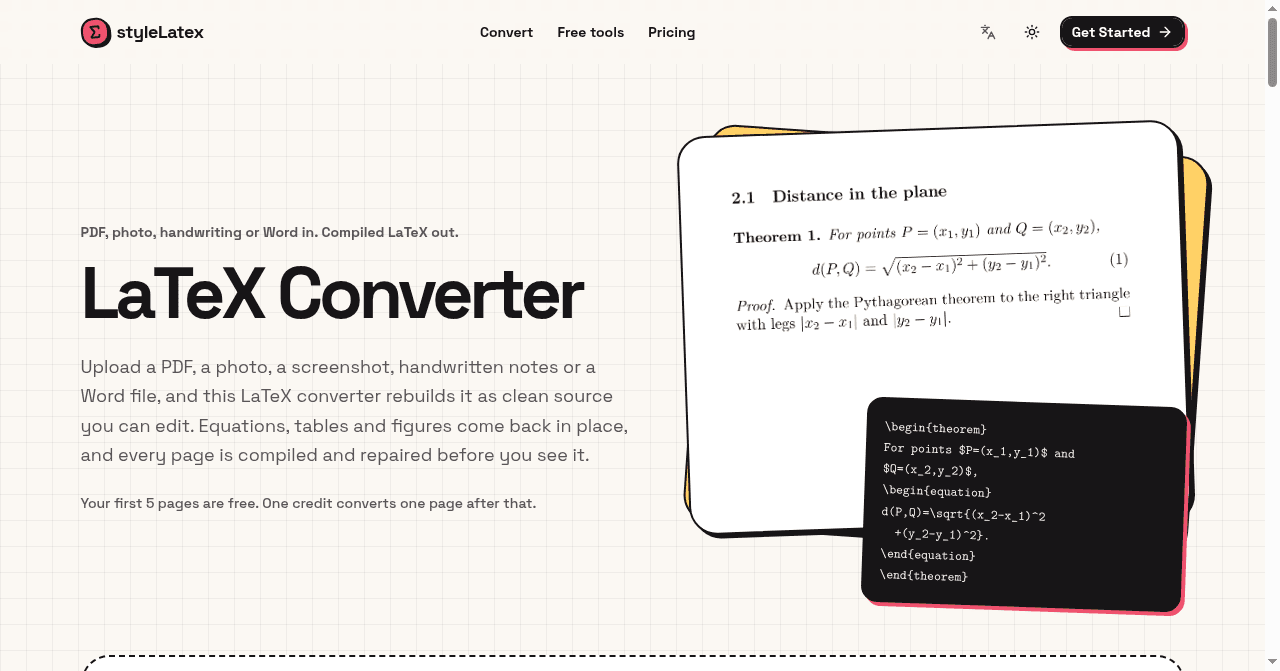
About this app
styleLatex is an online LaTeX converter for students, researchers and teachers. Upload a PDF, photo, screenshot, handwritten notes or a Word document to turn equations, tables and document content into editable LaTeX. Each converted page is compiled with XeLaTeX and repaired from compiler errors before review. Users can compare the source with a PDF preview, edit and compile the result, and download .tex, PDF or Word files, with extracted figures available in a ZIP. The site also offers free tools for LaTeX tables and conversions between LaTeX, Markdown, HTML and Typst. First five conversion pages free; Starter $8/month, Pro $16/month.
Key features
- 1PDF, photo, screenshot, handwriting and Word (.docx) to editable LaTeX conversion.
- 2Every page compiled with XeLaTeX and repaired from the error log before review.
- 3Side-by-side source and PDF preview with in-browser edit and recompile.
- 4Export .tex, PDF or Word, plus a ZIP of cropped figures (up to eight per page).
- 5Free tools for LaTeX tables and LaTeX/Markdown/HTML/Typst conversions.
Target customer profile
Drawn from the product itself, not from a survey.
Demographic
University Students & Researchers
Pain points
Time wasted manually retyping complex equations and tables from papers or lecture notes.
Primary needs
Accurate, fast conversion of visual math content into editable LaTeX code.
Demographic
Academic Authors/Technical Writers
Pain points
Difficulty maintaining consistent formatting or converting non-LaTeX source documents into required submissions.
Primary needs
Reliable document conversion (Word/PDF to .tex) that preserves complex structure and figures.
Demographic
Teachers preparing math documents
Pain points
Retyping handwritten equations and worksheet content.
Primary needs
Editable LaTeX with compilation checks and PDF preview.
Scout Review
Written by AI from measured evidence, scored out of 100.
styleLatex is a focused LaTeX converter with a real technical hook: it compiles every converted page with XeLaTeX, reads the error log and repairs it, and marks uncertain characters instead of hallucinating them. The site has a distinctive neo-brutalist look and a fast, well-optimized front end (mobile Lighthouse 96). Pricing is simple — five free pages, then $8/mo Starter (200 pages) and $16/mo Pro (500 pages). The weak spots are security hardening (1/12 header checklist points, HTTPS not enforced) and information density that buries key facts. Accessibility passes automated checks cleanly but lacks a published statement. A competent, differentiated tool with a clear audience and a fixable security gap.
Measure by measure
Usability
64Dropzone-first layout and a documented 3-step flow make the core job obvious. Undermined by dense paragraphs and a long FAQ that bury pricing, credits and file limits.
Design
70A consistent neo-brutalist system with a genuinely on-topic hero illustration. Held back by an empty FAQ column and small, low-contrast grey body copy.
Speed
88Lighthouse mobile 96/100 with LCP 901ms and CLS 0.019; desktop 83/100. Snappy, well-optimized front end with no lag complaints in evidence.
Security
30Probe found HTTPS not enforced, no HSTS, CSP, frame protection or Referrer-Policy; 1/12 checklist points. No SOC 2, ISO or bug-bounty claims. Basic transport hardening is missing.
Accessibility
80Lighthouse accessibility 100/100 on automated checks, plus language and theme toggles. No published WCAG statement, so full manual conformance is unverified.
Growth
62Real, specific pain (retyping equations/tables) with a concrete wedge: compile-and-repair plus honest [unreadable] marking. Free tools funnel well; category is crowded.
Improvement areas
- Security headers missing: HTTPS not enforced, no HSTS, CSP or frame protection (1/12 checklist points).
- No published WCAG/accessibility statement despite a 100/100 automated score.
- FAQ layout has an empty left column and dense, low-contrast body copy.
- Key facts (credits, file limits, pricing) buried in long paragraphs rather than surfaced near the dropzone.
Design & Usability
The homepage has a real identity: thick outlines, offset shadows, mint and pink accents, and a hero that shows a rendered theorem next to its source. That's a specific, on-topic visual rather than a stock graphic, and the upload dropzone sits high enough that the primary action is visible without scrolling. The problems are downstream. The FAQ leaves an entire left column empty, and the body copy in feature cards and answers is small, low-contrast grey that gets tiring over long passages. Usability-wise the flow is documented clearly in three steps — upload, check code beside a PDF preview, download .tex/PDF/Word — and the minimal nav keeps the top bar clean. But the lower page becomes a wall of text, and the facts users actually need (credits, file limits, pricing) are buried in long paragraphs.
Speed & Security
Speed is the standout. Lighthouse mobile performance scored 96/100 with LCP at 901ms, CLS 0.019 and TBT 225ms; desktop came in at 83/100. The front end is well-optimized and there are no lag complaints in the collected evidence. Security is the opposite story. The HTTP probe found HTTPS not enforced, no HSTS, no CSP, no frame protection, no X-Content-Type-Options, no Referrer-Policy and no Permissions-Policy — 1 of 12 checklist points, with only SPF present and DMARC absent. No SOC 2, ISO, penetration-test or bug-bounty claims appear on the site. For a product that asks users to upload research documents and handwritten notes, missing transport hardening is a real gap, not just an unverified nice-to-have.
Accessibility & Growth
Accessibility scores well on automated checks: Lighthouse returned 100/100, and the header offers both a language toggle and a theme toggle. What's missing is a published WCAG or accessibility statement, so full manual conformance — keyboard paths, screen-reader behavior on the converter itself — remains unverified. Growth is a judgement on the idea. The problem is real and specific: retyping complex equations and tables from papers and lecture notes is genuinely painful, and the target customer (students, researchers, teachers) is clearly named. The wedge is concrete — every page is compiled with XeLaTeX and repaired from the error log, and unreadable characters are marked [unreadable] rather than invented. Free tools for tables and Markdown/HTML/Typst conversions act as a sensible acquisition funnel. The limit is the category: PDF-to-LaTeX conversion is crowded, and the domain is brand new, so the differentiator has to carry a lot of weight.
Conclusion
If you're a student or researcher drowning in equations and tables, styleLatex targets exactly that pain and its compile-and-repair loop is a meaningful edge over raw OCR converters. Before uploading anything sensitive, note that the site hasn't enforced HTTPS or shipped standard security headers — fine for a problem set, less fine for unpublished research. The free five pages are enough to test whether the conversion quality holds up on your own documents. If it does, $8/month for 200 pages is reasonable for the time saved. The product's next win is boring but important: turn on HSTS and a CSP, publish a security page, and tighten the page copy so pricing and limits are findable.
Suggestions for improvement
- Enforce HTTPS and add HSTS, CSP, frame protection and Referrer-Policy; publish a short security page.
- Add a WCAG/accessibility statement and verify keyboard and screen-reader paths through the converter.
- Fix the FAQ layout (empty left column) and raise body-copy contrast for readability.
- Surface credits, file limits and pricing in a compact summary near the dropzone instead of burying them in FAQ text.
Alternatives comparison
Named competitors, point by point. Nobody paid to appear here or to be left out.
 styleLatex |  | ||
|---|---|---|---|
| Core conversion | PDF, photo, handwriting, Word, Excel/CSV to editable LaTeX | Not specified in provided details | Not specified in provided details |
| Compile-and-repair verification | Every page compiled with XeLaTeX and repaired from error log | Not specified in provided details | Not specified in provided details |
| Free tier | First five conversion pages free; free table/Markdown/HTML/Typst tools | Not specified in provided details | Not specified in provided details |
| Pricing | Starter $8/mo (200 pages), Pro $16/mo (500 pages) | Not specified in provided details | Not specified in provided details |
| Export formats | .tex, compiled PDF, Word, ZIP of cropped figures | Not specified in provided details | Not specified in provided details |
Comparing options? See styleLatex alternatives, scored side by side
More Education apps
View all Education
The Stack Newsletter
92A weekly newsletter delivering curated tech jobs, intervi...

SheetScroll
90> You play; SheetScroll turns the page. It listens through the microphone or a MIDI piano and holds the page until it's sure where you are.

Tracé slides
89Interactive math & physics slides with live graphs and an...

English Test Coach
89English Test Coach checks your IELTS essays and letters, gives an estimated band score across all four criteria, and tells you exactly what to revise next.

Random Movie Generator
88Free random movie picker from 142k+ films—no sign-up.

Startup Science
88A unified platform replacing 12-20 disconnected tools for...

Cromagnon
88Free, private browser-based PDF, Word, Excel, and study t...

TranscriptYou
88Free YouTube transcript generator with timestamps and AI ...

RBQ Exam
87Online practice for the RBQ contractor licence exams in Québec: original questions, timed mock exams and lessons, in French or English.

Coloring Pages Pro
87A massive collection of free printable coloring pages for...

CertWorthIt
87Data-driven tool revealing which certifications actually ...

Cat Years to Human Years
86Free cat age calculator converting cat years to human years.


A platform dedicated to providing unbiased reviews of newly launched applications, analyzing everything from their features to their full potential.
info@scoutforge.net© 2026 Scoutforge. All rights reserved.
