Cycling through all six. Tap any point to stop.
Measured on six things
Recover, convert, and investigate EWF forensic images wit...
Design
44Dated template landing page: faux boxshot, competing green/blue CTAs, chat bubble over the hero, and copy typos ('Treat file system', 'SWF file') that undercut a forensic-grade pitch.
Screenshots
1 / 1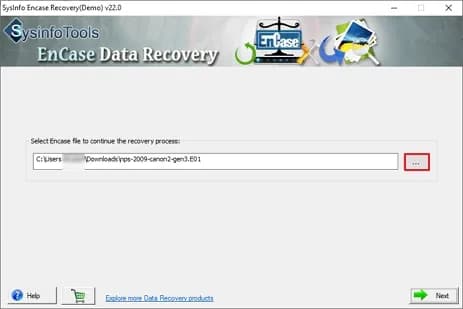
About this app
SysInfo EnCase Data Recovery is a Windows utility built for digital forensics, cybersecurity, and e-discovery professionals who need to extract and restore data from EnCase Evidence Files (EWF). Unlike generic data recovery tools, this app auto-detects EWF metadata, lets you parse the image as a virtual disk, and supports multiple file systems including FAT, NTFS, HFS+, and EXT. The software offers two core extraction modes: 'Convert to Raw' for pulling original files from a specific image, and 'Parse as Disk' for scanning an entire hard drive image. With dual scanning modes (Standard and Advanced), three recovery depths (Standard, Advanced, Deep), and support for both MBR and GPT partition tables, it handles everything from minor corruption to severe logical damage. You can add custom volumes, define sector ranges, and even inject new file signatures to recover uncommon file types. The tree-structure preview and auto-search make it easy to locate specific files before saving. It ru...
Key features
- 1Auto-detects EWF (EnCase image file format) metadata on file selection.
- 2Convert to Raw and Parse as Disk extraction modes for file-level or full-drive recovery.
- 3Dual scanning (Standard/Advanced) and three recovery depths (Standard/Advanced/Deep).
- 4Supports FAT16/32/64, NTFS, HFS+, and EXT file systems plus MBR and GPT partition tables.
- 5Custom volume addition, sector-range definition, and custom file-signature injection.
- 6Tree-structure preview and multi-file auto-search before saving recovered data.
Target customer profile
Drawn from the product itself, not from a survey.
Demographic
Digital forensics investigators and law enforcement analysts
Pain points
Struggling to extract data from proprietary EWF files without expensive forensic suites
Primary needs
Reliable parsing of EnCase images, support for MBR/GPT, and raw data export
Demographic
Cybersecurity analysts and incident responders
Pain points
Corrupted or partially damaged disk images hinder breach investigations
Primary needs
Advanced scanning modes, deep recovery, and custom volume addition
Demographic
IT administrators and data recovery technicians
Pain points
Limited budget for high-end forensic tools; need quick recovery from EWF backups
Primary needs
Affordable Windows-based solution with preview and selective file recovery
Demographic
E-discovery specialists and legal IT support
Pain points
Difficulty accessing legacy EnCase images in modern workflows
Primary needs
Convert EWF to raw format, search files, and save recovered data securely
Scout Review
Written by AI from measured evidence, scored out of 100.
SysInfo EnCase Data Recovery is a competent niche utility with a fast site and a clear pitch: pull data out of EWF images without paying EnCase Forensic prices. The measured evidence backs the speed claim (100/100 Lighthouse) and shows reasonable security hygiene (10/12 header checks). What drags it down is presentation — a dated template landing page with copy typos that undermine credibility for a forensic audience — and the absence of a trial, demo, or published compliance documentation. It works, it's fast, and it fills a real gap; it just doesn't look like it takes its own audience seriously.
Measure by measure
Usability
58Sticky anchor nav, Software Guide, video, and a simple browse-file-then-Next workflow help. But no live demo or trial is surfaced, and the page buries the path in dense small text.
Design
44Dated template landing page: faux boxshot, competing green/blue CTAs, chat bubble over the hero, and copy typos ('Treat file system', 'SWF file') that undercut a forensic-grade pitch.
Speed
88Lighthouse 100/100 on both mobile and desktop: LCP 1.1s, CLS 0, TBT 67ms. Genuinely fast static marketing page with no measured lag complaints.
Security
72HTTPS enforced with HSTS, CSP, Referrer-Policy, Permissions-Policy, SPF and DMARC (10/12 header checks). Missing frame protection and X-Content-Type-Options; no published audits found.
Accessibility
80Lighthouse 98/100 with only three failing audits (missing main landmark, role=presentation conflicts, label/name mismatches). No WCAG statement or a11y docs found; Windows-only product.
Growth
58Real, narrow niche (EWF extraction for forensics/IR/e-discovery) with a clear wedge: cheaper than EnCase Forensic, more capable than free FTK Imager. Ceiling is limited by a Windows-only, single-format scope.
Improvement areas
- Landing page copy errors ('Treat file system', 'SWF file', 'Repair Software') undermine forensic credibility.
- No free trial, live demo, or transparent pricing surfaced on the page.
- No published security/compliance documentation (SOC 2, ISO, pen-test) for regulated buyers.
- Missing HTTP security headers (X-Frame-Options, X-Content-Type-Options) and no <main> landmark for a11y.
Design & Usability
The landing page is a long, dense template with a faux boxshot, competing green and blue CTAs, and a chat bubble parked over the hero. Copy typos ('Treat file system', 'SWF file', 'Repair Software' vs 'Recovery') are especially damaging for a forensic-audience product where precision is the whole pitch. Usability is better than design: a sticky anchor bar, Software Guide, video, and a simple browse-file-then-Next workflow make the tool approachable. But no live demo or trial is surfaced, and the actual workflow is buried under nine lines of hero text and small-type feature lists.
Speed & Security
Speed is the standout: Lighthouse 100/100 on mobile and desktop, LCP 1.1s, CLS 0, TBT 67ms — a genuinely snappy static page. Security is solid but not exceptional: HTTPS enforced with HSTS, CSP, Referrer-Policy, Permissions-Policy, SPF and DMARC (10/12 header checks), but frame protection and X-Content-Type-Options are missing. No SOC 2, ISO, pen-test report, or bug bounty is published, which is a gap for a tool aimed at law enforcement and incident response teams handling sensitive evidence images.
Accessibility & Growth
Accessibility scores 98/100 on Lighthouse with only three failing audits — missing main landmark, role=presentation conflicts, and label/name mismatches — but there is no WCAG statement or a11y documentation, and the product is Windows-only. Growth is a real but narrow story: EWF extraction for forensics, IR, and e-discovery is a genuine need, and the wedge against EnCase Forensic (expensive) and FTK Imager (free but limited) is clear. The ceiling is capped by a single-format, single-OS scope and the risk that incumbents bundle the same capability for free.
Conclusion
If you're an IR analyst or e-discovery tech who needs to crack open an EWF image without an OpenText invoice, this is a plausible mid-tier option worth a download. If you're choosing tooling for a regulated investigation, the missing compliance documentation and the sloppy landing-page copy are real reasons to pause. Fix the typos, add a trial, publish a security page — the bones are fine.
Suggestions for improvement
- Fix the copy typos ('Treat file system', 'SWF file', 'Repair Software') — precision is the product's whole pitch.
- Add a free trial or live demo; 'Free Download' with no trial terms is a hard sell for forensic buyers.
- Publish a security/compliance page (SOC 2 status, data handling, pen-test summary) for law-enforcement and IR buyers.
- Pick one primary CTA color and demote the other; move the chat bubble off the hero.
Alternatives comparison
Named competitors, point by point. Nobody paid to appear here or to be left out.
 SysInfo EnCase Data Recovery |  EnCase Forensic | AccessData FTK Imager | Magnet AXIOM | |
|---|---|---|---|---|
| Native EWF (EnCase image) support | Yes — core purpose, with auto-detect of EWF metadata | Yes — native, full forensic suite | Yes — can mount and preview EWF images | Yes — EWF ingest for analysis |
| Raw data extraction / recovery focus | Yes — Convert to Raw and Parse as Disk are the core modes | Partial — investigation-first, export via workflow | Limited — imaging and preview, not deep recovery | No — analysis platform, not raw recovery |
| Custom file-signature injection | Yes — add new signatures to recover uncommon file types | Yes — via EnScript customization | No | Partial — via custom artifact support |
| Price positioning | Paid mid-tier utility (30-day moneyback, no trial surfaced) | Enterprise pricing — significantly more expensive | Free | Enterprise licensing |
| Platform | Windows only (32/64-bit, incl. Windows 11) | Windows | Windows | Windows |
EnCase Forensic
OpenText's flagship forensic suite that natively handles EWF files but is significantly more expensive and complex.
AccessData FTK Imager
Free imaging and preview tool that can mount EWF images but lacks advanced recovery and parsing features.
Magnet AXIOM
Forensic analysis platform with EWF support, focused on investigation rather than raw data recovery.
Comparing options? See SysInfo EnCase Data Recovery alternatives, scored side by side
More Development & Engineering apps
View all Development & Engineering
Vibe Coding Agent Skills
92A free, open-source platform offering 110 AI agent skills...

CreateMyCoin
92A no-code Solana token creator that deploys SPL tokens in...

CC Switch
91Open-source desktop app for switching AI coding providers...

TaxID
90Fast EU VAT validation API for developers, covering 27 EU...

DemoVexa
90Turn your code into professional product demo videos with AI-generated scripts, animated UI, and natural voiceovers.

FontPlop
89Browser-based font viewer & tester for TTF, OTF, WOFF, WO...

deed.page
89Permanent web hosting for AI agents, no human step

Webfetch
89Web scraping API that turns any URL into HTML, text, Mark...

Denpex
89AI-powered GPU failure diagnosis for distributed ML training

BeartIMAGE
88BeartIMAGE is a free, web-based image processing platform engineered for fast, bulk photo editing and conversion directly in your browser.

Claw Messenger
88Claw Messenger is an iMessage API service that gives AI a...

DataHabibi
88AI-powered Dubai real estate data platform with 12M+ DLD ...


A platform dedicated to providing unbiased reviews of newly launched applications, analyzing everything from their features to their full potential.
info@scoutforge.net© 2026 Scoutforge. All rights reserved.
