Cycling through all six. Tap any point to stop.
Measured on six things
Find LinkedIn Easy Apply jobs that match your resume
Growth
58Real, recurring pain with a genuine wedge: resume-scored matching, approval-by-default, and asking instead of guessing. But auto-apply is a crowded category and LinkedIn ToS risk caps how far it can scale.
Screenshots
1 / 1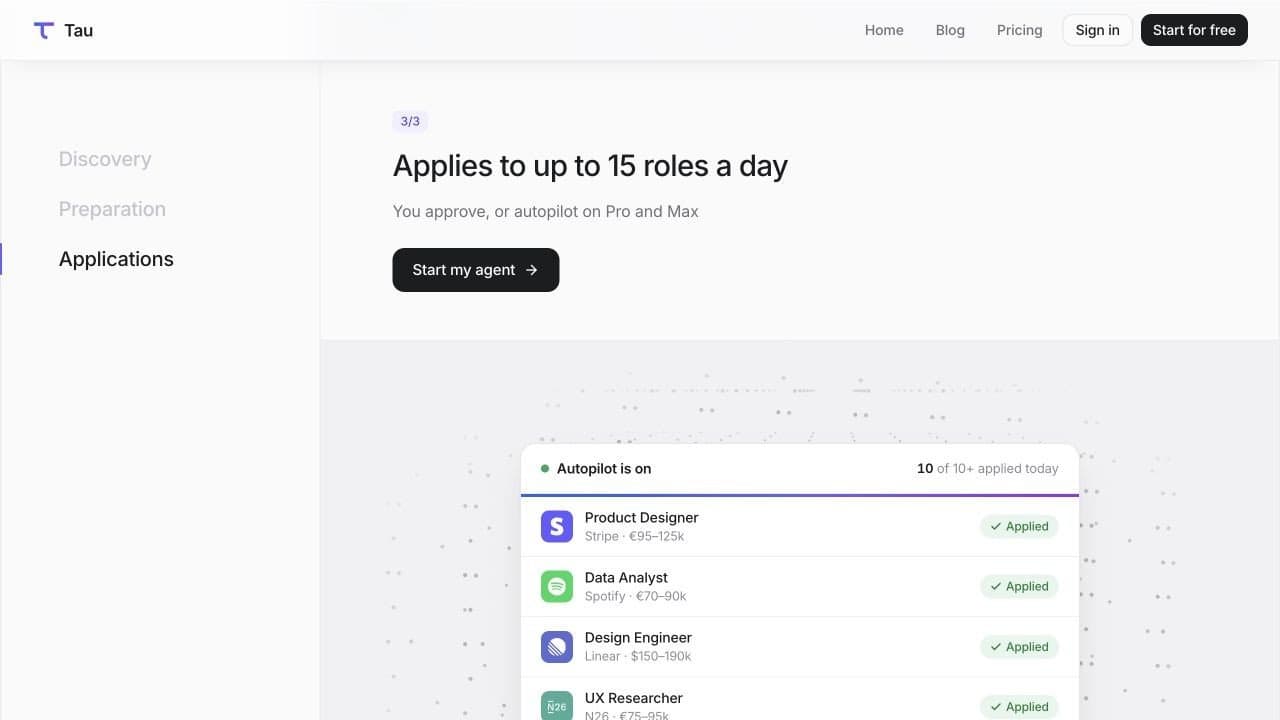
About this app
Tau is an AI job search agent for LinkedIn. Add your resume and connect your LinkedIn account to find matching Easy Apply jobs, review matches, and apply from your own account. Tau scores roles against your resume, fills application forms, and answers screening questions using your resume and previous answers. When it needs information only you know, such as salary expectations or visa status, it asks you instead of guessing. By default, applications require your approval. Pro and Max include Autopilot for matches above your chosen score and optional resume tailoring using facts already in your resume. Max also drafts notes to hiring managers for your approval. You can review application history, receive daily summaries, and disconnect your account to stop activity.
Key features
- 1Resume-scored matching against LinkedIn Easy Apply roles, with hiring posts and open-role managers surfaced too.
- 2Approval-by-default applications; Autopilot on Pro and Max applies above your chosen score within a daily cap.
- 3Asks you for salary expectations, visa status and other unknowns instead of guessing; answers screening questions from your history.
Target customer profile
Drawn from the product itself, not from a survey.
Scout Review
Written by AI from measured evidence, scored out of 100.
Tau is an AI job search agent that works inside LinkedIn: it scores Easy Apply roles against your resume, fills the forms, answers screening questions from your history, and asks you when it doesn't know something. Applications require approval by default; Pro and Max add Autopilot, resume tailoring, and (Max) hiring-manager notes. Pricing is $49/$99/$199 a month with a 5-day trial that requires a card. The site is fast and well-designed, the FAQ is refreshingly candid about the LinkedIn ToS risk, and the security headers are near-perfect. The gaps are the compliance layer, the post-signup documentation, and the structural ceiling that comes with automating a platform that forbids it.
Measure by measure
Usability
63Signup path is obvious and the promise is concrete ('live in 5 minutes, connect LinkedIn'). Pricing and FAQ answer the real objections. But there's no help center, no demo, and a card is required before you see anything work.
Design
71Polished, coherent landing page: gradient hero, numbered 1/3-3/3 scroll narrative with sticky step nav, restrained near-black/white/purple palette. Held back by a blurred dark-section CTA and tiny, low-contrast preview text.
Speed
82Lighthouse mobile 90/100 with LCP 1.7s and CLS 0.003 - genuinely fast. Desktop 88/100. TBT of 211ms is the one soft spot, but nothing here suggests a heavy SPA or lag complaints.
Security
74Strong header hygiene: HTTPS enforced, HSTS, CSP, frame protection, Referrer-Policy, SPF and DMARC all present (11/12). Only Permissions-Policy missing. No SOC 2, ISO or bug bounty published, and no security page found.
Accessibility
79Lighthouse accessibility 96/100 with a single contrast failure, corroborated by the visual audit flagging low-contrast grey step labels and very small card type. No WCAG statement or multi-language support found.
Growth
58Real, recurring pain with a genuine wedge: resume-scored matching, approval-by-default, and asking instead of guessing. But auto-apply is a crowded category and LinkedIn ToS risk caps how far it can scale.
Improvement areas
- No security or compliance page: no SOC 2, ISO, pen-test summary or bug bounty published for a product holding resumes and LinkedIn sessions.
- No help center, docs or live demo - users connect LinkedIn and enter a card before seeing the product work.
- Accessibility contrast failures on sidebar step labels and preview card type, plus a blurred primary CTA in the dark section.
Design & Usability
The landing page is genuinely well-built. A gradient hero, a numbered 1/3-3/3 scroll narrative with a sticky step nav, and a restrained black/white/purple palette give Tau a coherent brand that most early-stage AI tools don't manage. The problems are at the edges: the 'Launch my agent for free' button in the dark section is blurred to the point of looking disabled, and the preview cards use type so small the job titles and salaries are unreadable at full page scale. Usability is competent rather than deep. The path to signup is unmistakable, the pricing page answers the awkward questions (card required, no refunds, 15/day cap), and the FAQ is unusually honest. What's missing is everything after signup: no help center, no demo, no docs. You're asked to connect LinkedIn and hand over a card before you've seen the product do anything.
Speed & Security
Speed is the strongest measured dimension. Lighthouse mobile performance 90/100 with LCP 1.7s, CLS 0.003 and FCP 1.7s; desktop 88/100. Total blocking time of 211ms is the only soft metric, and there are no lag complaints in the collected evidence. Security is solid on the transport layer: HTTPS enforced, HSTS, CSP, frame protection, X-Content-Type-Options, Referrer-Policy, SPF and DMARC all present - 11 of 12 checklist points, with only Permissions-Policy missing. What's absent is the compliance layer. No SOC 2, no ISO 27001, no pen-test summary, no bug bounty, no security page. For a product that holds a LinkedIn session and a resume, that's a gap worth closing, though it's a normal one at this stage. The bigger security story is the one Tau tells on itself: its own FAQ states LinkedIn does not permit automation and that accounts risk restriction.
Accessibility & Growth
Accessibility scores well on automation - Lighthouse 96/100 - with a single failing audit for insufficient contrast. The visual audit independently caught the same thing twice: low-contrast grey step labels in the sidebar and very small type in the feature preview cards. No WCAG statement, no accessibility page, no multi-language support. Growth is the most interesting question. The problem is real and recurring: job seekers send hundreds of applications and hate it. The wedge is specific and defensible in messaging - resume-scored matching, approval by default, and asking the user for salary expectations and visa status instead of hallucinating them. That's a genuine differentiator against the auto-apply bot category. The honest limit is structural: LinkedIn's terms prohibit exactly this, the site says so plainly, and that caps how large and how safe the product can get. The claimed 5,000+ candidates and a domain registered in August 2026 put it early.
Conclusion
Tau is one of the better-executed entries in the auto-apply space, mostly because it refuses to be an auto-apply bot. The approval-by-default model, the resume-scored matching, and the willingness to ask instead of guess are the right instincts, and the site states the LinkedIn risk in plain language rather than burying it. If you're job hunting at volume and you understand that you're trading some account risk for time, the 5-day trial is a reasonable way to test it. Go in with eyes open: the card is charged on day six, there are no partial refunds, and no tool can make the ToS risk zero - Tau says so itself.
Suggestions for improvement
- Publish a security page with data handling, retention, and what happens to the LinkedIn session token - and pursue SOC 2 if you're handling resumes at scale.
- Add a help center or docs section covering what happens when a form has a field Tau can't fill, and how to revoke access cleanly.
- Fix the blurred dark-section CTA and raise the contrast on the sidebar step labels and preview card type.
- Make the 'illustrative examples, not Tau customers' disclaimer legible, or replace the fake salary cards with real anonymized outcomes.
Alternatives comparison
Named competitors, point by point. Nobody paid to appear here or to be left out.
 Tau | ||
|---|---|---|
| Pricing model | $49 / $99 / $199 per month, 5-day trial with card required | Not provided in app details |
| Human approval before applying | Yes by default; Autopilot opt-in on Pro and Max | Not provided in app details |
| Resume-based job scoring | Yes - scores roles against your resume, threshold configurable | Not provided in app details |
| Daily application cap | 5 (Starter) / 10 (Pro) / 15 (Max) | Not provided in app details |
| Resume tailoring and outreach | Tailored resume on Pro; hiring-manager notes on Max | Not provided in app details |
Comparing options? See Tau alternatives, scored side by side
More Business Intelligence apps
View all Business Intelligence
PayCall
90PayCall lets people abroad call U.S.

issued.live
89Free certificate transparency search and SSL lookup with ...

Silotree
89Most WordPress sites have posts that no other post links to. Readers and Google find posts by following links, so those posts get missed.

CitableReport
89CitableReport is an AI visibility audit:

Redstone
89Portfolio optimization and risk metrics for investors.

AuditCloser
89White-label website audits that close deals for digital a...

Spotwise
88AI-powered radio ad monitoring platform that tracks compe...

DataHabibi
88AI-powered Dubai real estate data platform with 12M+ DLD ...

Fenn
88AI visibility tracker that checks if ChatGPT recommends y...

Wajido
88See how your company appears in AI answers

Convertlyft
88Web analytics that shows why visitors don't buy and what ...

HISAB 360
87A Windows Excel add-in that pulls your ledger data into the workbook, reconciles it, and drafts the reports - all in plain English, inside Excel.


A platform dedicated to providing unbiased reviews of newly launched applications, analyzing everything from their features to their full potential.
info@scoutforge.net© 2026 Scoutforge. All rights reserved.
