Is this your app?
Claim TI 84 Calculator Online to manage its page, add your badge and see your traffic — free, and it stays free.
Cycling through all six. Tap any point to stop.
Measured on six things
A free web-based simulator replicating the TI-84 graphing calculator for students and professionals.
Accessibility
60Minimal support for screen readers, no keyboard shortcuts, and English-only interface limits global accessibility.
Screenshots
1 / 1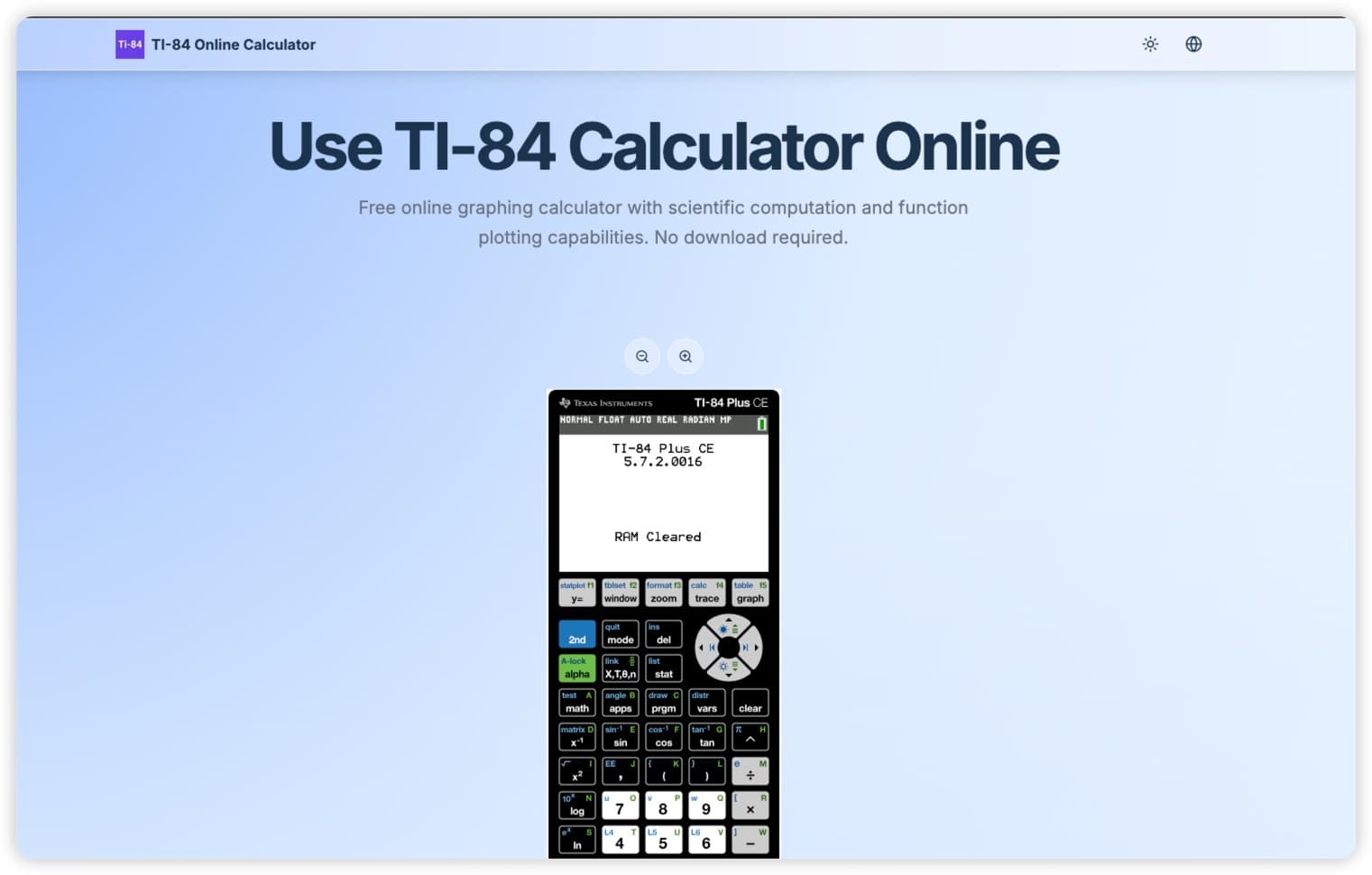
About this app
The TI 84 Calculator Online is a fantastic free tool that brings the power of the classic TI-84 graphing calculator to your browser. As a tech enthusiast who's used both the physical and digital versions, I can attest to its accuracy in mimicking the original interface—perfect for students tackling math homework or professionals needing quick computations. It handles graphing, scientific calculations, and data analysis without any downloads, making it super accessible. While it stays true to the nostalgic design, it could use some modern touches like better accessibility and multilingual support. Overall, it's a reliable alternative to pricey hardware, though it faces competition from sleeker apps like Desmos.
Key features
- 1Faithfully replicates the TI-84's iconic grid layout and monochrome display with pixel-perfect accuracy
- 2Lightning-fast load times and responsive calculations for efficient use
- 3Free web-based tool providing full TI-84 functionality without hardware costs
Target customer profile
Drawn from the product itself, not from a survey.
Demographic
High school and college students
Pain points
High cost of physical calculators, limited access to graphing tools for homework and exams
Primary needs
Free, on-demand graphing and scientific calculations for academic use
Demographic
STEM professionals and educators
Pain points
Need for quick computational tools without device dependencies for teaching or prototyping
Primary needs
Portable, no-installation solutions that are easily accessible and familiar
Demographic
Budget-conscious learners and hobbyists
Pain points
Inability to afford expensive hardware, desire for a no-cost tool for practice and learning
Primary needs
A free, web-based calculator that replicates advanced features without financial investment
Scout Review
Written by AI from measured evidence, scored out of 100.
The TI 84 Calculator Online succeeds as a faithful digital replica that eliminates the need for expensive hardware. It's particularly valuable for students and educators who need quick access to graphing capabilities without financial investment. The interface, while dated, provides comforting familiarity for TI-84 veterans.
Measure by measure
Usability
75Perfect for TI-84 veterans but clunky mouse-click navigation makes complex equations feel like digital archaeology.
Design
80Faithfully replicates the physical TI-84's iconic grid layout and monochrome display with pixel-perfect accuracy.
Speed
90Lightning-fast load times and responsive calculations, though complex graphing can cause minor lag in older browsers.
Security
70Basic HTTPS encryption protects sessions, but the missing privacy policy leaves data handling practices unclear.
Accessibility
60Minimal support for screen readers, no keyboard shortcuts, and English-only interface limits global accessibility.
Growth
75High demand for free educational tools, but needs modernization to compete with sleek alternatives like Desmos.
Improvement areas
- Enhance accessibility with screen reader support, keyboard shortcuts, and multilingual options
- Modernize UI with touchscreen optimization, resizable windows, and dark mode
- Publish a clear privacy policy to address data handling and security concerns
Design & Usability
The TI 84 Calculator Online nails the nostalgic aesthetic with its faithful recreation of the physical calculator's interface. The familiar grid of buttons and monochrome display will instantly comfort anyone who's struggled through high school math. However, this devotion to authenticity comes at a cost - the mouse-click navigation feels cumbersome compared to modern touch-optimized calculators. While graphing functions work reliably, the interface lacks dynamic controls that competitors like Desmos offer, making complex visualizations more tedious than they need to be.
Speed & Security
Performance-wise, this web app delivers where it counts. Basic calculations are instantaneous, and the site loads faster than most educational tools. Complex graphing operations might cause slight lag on older devices, but overall responsiveness is impressive. Security gets a passing grade with HTTPS encryption protecting user sessions, though the absence of a clear privacy policy is concerning. For a tool handling educational data, transparency about information practices should be non-negotiable.
Accessibility & Growth
Accessibility is this calculator's weakest area. The lack of screen reader support, keyboard navigation, and multilingual options makes it exclusionary for many users. Small buttons challenge those with motor impairments, and the English-only interface limits global usefulness. Despite these shortcomings, the growth potential remains strong due to the massive demand for free graphing calculators. With some modernization efforts, this could become the go-to digital alternative to expensive hardware.
Conclusion
If you're a student tired of borrowing calculators or an educator needing a reliable teaching tool, this free web version is worth bookmarking. It won't replace advanced mathematical software, but for homework emergencies and quick calculations, it delivers exactly what it promises without the $100 price tag.
Suggestions for improvement
- Implement keyboard shortcuts and touchscreen optimization for smoother input.
- Add multilingual support and screen reader compatibility to improve accessibility.
- Publish a clear privacy policy addressing data handling practices.
- Consider UI modernization options like resizable windows or dark mode.
- Include tutorial tooltips for users unfamiliar with TI-84 workflows.
Alternatives comparison
Named competitors, point by point. Nobody paid to appear here or to be left out.
 TI 84 Calculator Online TI 84 Calculator Online |  Desmos Scientific Calculator Desmos Scientific Calculator |  SageCalc Online TI-84 SageCalc Online TI-84 |  Physical TI-84 Calculator Physical TI-84 Calculator | |
|---|---|---|---|---|
| Cost | Free | Free | Free | $100+ |
| TI-84 Interface Accuracy | Pixel-perfect replica | Modern interface, not TI-84 | Partial replication | Original hardware |
| Accessibility Features | Minimal | Good screen reader support | Basic | None |
| Graphing Capabilities | Full TI-84 functionality | Advanced dynamic graphing | Basic graphing | Full TI-84 functionality |
Desmos Scientific Calculator
A free, browser-based calculator with graphing capabilities, but lacks the specific TI-84 interface and some advanced features.
SageCalc Online TI-84
Another TI-84 simulator, though less polished in replicating the original hardware layout and user experience.
Physical TI-84 Calculator
The traditional hardware version, offering offline use but at a high cost and with no accessibility advantages.
Comparing options? See TI 84 Calculator Online alternatives, scored side by side
More Education apps
View all Education
The Stack Newsletter
92A weekly newsletter delivering curated tech jobs, intervi...

SheetScroll
90> You play; SheetScroll turns the page. It listens through the microphone or a MIDI piano and holds the page until it's sure where you are.

Tracé slides
89Interactive math & physics slides with live graphs and an...

English Test Coach
89English Test Coach checks your IELTS essays and letters, gives an estimated band score across all four criteria, and tells you exactly what to revise next.

Startup Science
88A unified platform replacing 12-20 disconnected tools for...

Cromagnon
88Free, private browser-based PDF, Word, Excel, and study t...

TranscriptYou
88Free YouTube transcript generator with timestamps and AI ...

RBQ Exam
87Online practice for the RBQ contractor licence exams in Québec: original questions, timed mock exams and lessons, in French or English.

Coloring Pages Pro
87A massive collection of free printable coloring pages for...

CertWorthIt
87Data-driven tool revealing which certifications actually ...

HireVue Practice
85AI-powered HireVue practice with timed mock interviews, role-specific questions, transcripts, scoring, and actionable feedback.

Case Cub
85AI-powered law school study platform with 20,000+ case br...


A platform dedicated to providing unbiased reviews of newly launched applications, analyzing everything from their features to their full potential.
info@scoutforge.net© 2026 Scoutforge. All rights reserved.
