Cycling through all six. Tap any point to stop.
Measured on six things
AI study tool turning notes into quizzes, flashcards & gu...
Speed
56Lighthouse mobile 63/100 with a 6.6s LCP — the hero image is dragging first paint well past the 2.5s 'good' line. Desktop fares better at 75/100, and CLS is a clean 0.
Screenshots
1 / 3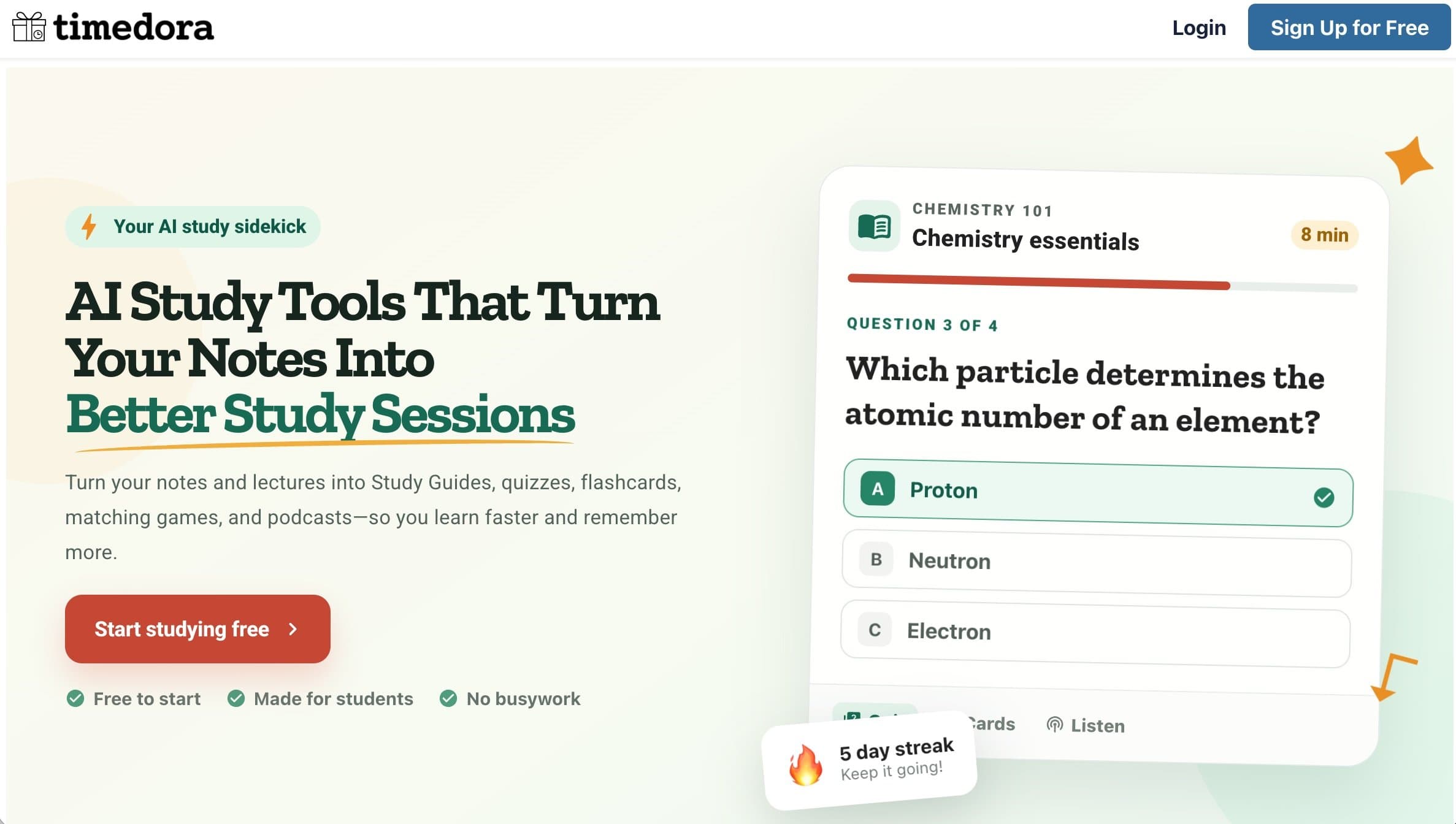
About this app
Timedora is an AI-powered study platform that transforms your notes, PDFs, slides, and recorded lectures into interactive study materials, including study guides, quizzes, flashcards, matching games, and even podcasts. Designed for students and teachers, it emphasizes active learning and retrieval practice to improve retention and make studying more efficient. Key features include an AI study guide generator, quiz and flashcard creators, a matching game builder, lecture recording with transcription, and a notes-to-podcast converter. The platform is free to start and focuses on reducing busywork so users can focus on mastering the material.
Key features
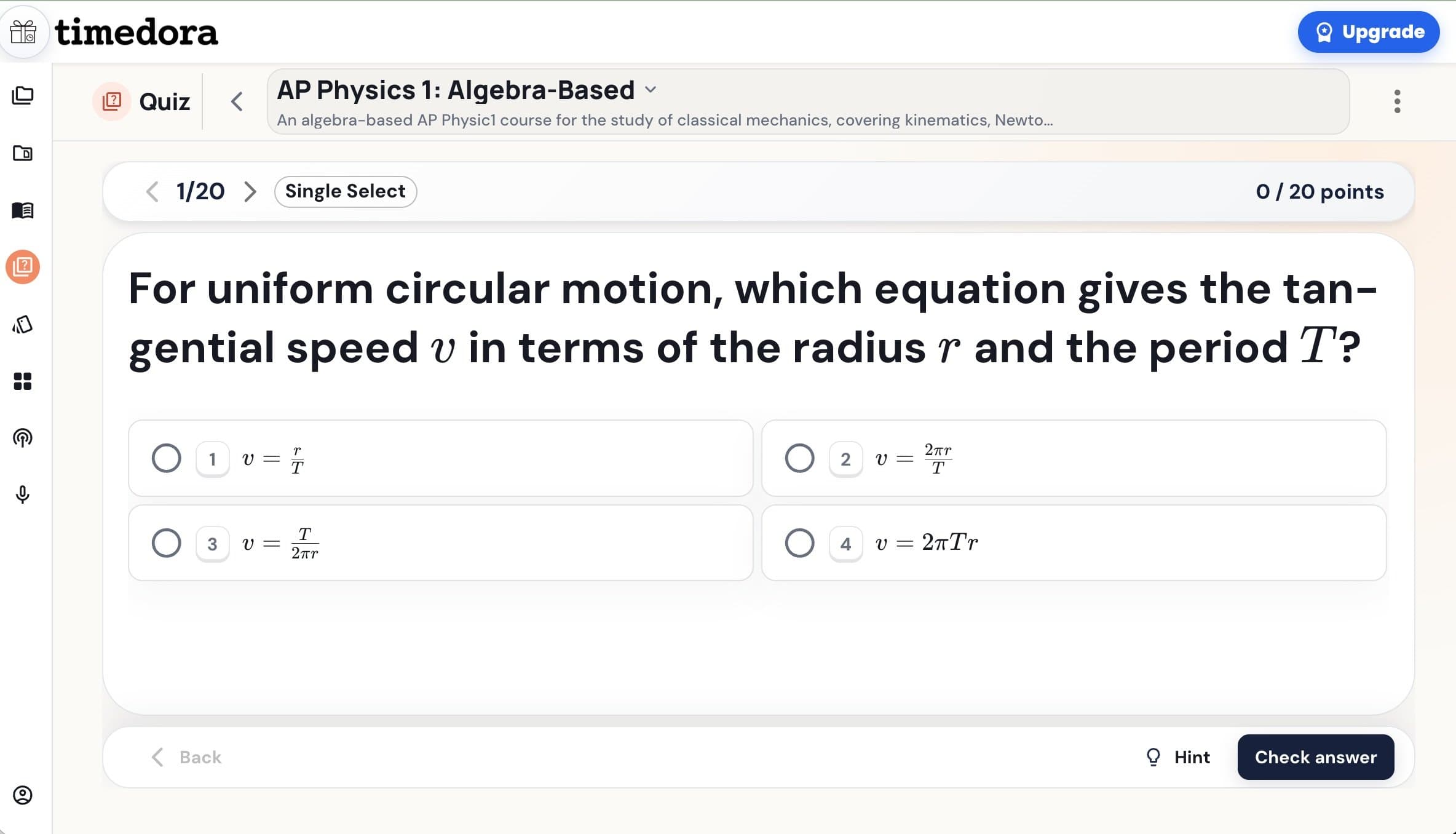
- 1AI study guide, quiz, flashcard, and matching-game generators from uploaded notes, PDFs, and slides.
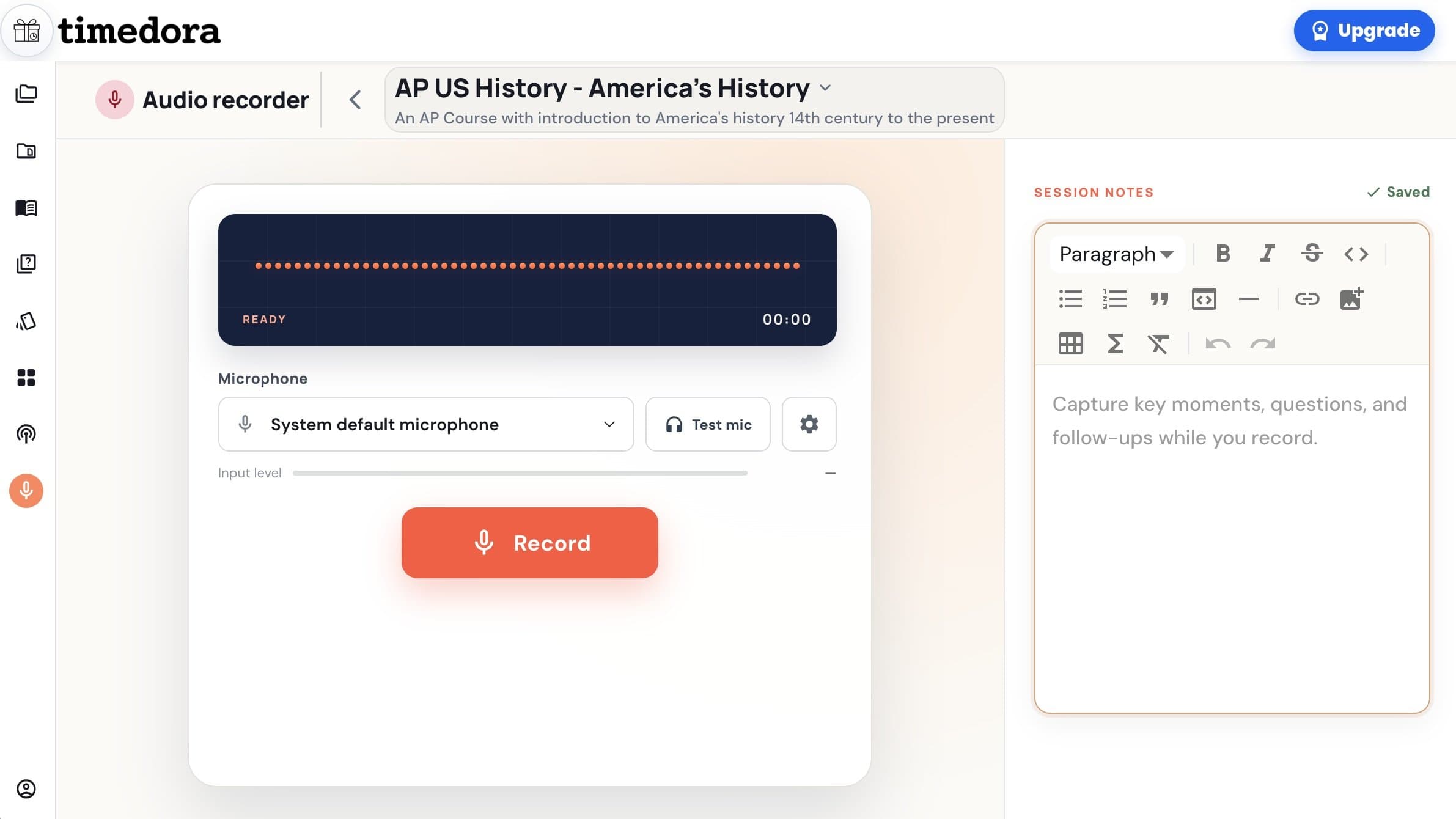
- 2Live lecture recording with transcription that converts class audio into study materials.
- 3Notes-to-podcast converter for audio-based review on the go.
- 4Teacher mode: build interactive activities from existing materials and share via a single link.
Target customer profile
Drawn from the product itself, not from a survey.
Demographic
High school and college students
Pain points
Overwhelmed by dense notes, difficulty retaining information, time-consuming study prep
Primary needs
Quickly convert materials into active recall tools (quizzes, flashcards) to study efficiently
Demographic
Teachers and educators
Pain points
Creating engaging lesson activities from existing materials takes too much time
Primary needs
Instantly generate interactive content (quizzes, matching games) from notes or slides and share with class
Demographic
Lifelong learners and professionals studying for certifications
Pain points
Limited time to organize study materials, need flexible learning formats (audio, visual)
Primary needs
Transform readings and lectures into podcasts, flashcards, and practice tests for on-the-go learning
Scout Review
Written by AI from measured evidence, scored out of 100.
Timedora is a genuinely well-branded AI study tool with a clear pitch: upload your notes, slides, or a recorded lecture, and get back study guides, quizzes, flashcards, matching games, and podcasts. The landing page sells it well — distinct palette, real product mock, plain-language FAQ. The lecture-recording-plus-transcription angle is a real differentiator against Quizlet and StudyStack, and the teacher sharing flow is smart. Where it stumbles: a 6.6-second mobile LCP, missing CSP and Permissions-Policy headers, no help center beyond four FAQ questions, and a contrast failure that the design audit independently flagged. None of these are fatal. All of them are fixable. The product is competent and clearly positioned; it just needs to get faster and publish more of what it claims.
Measure by measure
Usability
63Clear CTA hierarchy, trust micro-copy, and a plain-language FAQ make the first visit easy. But the site needs JavaScript to render anything, and there's no visible docs or help center beyond the FAQ.
Design
71Warm cream/terracotta/green palette and display serif give Timedora a distinct identity, and the hero quiz mock shows real product state. Undercut by a streak badge overlapping the tab row and low-contrast footer links.
Speed
56Lighthouse mobile 63/100 with a 6.6s LCP — the hero image is dragging first paint well past the 2.5s 'good' line. Desktop fares better at 75/100, and CLS is a clean 0.
Security
74HTTPS enforced with HSTS, frame protection, X-Content-Type-Options, Referrer-Policy, SPF and DMARC all present (9/12 checklist). Missing CSP and Permissions-Policy, and no published SOC 2 or bug bounty.
Accessibility
79Lighthouse a11y 95/100 with only a color-contrast failure flagged. No WCAG statement, no accessibility page, and no multi-language support — solid automated score, thin on stated commitment.
Growth
62Real problem, specific wedge: lecture recording + transcription feeding quizzes and podcasts is something Quizlet and StudyStack don't do. Free-to-start and teacher link-sharing give it a distribution loop.
Improvement areas
- Mobile performance: 6.6s LCP needs to drop below 2.5s.
- Security headers: missing CSP and Permissions-Policy; no published SOC 2 or security page.
- Documentation: no help center or docs beyond a four-question FAQ.
- Accessibility: fix the color-contrast failure and publish a WCAG statement.
Design & Usability
Timedora's landing page has a real personality: cream and terracotta, a heavy display serif, a hand-drawn gold underline, and a hero quiz card that shows an actual question with a highlighted answer and progress bar. That's better than most study-tool sites, which lead with a stock photo of a smiling student. The 'From materials to mastery' flow — upload panel, AI node, 2x3 tool grid — reads clearly as input-to-output. The dark green lecture-recording band breaks the rhythm nicely and makes the recorder feel tangible. The problems are small but visible: a '5 day streak' badge sits on top of the Quiz/Flashcards/Listen tabs, hiding the one control that explains the product; footer links are tiny and low-contrast; and the six pastel feature cards are so uniform they read as template. Usability is decent — the CTA is unmissable, trust copy answers objections, and the FAQ is plain-spoken. But the site needs JavaScript to render at all, and there's no help center or docs beyond four FAQ questions. First visit: easy. Second visit, when something breaks: you're on your own.
Speed & Security
Speed is the weak spot. Lighthouse mobile scores 63/100 with a 6.6-second LCP — the hero content takes over six seconds to paint on a phone, which is roughly the time it takes to lose a student's attention. TBT of 295ms and FCP of 2.9s confirm the page is doing real work before it's useful. Desktop is better at 75/100, and CLS of 0 means nothing jumps around once it loads. Security is competent: HTTPS enforced, HSTS, frame protection, X-Content-Type-Options, Referrer-Policy, SPF and DMARC all present — 9 of 12 checklist points. The gaps are CSP and Permissions-Policy, both absent, which matters more than usual for a site that requires JavaScript to function. There's no published SOC 2, ISO, or bug bounty, and no security page. For an early-stage study tool handling uploaded notes and lecture recordings, that's normal for the stage but not reassuring for anyone uploading a semester of coursework.
Accessibility & Growth
Accessibility scores 95/100 on Lighthouse with a single failing audit: insufficient color contrast. That's a good automated result, and it lines up with the design audit's note about low-contrast footer text — one real, fixable issue. Beyond the automated score, there's no accessibility statement, no WCAG conformance claim, and no multi-language support, so the commitment is implied rather than stated. Growth is the most interesting dimension. The problem is real — students drown in notes and teachers burn hours building activities — and Timedora names a specific wedge: lecture recording with live transcription that feeds directly into quizzes, flashcards, and podcasts. Quizlet has AI flashcards but no lecture capture; StudyStack has games but no AI generation at all. That gap is genuine. The free-to-start tier and teacher link-sharing create a plausible distribution loop. The limit is structural: if Quizlet ships lecture recording, Timedora's differentiator evaporates, and the domain has been registered since 2022 without obvious breakout traction.
Conclusion
If you're a student who records lectures and then spends an hour turning them into flashcards, Timedora is worth a free account — the workflow it promises is exactly the busywork it removes. If you're a teacher building weekly activities from slides, the link-sharing flow is the feature to test first. Go in expecting a young product: the site is fast enough on desktop, the FAQ is thin, and there's no security page to read. But the core idea — one upload, many study formats, including audio — is the right bet for a category where the incumbents are still mostly text. Fix the LCP, add a CSP, publish a real help center, and this moves from 'interesting' to 'recommended.'
Suggestions for improvement
- Cut mobile LCP from 6.6s — compress and preload the hero image, and defer non-critical JS so first paint lands under 2.5s.
- Add a Content-Security-Policy and Permissions-Policy header; a JS-dependent site should not ship without CSP.
- Fix the color-contrast failure flagged by Lighthouse, starting with the footer links the design audit also called out.
- Build a real help center or docs section — four FAQ questions is not enough for a tool with uploads, recording, and sharing.
Alternatives comparison
Named competitors, point by point. Nobody paid to appear here or to be left out.
 Timedora |  Quizlet | StudyStack | |
|---|---|---|---|
| AI generation from uploaded notes/PDFs/slides | Yes — study guides, quizzes, flashcards, matching games, podcasts | Yes — AI flashcards and study sets | No — manual flashcard creation |
| Lecture recording with live transcription | Yes — live recorder with searchable transcript | No | No |
| Notes-to-podcast / audio study format | Yes — AI podcast generator from notes | No | No |
| Matching game / interactive activities | Yes — AI matching game generator | Yes — Match and other study modes | Yes — matching and game modes |
| Teacher sharing via link | Yes — one link to the whole class | Yes — class and set sharing | Limited — set sharing |
| Free tier | Yes — free to start, no payment details | Yes — free tier with paid Plus | Yes — fully free |
Quizlet
Popular flashcard and study tool with AI-powered features, but lacks lecture recording and podcast generation.
StudyStack
Free flashcard platform with games, but no AI generation from notes or lecture transcription.
Comparing options? See Timedora alternatives, scored side by side
More Education apps
View all Education
The Stack Newsletter
92A weekly newsletter delivering curated tech jobs, intervi...

SheetScroll
90> You play; SheetScroll turns the page. It listens through the microphone or a MIDI piano and holds the page until it's sure where you are.

Cross Stitch Pattern Maker
89Free on-device photo-to-DMC/Anchor chart with skein counts.

English Test Coach
89English Test Coach checks your IELTS essays and letters, gives an estimated band score across all four criteria, and tells you exactly what to revise next.

Tracé slides
89Interactive math & physics slides with live graphs and an...

Startup Science
88A unified platform replacing 12-20 disconnected tools for...

Cromagnon
88Free, private browser-based PDF, Word, Excel, and study t...

TranscriptYou
88Free YouTube transcript generator with timestamps and AI ...

Random Movie Generator
88Free random movie picker from 142k+ films—no sign-up.

RBQ Exam
87Online practice for the RBQ contractor licence exams in Québec: original questions, timed mock exams and lessons, in French or English.

Coloring Pages Pro
87A massive collection of free printable coloring pages for...

CertWorthIt
87Data-driven tool revealing which certifications actually ...


A platform dedicated to providing unbiased reviews of newly launched applications, analyzing everything from their features to their full potential.
info@scoutforge.net© 2026 Scoutforge. All rights reserved.
