Cycling through all six. Tap any point to stop.
Measured on six things
A calm, private travel companion that keeps bookings, itineraries, documents, and saved places together on one clear timeline.
Speed
58No performance measurement was captured, so this sits at the category-typical band. The homepage is a marketing page with an embedded interactive sample trip; no benchmarks or lag complaints found.
Screenshots
1 / 1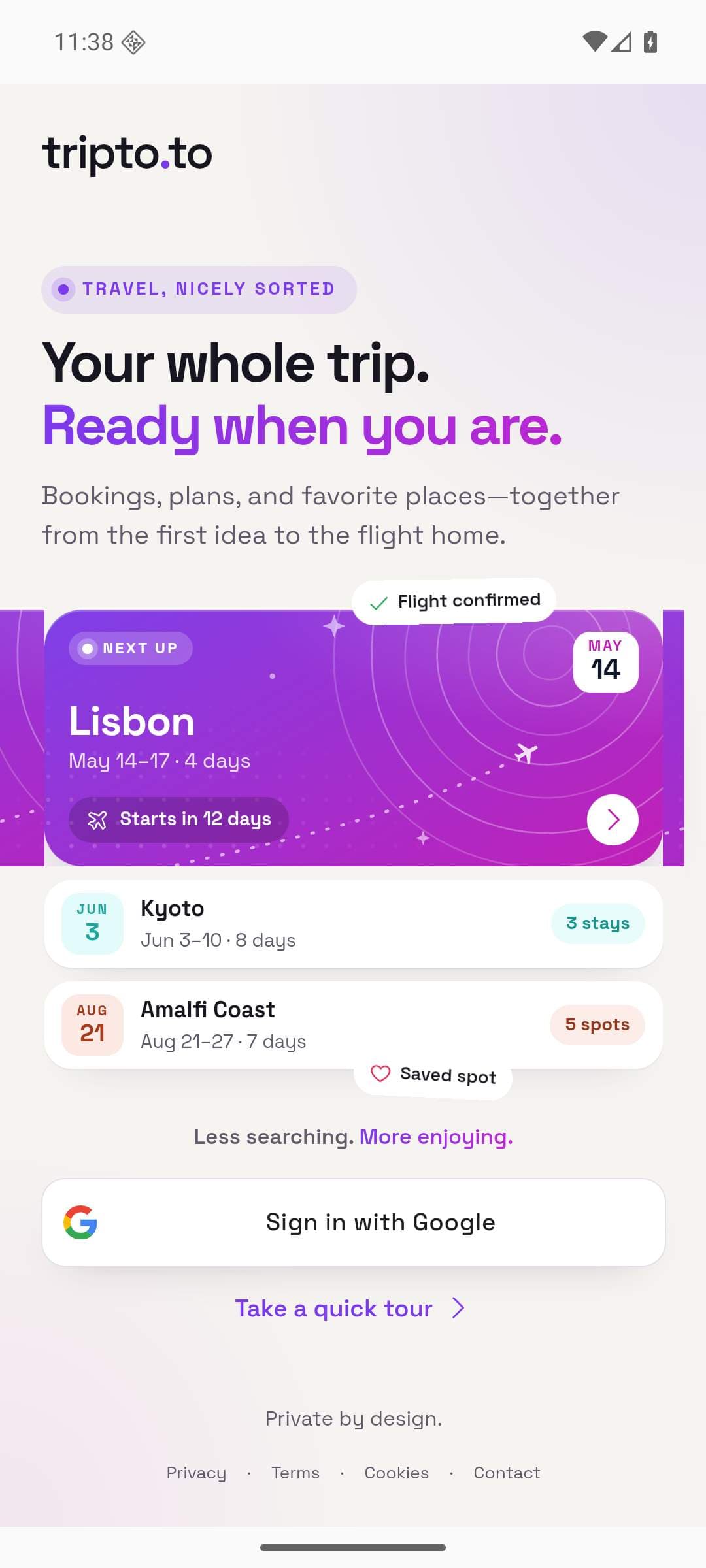
About this app
Tripto brings every part of a journey into one beautifully clear place. Travelers can organize flights, stays, activities, documents, day plans, and saved places on a calm timeline that works across devices and remains useful offline. Booking details can be added manually or imported, while maps, weather, currency tools, PDF exports, collaboration, and practical travel information stay close to each trip. The first trip is free, and Tripto Plus unlocks unlimited trips and all planning tools. Designed for people who want less travel admin and more time enjoying the journey, Tripto is private by design, available in five languages, and built as a web app and Android app.
Key features
- 1Unified trip timeline combining flights, stays, activities, day plans and saved places in one view
- 2Manual booking entry plus an import flow with a review step for supported confirmations
- 3Collaboration with per-trip sharing permissions, plus maps, weather, currency tools and PDF export
Target customer profile
Drawn from the product itself, not from a survey.
Demographic
Frequent leisure travelers (25–45)
Pain points
Tabs, screenshots, and confirmation emails scattered everywhere
Primary needs
One clear timeline for flights, stays, and daily plans
Demographic
Group trip organizers
Pain points
Endless 'what's the plan?' messages and lost links
Primary needs
Shared trip with individual access and a single plan
Demographic
City-break planners who save places
Pain points
Saved cafes and viewpoints never make it into the day plan
Primary needs
Collect places, then slot them into daily plans
Scout Review
Written by AI from measured evidence, scored out of 100.
Tripto is a travel organizer that pulls flights, stays, activities, saved places and day plans onto one timeline, with booking import, maps, weather, currency tools, PDF export, collaboration and offline use. The first trip is free; Tripto Plus unlocks unlimited trips and all planning tools. It ships as a web app and an Android app, in five languages. The measured picture is genuinely strong on the technical side: a 100/100 Lighthouse accessibility score, 11 of 12 security header checks passing, and a homepage that communicates the product in one glance. The weak spots are structural rather than cosmetic — no visible sign-in in the navigation, no performance measurement to point at, no DMARC, no published compliance audits, and a competitive set where Wanderlog already occupies much of the same ground. It's a well-executed early product with a clear pitch and a crowded lane.
Measure by measure
Usability
62Clear 'Start planning' CTA, a tour link, and an FAQ that honestly admits no live flight monitoring. But there's no visible sign-in or account entry point in the nav, which is odd for a trip app.
Design
70Dark navy hero with yellow accents and a Lisbon timeline mockup communicates the product instantly. The purple mobile promo card breaks the palette, and the cookie banner sits on top of the footer.
Speed
58No performance measurement was captured, so this sits at the category-typical band. The homepage is a marketing page with an embedded interactive sample trip; no benchmarks or lag complaints found.
Security
74Strong header hygiene: HTTPS, HSTS, CSP, frame protection, Referrer-Policy and Permissions-Policy all present (11/12 probe points). DMARC is missing and no SOC 2, ISO or audit claims are published.
Accessibility
80Lighthouse accessibility scored a perfect 100/100, with one failing audit on text-label accessible names. Five-language support is claimed; no WCAG conformance statement published.
Growth
58A real, specific problem — scattered tabs and confirmation emails — with day-planning plus saved places as the wedge against Google Travel, TripIt and Wanderlog. Registered 2026-08-21, so traction is context only.
Improvement areas
- No visible sign-in or account entry point in the main navigation for returning users
- Missing DMARC record and no published SOC 2, ISO or penetration test documentation
- No WCAG conformance statement despite a 100/100 automated accessibility score
Design & Usability
Tripto's homepage is a genuinely well-built piece of marketing: dark navy canvas, yellow accents pulling the eye to 'Start planning', and a floating Lisbon timeline mockup that explains the whole product in one glance. The four feature tabs — Bookings, Day plans, Saved places, Travel together — map cleanly to the pitch. Where it slips is consistency: a light purple mobile promo card breaks the dark theme, and the cookie banner sits directly on top of the FAQ and footer links. Usability is competent but has a real gap — the nav offers no visible sign-in or account entry point, which for a product whose entire value is 'come back to your trip' is a strange omission. The FAQ is honest and useful, confirming manual entry, a booking import flow with a review step, collaboration with per-trip permissions, and — refreshingly — that live flight monitoring is not enabled. Onboarding friction is low, but the path back into an existing trip is unclear from the marketing site alone.
Speed & Security
No Lighthouse performance run was captured for tripto.to, so speed is scored at the category-typical band rather than from measurement. The homepage is a marketing page carrying an embedded interactive sample trip and a large app mockup, which is the kind of page that can go either way; no published benchmarks or user lag complaints surfaced in the collected evidence. Security is where Tripto quietly overdelivers for its stage: the HTTP probe found HTTPS enforced with HSTS, a Content-Security-Policy, frame protection, X-Content-Type-Options, Referrer-Policy and Permissions-Policy all present — 11 of 12 checklist points. The one miss is DMARC, which leaves the domain open to email spoofing even while the web surface is locked down. There is no published SOC 2, ISO 27001, penetration test or bug bounty program, which is normal for a product this young but keeps the score out of the top band. For a trip app holding flight and stay details, the header hygiene is a good sign; the missing compliance paperwork is the honest limit.
Accessibility & Growth
Accessibility is Tripto's strongest measured dimension: a Lighthouse axe-core audit returned 100/100, with a single failing audit around elements whose visible text labels don't match their accessible names. The site claims five-language support, which is meaningful for a travel product, though no WCAG conformance statement is published — so the automated score is excellent while the manual-audit picture stays unknown. Growth is a different question. The problem Tripto names is real and specific: flight in one email, hotel in another, that café somewhere in a chat, and group trips drowning in 'what's the plan?' messages. The wedge is day-planning plus saved places plus shared trips with individual access. But the alternatives list is brutal — Google Travel aggregates from Gmail passively, TripIt owns the forward-your-confirmation reflex, and Wanderlog already does collaborative maps and day-by-day notes. Tripto's differentiator is tone and calm, not a capability the incumbents structurally lack. The category has headroom, but the product needs a sharper answer to 'why not Wanderlog?' than a nicer dark theme.
Conclusion
Tripto is the rare early-stage product where the engineering hygiene outpaces the marketing confidence. The security headers are tighter than most funded startups manage, the accessibility score is flawless on automated checks, and the homepage does its one job — making 'one clear timeline' feel obvious and desirable. What it hasn't solved yet is differentiation. Google Travel, TripIt and Wanderlog each own a piece of this problem, and Tripto's answer so far is calm design and a shared-trip model. That's a real start, but it's a positioning argument, not a moat. The honest verdict: a beautifully built tool that needs to decide what it does that the other three can't. Fix the sign-in gap, publish a WCAG statement, add DMARC, and give travelers one feature Wanderlog can't copy in a weekend — then this becomes genuinely hard to ignore.
Suggestions for improvement
- Add a visible sign-in or account entry point to the main navigation — returning users currently have no obvious path back into their trips.
- Publish a DMARC record to complete the email security posture; SPF alone leaves the domain open to spoofing.
- Ship a WCAG 2.2 conformance statement and fix the one failing accessible-name audit to back up the 100/100 automated score.
- Sharpen the differentiator against Wanderlog: lead with the shared-trip permission model or offline behavior rather than 'calmer' positioning.
Alternatives comparison
Named competitors, point by point. Nobody paid to appear here or to be left out.
 tripto.to |  Google Travel |  TripIt |  Wanderlog | |
|---|---|---|---|---|
| Automatic booking import from email | Manual entry plus an import flow with a review step for supported confirmations | Aggregates reservations automatically from Gmail | Forward confirmation emails to build the itinerary automatically | Manual entry with some email import support |
| Day-by-day planning with saved places | Collect saved places, then slot them into daily plans on a timeline | Passive timeline; limited active day planning | Itinerary focused; day planning is limited | Day-by-day notes, maps and places built in |
| Collaboration on a shared trip | Invite companions with individual access and per-trip permissions | Limited sharing; mostly a personal view | Sharing is limited and not the core focus | Real-time collaborative trip planning with maps |
| Offline access to trip details | Stated to remain useful offline across devices | Some offline support via Google apps | Offline access available in mobile apps | Offline maps and trip access in the mobile app |
| Pricing model | First trip free; Tripto Plus unlocks unlimited trips and all planning tools | Free | Free tier plus TripIt Pro subscription | Free with a Pro upgrade |
Google Travel
Aggregates reservations from Gmail and shows trip timelines, though planning is more passive.
TripIt
Forward confirmation emails to build an itinerary automatically, but day planning is limited.
Wanderlog
Collaborative trip planner with maps and day-by-day notes and places.
Comparing options? See tripto.to alternatives, scored side by side
More Lifestyle & Entertainment apps
View all Lifestyle & Entertainment
RoomCreator
92An AI-powered interior and exterior design tool that tran...

Factory Direct Mattress Overland Park
92A locally-owned mattress store in Overland Park, KS offer...

Seating Chart Generator
90Free seating chart maker for weddings and events

SheetScroll
90> You play; SheetScroll turns the page. It listens through the microphone or a MIDI piano and holds the page until it's sure where you are.

Hireci
89Save every recipe. Plan every meal.

TUNL - Cave Flyer
89A hold-to-thrust cave flyer with a new daily level, ghost races, and a global leaderboard.

Roami eSIM
88A global travel eSIM app offering instant activation, no ...

Portrait Gift
88AI-powered personalized face swap art platform creating c...

TranscriptYou
88Free YouTube transcript generator with timestamps and AI ...

Random Movie Generator
88Free random movie picker from 142k+ films—no sign-up.

FaceSwapAI
87AI face swap for photos, videos, GIFs with free trial.

youtubetomp3.ink
87Free online YouTube to MP3 converter with no signup or so...


A platform dedicated to providing unbiased reviews of newly launched applications, analyzing everything from their features to their full potential.
info@scoutforge.net© 2026 Scoutforge. All rights reserved.
