Cycling through all six. Tap any point to stop.
Measured on six things
AI image and video studio for creators and small brands
Security
40Only 2/12 security-header checklist points: HTTPS not enforced, no HSTS, CSP, frame protection or Referrer-Policy. SPF and DMARC are set. No SOC 2, ISO, pen-test or bug bounty claims found — thin for a product handling accounts and payments.
Screenshots
1 / 1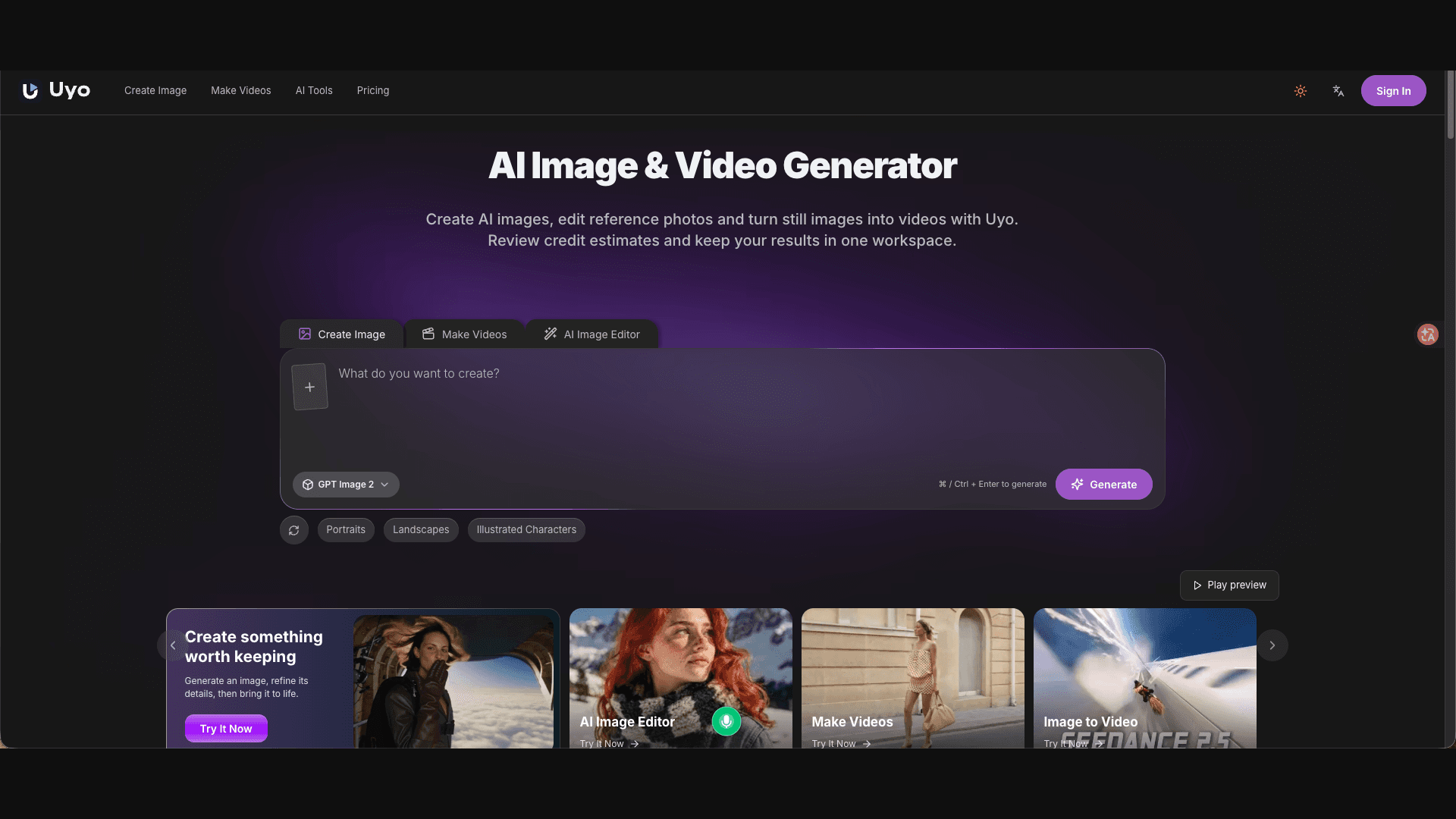
About this app
Uyo is a browser-based AI creative workspace that blends image generation, photo editing, and short-video production into a single account. It is built for social creators, small brand owners, and anyone who wants to experiment with portrait, outfit, or product visuals without juggling multiple tools. The standout feature is the transparent credit-quote system that shows the estimated cost before every generation, plus a seamless image-to-video pipeline for animating stills. With editable prompts, saved results in My Creations, and a growing library of example prompts, Uyo makes AI content creation feel approachable and cost-aware. The interface supports English and Chinese, and new accounts can claim a small starter credit to test the workflow.
Key features
- 1Transparent credit-quote system showing estimated cost before every image or video generation.
- 2Unified image generation, AI photo editing and five-second image-to-video in a single account.
- 3Saved results in My Creations plus a library of 26+ example prompts across four categories.
- 4English and Chinese interface with a language switcher.
- 5Starter credits for eligible new accounts plus non-expiring one-time credit packs.
Target customer profile
Drawn from the product itself, not from a survey.
Demographic
Social media creators and influencers
Pain points
Need fresh visuals fast; limited budget for photo shoots; inconsistent content quality
Primary needs
Quick outfit previews, portrait ideas, and short video clips for posts
Demographic
Small brand owners and e-commerce sellers
Pain points
Expensive product photography; no in-house design team; need multiple scene variations
Primary needs
Affordable product shots, scene changes, and animated product demos
Demographic
Freelance designers and content marketers
Pain points
Tight deadlines; client revisions; tool sprawl across image and video apps
Primary needs
Unified image-to-video workflow, editable prompts, and saved project history
Scout Review
Written by AI from measured evidence, scored out of 100.
Uyo is a browser-based AI creative workspace that bundles image generation, photo editing and short-video production into one account, aimed at social creators, small brands and freelance designers. Its standout is cost transparency: credit quotes appear before every generation and the pricing page breaks down per-task costs. The design is coherent but unpolished in the details, speed is solid, and accessibility audits clean. Security is the weak link — minimal headers and no published compliance. Growth potential is real but capped by large incumbents.
Measure by measure
Usability
62Composer-first hero and up-front credit quotes make the core loop easy to grasp, and the pricing page has a genuinely useful per-task cost table. The very long homepage and the split between Studio credits and separate scene-video packs add friction.
Design
58Coherent dark-purple identity with a clear composer focal point and a clean four-up 'What Will You Create Today?' grid. Undercut by leftover Chinese overlay text on a thumbnail, tiny low-contrast credit microcopy, and a busy inspiration masonry with uneven captions.
Speed
72Lighthouse mobile 80/100 with LCP 1.4s, CLS 0 and FCP 1.4s — solid core metrics. TBT of 814ms and a desktop score of 73/100 show main-thread work still needs trimming, but the page feels responsive on the numbers.
Security
40Only 2/12 security-header checklist points: HTTPS not enforced, no HSTS, CSP, frame protection or Referrer-Policy. SPF and DMARC are set. No SOC 2, ISO, pen-test or bug bounty claims found — thin for a product handling accounts and payments.
Accessibility
80Lighthouse accessibility 100/100 with a single failing audit on visible-text/accessible-name matching. English and Chinese language switching is supported. No published WCAG statement, so the score sits in the upper band on automated evidence alone.
Growth
60Real problem (creators and small brands need cheap visuals fast) with a concrete wedge: transparent credit quotes plus image-to-video in one account. Differentiation is workflow and cost, not model quality, so headroom is real but capped.
Improvement areas
- Security headers are minimal (2/12 checklist points) and no SOC 2, ISO or pen-test claims are published.
- Homepage is very long with repetitive tile grids; leftover unlocalised Chinese overlay text on a thumbnail.
- Pricing splits Studio credits from separate scene-video packs, which is confusing for new users.
- Credit-cost microcopy is low-contrast and small, undermining the transparency pitch.
Design & Usability
Uyo's design is coherent where it counts: a dark purple theme, a composer that is unmistakably the primary action, and a clean four-up inspiration grid. The cracks are in the details — a thumbnail still carrying Chinese overlay text, credit-cost microcopy set in tiny low-contrast grey, and a busy masonry feed with uneven captions. Usability is stronger than design: the composer-first hero and up-front credit quotes make the loop obvious, and the pricing page's per-task cost table is genuinely useful. The long homepage and the split between Studio credits and separate scene-video packs are where friction creeps in.
Speed & Security
Speed is a real strength on the numbers: Lighthouse mobile 80/100, LCP 1.4s, CLS 0, FCP 1.4s. TBT of 814ms and a desktop score of 73/100 show main-thread work still needs trimming, but nothing here suggests a sluggish product. Security is the opposite story. The HTTP probe found only 2/12 checklist points — HTTPS not enforced, no HSTS, no CSP, no frame protection, no Referrer-Policy. SPF and DMARC are present, but there is no SOC 2, ISO, pen-test or bug bounty claim anywhere in the site content. For a product that takes payments and stores user creations, that is thin.
Accessibility & Growth
Accessibility scores well on automated evidence: Lighthouse 100/100 with a single failing audit on visible-text/accessible-name matching, plus English and Chinese language switching. No WCAG statement is published, so the score rests on the audit rather than a documented commitment. Growth is a judgement on the idea: creators and small brands genuinely need cheap, fast visuals, and Uyo's wedge — transparent credit quotes before every generation plus image-to-video in one account — is concrete and demonstrable. The limit is that the wedge is workflow and cost, not model quality, and Canva, Runway and Leonardo.Ai are all large enough to copy it.
Conclusion
If you are a creator or small brand who wants one account for portraits, product shots and short clips without surprise credit burn, Uyo's transparent quoting is a genuine reason to try it. If you need enterprise-grade security assurances or deep creative controls, look at Leonardo.Ai or Runway instead. The starter credits make the test cheap — claim them, run a few generations, and judge the output quality yourself before committing to a subscription.
Suggestions for improvement
- Enforce HTTPS and add HSTS, CSP, frame protection and Referrer-Policy headers — the 2/12 checklist score is the biggest fixable gap.
- Publish a security page with data-handling details and, eventually, a SOC 2 or pen-test summary to match the payments you take.
- Clean up the leftover Chinese overlay text on the 'Projector light reveal' thumbnail and raise contrast on credit-cost microcopy.
- Simplify the pricing page: the split between Studio credits and separate scene-video packs is confusing, and remove the '2K not yet verified' caveat by verifying it.
Alternatives comparison
Named competitors, point by point. Nobody paid to appear here or to be left out.
 Uyo |  Canva |  Runway |  Leonardo.Ai | |
|---|---|---|---|---|
| Transparent pre-generation cost quote | Yes — credit quote shown before every generation | Partial — credit costs vary by tool | Credit-based, less granular per-task quoting | Token-based, cost shown per generation |
| Built-in image-to-video pipeline | Yes — animate stills into 5s clips | Yes — basic AI video tools | Yes — advanced video generation suite | Limited — no built-in video workflow |
| Entry price point | $8.90/mo Starter or $8.90 one-time 300 credits | Free tier; Pro around $15/mo | Free tier; paid plans higher, pro-focused | Free tier; paid plans from ~$12/mo |
| Target audience | Social creators, small brands, freelance designers | Broad — marketers, small business, consumers | Professional filmmakers and video editors | AI artists and creative professionals |
| Published security compliance | None found — minimal headers, no SOC 2/ISO claims | SOC 2, ISO 27001, GDPR compliance published | SOC 2 Type II published | Security page with compliance details |
Canva
All-in-one design platform with AI image tools and video editing, but credit costs and generation quality vary.
Runway
Advanced AI video generation and editing suite aimed at professional filmmakers, with steeper learning curve and pricing.
Leonardo.Ai
AI image generation with strong creative controls and community models, but limited built-in video workflow.
Comparing options? See Uyo alternatives, scored side by side
More AI Generations apps
View all AI Generations
Uni-1 by Luma AI
92Uni-1 is an advanced multimodal text-to-image AI model th...

Gerty
91Private, local AI assistant for Mac that runs offline

LTX 2.3 AI Video Generator
91Fast, open-source AI video generator with 4K support, mul...

DemoVexa
90Turn your code into professional product demo videos with AI-generated scripts, animated UI, and natural voiceovers.

AI Vocals Generator
89Add AI singers or rappers to your own beat, get two takes...

Voqusa
89Transcribe social media video and audio links into text (free signup, 5 free credits, then pay-as-you-go)

All of Us
89Add deceased loved ones to photos with AI and see free pr...

PodRescale
89Every episode becomes two weeks of posts. In your voice. Posted for you.

Pixelimg
88A free online AI-powered tool that instantly converts ima...

Cantoro
88Custom AI songs with a name, heard free before paying $4....

tradutor de mangá com IA
88O tradutor de mangá com IA traduz capítulos em lote, personaliza textos e oferece edição visual para estúdios.

IraVoice
88Private on-device dictation for Apple-silicon Macs.


A platform dedicated to providing unbiased reviews of newly launched applications, analyzing everything from their features to their full potential.
info@scoutforge.net© 2026 Scoutforge. All rights reserved.
