Cycling through all six. Tap any point to stop.
Measured on six things
AI academic assistant for writing, research, presentations, and coding
Design
58Clean serif-italic headline accents and a hero composer that demos the product are real strengths, but the cropped logo marquee, unreadable tool previews and generic gradient-blob aesthetic keep it at category-average.
Screenshots
1 / 1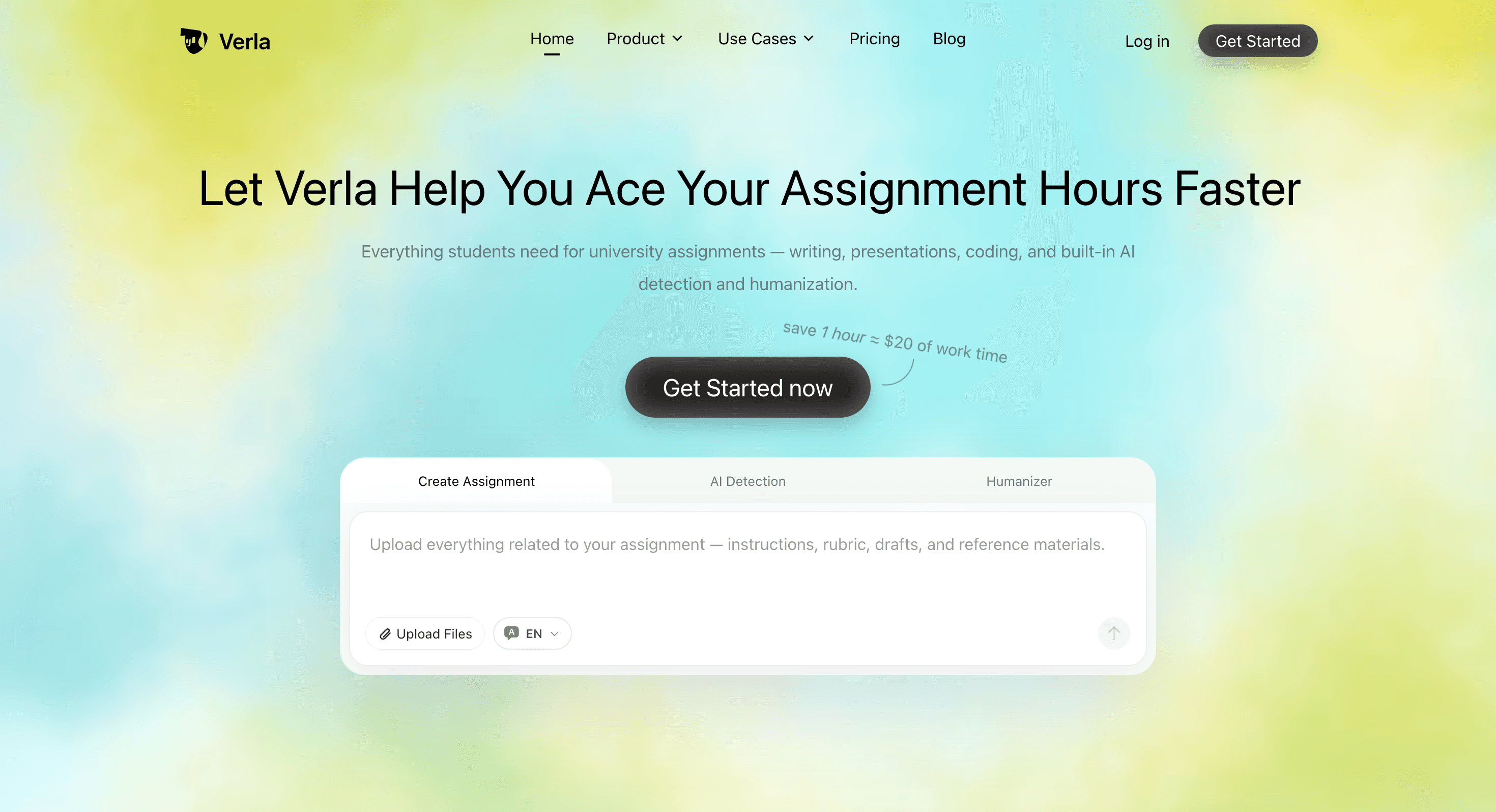
About this app
Verla is an AI academic assistant designed for university and college students. It combines an AI essay writer, AI research assistant, AI paper writer, AI report generator, AI presentation maker, and AI code assistant with AI detection and AI humanizer tools. Students can use Verla to create essays, research papers, literature reviews, lab reports, presentations, and coding assignments, then check AI-generated content and refine AI-assisted academic writing.
Key features
- 1One-run assignment generation with rubric awareness, file uploads and traceable citations in APA/MLA/Chicago/IEEE/Harvard/Vancouver.
- 2Built-in AI detection with sentence-level highlights and a humanizer that preserves meaning and citations.
- 3Multi-format output: essays, research papers, slide decks with speaker notes, and code/notebook exports (Python, R, SQL).
Target customer profile
Drawn from the product itself, not from a survey.
Demographic
Undergraduate students in humanities and social sciences (essays, literature reviews, case studies)
Pain points
Blank-page paralysis, tight deadlines, uncertainty about rubric alignment, fear of AI detection flags
Primary needs
Fast structured drafts, rubric-aware writing, real citations, a reliable AI-risk check before submission
Demographic
STEM and computer science students (lab reports, coding assignments, data analysis, Jupyter notebooks)
Pain points
Format-specific output requirements, debugging time sinks, translating lecture methods into deliverables
Primary needs
Code-aware generation (Python, R, SQL), data visualization tasks, exportable notebooks and technical reports
Demographic
Graduate and MBA students juggling research proposals, presentations and group projects
Pain points
Multi-format workloads, heavy reading lists, needing traceable sources they can actually open and verify
Primary needs
One-run complete drafts, slide decks plus speaker notes, citation-verified references, email alerts for background runs
Demographic
Non-native English speakers and international students at global universities
Pain points
Tone and formality mismatches, academic phrasing struggles, AI detectors behaving inconsistently across languages
Primary needs
Multilingual AI detection (20+ languages), humanizing that preserves meaning, polished academic tone
Scout Review
Written by AI from measured evidence, scored out of 100.
Verla AI is a competent, fast, well-positioned academic assistant that bundles assignment generation, AI detection and humanizing into one rubric-aware workflow. The site loads at 96/100 on mobile Lighthouse, the hero composer demos the product honestly, and the pricing is transparent about its $2.99 trial and quota packs. The weaknesses are cosmetic and structural: a generic AI-startup aesthetic with a cropped logo marquee and unreadable tool previews, low-contrast tabs and body copy, three real accessibility audit failures, a security posture that's solid but un-audited, and a growth story that leans on a workflow wedge any incumbent could replicate. It's a good product for its stage, not yet a category leader.
Measure by measure
Usability
62Clear primary CTA and a single tabbed entry point for all three tools make the flow legible, but low-contrast tabs, small long-line body copy and a chatbot-gated help center add friction.
Design
58Clean serif-italic headline accents and a hero composer that demos the product are real strengths, but the cropped logo marquee, unreadable tool previews and generic gradient-blob aesthetic keep it at category-average.
Speed
88Lighthouse mobile 96/100 with 1.5s LCP and zero CLS is genuinely fast; desktop drops to 81/100, hinting at heavier desktop assets, but overall this is well above category norms.
Security
74Strong header hygiene (HSTS, frame protection, Referrer/Permissions-Policy, SPF, DMARC) earns 10/13 checklist points, but no CSP, no secure-cookie flag, and no published SOC 2/ISO/pen-test claims.
Accessibility
68Lighthouse a11y 94/100 is strong, but three real failing audits — contrast, touch-target size, and label/accessible-name mismatches — plus the low-contrast hero subtitle show gaps beyond the score.
Growth
60A real, high-anxiety problem (deadlines + AI-detection fear) with a concrete wedge — generation, detection and humanizing in one rubric-aware flow — but the category is crowded and the moat is thin.
Improvement areas
- Fix the cropped logo marquee, unreadable tool previews and low-contrast tabs/subtitle — the visual polish lags the product.
- Resolve the three failing Lighthouse a11y audits (contrast, touch targets, label/accessible-name mismatches) and publish a WCAG statement.
- Add a Content-Security-Policy, confirm secure-cookie flags, and publish a trust/security page with any audit or bug-bounty program.
Design & Usability
Verla's homepage is competent rather than distinctive. The serif-italic accent on 'Assignments' and 'Trust' gives the headings real personality, and the inline composer in the hero — with Create Assignment / AI Detection / Humanizer tabs — shows the core action immediately instead of hiding behind abstract art. But the university logo marquee is cropped at both edges and mixes logo sizes, the 'Three Tools' previews are too small to read, and the pastel gradient mesh is the same look every AI launch ships. Usability is better: a high-contrast 'Start My Assignment Free' pill sits right under the headline, and one tabbed entry point covers all three tools. The friction is in the details — low-contrast tabs, small long-line body copy, and a help center that routes refunds through an AI chatbot.
Speed & Security
Speed is the standout. Lighthouse mobile scores 96/100 with a 1.5s LCP, zero CLS and 133ms TBT — the page loads before you can second-guess the assignment. Desktop drops to 81/100, suggesting heavier desktop assets, but nothing here reads as sluggish. Security is solid but not exceptional: the HTTP probe confirms HTTPS enforcement, HSTS, frame protection, X-Content-Type-Options, Referrer-Policy, Permissions-Policy, SPF and DMARC — 10 of 13 checklist points. The gaps are a missing Content-Security-Policy header and no detected secure-cookie flag. There is no published SOC 2, ISO, pen-test or bug-bounty program in the site content, which is normal for an early-stage product but keeps this out of the top band.
Accessibility & Growth
Accessibility lands at a respectable 94/100 on Lighthouse, but the three failing audits are real: insufficient color contrast, touch targets too small or tightly spaced, and visible labels that don't match their accessible names. The visual audit independently flagged the light-grey hero subtitle on pastel gradients. There's no WCAG statement in the collected content, though the product does advertise AI detection across 20+ languages. Growth is a judgement on the idea: Verla names a real, high-anxiety problem — deadline pressure plus fear of AI-detection flags — and targets it specifically with rubric-aware generation, traceable citations, and a bundled detection-plus-humanizer loop. That's a genuine wedge against Grammarly (no generation), Turnitin (instructor-only), ChatGPT (no rubric/citations/exports) and QuillBot (no full generation). The limit is that the moat is a workflow, not a technology — any incumbent could copy the three-tab bundle.
Conclusion
If you're a student staring down a rubric at 2am, Verla's one-run draft-plus-detection-plus-humanize loop is a genuinely useful shortcut, and the speed means it won't waste your time getting there. Just don't mistake 'A+ ready' marketing for a guarantee — the citations and rubric alignment still need your eyes, and the humanizer is a risk-reduction tool, not a get-out-of-academic-integrity-free card. For the price of a coffee trial, it's worth a look; for a permanent subscription, wait to see whether the accessibility and security gaps close and whether the wedge survives contact with the incumbents.
Suggestions for improvement
- Fix the cropped university logo marquee and normalize logo sizes — it's the first thing that reads as unfinished.
- Enlarge the 'Three Tools' product previews so the actual UI is legible; right now they're decorative thumbnails.
- Raise contrast on the hero subtitle and the composer tabs, and fix the three failing Lighthouse a11y audits (contrast, touch targets, label names).
- Publish a security/trust page with CSP rollout, secure-cookie confirmation, and any audit or bug-bounty program to move past the 10/13 header score.
Alternatives comparison
Named competitors, point by point. Nobody paid to appear here or to be left out.
 Verla AI |  Grammarly |  Turnitin |  ChatGPT |  QuillBot | |
|---|---|---|---|---|---|
| Full assignment generation from rubric and files | Yes — one-run generation with rubric awareness and file uploads | No — polishes existing text only | No — detection/plagiarism checking only | Partial — drafts text but no rubric awareness or structured exports | No — paraphrasing and grammar only |
| Built-in AI detection with passage-level analysis | Yes — sentence/paragraph highlights, 20+ languages | No | Yes — but instructor-facing, students can't self-check | No | No integrated detection dashboard |
| AI humanizer that preserves citations and meaning | Yes — bundled with generation and detection | No dedicated humanizer | No | Manual prompting only | Yes — strong paraphrasing/humanizing, no generation |
| Multi-format exports (slides, code notebooks, citations) | Yes — Word, PDF, slides, code/notebook exports | No | No | Limited — text/code, no slide or notebook export | No |
| Pricing model | $2.99 7-day trial, then tiered monthly/annual with quota packs | Freemium with paid premium tiers | Institutional licensing (not student-priced) | Freemium with paid Plus/Pro tiers | Freemium with paid premium tiers |
Grammarly
Polishes grammar, tone and clarity in real time but doesn't generate full assignments, detect AI risk or handle citation-heavy academic drafts.
Turnitin
The institutional standard for plagiarism and AI detection, but it's instructor-facing — students typically can't run their own submissions through it before handing work in.
ChatGPT
General-purpose chatbot that can draft academic text, but lacks rubric awareness, traceable citations, format-specific exports (slides, code notebooks) and built-in detection/humanizing.
QuillBot
Strong paraphrasing and humanizing tool with a grammar checker, but no full assignment generation, no rubric-aware structure and no integrated detection dashboard.
Comparing options? See Verla AI alternatives, scored side by side
More Education apps
View all Education
The Stack Newsletter
92A weekly newsletter delivering curated tech jobs, intervi...

SheetScroll
90> You play; SheetScroll turns the page. It listens through the microphone or a MIDI piano and holds the page until it's sure where you are.

Cross Stitch Pattern Maker
89Free on-device photo-to-DMC/Anchor chart with skein counts.

English Test Coach
89English Test Coach checks your IELTS essays and letters, gives an estimated band score across all four criteria, and tells you exactly what to revise next.

Tracé slides
89Interactive math & physics slides with live graphs and an...

Startup Science
88A unified platform replacing 12-20 disconnected tools for...

Cromagnon
88Free, private browser-based PDF, Word, Excel, and study t...

TranscriptYou
88Free YouTube transcript generator with timestamps and AI ...

Random Movie Generator
88Free random movie picker from 142k+ films—no sign-up.

RBQ Exam
87Online practice for the RBQ contractor licence exams in Québec: original questions, timed mock exams and lessons, in French or English.

Coloring Pages Pro
87A massive collection of free printable coloring pages for...

CertWorthIt
87Data-driven tool revealing which certifications actually ...


A platform dedicated to providing unbiased reviews of newly launched applications, analyzing everything from their features to their full potential.
info@scoutforge.net© 2026 Scoutforge. All rights reserved.
